




We may not have the course you’re looking for. If you enquire or give us a call on 01344203999 and speak to our training experts, we may still be able to help with your training requirements.
How to Delete or Deactivate a Snapchat Account: Explained
James Smith 19 December 2025Want a break from Snapchat? You can delete or deactivate your account easily. Deleting starts with a 30-day pause, where your profile is hidden but can be reactivated. If you don’t log in during that time, the account will be deleted. Before deleting, download the data to keep a copy of Snapchat activity. Let's get started!

Certified Artificial Intelligence (AI) for Digital Marketing Training
 Top Rated Course
Top Rated Course
Exclusive 40% OFF
Training Outcomes Within Your Budget!
We ensure quality, budget-alignment, and timely delivery by our expert instructors.
Table of Contents
Tired of maintaining streaks, watching endless stories, or do you feel like you’re always online? Well, you’re not alone. Whether it’s for a digital detox or to shut the door on Snapchat for good, knowing How to Delete Snapchat Account can be a helpful way to regain control over your digital space.
In this blog, we’ll walk you through How to Delete Snapchat Account or temporarily deactivate it. From saving your chats and memories to reactivating later if you change your mind, we’ve got every step covered. Let’s help you make a clean and confident break from the app.
Table of Contents
1) How to Delete Your Snapchat Account?
2) How to Deactivate Your Snapchat Account?
3) How to Download Your Snapchat Data?
4) Reactivate Your Snapchat Account
5) Conclusion
How to Delete Your Snapchat Account?
Deleting your Snapchat account begins with a 30-day deactivation phase. During this period, your account is inactive but can still be recovered if you change your mind. The following are the steps on How to Delete Snapchat Account:
Using a Web Browser (Android and Computer Users)
Steps to delete your Snapchat account using a web browser:
a) Visit the official website of Snapchat in your browser
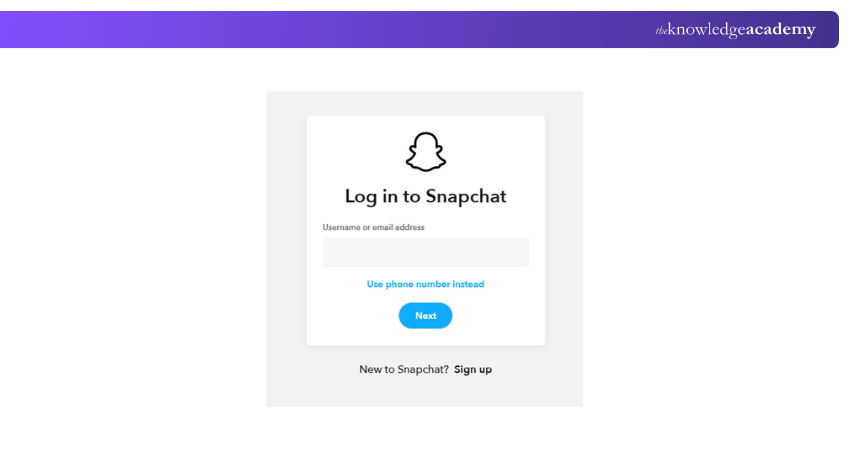
b) Log in with your username and password
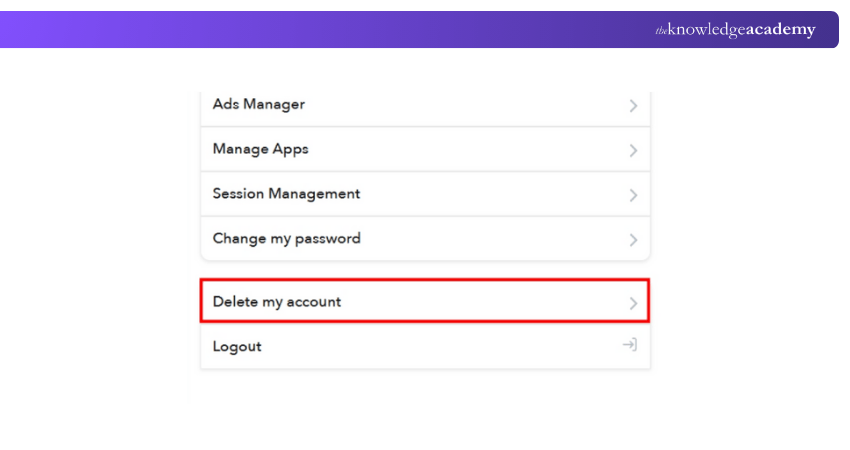
c) Click “Delete My Account”
d) Re-enter your password and click “Continue”
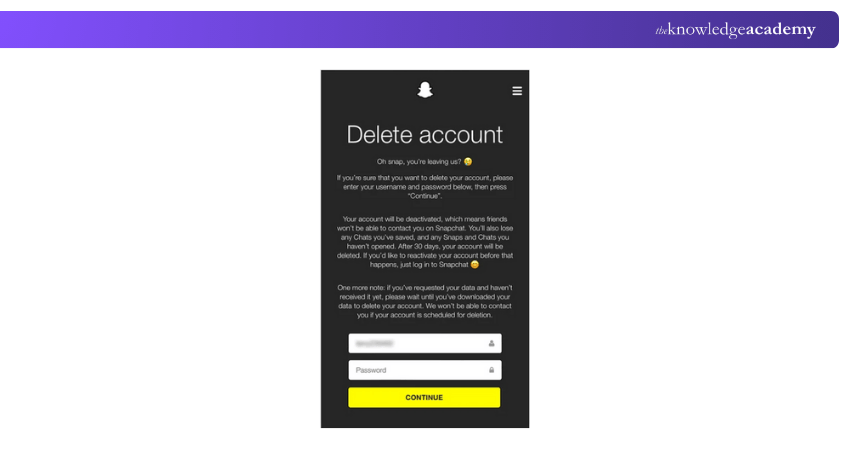
Your account will be deactivated for 30 days, after which it will be permanently deleted if you don’t log back in.

Using an iOS Device
Steps to delete your Snapchat account Using an iOS Device:
a) Open Snapchat and tap your profile icon
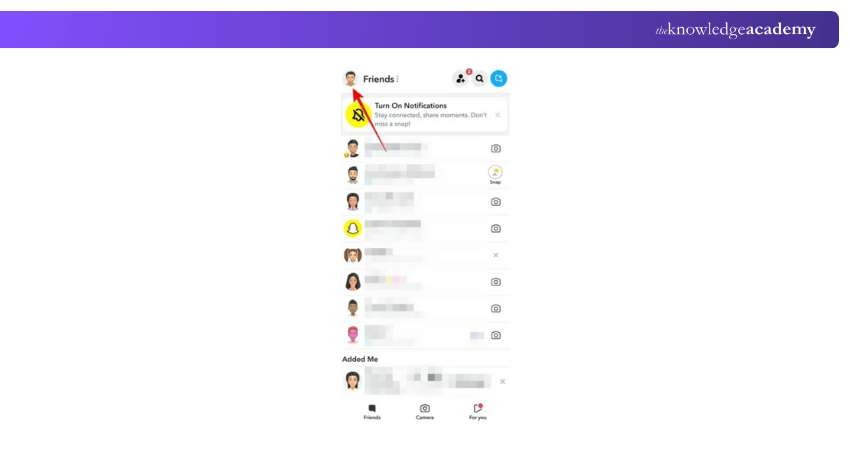
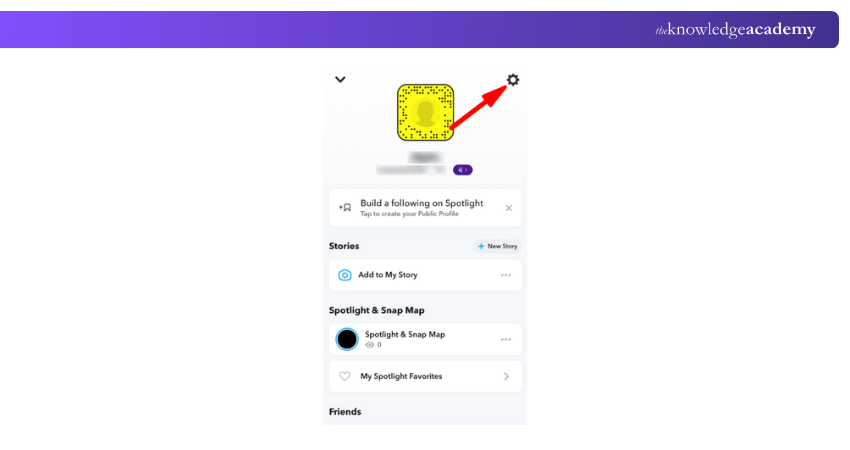
b) Tap the gear icon to go to Settings
c) Scroll to “Account Actions” and tap “Delete Account”
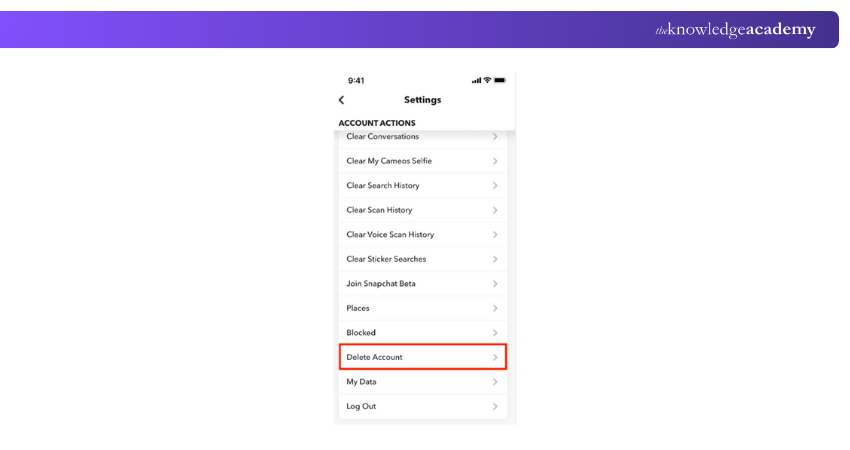
d) Follow the steps to confirm the deletion
Once confirmed, your account will be deactivated immediately for 30 days before permanent deletion.
Take your first step into the world of marketing with our Business Marketing Strategies Training – Register today!
How to Deactivate Your Snapchat Account?
Snapchat doesn’t offer a traditional deactivation option. Instead, when you delete your account, it enters a 30-day deactivation phase. During this time:
a) Friends won’t be able to contact you
b) Your name disappears from searches
c) You can still recover your account by logging in
Think of it as Snapchat’s version of a cooldown period; perfect for taking a break without fully saying goodbye.
How to Download Your Snapchat Data?
Want to keep your data before exiting Snapchat? You can request a copy of your:
a) Saved memories
b) Chat history
c) Account details
d) Friends list
Follow the following steps to download your Snapchat data before deleting or deactivating your account:
Through the Web Browser (Android and Computer Users)
Steps to download your Snapchat data through the web browser:
a) Visit the official Snapchat website and log in
b) Click on "My Data" from the main menu
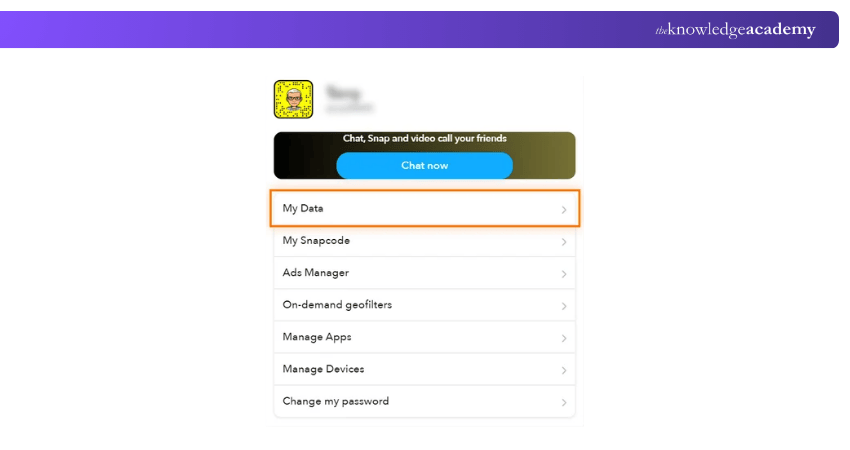
c) Choose the data you want to download and select the desired file format
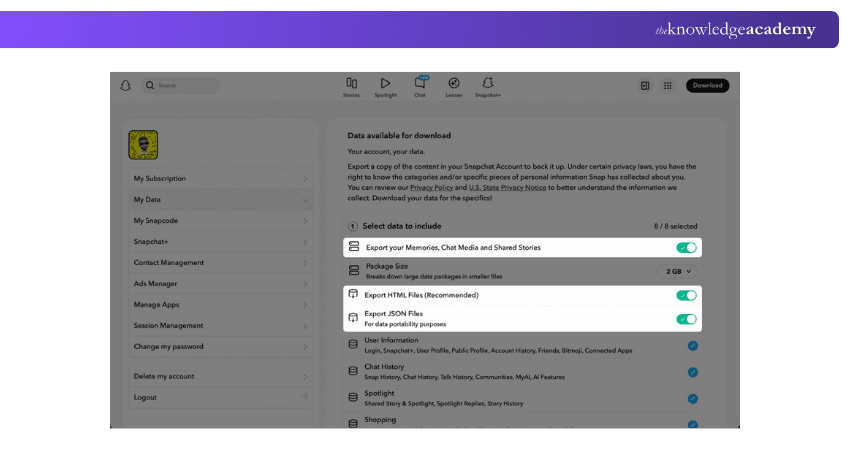
d) If you wish to export data from a specific period, add the date range
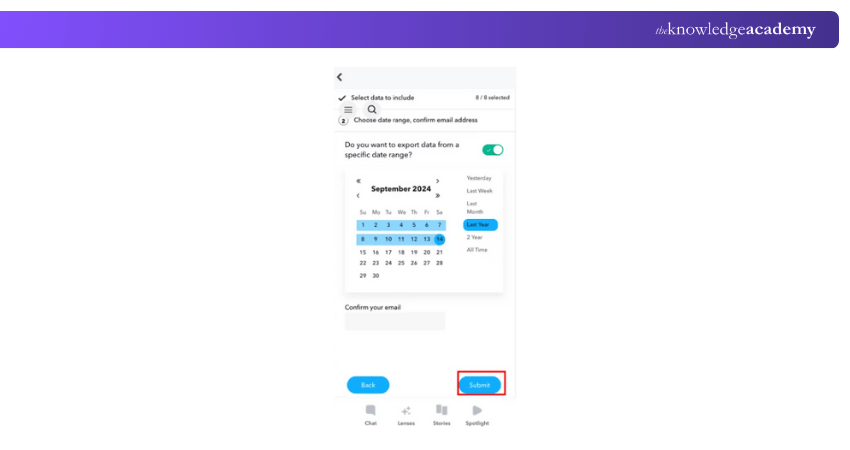
e) Enter your email address and click "Submit"
f) Snapchat will compile your data and send you an email with a download link to a zip for Data Compression of your file containing the information
Turn your ideas into impactful campaigns with our Strategic Marketing Course – Join today to learn more!
Through the iOS App
Steps to download your Snapchat data through the iOS app:
a) Open the Snapchat app and tap your profile icon.
b) Tap the Settings button (gear icon).
c) Scroll down to the Privacy Controls section and tap "My Data".
d) Select the data you wish to download and choose the file format.
e) If needed, specify a date range for the data export.
f) Confirm your email address and tap "Submit".
g) Snapchat will process your request and email you a download link to a .zip file with your data.
Reactivate Your Snapchat Account
Had a change of heart? You’ve got 30 days after deletion to return.
Here’s how:
a) Just log in to Snapchat with your username and password
b) The app may take a few minutes to reactivate your account
c) All your data including chats and memories will be restored
After 30 days, your account will be permanently deleted and cannot be recovered.
Conclusion
Now you know exactly How to Delete Snapchat Account, whether you're taking a short break or leaving permanently. From saving your data to understanding how to restore your profile, you're equipped to take full control of your digital presence. Always remember - social media should support your wellbeing, not compromise it. Take the steps that feel right for you and enjoy greater peace of mind in your digital life.
Build strong marketing foundations today with our Introduction To Marketing Training – Join right now to get more!
Frequently Asked Questions
Why Won't Snapchat Let Me Delete My Account?

If you're having trouble deleting your Snapchat account, it could be due to incorrect login credentials or temporary server issues. Double-check your username and password, and if everything is correct, try again later in case the problem is on Snapchat’s end.
Does Deleting Snapchat Delete Your Profile?
Yes, but not immediately. When you delete your Snapchat account, it first enters a 30-day deactivation period. During this time, your friends won’t be able to contact you. After 30 days, your account including your profile, snaps, chats, and data is permanently deleted from Snapchat’s servers.
What are the Other Resources and Offers Provided by The Knowledge Academy?
The Knowledge Academy takes global learning to new heights, offering over 3,000+ online courses across 490+ locations in 190+ countries. This expansive reach ensures accessibility and convenience for learners worldwide.
Alongside our diverse Online Course Catalogue, encompassing 19 major categories, we go the extra mile by providing a plethora of free educational Online Resources like Blogs, eBooks, Interview Questions and Videos. Tailoring learning experiences further, professionals can unlock greater value through a wide range of special discounts, seasonal deals, and Exclusive Offers.
What is The Knowledge Pass, and How Does it Work?
The Knowledge Academy’s Knowledge Pass, a prepaid voucher, adds another layer of flexibility, allowing course bookings over a 12-month period. Join us on a journey where education knows no bounds.
What are the Related Courses and Blogs Provided by The Knowledge Academy?
The Knowledge Academy offers various Digital Marketing Courses, including the Digital Marketing Tools Training, Social Media Marketing Course and the Certified Artificial Intelligence (AI) For Digital Marketing Training. These courses cater to different skill levels, providing comprehensive insights into How to Get More Followers on Instagram.
Our Digital Marketing Blogs cover a range of topics related to Social Media, offering valuable resources, best practices, and industry insights. Whether you are a beginner or looking to advance your Social Media skills, The Knowledge Academy's diverse courses and informative blogs have got you covered.

James Smith


Digital Marketing Manager and Trainer
James Smith is a digital marketing professional with over a decade of experience in SEO, content strategy, paid media and analytics. He has supported both SMEs and global brands in transforming their digital presence. James’s writing and training are rooted in results-driven tactics and the latest marketing trends.
View Detail
Upcoming Digital Marketing Resources Batches & Dates
Date
 Certified Artificial Intelligence (AI) for Digital Marketing Training

 If you wish to make any changes to your course, please


