




We may not have the course you’re looking for. If you enquire or give us a call on 01344203999 and speak to our training experts, we may still be able to help with your training requirements.
What is iOS? Features, Updates, and Apple Ecosystem Insights
ByThe Knowledge AcademyLast updated on: 10 October 2026
Curious about what is iOS? iOS is Apple’s mobile Operating System, powering devices such as iPhones and iPads. It offers seamless performance, robust security, and intuitive interfaces. This blog explores key features, the latest updates, and how iOS integrates into the Apple ecosystem for a unified user experience.
What You'll Discover
1. iOS is Apple's mobile Operating System, managing everything from app performance to security and hardware.2. Major iOS releases have progressively introduced changes to personalisation, communication, privacy, accessibility and device functionality.3. The platform uses multiple software layers that connect fundamental system services with frameworks and user-facing applications.4. Security features like encryption, biometric authentication and permission controls help protect devices and personal information.5. Integration with other Apple devices allows supported activities and content to move more smoothly between compatible devices.
What is iOS? It's the heartbeat of every iPhone and iPad; a sleek, intuitive Operating System (OS) designed by Apple to make your digital experience seamless and effortless. Since its debut in 2007, iOS has been at the forefront of mobile innovation, from its revolutionary touch interface to groundbreaking features like multitasking, Augmented Reality, and robust privacy tools.
But iOS isn’t just about individual devices; it thrives within the Apple ecosystem; with features like Handoff, Continuity, and Universal Clipboard, your iPhone, iPad, Mac, and Apple Watch work harmoniously, creating a smooth, interconnected experience. Regular updates ensure iOS stays fresh, secure, and packed with exciting new features, making it the gold standard in mobile Operating Systems.
What is iOS?
iOS is a software platform that runs on Apple’s digital devices, such as the iPhone, iPad, iPod touch, and Apple TV. iOS stands for iPhone Operating System, although it is not limited to the iPhone. iOS is based on the Mac OS X Operating System, which is derived from the Unix Operating System.
iOS is a closed-source system, meaning that Apple doesn't publicly release the source code of iOS, and only Apple can modify it. However, iOS supports third-party applications, which are software programs that can be downloaded from the App Store and installed on iOS devices. This Operating System also supports various Frameworks in Programming and libraries, which are collections of code that provide common functions and features for developers to use in their applications.

Evolution of Apple iOS Versions
Apple's iOS, the Operating System powering iPhones, iPads, and iPod Touch devices, has undergone remarkable advancements since its launch. It was introduced in 2007 alongside the first iPhone. One of iOS's useful features is screen mirroring, which allows users to display content from their iPhone on a compatible TV for a larger and more immersive viewing experience. Over the years, iOS updates have consistently enhanced functionality and user experience:
1) iOS 4 (2010): Introduced multitasking, FaceTime, and customisable wallpapers, enabling users to run multiple apps simultaneously.
2) iOS 7 (2013): Marked a visual transformation with flat design aesthetics, enhanced multitasking, and the control center for quick access to settings.
3) iOS 9 (2015): Focused on performance and battery optimisation, introduced proactive Siri, and added Split View multitasking for iPads.
4) iOS 11 (2017): Introduced the Files app, Screen Recording in iPhone, augmented reality (AR) capabilities, a redesigned App Store, and iPad-specific multitasking features.
5) iOS 14 (2020): Introduced customisable widgets, the App Library for streamlined app organisation, App Clips for quick app interactions, and more personalisation options.
6) iOS 15 (2021): Enhanced FaceTime with spatial audio, added Focus modes for personalised notifications, and introduced advanced privacy tools like Mail Privacy Protection.
7) iOS 16 (2022): Focused on personalisation with customisable lock screens, introduced the iCloud Shared Photo Library, and added advanced dictation capabilities.
8) iOS 17 (2023): Enhanced communication with Contact Posters and Live Voicemail, improved AirDrop and introduced StandBy and the Journal app.
9) iOS 18 (2024): Introduced deeper Home Screen and Control Centre customisation, a major redesign of the Photos app, Messages enhancements and Apple Intelligence on compatible devices. It also introduced features such as Messages via satellite in supported regions.
10) iOS 26 (2025): Introduced the new liquid glass design across the system, along with improvements to the Lock Screen, Camera, Photos, Safari, Phone and Messages. It also expanded Apple Intelligence with features such as live translation and enhanced visual intelligence on compatible devices.
Trainer's Insight
A new iOS release does not mean every iPhone receives every feature. Hardware requirements and device compatibility can affect which capabilities are available.
Key Features of the iOS Platform
Now that you know what is iOS, let’s learn about its amazing features. This Operating System is known for its user-friendly, elegant, and consistent design, which makes it easy to use and navigate. Some of the key features of the iOS platform are:
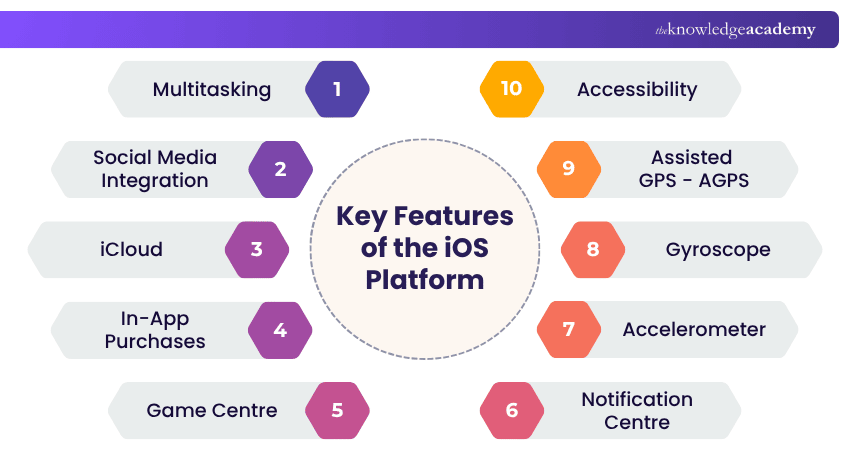
1) Multitasking: Introduced with iPhone 4 and 3GS, iOS enables seamless app switching through multitasking features and multi-finger gestures on iPads.
2) Social Media Integration: iOS facilitates easy content sharing and incorporates activity streams, seamlessly integrating social network interactions into apps.
3) iCloud: Apple's internet-based data storage service, iCloud, operates across all Apple devices and certain Windows platforms, ensuring secure data storage with encryption and offering iPhone Backup and other iOS devices.
4) In-App Purchases: Available on all Apple platforms, in-app purchases allow users to acquire additional digital items, subscriptions, and premium content directly within apps, with the App Store serving as a platform for promotion and sales.
5) Game Centre: Apple's social gaming network, game centre, enhances gaming experiences by providing features such as leaderboards, achievements, multiplayer capabilities, and a dashboard.
6) Notification Centre: iOS consolidates app alerts in the notification center, allowing users to manage notifications at their convenience with customisable settings.
7) Accelerometer: Every iOS device incorporates a three-axis accelerometer, detecting changes in velocity along each axis and enhancing device functionality.
8) Gyroscope: iOS devices feature a three-axis gyroscope, measuring rotational data in each of the three axes, contributing to advanced functionality.
9) Assisted GPS - AGPS: The iPhone utilises an inbuilt AGPS chip for location detection. This provides a quick and accurate approximation of the user's location based on satellite information.
10) Accessibility: Apple products and services are designed with one-tap accessibility features. Thus, Apple ensures ease of use and alignment with users' preferences.
Improve your skills in application development with App & Web Development Training and stay ahead of the learning curve!
How Does iOS Work?
iOS is a layered system, meaning it’s built with different layers of software that work together to make your iPhone or iPad run smoothly. Here's a quick breakdown of these layers:
1) Core OS: This is the foundation. Through drivers, it handles essential system tasks like security, power management, networking, and hardware communication.
2) Core Services: This layer manages vital system services like file storage, iCloud syncing, location tracking, and databases. It also supports key frameworks like Core Motion and Core Foundation.
3) Media: The media layer is all about audio, video, and graphics. It ensures smooth animations, clear sound, and high-quality visuals using core graphics and AVFoundation frameworks.
4) Cocoa Touch: At the top is Cocoa Touch, which powers the user interface. It includes frameworks like UIKit and MapKit, enabling smooth interactions, notifications, and app functionality.
Trainer's Insight
Think of these layers as working together rather than independently. Lower layers provide fundamental system capabilities, while higher layers make those capabilities available to applications and the user experien
How to Update iOS Devices?
Updating your iOS device is important to keep it secure, stable, and compatible with the latest apps and features. There are two ways to update any iOS device: Over the Air (OTA) or via iTunes. The two ways include the following:
1) OTA Update
The easiest and most convenient way to update your iOS device is by doing it Over the Air, as it does not require a computer or a cable. Follow these steps to update your device seamlessly:
a) Connect your device to a Wi-Fi network and a power source
b) Go to Settings > General > Software Update
c) Tap the Download and Install button
d) Follow the on-screen instructions
2) iTunes Update
This is an alternative way to update your iOS device, which requires a computer, a cable, and the iTunes software. To update your iOS device via iTunes, follow these steps:
a) Connect your device to your computer using a USB cable
b) Launch iTunes
c) Select your device from the iTunes sidebar
d) Click the Check for Update option
e) Click the Download and Update option
f) Follow the on-screen instructions
iOS Ecosystem: Integration with Other Apple Devices
iOS works closely with other Apple devices, including Macs, iPads, Apple Watches and Apple TVs, creating a connected ecosystem that makes everyday tasks more convenient. Features such as Handoff and Continuity allow users to begin an activity on one device and continue it on another, such as starting an email on an iPhone and finishing it on a Mac.
Other features, including universal clipboard, allow users to copy content on one compatible Apple device and paste it on another. Calls and messages can also be accessed across supported devices when properly configured. This integration creates a more consistent experience and helps users move between devices with less interruption.
What Sets iOS Apart from Android?
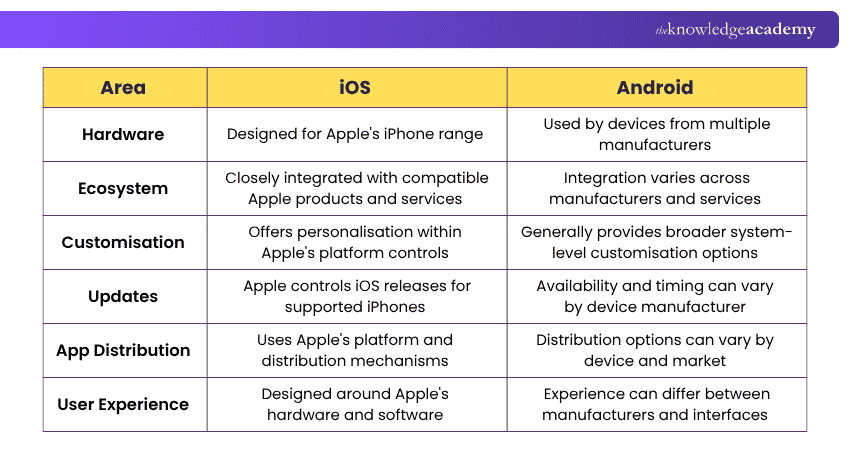
iOS and Android are both widely used mobile Operating Systems, but they take different approaches to hardware, software distribution, customisation and ecosystem integration. iOS runs exclusively on Apple's own hardware, giving Apple tighter control over how software and devices work together, while Android runs across many different manufacturers, offering more variety but less consistency.
These differences shape everything from how updates are rolled out to how much users can personalise their device. Here are the key distinctions:
Security and Privacy Features in Apple's iOS
Apple’s iOS is built with security and privacy, ensuring users’ data stays protected. Here are some key features:
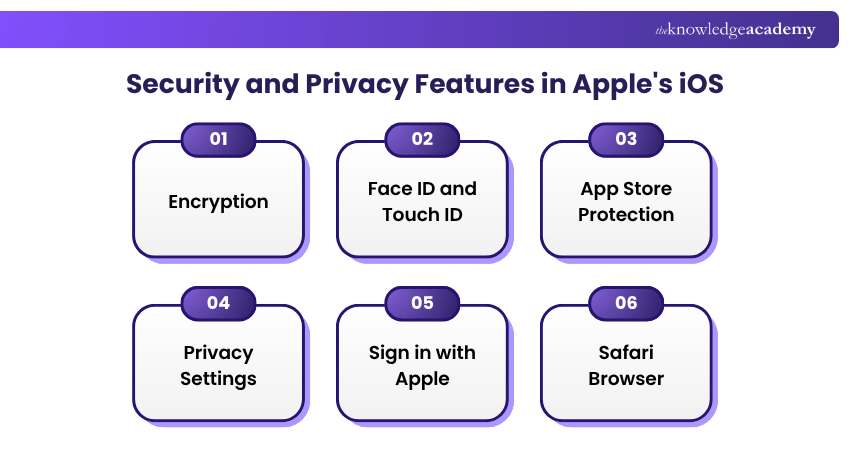
1) Encryption: iOS uses encryption to help protect data stored on the device. Device security works alongside authentication mechanisms such as the device passcode.
2) Face ID and Touch ID: These biometric systems provide secure, easy access to your device and can be used for payments and app sign-ins.
3) App Store Protection: Apps on the App Store go through Apple’s strict review process to ensure they’re safe and trustworthy.
4) Privacy Settings: iOS gives you complete control over which apps can access your camera, location, microphone, contacts, and more.
5) Sign in with Apple: This feature lets you log into websites and apps via your Apple ID without sharing personal details like your email.
6) Safari Browser: Safari enhances privacy with features like intelligent tracking prevention and blocking third-party trackers for safer browsing.
Quick Security Checklist
□ Keep iOS updated□ Use a strong device passcode□ Configure Face ID or Touch ID where supported□ Review application permissions□ Check location access for installed apps□ Review camera and microphone permissions□ Download apps from trusted sources

The Knowledge Academy develops accessible learning content across Project Management, IT, Cybersecurity, Data Science, Business Analysis, HR, Accounting and Finance, Leadership and Health and Safety. Its resources combine subject research with clear explanations to help professionals build practical knowledge across a wide range of disciplines.
View Detail

 If you wish to make any changes to your course, please


