




We may not have the course you’re looking for. If you enquire or give us a call on 01344203999 and speak to our training experts, we may still be able to help with your training requirements.
Top Android Project Ideas
ByNilotpal SarmahLast updated on: 10 October 2026
Explore top Android project ideas for beginner, intermediate and advanced developers, with core features, skills practised and optional upgrades for each project.
Picture this: You open Android Studio, ready to build something exciting. But one question stops you before you write the first line of code:
“What should I build?”
A simple game feels too easy. A feature-packed app feels too ambitious. And with so many possibilities, choosing a project that matches your skills can be harder than building it.
That’s where the right Android project ideas can help.
A beginner might start with a quiz or note-taking application, while someone with more experience could experiment with geofencing or complex app workflows. The goal isn’t simply to build another app; it’s to choose a project that gives you the right challenge and helps you practise something new.
The exciting part? Every finished project can become a stepping stone to the next one. So, explore these Android project ideas, find the one that matches your level and start turning your knowledge into something that works. Let’s begin!
What is an Android Project?
An Android project is a software development project focused on creating an application that runs on the Android operating system. It involves designing the User Interface (UI), writing application logic, testing functionality and integrating the services or features the app requires.
Developers commonly use Android Studio to build, test and debug Android applications, with Kotlin widely used for native development and Jetpack Compose for modern UI development. Depending on the app, a project may also involve databases, navigation, authentication, or external hardware.

How to Choose the Right Android Project?
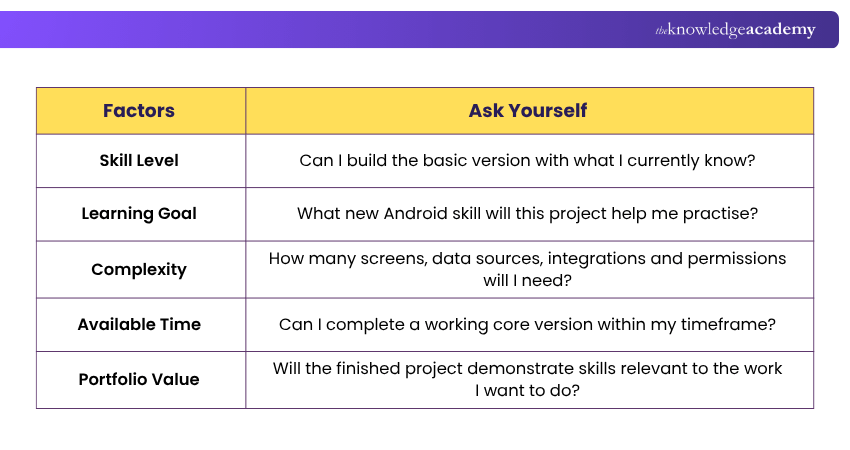
The best project isn't necessarily the one with the longest feature list. Choose something that is challenging enough to develop your skills without requiring so many unfamiliar technologies that completing it becomes unrealistic. Consider these five factors:
Pro Tip
Define a minimum viable version of the project before adding advanced features. Get the essential workflow working first, then add upgrades such as authentication, cloud synchronisation, notifications or offline support.
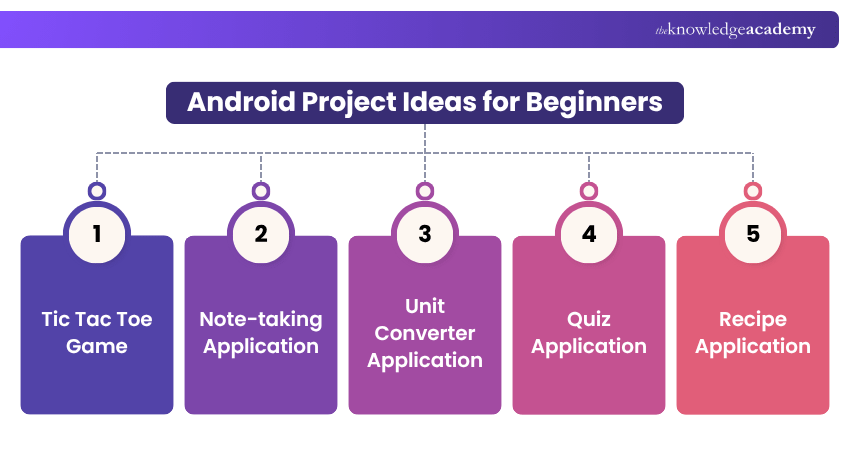
Android Project Ideas for Beginners
The following projects are useful starting points for developers looking to practise fundamental Android concepts without immediately introducing excessive application complexity. Let’s look at them below:
1) Tic Tac Toe Game
Creating a tic tac toe game for Android is a great way for beginner developers to learn and practise their skills. The game is simple to understand but introduces several important programming concepts.
Design a user-friendly interface with a 3×3 grid representing the game board. Each cell can respond to player input, while the game logic tracks turn, detects winning combinations and identifies draws.
a) Core Features: Two-player gameplay, turn handling, win/draw detection and restart functionality.
b) Skills Practised: UI state, conditional logic, event handling and basic game logic.
c) Optional Upgrade: Add score tracking or a computer-controlled opponent.
2) Note-taking Application
A note-taking application for Android is a practical project designed to help users capture, organise and manage notes digitally. Users can create, edit and delete notes and organise information for easier retrieval.
A basic version can store structured note data locally. Room is particularly suitable for projects involving non-trivial structured local data and is recommended by Android over working directly with SQLite APIs.
a) Core Features: Create, edit, delete, search and organise notes.
b) Skills Practised: CRUD operations, forms, UI state and local data persistence.
c) Optional Upgrade: Add tags, cloud synchronisation, reminders or multimedia attachments.
Trainer’s Insight
Finishing an app is useful but being able to explain how it works is even more valuable for learning. After completing a project, try explaining how data moves through the app, how the UI responds to changes and why you chose your approach.
3) Unit Converter Application
A Unit Converter Application simplifies conversions between measurement units. Categories can include length, mass, temperature, time and other common measurements.
This is particularly useful for beginners because the project can remain completely local and focuses attention on interface design and reliable application logic.
a) Core Features: Unit selection, value input, conversion calculations and instant results.
b) Skills Practised: Form inputs, state handling, mathematical logic and input validation.
c) Optional Upgrade: Add conversion history, favourites and custom units.
Learn how to turn every click into an experience with the UI UX Design Course – Join now!
4) Quiz Application
A Quiz Application allows users to answer questions and receive feedback or scores. Questions can use multiple-choice or true/false formats, while a timer can introduce additional game logic.
Start with locally stored questions before introducing online databases or user accounts.
a) Core Features: Questions, answer choices, scoring, progress and results.
b) Skills Practised: State management, conditional logic, navigation and data modelling.
c) Optional Upgrade: Add timed questions, categories, profiles or leaderboards.
5) Recipe Application
A recipe application helps users browse, search and organise recipes. It can include features such as ingredient lists, preparation instructions, cooking times and favourites.
A beginner version can use a small local recipe collection, avoiding unnecessary API complexity at the start.
a) Core Features: Recipe list, recipe details, ingredient information, search and favourites.
b) Skills Practised: Lists, navigation, search/filtering, data models and local persistence.
c) Optional Upgrade: Connect a recipe API or generate shopping lists from selected recipes.
Quick Check
Are you ready for an intermediate Android project?
Ask yourself:
□ Can I build and navigate between multiple screens?□ Can I manage changing UI states and user input?□ Can I save and retrieve data when the project requires it?□ Can I identify and fix common errors in my code?□ Can I add a new feature without rebuilding the entire application?
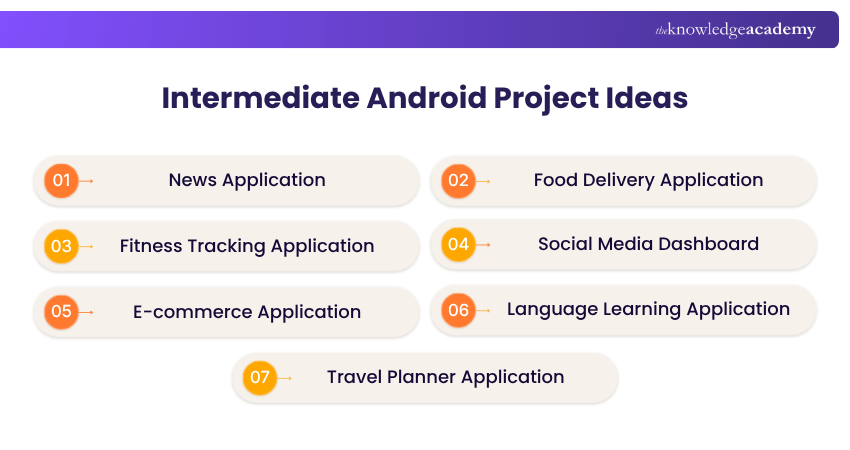
Intermediate Android Project Ideas
Intermediate projects combine the Android fundamentals with larger data models, multiple user journeys, network services or device capabilities. Let’s look at them below:
1) News Application
A News Application in Android provides users with a convenient way to access and organise news content. It can retrieve articles from a suitable news Application Programming Interface (API) and display them according to categories, topics or user preferences.
Building this application gives developers practical experience with API integration, which is a key part of the project. It also provides opportunities to work with dynamic content and organise retrieved data within an easy-to-use interface.
a) Core Features: Article feed, categories, search, article details and bookmarks.
b) Skills Practised: REST API integration, JSON data handling, lists, navigation and asynchronous data loading.
c) Optional Upgrade: Add offline reading by caching selected or recently retrieved content locally.
2) Food Delivery Application
A food delivery application connects users with restaurants, allowing them to browse menus, place orders and monitor order progress. It can also include registration, restaurant listings, payments, reviews and delivery tracking.
For a learning project, you don't need to recreate a production food-delivery platform. Build a simplified version around the customer journey.
a) Core Features: Restaurant listings, menus, basket, checkout flow and order status.
b) Skills Practised: Authentication, databases, multi-screen navigation, state management and backend integration.
c) Optional Upgrade: Add mapping, simulated delivery tracking or payment sandbox integration.
3) Fitness Tracking Application
A fitness tracking application helps users record activities, workouts, goals and progress. Useful capabilities can include activity tracking, workout logging, goal setting and data visualisation.
For more advanced fitness-data integration, Android's Health Connect provides a platform through which apps can read and write supported health and fitness data with user permission.
a) Core Features: Workout logging, goals, progress history and activity summaries.
b) Skills Practised: Structured data, charts, permissions and state management.
c) Optional Upgrade: Integrate appropriate health connect data after implementing the necessary permission handling.
4) Social Media Dashboard
A social media dashboard provides a unified interface for viewing and managing social content. It can include capabilities such as feeds, scheduled content, analytics and notifications.
For a portfolio project, use mock data or APIs that explicitly permit the functionality you implement rather than assuming unrestricted access to third-party social platforms.
a) Core Features: Dashboard feed, account views, post scheduling UI and engagement summaries.
b) Skills Practised: API concepts, authentication flows, complex UI state and data visualisation.
c) Optional Upgrade: Integrate one supported external platform before attempting a multi-platform dashboard.
5) E-commerce Application
An E-commerce Application allows users to browse products, search or filter a catalogue, and view detailed product information. It can also help users find relevant items more easily through organised categories and search features.
Users can add selected products to a basket and proceed through a checkout workflow. Building this application gives developers practical experience with common e-commerce features and multi-step user journeys.
a) Core Features: Product catalogue, search, product details, basket, wishlist and checkout flow.
b) Skills Practised: Navigation, application state, databases, authentication and network-backed data.
c) Optional Upgrade: Add a payment provider's development or sandbox environment rather than processing real financial transactions in a learning project.
Pro Tip
Before coding a multi-screen app, sketch the main user journey. For an e-commerce application, that might be Browse → Product Details → Basket → Checkout → Confirmation. Mapping the journey first can make navigation and state requirements easier to plan.
6) Language Learning Application
A Language Learning Application can combine lessons, vocabulary exercises, flashcards and quizzes to create an engaging and interactive learning experience. These features allow users to practise different language skills within a single application.
The app can also track users’ progress, showing which lessons they have completed and where they may need more practice. This helps create a more structured learning experience while encouraging users to continue developing their language skills.
a) Core Features: Lessons, flashcards, quizzes and progress tracking.
b) Skills Practised: Data modelling, multimedia content, navigation, local storage and progress state.
c) Optional Upgrade: Add audio exercises, offline lessons or speech-related features.
7) Travel Planner Application
A travel planner Android project can help users organise trips by creating itineraries, saving destination details and managing travel budgets. It provides a convenient way to keep important trip information in one place.
The application can also include features such as maps, weather information, packing lists and offline access. These additions can make the project more practical while giving developers experience with different Android features and integrations.
a) Core Features: Trip creation, itinerary, destinations, budget tracking and saved travel information.
b) Skills Practised: Complex data models, local storage, maps/API integration and multi-screen workflows.
c) Optional Upgrade: Add weather data, map-based places or offline itinerary access.
Learn the fundamentals of web development, including HTML, CSS, and JavaScript with our Web Development Training – Join now!
Advanced Android Project Ideas
Advanced projects introduce greater architectural complexity and may involve hardware, sensitive information, background behaviour, location services or external systems. Let’s look at them below:
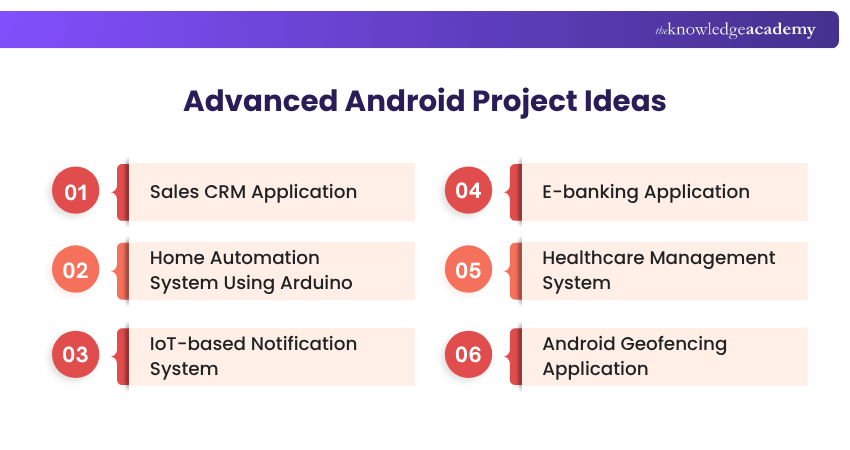
1) Sales CRM Application
A sales CRM application helps users manage customer relationships, leads, meetings and sales activity. It can track current and prospective customers, meetings, targets and lead conversion.
The Android client can work with an appropriately designed backend, allowing developers to focus on authentication, data handling and application architecture.
a) Core Features: Contacts, leads, activities, meetings, sales stages and dashboard.
b) Skills Practised: Authentication, backend integration, relational data, filtering and application architecture.
c) Optional Upgrade: Add offline caching and synchronisation for sales staff working with intermittent connectivity.
2) Home Automation System Using Arduino
This project combines an Android application with Arduino-based hardware to control connected appliances. A prototype can use an Arduino Uno, relays and Bluetooth so that an Android device can send commands to connected hardware.
For modern Android targets, Bluetooth functionality also requires appropriate permissions. Apps targeting Android 12 or higher use permissions such as BLUETOOTH_SCAN and BLUETOOTH_CONNECT depending on what the app does.
a) Core Features: Device connection, appliance controls and connection status.
b) Skills Practised: Bluetooth communication, runtime permissions, hardware integration and asynchronous state.
c) Optional Upgrade: Display sensor readings or add device-status feedback.
3) IoT-based Notification System
An IoT-based notification system can connect sensors or other smart devices to an Android application and notify the user when predefined events occur. Home-security sensors are one possible example.
A prototype could monitor states such as motion, temperature or door status and send the resulting events to an Android client through an appropriate backend or messaging mechanism.
a) Core Features: Device/event dashboard, sensor states, event history and alerts.
b) Skills Practised: IoT integration, backend communication, asynchronous events and notifications.
c) Optional Upgrade: Let users configure which events trigger alerts.
Learn to code smarter and build faster with the Kotlin Engineer Training now!
4) E-banking Application
An e-banking application project can simulate common digital-banking workflows such as account views, transaction history, transfers and financial summaries.
For a learning project, however, use mock financial data and simulated transactions rather than attempting to create a real banking service.
a) Core Features: Secure sign-in prototype, account dashboard, transaction history and simulated transfers.
b) Skills Practised: Secure UI design, authentication concepts, backend integration and complex state handling.
c) Optional Upgrade: Add biometric authentication to the prototype where appropriate.
Pro Tip
When experimenting with sensitive or complex systems, start with fictional or mock data. You can practise application architecture, authentication flows, dashboards and data handling without introducing unnecessary risks associated with real financial, health or personal information.
5) Healthcare Management System
A healthcare management system can provide workflows for patient registration, appointment scheduling, records and reminders. More advanced versions can also explore electronic records and telemedicine-related functionality.
Since real medical information is sensitive and healthcare systems face substantial privacy, security and regulatory requirements, a portfolio project should use fictional or synthetic patient data.
a) Core Features: Patient profiles, appointments, reminders and record views.
b) Skills Practised: Role-based workflows, structured databases, authentication and complex data relationships.
c) Optional Upgrade: Build separate prototype views for patients and healthcare staff.
6) Android Geofencing Application
An Android geofencing application uses virtual geographic boundaries to trigger behaviour when a device enters, exits or remains within defined areas. It can include custom geofences, location-based actions and notifications.
This makes it a strong advanced project because the developer must consider location permissions, user privacy and lifecycle conditions rather than simply drawing a location on a map.
a) Core Features: Create geofences, display saved areas, detect supported transitions and trigger relevant actions.
b) Skills Practised: Location services, permissions, background events and notification handling.
c) Optional Upgrade: Allow users to create location-based reminders with configurable actions.
Build apps that belong in every pocket by registering for the Android App Development Course today!

Nilotpal Sarmah is a Senior Content Writer with 11+ years of overall experience spanning engineering, operations and content development. His technical knowledge and extensive writing experience enable him to simplify specialised topics across IT and Tech, Business Skills, Project Management, Health and Safety, and ISO and Compliance.
View Detail

 If you wish to make any changes to your course, please


