




We may not have the course you’re looking for. If you enquire or give us a call on 01344203999 and speak to our training experts, we may still be able to help with your training requirements.
Best SEO Tools: A Complete Overview
ByAishwarya UnniLast updated on: 29 October 2026
SEO tools help businesses research keywords, analyse competitors, identify website issues and monitor search performance. Discover top tools for on-page, off-page, technical and local optimisation, along with options for different budgets and experience levels.
SEO Tools at a Glance
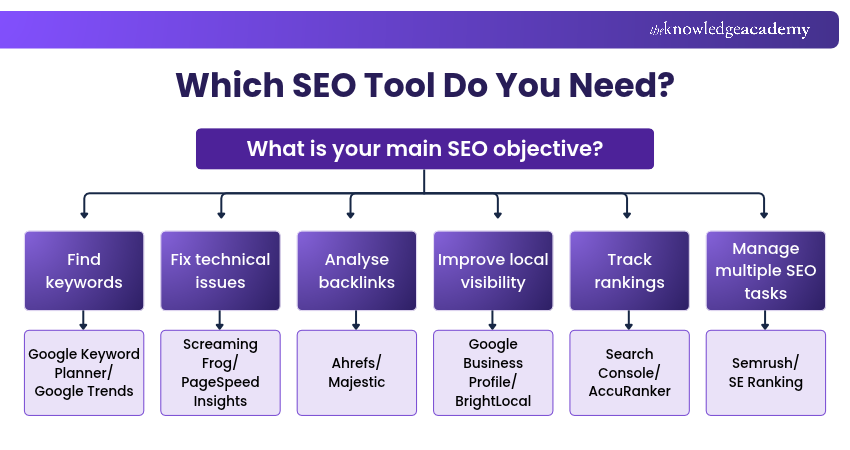
1. All-in-One SEO Tools: Semrush and Ahrefs support keyword research, competitor analysis and SEO audits.2. Keyword Research Tools: Google Keyword Planner and Google Trends help identify keyword opportunities and search trends.3. On-Page and Off-Page SEO Tools: Yoast SEO, Rank Math and Majestic support content optimisation and backlink analysis.4. Technical and Local SEO Tools: Screaming Frog, PageSpeed Insights and BrightLocal help assess website issues and local visibility.5. Rank Tracking and Analytics Tools: Google Search Console, Google Analytics and AccuRanker help monitor search performance and website traffic.
Imagine publishing a carefully written blog, only to discover weeks later that hardly anyone is finding it through search engines. Is the keyword too competitive? Is there a technical issue preventing indexing? Or are competing websites simply answering readers' questions more effectively?
SEO tools help turn that uncertainty into actionable insights. From finding relevant keywords and analysing competitors to detecting broken links and monitoring rankings, they support different stages of website optimisation.
But with so many options available, which tools are worth using? The answer depends on what you need to improve. Some tools specialise in one task, while others bring several SEO capabilities together in a single platform. Let’s explore them!
Best SEO Tools
Different SEO tools serve different purposes. Some provide a complete optimisation platform, while others specialise in keyword research, technical auditing, link analysis or performance monitoring.
The following SEO tools are grouped by their main functions to help you identify suitable options.
1) All-in-one SEO Tools
All-in-one SEO tools combine several important optimisation activities, such as keyword research, competitor analysis, technical auditing, backlink monitoring and rank tracking. They are particularly useful for marketers, agencies and businesses that want to manage multiple SEO activities within a single platform. Some of the key ones include:
1) Semrush
Semrush is a comprehensive digital marketing platform that helps businesses analyse search visibility, research competitors, and plan SEO campaigns. It brings together keyword research, website auditing, backlink analysis and position tracking.
Key Features:
a) Keyword research and keyword difficulty analysis
b) Website audits to identify technical SEO issues
c) Competitor keyword and traffic analysis
d) Backlink research and monitoring
e) Keyword position tracking
f) Content optimisation and reporting tools
Best For: Marketing teams and businesses looking for an integrated SEO and competitor research platform.

2) Ahrefs
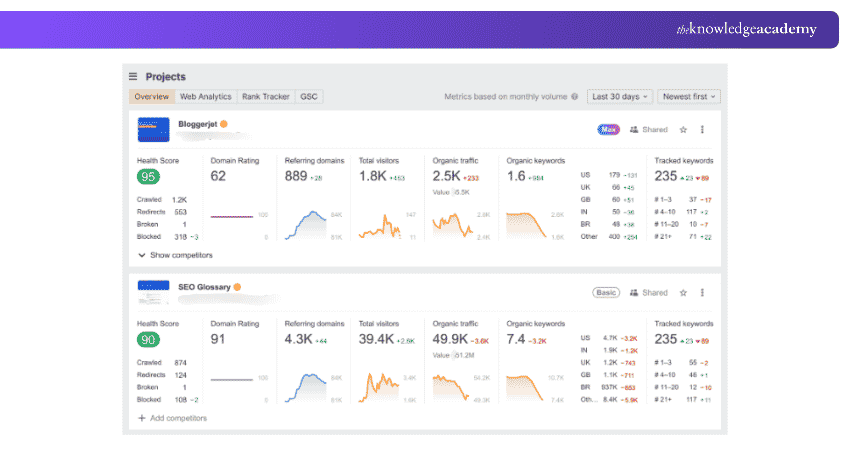
Ahrefs is a popular SEO platform known for its backlink research, keyword analysis and competitor insights. It helps users investigate search opportunities and understand how competing websites attract organic traffic.
Key Features:
a) Site explorer for competitor and backlink analysis
b) Keywords explorer for keyword research
c) Site audit for technical SEO checks
d) Rank tracking and historical performance analysis
e) Content research and organic search insights
Best For: SEO professionals and businesses that require detailed backlink and competitor research.
3) Moz Pro
Moz Pro is an SEO platform that provides tools for keyword discovery, backlink analysis, website auditing and search ranking monitoring. Its interface and reporting features can help businesses understand their SEO performance and identify areas requiring attention.
Key Features:
a) Keyword explorer for keyword analysis
b) Link explorer for backlink research
c) Domain authority and other comparative link metrics
d) Website crawling and technical issue detection
e) Ranking monitoring and optimisation recommendations
Best For: Businesses and marketers looking for a structured approach to managing SEO performance.
4) SE Ranking
SE Ranking is a cloud-based SEO platform that combines keyword rank tracking, website audits, backlink analysis and competitor research. It is suitable for businesses and agencies that want to monitor multiple SEO activities and present results through organised reports.
Key Features:
a) Keyword rank tracking
b) Website health audits
c) Competitor and keyword research
d) Backlink monitoring
e) SEO reporting and white-label capabilities
f) Local search and content optimisation features
Best For: Small businesses, agencies and marketing teams requiring a range of SEO functions.
Create content with purpose and connect with impact by joining the Content Marketing Course today!
5) Serpstat
Serpstat provides tools for analysing keywords, competitors, backlinks and website performance. It combines several SEO activities into one platform. Users can research keyword opportunities, identify website issues and monitor changes in search rankings.
Key Features:
a) Keyword and competitor research
b) Backlink analysis
c) Website auditing
d) Rank tracking
e) Search performance analysis
f) SEO reporting
Best For: Businesses and SEO professionals looking for an all-in-one platform to manage different optimisation activities.
Trainer's Insight: Understand SEO Data Differences
Keyword volumes, backlink totals and difficulty scores can vary between SEO platforms because their data sources and estimation methods differ. When comparing tools, focus on trends and consistent measurements rather than expecting identical figures from every provider.
2) Keyword Research Tools
Keyword research tools help identify the words and phrases people use in search engines. They support content planning, search demand analysis and the discovery of relevant topics. Some useful tools include:
6) Google Keyword Planner
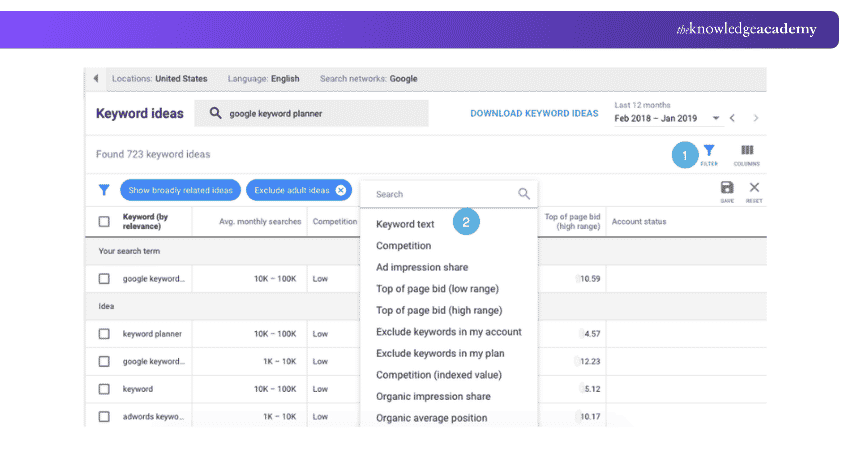
Google Keyword Planner is a keyword research tool within Google Ads. It helps users discover keyword ideas, examine estimated monthly searches and assess potential advertising costs. Although primarily designed for paid search campaigns, it can also support SEO content planning.
Key Features:
a) Keyword suggestions based on search terms or websites
b) Estimated average monthly searches
c) Location and language filtering
d) Advertiser competition levels and estimated advertising bids
e) Keyword grouping and advertising forecasts
Best For: Beginners and marketers seeking keyword ideas and search demand estimates.
7) KeywordTool.io
KeywordTool.io generates keyword suggestions using autocomplete data from search engines and other online platforms. It can help content creators discover long-tail keyword opportunities and identify related search phrases.
Key Features:
a) Long-tail keyword suggestions
b) Keyword research across multiple platforms
c) Language and country targeting
d) Search volume and advertising metrics in supported paid plans
e) Keyword data export
Best For: Content creators and marketers researching long-tail keywords.
8) AnswerThePublic
AnswerThePublic helps users explore search questions, comparisons and related phrases associated with a topic. Its visual approach can be useful for understanding audience interests and generating content ideas.
Key Features:
a) Question-based keyword suggestions
b) Search phrase categorisation
c) Topic and content idea discovery
d) Search interest insights
e) Visual keyword exploration and data export options
Best For: Bloggers and content marketers who want to develop content around audience questions.
9) Soovle
Soovle is a keyword suggestion tool that brings together autocomplete suggestions from multiple search platforms. Its simple interface helps users explore keyword variations without switching between several websites.
Key Features:
a) Keyword suggestions from multiple search engines
b) Autocomplete-based keyword discovery
c) Quick comparison of suggestions
d) Simple interface for generating content ideas
Best For: Beginners who want quick keyword inspiration across different platforms.
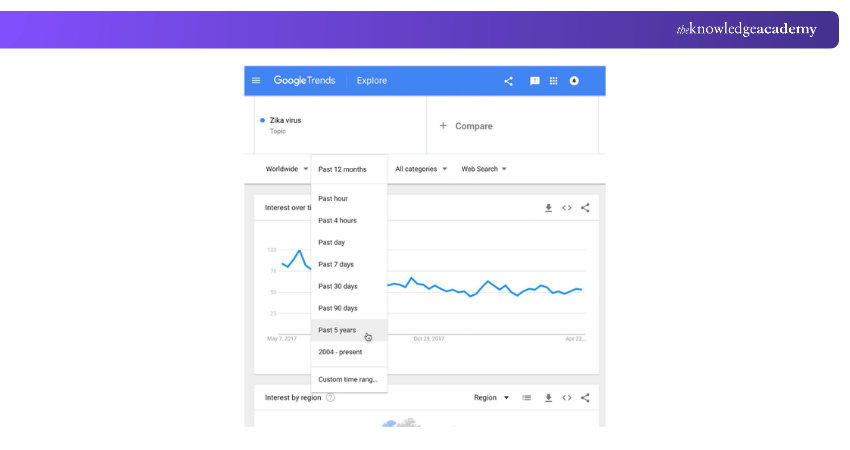
10) Google Trends
Google Trends is a free tool that shows how relative search interest changes over time. It helps marketers identify seasonal demand, compare topics and explore search trends in different geographical areas.
Key Features:
a) Historical and recent search interest trends
b) Comparison of multiple search terms
c) Location and category filters
d) Related topics and queries
e) Insights into seasonal search patterns
Best For: Marketers planning seasonal content and evaluating topic trends.
See beyond the clicks and discover what drives results with the Web Analytics Course now!
11) SpyFu
SpyFu is a competitive research platform focused on SEO and paid search insights. It helps users investigate the keywords competing websites rank for and examine aspects of their search advertising strategies.
Key Features:
a) Competitor keyword research
b) Organic ranking analysis
c) PPC keyword and advertising history
d) Keyword ranking information
e) Backlink and competitor insights
Best For: Businesses comparing competitor SEO and PPC strategies.
Bonus Tip: Don't Confuse Keyword Competition with Ranking Difficulty
A keyword with low advertising competition isn't necessarily easy to rank for organically. Google Keyword Planner's competition metric reflects competition among advertisers, while organic keyword difficulty metrics from SEO platforms estimate how challenging it may be to rank in unpaid search results. Consider search intent, content relevance and competing pages alongside keyword metrics before selecting a target keyword.
3) On-page SEO Tools
On-page SEO tools help optimise elements within individual webpages, including content, titles, metadata, internal linking and page structure. These tools are useful for improving how clearly a webpage communicates its topic to both readers and search engines. These include:
12) Yoast SEO
Yoast SEO is a WordPress plugin that helps website owners optimise content and important on-page elements. It provides recommendations for readability, metadata and aspects of technical SEO.
Key Features:
a) SEO title and meta description management
b) Content and readability analysis
c) XML sitemap functionality
d) Structured data support
e) Search appearance settings
f) Internal linking assistance in supported premium features
Best For: WordPress website owners seeking guidance on content and on-page optimisation.
13) Rank Math
Rank Math is a WordPress SEO plugin that helps users configure and manage website optimisation settings. It provides content analysis, metadata controls and additional SEO features through its different plans.
Key Features:
a) Content analysis and SEO recommendations
b) Title and meta description optimisation
c) XML sitemap management
d) Structured data functionality
e) Redirection and monitoring features
f) Search performance integrations
Best For: WordPress users who want detailed control over their on-page SEO settings.
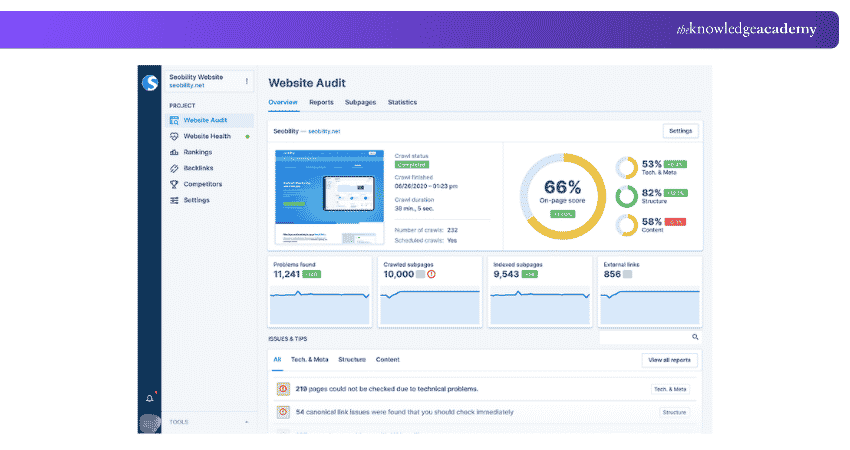
14) Seobility SEO Checker
Seobility provides SEO analysis tools for reviewing website optimisation issues. Its SEO checker examines selected webpage elements and presents recommendations for improvement.
Key Features:
a) Page-level SEO analysis
b) Meta-information checks
c) Content and page structure analysis
d) Internal linking assessment
e) Technical issue identification
f) Optimisation recommendations
Best For: Beginners and website owners who want to identify common on-page SEO issues.
15) SEOquake
SEOquake is a browser extension that provides SEO information about webpages and search results. It helps users review selected website metrics and examine on-page elements while browsing.
Key Features:
a) On-page SEO analysis
b) SEO metric overlays
c) SERP analysis
d) Keyword density information
e) Page and link inspection
f) Data export options
Best For: Marketers and SEO professionals performing quick webpage and search results analysis.
Build campaigns that capture attention and drive action with the Digital Marketing Courses now!
4) Off-page SEO Tools
Off-page SEO tools help users investigate backlinks, monitor referring websites and identify opportunities for digital PR and relationship building. These tools provide information that can support backlink research and outreach campaigns. Some important ones include:
16) Majestic
Majestic specialises in backlink intelligence. It provides information about websites linking to a domain and offers metrics for assessing link profiles.
Key Features:
a) Backlink profile analysis
b) Referring domain information
c) Trust flow and citation flow metrics
d) Anchor text analysis
e) Historical link data
f) Competitor backlink comparison
Best For: SEO professionals requiring detailed backlink research.
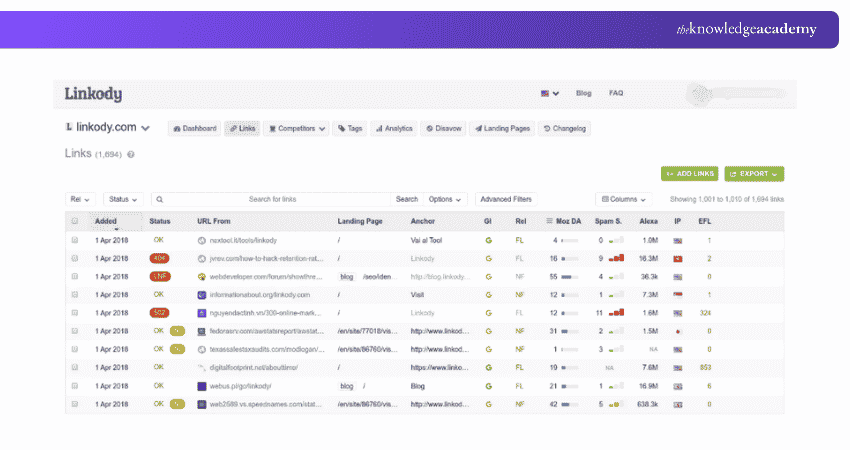
17) Linkody
Linkody is a backlink monitoring platform that helps users track links pointing to their websites. It provides information about new, existing and lost backlinks, helping businesses monitor changes to their link profiles.
Key Features:
a) Backlink monitoring
b) New and lost link notifications
c) Anchor text analysis
d) Referring domain information
e) Competitor backlink tracking
f) Reporting features
Best For: Businesses looking for a focused backlink monitoring solution.
18) BuzzSumo
BuzzSumo helps marketers research content performance, discover popular topics and identify publishers or creators relevant to their industry. It is primarily a content research and digital PR tool rather than a complete SEO platform.
Key Features:
a) Content discovery and research
b) Social engagement analysis
c) Competitor content insights
d) Relevant journalist and creator discovery
e) Content monitoring
f) Outreach research support
Best For: Content marketing and digital PR teams researching engaging topics and outreach opportunities.
19) Monitor Backlinks (SEOptimer)
Monitor Backlinks was acquired by SEOptimer in 2023. Its backlink analysis and monitoring capabilities are now associated with SEOptimer's SEO platform, which supports backlink research, monitoring and competitor link analysis.
Key Features:
a) Monitoring new and lost backlinks
b) Competitor link analysis
c) Backlink reporting
d) Keyword monitoring
e) Link profile evaluation
Best For: Website owners and SEO professionals monitoring backlink profiles and competitor links.
20) Collaborator
Collaborator is a content placement and digital PR marketplace that connects advertisers with publishers. It supports the discovery of websites for sponsored content, guest posts and other placement opportunities.
Sponsored placements should follow Google's link spam policies. Paid links should be appropriately qualified using rel="sponsored" or rel="nofollow" rather than being purchased to manipulate search rankings.
Key Features:
a) Publisher discovery
b) Website filtering and selection
c) Guest posting opportunities
d) Content placement management
e) Publisher information and campaign tools
Best For: Digital PR and content outreach teams.
21) Hunter
Hunter is an email discovery and outreach platform that helps users find and verify professional contact information. Although it is not a dedicated SEO tool, it can support relevant outreach activities such as contacting publishers and potential digital PR partners.
Key Features:
a) Professional email discovery
b) Email verification
c) Domain-based contact research
d) Outreach campaign management
e) Contact organisation and integrations
Best For: Digital PR teams and marketers managing professional outreach.
22) NinjaOutreach
NinjaOutreach is an influencer discovery and outreach platform that helps businesses identify potential promotional partners and manage outreach activities.
Key Features:
a) Influencer discovery
b) Audience and creator research
c) Outreach campaign management
d) Contact management
e) Campaign tracking and reporting
Best For: Influencer marketing and digital PR campaigns that can support wider brand visibility.
Turn smart keywords into powerful ad campaigns by signing up for the Google Ads Certification now!
5) Technical SEO Tools
Technical SEO tools help identify problems affecting website crawling, indexing, performance and technical structure. They are particularly useful for websites with large numbers of pages or complicated technical requirements. Some relevant tools include:
23) Screaming Frog SEO Spider
Screaming Frog SEO Spider is a website crawling application that helps SEO professionals identify technical and on-page issues. It examines website URLs and provides information about metadata, internal links, redirects and other technical elements.
Key Features:
a) Website crawling
b) Broken link identification
c) Redirect analysis
d) Duplicate and missing metadata checks
e) XML sitemap generation
f) Canonical and internal linking analysis
Best For: Technical SEO audits and website crawling.
24) Google PageSpeed Insights
Google PageSpeed Insights evaluates webpage performance on mobile and desktop devices. It combines laboratory-based performance analysis with available real-user experience data and offers recommendations for improvement.
Key Features:
a) Mobile and desktop performance reports
b) Core Web Vitals information
c) Lighthouse-based diagnostics
d) Page loading analysis
e) Performance improvement recommendations
Best For: Website owners and developers looking to investigate page performance issues.
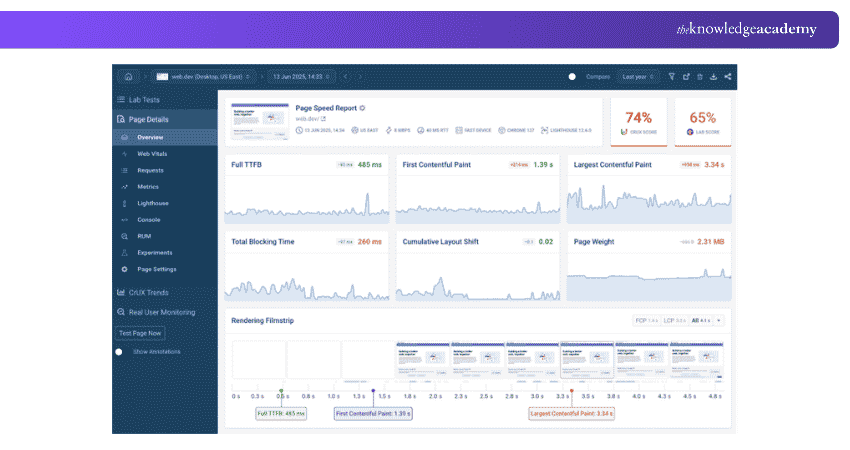
25) GTmetrix
GTmetrix is a website performance analysis tool that helps users investigate how webpages load and identify potential bottlenecks.
Key Features:
a) Website performance testing
b) Page loading metrics
c) Resource loading analysis
d) Performance recommendations
e) Waterfall reports
f) Testing and monitoring features
Best For: Website owners and developers diagnosing loading performance.
26) Lumar (Formerly Deepcrawl)
Lumar is an enterprise website optimisation platform that provides technical SEO crawling, monitoring and website intelligence capabilities. Formerly known as Deepcrawl, it helps large organisations identify and prioritise technical website issues.
Key Features:
a) Enterprise website crawling
b) Technical SEO issue detection
c) Website monitoring
d) Technical performance analysis
e) Website health reporting
f) Workflow and prioritisation support
Best For: Enterprise websites and large SEO teams managing complex technical requirements.
27) Botify
Botify is an enterprise SEO platform designed to help businesses understand how search engines interact with large websites. Its technical analysis capabilities support crawling, indexing and organic search performance investigations.
Key Features:
a) Enterprise website crawling
b) Log file analysis
c) Crawl behaviour insights
d) Indexing analysis
e) Search visibility monitoring
f) Technical SEO recommendations
Best For: Large websites requiring detailed technical SEO and crawling analysis.
28) Lighthouse
Lighthouse is an open-source tool for auditing different aspects of webpage quality. It provides automated checks for performance, accessibility, SEO and other web development considerations.
Key Features:
a) Performance auditing
b) Accessibility checks
c) SEO-related checks
d) Web development best-practice analysis
e) Diagnostic reports and recommendations
Best For: Developers and website owners reviewing technical page quality.
29) WebPageTest
WebPageTest provides detailed website performance testing using browsers and configurable testing conditions. It helps users understand how pages load and how individual resources affect the overall loading experience.
Key Features:
a) Browser-based performance testing
b) Resource waterfall analysis
c) Page loading metrics
d) Video and visual performance analysis
e) Testing configuration options
f) Performance diagnosis
Best For: Developers and technical teams investigating detailed loading behaviour.
30) W3C Markup Validator
The W3C Markup Validator checks webpage markup against web standards and identifies validation errors. Although primarily a web development tool, it can support technical SEO investigations by identifying markup issues that may affect document structure or interpretation.
Key Features:
a) HTML markup validation
b) Standards compliance checks
c) Error and warning reports
d) Markup structure analysis
e) Developer troubleshooting support
Best For: Developers reviewing website markup quality.
31) MobileMoxie
MobileMoxie provides tools for examining mobile search experiences and how websites appear in different mobile search environments. It can help SEO professionals investigate mobile SERP presentation and location-related search differences.
Key Features:
a) Mobile search results testing
b) Device-based search experience analysis
c) Location-specific SERP investigation
d) Mobile content visibility checks
e) Mobile SEO research
Best For: SEO professionals investigating mobile search visibility and presentation.
6) Local SEO Tools
Local SEO tools help businesses manage location information, business listings, reviews and visibility in geographically relevant searches. They are particularly useful for businesses with physical locations or services targeting defined geographical areas. These include:
32) Google Business Profile
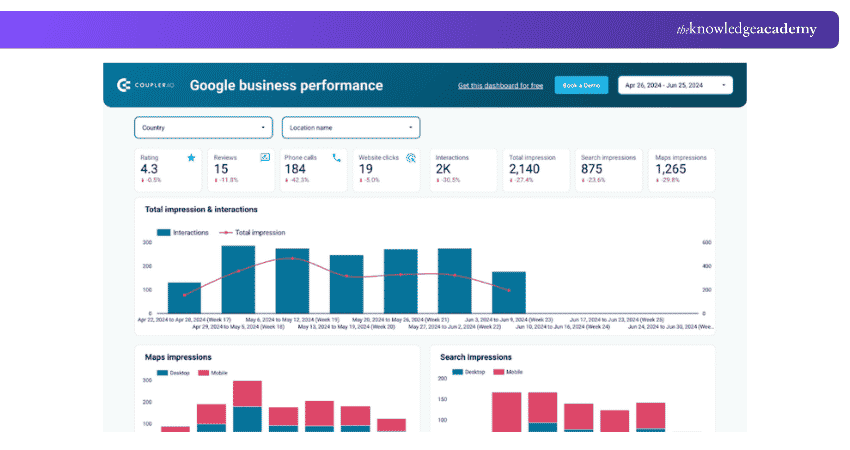
Google Business Profile is a free Google service that helps eligible businesses manage how their information appears in Google Search and Maps. Businesses can maintain relevant details, respond to reviews and share updates through their profiles.
Key Features:
a) Business information management
b) Opening hours and contact details
c) Customer review management
d) Photos and business updates
e) Business Profile performance insights
Best For: Eligible storefront and service-area businesses that interact with customers in person.
33) BrightLocal
BrightLocal provides tools for tracking local search performance and managing business listing information. It is designed to support businesses and agencies working on local SEO campaigns.
Key Features:
a) Local rank tracking
b) Citation management and auditing
c) Review monitoring
d) Local SEO reporting
e) Competitor insights
f) Business listing analysis
Best For: Local businesses and agencies managing location-based search performance.
34) Whitespark
Whitespark offers tools and services focused on local search optimisation. It helps businesses identify citation opportunities, monitor local rankings and manage important aspects of their local presence.
Key Features:
a) Local citation discovery
b) Citation management
c) Local ranking tracking
d) Reputation management tools
e) Local competitor research
Best For: Businesses focusing on local citations and search visibility.
35) Yext
Yext is a digital presence management platform that helps organisations maintain business information across supported digital channels. It is particularly relevant to businesses managing location information across multiple listings.
Key Features:
a) Business listing management
b) Location data synchronisation
c) Digital presence monitoring
d) Review and reputation management
e) Location-based reporting
Best For: Multi-location businesses managing online business information.
36) Synup
Synup provides local marketing and digital presence management capabilities. It helps businesses organise their online listings and monitor aspects of their reputation across supported platforms.
Key Features:
a) Business listing management
b) Local citation monitoring
c) Review management
d) Online reputation tracking
e) Location-based marketing insights
Best For: Businesses seeking coordinated local listings and reputation management.
7) Rank Tracking and SEO Analytics Tools
Rank tracking and SEO analytics tools help monitor search visibility, keyword performance, website traffic and marketing outcomes. They are useful for evaluating the results of optimisation activities over time. Some useful tools include:
37) Google Search Console
Google Search Console is a free tool that helps website owners monitor how their pages perform in Google Search. It provides information about search queries, indexing, technical issues and other aspects of search visibility.
Key Features:
a) Organic search clicks and impressions
b) Search query and page performance reports
c) Indexing and URL inspection
d) Sitemap submission
e) Core web vitals reporting
f) Link reports and security notifications
Best For: Website owners monitoring their organic performance in Google Search.
38) Bing Webmaster Tools
Bing Webmaster Tools is a free platform provided by Microsoft to help website owners monitor and manage their visibility in Bing Search.
Key Features:
a) Search performance reports
b) Sitemap and URL submission
c) URL inspection
d) Backlink analysis
e) Website scanning and SEO reports
f) Crawl and indexing information
Best For: Website owners monitoring their presence in Bing Search.
39) Google Analytics
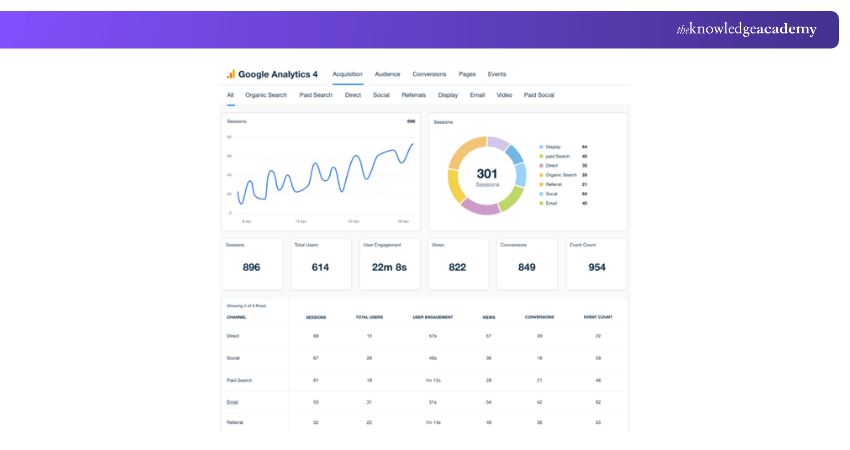
Google Analytics is a website and app analytics platform that helps businesses understand visitor behaviour, traffic acquisition, key events and campaign conversions. Google Analytics 4 (GA4) provides event-based measurement and reporting capabilities.
Key Features:
a) Website traffic reporting
b) User engagement analysis
c) Traffic acquisition reports
d) Event tracking, key event measurement and conversion reporting
e) Audience analysis
f) Reporting and integrations
Best For: Businesses measuring website engagement and marketing performance.
Decode website data and discover growth opportunities with the Google Analytics Certification now!
40) AccuRanker
AccuRanker specialises in monitoring keyword positions across search results. It offers reporting and analytical capabilities that help SEO teams evaluate changes in ranking performance.
Key Features:
a) Keyword position tracking
b) Location and device-based rank monitoring
c) Competitor comparisons
d) SERP feature analysis
e) Historical ranking trends
Best For: SEO teams requiring detailed keyword ranking information.
41) Rank Tracker
Rank Tracker by SEO PowerSuite is a desktop application used to monitor keyword positions and research ranking opportunities. It helps users investigate keyword performance across supported search engines and locations.
Key Features:
a) Keyword rank monitoring
b) Competitor ranking analysis
c) Local and device-specific tracking
d) Keyword research
e) Historical ranking reports
f) SEO performance reporting
Best For: Marketers who prefer a desktop-based ranking and keyword research application.
42) Data Studio
Data Studio, previously known as Looker Studio, is a reporting and data visualisation platform. It helps businesses combine data from supported sources and present information through custom dashboards.
Key Features:
a) Custom reporting dashboards
b) Data visualisation
c) Google Analytics and Google Search Console integrations
d) Multiple data-source reporting
e) Report sharing and collaboration
f) Custom charts and tables
Best For: Agencies and marketing teams building dashboards to communicate SEO performance.
How to Choose the Right SEO Tools?
Choosing the right SEO tools begins with understanding what you want to achieve. A business struggling with website indexing issues may need a different solution from a content marketer researching blog topics or an agency managing several clients. Here are five important considerations:
a) Identify Your Primary SEO Goal: Determine whether your main priority is keyword research, technical auditing, backlink analysis, local search visibility or performance monitoring. Choose tools that directly support that objective.
b) Consider Your Experience Level: Beginners may benefit from tools with simple dashboards and straightforward recommendations. Experienced SEO professionals may need deeper datasets, specialised controls and advanced reporting capabilities.
c) Evaluate Your Budget: Begin with free tools where appropriate. Consider paid subscriptions when the additional capabilities provide meaningful value. Review usage limits, data access and subscription terms before committing.
d) Check Website Size and Complexity: A small informational website may need only basic monitoring and occasional audits. Large websites may require advanced crawling, automated monitoring and more sophisticated data analysis.
e) Avoid Unnecessary Feature Overlap: Some platforms provide similar keyword research, backlink analysis and rank tracking features. Before subscribing to multiple products, compare their capabilities and identify where specialist functionality genuinely adds value.
The right SEO tool should address your website's main challenges without adding unnecessary complexity. Start with your immediate requirements and expand your toolkit as your needs change. Remember, SEO success depends on how effectively you use the insights and continuously improve your strategy.

Aishwarya Unni is a Copywriter with 2+ years of experience in reporting, web content, blogs, email marketing, and case studies. Her journalism background, combined with her research and writing experience across Business Skills and Human Resources, helps her create clear, engaging content for different audiences.
View Detail

 If you wish to make any changes to your course, please


