


 Top Rated Course

We may not have the course you’re looking for. If you enquire or give us a call on 01344203999 and speak to our training experts, we may still be able to help with your training requirements.
What is an Intranet: Definition, Features, and Benefits
The Knowledge Academy 19 December 2025An Intranet is a private, secure network used within an organisation to share information, collaborate, and manage internal communications and resources. It is different from the internet by being secured and privatised in its access. The backbones of an intranet are a web server, content management system, LANs, and Firewall.

Training Outcomes Within Your Budget!
We ensure quality, budget-alignment, and timely delivery by our expert instructors.
Table of Contents
If you are running a business or an organisation, you need to be extra careful to secure all your data. Data breaches and cyber-attacks can happen through your internet services, networks, servers, or via individual devices. In such cases, using the internet could be dangerous and vulnerable.
This is where an Intranet becomes really inevitable to implement. You need simple and secure ways to keep everyone in your company connected. It replaces the internet with a privatised version. Let's delve into this blog to explore topics like What is Intranet, its features, benefits along with real-life examples!
Table of Contents
1) What is an Intranet?
2) Why is Intranet Important?
3) Key Features of an Intranet
4) How do Intranets Work?
5) Benefits of Using an Intranet
6) Common Challenges of Intranets
7) Best Practices for Intranet
8) Real-world Examples of Intranet
9) Intranet vs Extranet: What Sets Them Apart?
10) Conclusion
What is an Intranet?
An Intranet is a private and secure network that people inside a company can only use. It helps employees share information, access documents, and communicate more easily. It is more like a company’s own website, which is not accessible to the public.
Intranets are used to read company news, find employee contact details, manage files, and do several other work-related tasks, all in one place. It makes life easier at work by keeping everything organised and secure.
Why is Intranet Important?
A good Intranet helps companies or organisations run better and maintain the connection between the employees, no matter where they are working. Here are a few reasons why Intranets matter:
1) Improved Communication: All company news and updates are shared in one place, so everyone gets to know what is going on.
2) Saves Time: The employees can quickly find the documents or information they need with organisational clarity.
3) Collaborated Teamwork: Multiple people can work together on tasks and projects, even if they are in different locations.
4) Building Company Culture: Sharing stories, birthdays, or achievements of everyone from the company can make them feel more involved and connected.
Key Features of an Intranet
Modern Intranets come with a lot of tools to help your employees do their jobs better. Some of the main features of an Intranet include a Document Management System (DMS), a collaboration system, an employee directory, and a lot more.
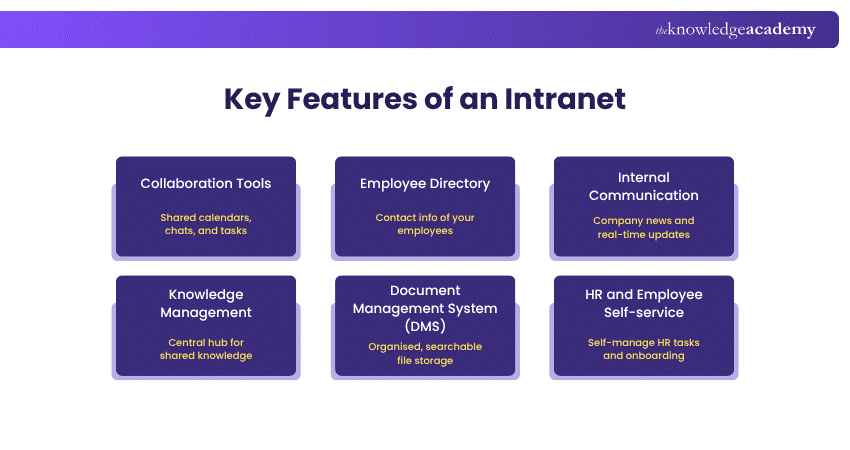
1) Collaboration Tools
Intranets often include helpful tools that make it easier for teams to work together. These might include shared calendars, group chats, team pages, and task lists. Employees can plan projects, assign tasks, and share ideas even if they are in different departments.
Some tools also let employees work on the same document at the same time. This makes teamwork smoother and helps everyone stay organised and up to date with the trends.
2) Employee Directory
An employee directory is a list of everyone who works in the company. It usually shows their names, job titles, departments, phone numbers, and email addresses. Some directories even have photos to help put faces into names.
This makes it simple to find and contact the right person, especially in large businesses where not everyone knows each other. It’s a quick and easy way to access contact details.
3) Internal Communication
Intranets are a great place for sharing company news and updates. From a message from the CEO to a new policy or details about an upcoming event, the Intranet helps everyone stay in the loop. All the members concerned will receive updates in real-time.
Instead of sending lots of emails, companies can post updates in one place for all staff to see. Some Intranets also let people comment or ask questions, which makes it open and interactive.
Enhance your leadership skills for managing teams and driving results by joining our Service Desk Senior Analyst Training now!
4) Knowledge Management
Companies have a lot of useful information, like how things are done, training materials, and answers to general questions. The Intranet helps to collect all of this knowledge in one easy-to-access place.
This saves time and helps employees learn from each other without always needing to ask for help. If someone needs help with a task or to learn something new, they can check the Intranet.
5) Document Management System (DMS)
Instead of keeping important files in emails or on different computers, Intranets lets you store them all in one place. Even employees can upload, organise, and share things like reports, forms, and templates.
Everyone can find the latest versions quickly using search tools. This helps avoid mistakes and ensures that people are always working with the most relevant and updated information.
6) HR and Employee Self-service
Intranets are also useful for handling everyday Human Resources (HR) tasks. Employees can request time off, check their pay slips, update their contact info, or read company policies without needing to contact HR directly.
For new employees, the Intranet can help them through their first few days, giving them access to welcome messages and training. This makes it easier to manage your own work needs.
How do Intranets Work?
Intranets work by using private computer networks that are protected from any other outside access. Let’s unveil how it works:
1) Hosting: The Intranet can run from the server of your company, or it can be hosted online in the cloud.
2) Accessing: Since it is secured, it requires people with the right username and password to log in and use it.
3) Organisation: All the information is grouped by teams, departments, or topics so that it will be easier to find.
4) Connections: Intranets can work alongside other tools that your company already uses, like HR software or email.
Benefits of Using an Intranet
There are a lot of benefits that come with an Intranet to justify why you should implement this over other advanced tools. Here are some of its benefits:
1) Efficient File and Information Storage
One of the best things about an Intranet is having a single place to store all files, forms, and policies. It acts as a storage repository, too. Instead of digging through emails or shared folders like Drives, you can quickly find what you need.
2) Easy Ways to Communicate Among Employees
Intranets help employees to stay in touch, especially in large companies or when working in remote locations. They can post announcements and discussions, chat in real-time, or use message boards to keep each other informed or updated.

3) A Good Content Management System (CMS)
The Content Management System (CMS) makes it easy to add and update information to the Intranet. There is no requirement to have technical skills to share blog posts, create pages, or update documents. With its simple structure, anyone can do the work.
Upgrade your service management systems with our Certified Helpdesk Support Technician Course – Register today!
Common Challenges of Intranets
Despite their benefits, Intranets aren’t without their hurdles. Some of the common challenges organisations face include:
1) Low Engagement: Without regular updates or a user-friendly design, employees might not use the platform on a regular basis.
2) Poor Search Capabilities: If employees struggle to locate what they need, they are likely to turn to less secure alternatives.
3) Lack of Integration: The Intranet needs to be connected with the core business tools, and if not, it can become a burden rather than a benefit.
4) Outdated Content: Maintaining the content up-to-date is a bit challenging, but if not, it can quickly become irrelevant or misleading.
5) Security Risks: Without proper access controls, sensitive internal data could be exposed to the wrong users.
Best Practices for Intranet
To make an Intranet truly helpful for employees, it needs to be easy to use, regularly updated, and work well for everyone, irrespective of their location. Here are four simple best practices to follow:

1) Modern User Experience
1) The Intranet needs to look clean and work flawlessly
2) It has to be easy and simple to navigate on all the devices
3) Designed with clear menus, a good search bar, and layouts
4) Maintain the design up to date and check regularly
2) Regular Engagement
1) Achieve regular engagement by posting regular updates
2) Use features like polls or comments to let employees join in and give feedback
3) Make them feel involved so they will return to the Intranet often
3) Multichannel Approach
1) The Intranet needs to be installed and supported by several tools
2) Send alerts by email or mobile notifications
3) It could be connected to platforms like Microsoft Teams
4) Optimise for Remote Work
1) The Intranet needs to be available from anywhere in the office, at home, or on the go
2) Using cloud-based systems will make sure it works well on mobile devices
3) Include tools like chat, video meetings, and shared documents
Real-world Examples of Intranet
Several leading companies have developed Intranet platforms to boost collaboration and efficiency. Let's explore what those companies are. Deloitte uses its global Intranet to connect thousands of employees with tools for learning, news, and sharing best practices.
Virgin Media has built a fun, mobile-friendly Intranet where employees can read news, give feedback, and get support. Other applications that make the best use of the Intranet are Blink, Axero, Zoho Connect, and so on.
Intranet vs Extranet: What Sets Them Apart?
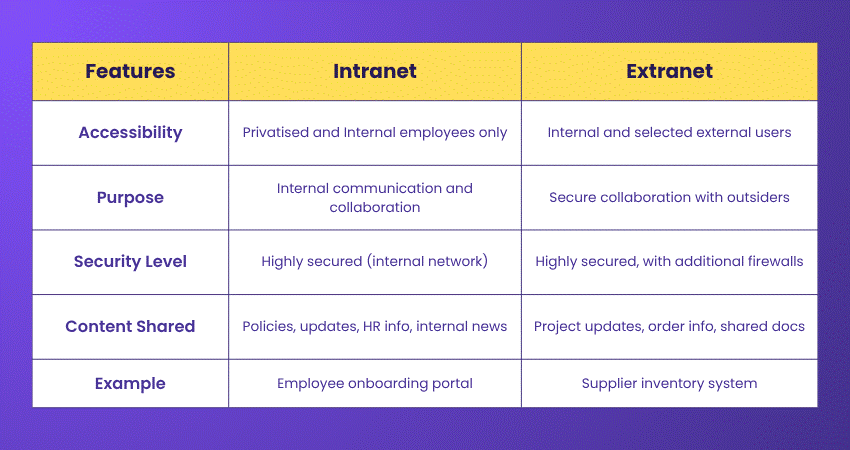
So far, this blog has focused on “What is Intranet? Its features, benefits, and best practices. It also has its associate term called “Extranet.” An extranet is also a secure platform, but it can be accessed by third parties, unlike the Intranet. It grants permission to access by authorised people like customers, vendors, and partners. Here are the factors that set both the Intranet and extranet apart:
Conclusion
Intranets have come a long way. What used to be simple internal websites are now powerful digital workspaces that support everything ranging from communication to HR services. The aim of the Intranet is to make it easy to use, update it often, and listen to staff feedback. That way, your Intranet stays useful and valuable over time.
Build essential skills to handle real-world service desk challenges confidently by signing up for our Service Desk Analyst (SDA) Course soon!
Frequently Asked Questions
What Are the Three Types of Intranets?

Each type of Intranet serves a different function. The three types of Intranets are collaboration Intranets, communication Intranets, customer relations, and hybrid Intranets.
Do Companies Still Use Intranets?
Yes, companies still use the Intranets since they are more important than ever, especially for remote or hybrid teams. Modern Intranets help employees stay connected and informed no matter where they work from.
What are the Other Resources and Offers Provided by The Knowledge Academy?
The Knowledge Academy takes global learning to new heights, offering over 3,000 online courses across 490+ locations in 190+ countries. This expansive reach ensures accessibility and convenience for learners worldwide.
Alongside our diverse Online Course Catalogue, encompassing 19 major categories, we go the extra mile by providing a plethora of free educational Online Resources like News updates, Blogs, videos, webinars, and interview questions. Tailoring learning experiences further, professionals can maximise value with customisable Course Bundles of TKA.
What is The Knowledge Pass, and How Does it Work?
The Knowledge Academy’s Knowledge Pass, a prepaid voucher, adds another layer of flexibility, allowing course bookings over a 12-month period. Join us on a journey where education knows no bounds.
What are the Related Courses and Blogs Provided by The Knowledge Academy?
The Knowledge Academy offers various Helpdesk Training, including Certified Service Desk Support Technician Course, Certified Helpdesk Support Technician Course and Service Desk Senior Analyst Training. These courses cater to different skill levels, providing comprehensive insights into Help Desk Software.
Our IT Service Management Blogs cover a range of topics related to Intranet, offering valuable resources, best practices, and industry insights. Whether you are a beginner or looking to advance your IT Service Management skills, The Knowledge Academy's diverse courses and informative blogs have got you covered.

The Knowledge Academy


Global Training Provider
The Knowledge Academy is a world-leading provider of professional training courses, offering globally recognised qualifications across a wide range of subjects. With expert trainers, up-to-date course material, and flexible learning options, we aim to empower professionals and organisations to achieve their goals through continuous learning.

Upcoming IT Service Management Resources Batches & Dates
Date
 Certified Service Desk Support Technician
Certified Service Desk Support Technician
Wed 1st Apr 2026
Certified Service Desk Support Technician
Wed 24th Jun 2026
Certified Service Desk Support Technician
Thu 3rd Sep 2026
Certified Service Desk Support Technician
Wed 23rd Dec 2026

 If you wish to make any changes to your course, please


