


 Top Rated Course

We may not have the course you’re looking for. If you enquire or give us a call on 01344203999 and speak to our training experts, we may still be able to help with your training requirements.
14 Most Common Types of Malware
The Knowledge Academy 10 February 2026Types of Malware include viruses, worms, ransomware, spyware, and trojans. Understanding how each works helps organisations prevent attacks and reduce risk. Malwares is one of the most harmful threats in the digital world, affecting individuals and businesses. Recognising how each type works is the first step towards better protection.

Training Outcomes Within Your Budget!
We ensure quality, budget-alignment, and timely delivery by our expert instructors.
Table of Contents
Every day people click links, download files, and install apps without thinking twice, but one mis-click can invite serious trouble into a device. From laggy computers and strange pop-ups to stolen passwords and locked files, many of these issues are caused by hidden threats. That is why recognising and understanding the different Types of Malware is essential for anyone who is using the internet.
Different Types of Malware work in different ways. Some quietly spy on your activity, some steal data, and others can lock your entire system. That is why recognising the different types is crucial for spotting risks proactively. In this blog, you will learn about Malware and its types, how to identify it, how it spreads, and more!
Table of Contents
1) What is Malware?
2) What are the Types of Malware?
3) Common Ways Malware Spreads and Poses Threats
4) How to Identify Malware Infection on Your Device?
5) How to Prevent Malware Attacks?
6) Conclusion
What is Malware?
Malware is any program or code created to harm, disrupt, or gain unauthorised access to computers, networks, and personal devices. It includes different threats, such as harmful scripts and highly advanced attacks. Malware often spreads through phishing emails, fake downloads, or infected links, and is disguised as legitimate files, so users install or download it without realising the risk.

What are the Types of Malware?
Here are the various Types of Malware you need to know, each posing different threats to your digital security.
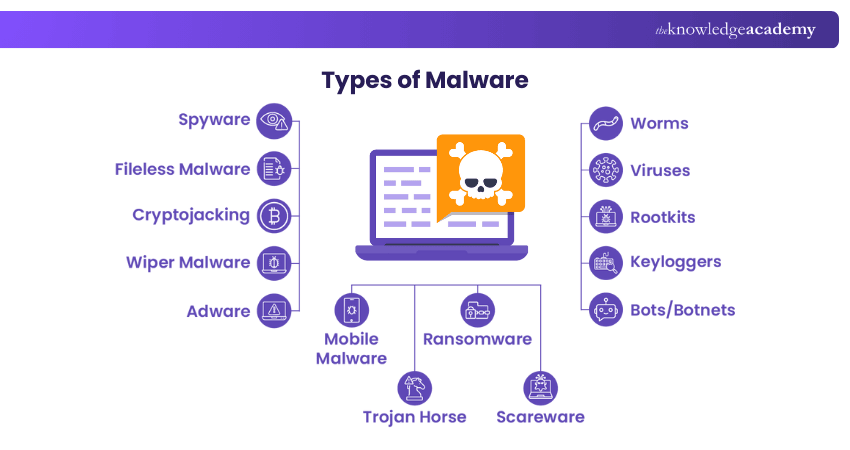
1) Spyware
Spyware is malicious software that silently tracks user activity. It collects confidential data like passwords, payment details, and private messages. It can hide in mobile apps and essential programs. Even without stealing sensitive info, it slows systems and affects productivity. Network stability may suffer. Over time, this weakens overall security.
2) Fileless Malware
Fileless Malware operates without installing any software initially. Instead, it modifies files that are native to the Operating System (OS), such as PowerShell or WMI. Because the Operating System recognises these altered files as legitimate, antivirus software often fails to detect fileless attacks. Due to their stealthy nature, these attacks are up to ten times more effective than traditional Malware attacks.
3) Cryptojacking
Cryptojacking is a silent attack that hijacks devices to mine cryptocurrency. Hackers slip malicious code through links, ads, or apps. It drains power, slows systems, and heats hardware. Victims face higher bills and reduced device life. Organisations lose time, money, and efficiency.
4) Wiper Malware
A wiper is a type of Malware designed solely to erase user data irrecoverably. Wipers are deployed to disrupt computer networks in both public and private sectors. Threat actors also use wipers to eliminate traces of their intrusion, hindering the victim’s ability to respond effectively.
5) Adware
Adware monitors browsing habits to serve targeted ads. It collects data but doesn’t steal passwords or install programs. The key threat is loss of privacy. Collected info is merged with online activity. This profile may be sold without permission. Users often notice slow performance. Repeated pop-ups can disrupt workflow.
6) Worms
Worms exploit OS flaws to enter networks without warning. They spread through backdoors, bugs, or infected drives. Inside, Hackers can turn them into tools for damage. Worms may trigger Distributed Denial-of-service (DDoS) attacks, data theft, or Ransomware. Such breaches cause major loss and chaos. Systems may crash unexpectedly. Recovery often demands time and expert support.
7) Viruses
A Computer Virus infects devices and replicates itself across systems, requiring human intervention to spread. Users often download the malicious code via malicious advertisements or phishing emails, allowing the Virus to propagate throughout their systems. Viruses can modify computer functions and applications, copy, delete, and exfiltrate data, encrypt data for Ransomware attacks, and carry out (DDoS) attacks.
Turn your team into a human firewall with Cyber Security Awareness Training today!
8) Rootkits
Rootkit is a software that allows malicious actors to remotely control a victim's computer with full Administrator privileges. Rootkits can be introduced into apps, kernels, hypervisors, and firmware. They propagate through phishing, malicious attachments, malicious downloads, and infected shared drives. Rootkits can potentially hide additional Malware, such as keyloggers.
9) Keyloggers
A Keylogger is a spyware that records every keystroke a user makes. It can be used for monitoring but is often misused. Cybercriminals deploy it to steal passwords and financial details. It spreads through phishing, fake links, or risky downloads. Once active, it quietly captures sensitive input.
10) Bots/Botnets
Bots are programs that carry out tasks automatically when triggered. Some help, like indexing websites for Search Engines. Others act as Malware, spreading and connecting to remote servers. In large numbers, they form botnets. These launch wide-scale attacks such as DDoS strikes.
11) Mobile Malware
Mobile Malware attacks have seen a significant increase recently. How to Know if Your Phone is Hacked is becoming a crucial concern as these threats are as diverse as those targeting desktops, including Trojans, Ransomware, and advertising click fraud, and more. They spread through phishing and malicious downloads, particularly impacting jailbroken phones that lack original system protections.
12) Trojan Horse
A Trojan Horse refers to a malicious software disguised as a harmless file or app. It tricks users through Social Engineering to gain entry. Once active, it installs a harmful code to exploit the system. Trojans open backdoors for spying, theft, or more Malware. Remote Access Trojans (RATs) give attackers full control of infected devices. They spread quietly, forming hidden botnets.
13) Ransomware
Ransomware is a malicious code and one of the Malware examples that occurs and locks or encrypts your files and requires payment to unlock them. It is highly transmitted by phishing emails or malicious downloads. Being victimised may result in loss of data, financial losses, and severe inconvenience.
14) Scareware
Scareware is a type of Malware that fools customers into believing that their machine is being infected or is in danger, usually with threatening pop-ups or simulated antivirus warnings. It aims at compelling the user to buy unneeded software or disclose his or her personal information. It is very important to remain calm and check these Types of Malware attacks by using reliable sources.
Become a Certified Cyber Security Professional to safeguard digital environments with our Certified Cyber Security Professional (CCS-PRO) Course. Sign up now!
Common Ways Malware Spreads and Poses Threats
Recognising common Types of Malware is as important as understanding how they spread and infiltrate systems. Malware often relies on user interaction, system weaknesses, or hidden delivery methods to gain access. Let’s explore the most common ways Malware spreads and poses threats below.
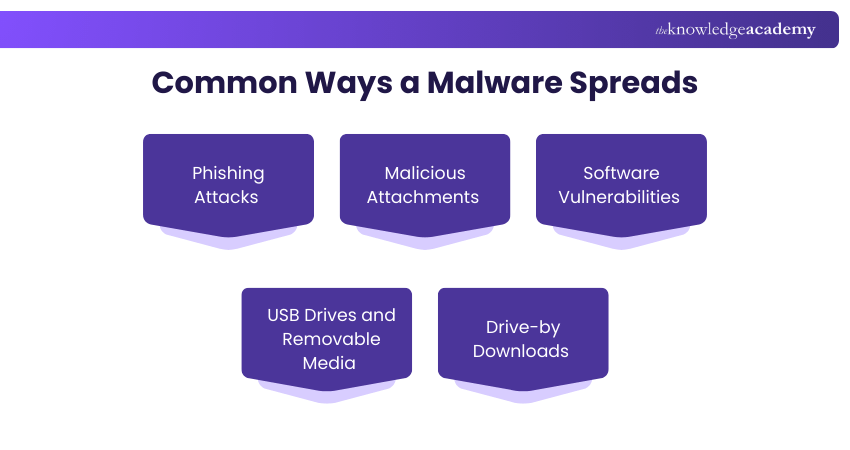
1) Phishing Attacks
Phishing is one of the most common Malware delivery methods. Attackers send fake emails, text messages, or create look-alike websites that appear legitimate. These messages often create urgency, fear, or curiosity to encourage users to click harmful links.
2) Malicious Attachments
Cybercriminals send convincing attachments, such as invoices, reports, or delivery notices. These files or embedded links appear to be genuine but contain hidden Malware that activates once they are opened.
3) Software Vulnerabilities
Outdated or unpatched software is an easy target. Attackers exploit known security flaws to inject malicious code. After entry, the Malware spreads across connected systems within the same network.
4) USB Drives and Removable Media
Infected USB drives and external media can carry Malware between devices. When they are plugged in, the malicious program can run automatically and infect the entire system. The risk increases when unknown or shared storage of devices is used without security scanning.
5) Drive-by Downloads
Drive-by Downloads happen when a user visits a compromised website, and Malware downloads silently in the background. Here, no direct link or download approval is required, making this method dangerous.
Learn to identify, assess, and reduce cyber risks before they become costly incidents with Cyber Security Risk Management Training now!
How to Identify Malware Infection on Your Device?
Identifying Malware can be tricky because it runs quietly in the background. Let’s look at the signs that will help you act proactively and reduce damage below:
1) Slower System Performance: If your device becomes slow without a clear reason, Malware may be using your system resources in the background.
2) Unusual Pop-ups: Frequent random pop-ups, fake alerts, or redirection to suspicious websites indicate adware or spyware activity.
3) Increased Network Activity: Unexpected spikes in internet usage can mean Malware is communicating with external servers.
4) Unexplained File Changes: Missing files, renamed folders, or corrupted documents signal Malware, especially ransomware or rootkit infections.
5) Suspicious Account Activity: Unknown logins, password reset messages, or unusual transactions suggest credential stealing Malware, such as keyloggers.
How to Prevent Malware Attacks?
While complete protection from Cybercriminals is impossible, companies can take several measures to mitigate or prevent Malware attacks, including:
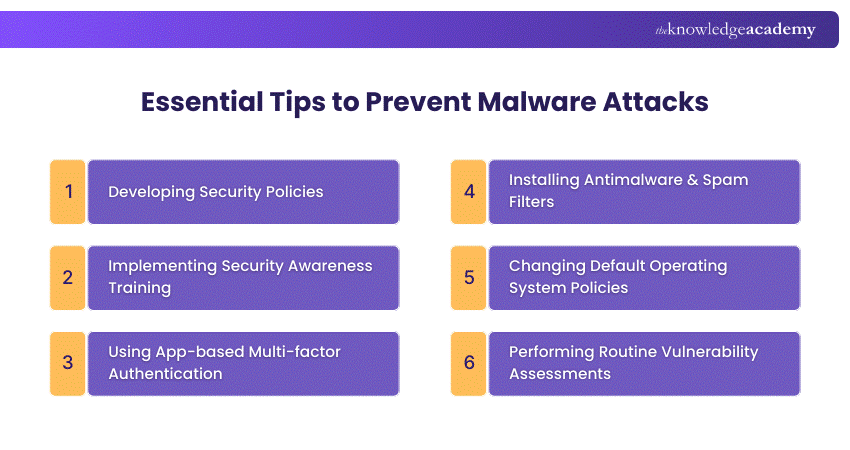
1) Developing Security Policies: Provide a roadmap for employees, detailing actions, timing, and access. Examples include Social Engineering awareness, server Malware protection, software installation, and removable media policies.
2) Implementing Security Awareness Training: Invest in training to save money lost to cyber-attacks. Involves baseline testing, user training, phishing campaigns, and reporting results.
3) Using App-based Multi-factor Authentication (MFA): Prevent 99.9% of automated Malware attacks on Windows Systems. Prefer app-based or hardware MFA over SMS-based MFA.
4) Installing Anti-malware and Spam Filters: Add protections to mail servers as part of a defence-in-depth approach. Balance blocking malicious traffic and allowing legitimate traffic.
5) Changing Default Operating System Policies: Improve default settings, such as password history and age, to enhance security.
6) Performing Routine Vulnerability Assessments: Use tools like Nessus to scan ports, analyse protocols, and map networks. Display vulnerabilities and their severity in a dashboard.
Conclusion
Malware is a daily digital risk that can affect anyone who uses a device or the internet. The most important need is the awareness of common Types of Malware, how they spread, and their warning signs to prepare yourself for a strong defence. Also, it is crucial to stay cautious with links, downloads, and attachments, keep your systems updated, and use trusted security tools. Through small defence habits, bigger differences can be made over time.
Build cyber defence skills and protect real systems with Cyber Security Courses – Sign up now!
Frequently Asked Questions
Why is a Computer Virus More Dangerous Than Other Types of Malware?

A computer virus is more dangerous than other Types of Malware because it can self-replicate and spread across networks and files. It can corrupt data, slow systems, and create security gaps for more attacks. This widespread and deep damage potential makes viruses harder to control and remove.
What are the Main Sources of Malware?
Malware typically originates from sources such as malicious email attachments, and phishing links. It can also spread through compromised websites, fake software updates, and removable media like USB drives. Peer-to-peer file sharing and outdated software with security vulnerabilities further increase the risk of Malware infection.
What are the Other Resources and Offers Provided by The Knowledge Academy?
The Knowledge Academy takes global learning to new heights, offering over 3,000+ online courses across 490+ locations in 190+ countries. This expansive reach ensures accessibility and convenience for learners worldwide.
Alongside our diverse Online Course Catalogue, encompassing 19 major categories, we go the extra mile by providing a plethora of free educational Online Resources like Blogs, eBooks, Interview Questions and Videos. Tailoring learning experiences further, professionals can unlock greater value through a wide range of special discounts, seasonal deals, and Exclusive Offers.
What is The Knowledge Pass, and How Does it Work?
The Knowledge Academy’s Knowledge Pass, a prepaid voucher, adds another layer of flexibility, allowing course bookings over a 12-month period. Join us on a journey where education knows no bounds.
What are the Related Courses and Blogs Provided by The Knowledge Academy?
The Knowledge Academy offers various Cyber Security Training, including the Malware Analysis Training, Certified Cyber Security Professional (CCS-PRO) Course, and Cyber Security Awareness Training. These courses cater to different skill levels, providing comprehensive insights into What is a Firewall.
Our IT Security & Data Protection Blogs cover a range of topics related to Types of Malware, offering valuable resources, best practices, and industry insights. Whether you are a beginner or looking to advance your IT Security & Data Protection skills, The Knowledge Academy's diverse courses and informative blogs have got you covered.

The Knowledge Academy


Global Training Provider
The Knowledge Academy is a world-leading provider of professional training courses, offering globally recognised qualifications across a wide range of subjects. With expert trainers, up-to-date course material, and flexible learning options, we aim to empower professionals and organisations to achieve their goals through continuous learning.

Upcoming IT Security & Data Protection Resources Batches & Dates
Date
 Certified Cyber Security Professional (CCS-PRO)
Certified Cyber Security Professional (CCS-PRO)
Fri 24th Apr 2026
Certified Cyber Security Professional (CCS-PRO)
Fri 24th Jul 2026
Certified Cyber Security Professional (CCS-PRO)
Fri 9th Oct 2026

 If you wish to make any changes to your course, please


