


 Top Rated Course

We may not have the course you’re looking for. If you enquire or give us a call on 01344203999 and speak to our training experts, we may still be able to help with your training requirements.
What is Antivirus Software? Types, Features, and Benefits
The Knowledge Academy 16 July 2026Antivirus Software protects your devices by detecting, preventing, and removing viruses and malware, helping businesses and users stay secure online. It provides real-time monitoring and regular updates to guard against evolving cyber threats. This protection supports data privacy, secure transactions, and safer digital use.
Home
 Resources
IT Security & Data Protection
What is Antivirus Software? Types, Features, and Benefits
Resources
IT Security & Data Protection
What is Antivirus Software? Types, Features, and Benefits
Resources
IT Security & Data Protection
What is Antivirus Software? Types, Features, and Benefits

Training Outcomes Within Your Budget!
We ensure quality, budget-alignment, and timely delivery by our expert instructors.
Table of Contents
The most frequently asked question is What is Antivirus Software? It is a security tool that is meant to scan your devices against known threats and block or eliminate them promptly before they can harm you. Antivirus programs prevent viruses, malware, and other online threats by constantly scanning the background. It helps to keep your personal information safe and minimise vulnerability to cybercrimes by using trusted software.
Table of Contents
1) What is Antivirus Software?
2) How Antivirus Software Works?
3) Why Do I Need Antivirus Software?
4) What Does Antivirus Software Do?
5) What Antivirus Software Protects From?
6) Benefits of Antivirus Software
7) Drawbacks of Antivirus Software
Conclusion
What is Antivirus Software?
Antivirus Software is created to safeguard computers and mobile devices against malware, hackers, and other cybercriminal activities. It operates in the background, scanning files on your computer and any data entering your device and any content on websites, emails, attachment and application to identify and block mischievous behavior.
Antivirus solutions can ensure that links and untrusted downloads do not damage a system by examining data and pinpointing suspicious behaviours or recognised malicious trends. Frequent updates ensure that the software is ready to resist new threats, and periodic scans give more in-depth checks of the system. Antivirus tools are most effective when used together with other cybersecurity measures to ensure better overall protection.

How Antivirus Software Works?
Antivirus Software uses multi-layered detection and prevention technologies to detect, block, and eliminate malicious code. It integrates signature databases, behaviour tracking and automated refresh to protect against both new and existing threats. Below are the key mechanisms involved:
1) Signature-based Detection: This conventional approach is based on a malware signature database. Whenever files, programs, or data get into a system, the antivirus scans them and checks their code against those threat definitions stored. In case of a match, the software quarantines or deletes file to avoid infection.
2) Heuristic Analysis: Heuristic detection aids in detecting new or altered malware that may not be available in signature databases. It analyses file structure, code, and behaviour patterns involved in suspicious characteristics. In case the activity is similar to malicious behaviour, then the file is flagged even without a precise signature match.
3) Real-time Scanning: Antivirus Software is not just a manual scan but constantly checking the activity of the system. It scans files when they are opened, downloaded, or executed and checks web traffic, email attachments, and applications to prevent threats before they can execute.
4) Sandboxing: Sophisticated systems can employ sandboxing to isolate suspicious files within a supervised virtual machine. This will enable the software to monitor the behavior of a file without endangering the primary system. When the malicious actions are detected, the file is blocked or safely removed.
5) Automatic Updates: Antivirus programs constantly update virus definitions and detection engines in order to be effective. New malware, cyber threats, and techniques of attack are frequently updated to provide protection against them.
Improve workplace safety and compliance through our Incident Reporting Training – Join today!
Why Do I Need Antivirus Software?
Antivirus Software is essential in ensuring the security of any device due to the continuous flood of online threats such as malicious websites, infected files, phishing mails, and dangerous links.
Sensitive data like personal information and financial data can become accessible to online criminals due to insufficient security. Antivirus Software keeps systems secure and users free as they browse the internet by constantly tracking the activity and blocking threats in real time.
What Does Antivirus Software Do?
In a world where we live much of our lives online, Antivirus Software acts as a digital bodyguard for your devices. But what exactly does it do? Let’s break it down in simple terms.
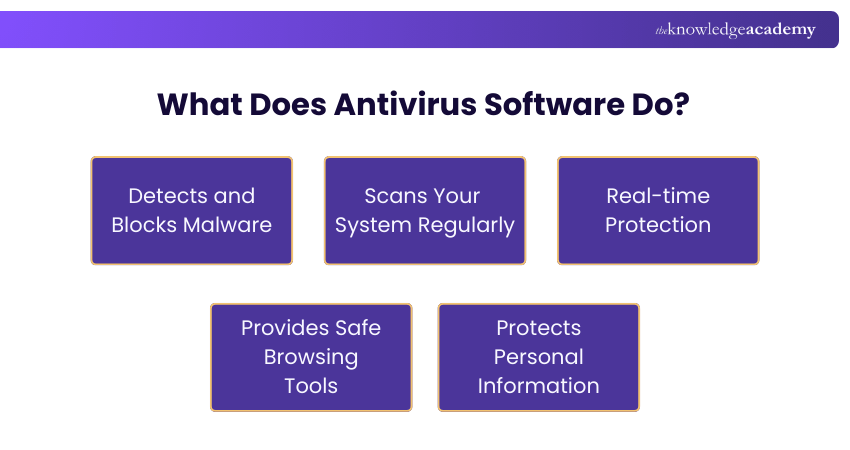
1) Detects and Blocks Malware
The primary job of Antivirus Software is to detect harmful programs like viruses, worms, trojans and Ransomware. As soon as it spots something suspicious, it either removes it or blocks it from causing any damage.
2) Scans Your System Regularly
Antivirus tools continuously scan your system in the background. They look for anything unusual or potentially dangerous and keep your files, apps and software in check.
3) Real-time Protection
Modern Antivirus Software doesn’t just wait until a full scan. It works in real time, actively monitoring downloads, email attachments and even websites to keep threats out the moment they appear.
4) Provides Safe Browsing Tools
Many antivirus programmes come with browser extensions that warn you about unsafe websites or prevent you from clicking on malicious links. It’s like having a watchful friend as you surf the web.
5) Protects Personal Information
Some antivirus tools also include identity protection. They monitor for signs of data breaches or Phishing attempts to help keep your personal details safe.
In short, Antivirus Software is a must-have for anyone using a computer, tablet or smartphone. It runs quietly in the background but makes a huge difference in keeping your digital life secure.
What Antivirus Software Protects From?
An antivirus is essential for protecting all your devices from a wide range of threats that target your data and security.
1) Malware
a) Malware is a term that encompasses various harmful programs such as viruses, worms, and trojans that either rupture or take advantage of the systems.
b) Antivirus detects, suspiciously, the files and stops the bad behavior thus doing the malware removal and scanning.
2) Ransomware
a) Ransomware is a malicious software that encrypts your data and afterward it requires a ransom to unlock the files and allow access to them again.
b) Antivirus software prevents ransomware from getting on the system by detecting its behavior and quarantining the affected areas right away.
3) Spam & Phishing
a) Spam and phishing trick by using fraudulent messages to gain access to information or distribute undetected malware.
b) Antivirus programs act as a filter for hazardous email messages, does not allow access to harmful links and thoroughly checks the attachments for safety.
4) Trojan Horses
a) Trojan Horse manages to outsmart users by masking themselves as trustworthy files and eventually leading the user to install malware.
b) The Antivirus Software uncovers trojans by not only doing signature checks but also through analysing their actions so that they can stop the intrusion.
5) Adware
a) Adware installs intrusive advertisements and might also quietly install other malicious programs.
b) Antivirus detects adware by noticing pop-ups that are not allowed and preventing their installation.
6) Spyware
a) Spyware is a type of malicious software that secretly observes a user's activities and then, in addition, steals important data like passwords.
b) The antivirus program tracks the behaviour of spyware and, on the other hand, prevents any information extraction attempts.
Strengthen your cybersecurity expertise with our practical Computer Forensics Foundation Training now!
Benefits of Antivirus Software
Antivirus Software installation will offer a multidimensional protection that will assist in keeping your devices, data, and online actions safe. Key benefits include:
1) Defence Against Multiple Threat Types: The current Antivirus Software detects and prevents viruses, ransomware, spyware, phishing, Trojan Horses, and other types of malwares and offers extensive coverage of cyber security.
2) Improved System Performance: Antivirus programs keep systems running more efficiently and consistently by identifying and eliminating malicious software that tend to slow down computers.
3) Safer Online Transactions: Most antivirus programs have options that facilitate online payment and other delicate financial operations by preventing fraudulent websites and other suspicious links.
4) Early Detection of Emerging Threats: The Antivirus Software with new virus definitions and behavioural tracking features can detect and prevent threats before they can do significant harm.
5) Automatic Updates for Ongoing Security: Automatic processing also means that the security against brand-new malware and emerging cyber threats is maintained without any human input.
Investing in Antivirus Software strengthens your overall digital security strategy and helps create a safer, more dependable online experience.
Drawbacks of Antivirus Software
Although Antivirus Software is a necessary element in the digital protection, it has certain limitations. The following are the main disadvantages:
1) No End-to-End Security Solution: Antivirus Software, on its own, is not sufficient to protect against all forms of cyber threats. It must be used together with other security tools like firewalls, safe browsing habits, and frequent system updates.
2) May Not Detect Brand-New Threats Immediately: There are new and very advanced malwares which may escape detection until the virus definitions and security databases are updated.
3) Potential Impact on Device Performance: Real time monitoring and background scanning have the potential to consume system resources which can slow down the performance of older or low-spec devices.
4) False Positives: It can sometimes happen with a legitimate file or application being displayed as a threat and result in unwarranted notifications or being hindered in the meantime.
5) Requires Regular Updates: Antivirus Software should be updated regularly in order to be effective. Protection levels can become obsolete very easily without updates.
Understanding these drawbacks helps users adopt a more comprehensive and balanced approach to cybersecurity.
Conclusion
Antivirus Software is a crucial protector for your gadgets against malware, scams, and other online threats. Their operation is nonstop as they prevent attacks and secure your data. Knowing What is Antivirus Software simplifies the selection of the most suitable security solution for your requirements.
Advance your cybersecurity skills today with our comprehensive Digital Forensics Training course!
Frequently Asked Questions
How Will the Software Respond When It Finds Malware?

When Antivirus Software detects malware, it usually quarantines or deletes the threat immediately. You’ll receive a notification explaining what was found, what action was taken and if further steps are needed. Some programs may ask for your permission before removing the file.
What Happens If I Don't Use Antivirus?
If you do not use Antivirus Software, your device becomes more vulnerable to malware, ransomware, phishing attacks, and data theft. Without active protection, harmful files or infected links can run unnoticed, potentially leading to financial loss, identity theft, system damage, or loss of important data.

The Knowledge Academy


Global Training Provider
The Knowledge Academy is a world-leading provider of professional training courses, offering globally recognised qualifications across a wide range of subjects. With expert trainers, up-to-date course material, and flexible learning options, we aim to empower professionals and organisations to achieve their goals through continuous learning.


 If you wish to make any changes to your course, please


