




We may not have the course you’re looking for. If you enquire or give us a call on +1 7204454674 and speak to our training experts, we may still be able to help with your training requirements.
What is Phishing? A Complete Beginner's Guide
ByNilotpal SarmahLast updated on: 22 September 2026
Phishing is a cybercrime where scammers use fake messages, emails or websites to steal sensitive information such as passwords and banking details. It exploits trust and human error to trick individuals into revealing confidential data or installing malicious software, often leading to identity theft, financial loss, and data breaches
Have you ever received an email or message that looked official but asked you to click a suspicious link or share personal details? Many people face this situation online every day. This is where understanding What is Phishing becomes important. Phishing is a cyberattack where criminals impersonate trusted sources to manipulate users into revealing sensitive information, such as banking details, or personal data.
As more of our daily activities move online, these attacks are becoming increasingly common and sophisticated. Understanding What is Phishing helps individuals and organisations recognise suspicious messages and avoid falling into traps set by cybercriminals. In this blog, you will learn about Phishing, its types, how it works, how to detect one, and more.
What is a Phishing Attack?
Phishing is a cyberattack where criminals pose as legitimate organisations to trick people into revealing sensitive data. Phishing refers to a deceptive practice where attackers use fake emails, websites, or text messages to steal sensitive details such as passwords, financial data, or personal information.
The stolen information is misused for identity theft, financial fraud, or gaining unauthorised system access. As Phishing exploits human error rather than technical weaknesses, it remains a widespread Cyber Security threat. Awareness, vigilance, and strong security practices are crucial to safeguard individuals and organisations.
How Phishing Works?
Phishing works by deceiving people into trusting messages that appear to come from legitimate sources. Usually, attackers contact victims through different channels to make the message look convincing. Some common methods are listed below:
1) Emails: Fake emails that imitate trusted organisations and ask users to click links or download attachments.
2) Phone Calls: Scammers pose as officials or support agents to obtain sensitive information.
3) Text Messages: Messages that create urgency and direct users to suspicious links.
4) Fake Websites or Social Media Messages: Pages designed to look real and trick users into entering personal details.
The aim of these cyberattacks is to persuade the victim to take a specific action. It may include sharing passwords, entering personal details, or changing payment information. In many cases Phishing messages contain links or attachments that install malware, such as viruses or spyware, which can steal data or give cybercriminals access to the victim’s device.
Types of Phishing Attacks
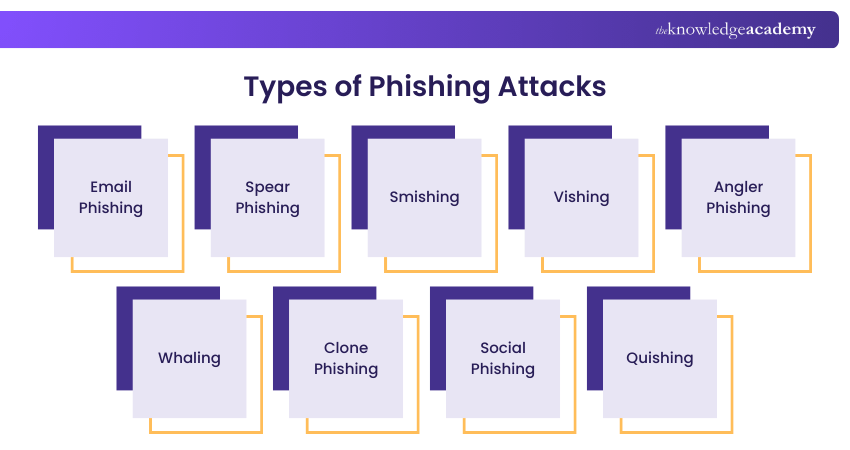
Below, we outline the most common types of Phishing campaigns, how they operate across email, SMS, and voice channels, and the red flags that help you spot and stop them early. Let’s look at them below:
1) Email Phishing
Email Phishing is the most common type of Phishing technique. Attackers craft and send fraudulent emails that appear to be coming from legitimate organisations, often containing malicious links or attachments. The goal is to trick recipients into sharing sensitive information or downloading malware.
2) Spear Phishing
Spear Phishing is a targeted style of Phishing aimed at specific individuals or organisations. Unlike generic email Phishing, these attacks are highly personalised, using details about the victim to make the message more convincing. This increases the likelihood of success and data theft.
3) Smishing
Smishing is a Phishing technique that employs text messages to trick victims into clicking into malicious links or sharing sensitive information. These messages often appear to come from trusted organisations like banks or delivery services.
4) Vishing
Vishing involves attackers making fraudulent phone calls to manipulate victims into revealing confidential details such as account numbers, passwords, or credit card data. Criminals often impersonate legitimate authorities or companies to gain trust quickly.
5) Angler Phishing
Angler Phishing attacks are carried out with the help of Social Media accounts. Here, the attacker uses a fake Social Media account similar to any other reputable organisation’s Social Media account. Besides, the profile picture of this account is identical to the actual organisation’s Social Media account.
6) Whaling
Whaling is a targeted Phishing attack mostly aimed at high-profile individuals such as Chief Executive Officer (CEOs), directors, or senior executives. These attacks often involve highly personalised emails crafted to steal sensitive business data or authorise fraudulent transactions.
7) Clone Phishing
Clone Phishing occurs when attackers copy a legitimate email previously sent to the victim, replace the original links or attachments with malicious ones, and resend it. Because the email looks familiar, victims are more likely to trust and act on it.
8) Social Phishing
Social Phishing occurs when scammers use Social Media platforms, such as Facebook, Instagram, or X, to steal personal information. They may create fake profiles or impersonate friends and organisations to send messages with malicious links or requests for sensitive details.
9) Quishing
Quishing is a Phishing attack that uses fake Quick Response (QR) codes to sway users towards harmful websites. These codes may appear in emails, messages, or public places. Sometimes scammers replace real QR codes with fake ones to steal payment or personal data.
Learn to detect and stop fraud with cutting-edge analytics by joining the Fraud Analytics Training today!
How to Identify a Phishing Attack?
Recognising the warning signs of Phishing attacks is an important step to shield yourself from cyber threats. Paying attention to certain indicators can help users identify cyberthreats and avoid sharing sensitive information. Let’s look at the signs below to better understand What is Phishing:
1) Unexpected Messages: Emails or messages that appear suddenly from organisations that generally contact you in a different way.
2) Unusual Tone or Greeting: Messages that sound overly casual, too friendly, or informal when they should be professional.
3) Spelling or Grammar Mistakes: Poorly written content and formatting that may indicate the message is not from a legitimate source.
4) Urgent or Threatening Language: Messages pressuring you to act quickly, such as claiming unpaid taxes or account suspension.
5) Suspicious Email Addresses: Slight misspellings or unusual domain names that imitate legitimate companies.
6) Unexpected Attachments: Files or links included in emails that may contain malware or harmful software.
Build smarter defence strategies with our Cyber Security Risk Management Course – Register today!
How to Minimise the Risks of Phishing Attacks in Your Organisation?
Reducing the threat of Phishing requires a proactive and layered approach. Organisations can strengthen their defences by focusing on employee awareness, deploying advanced security measures, and enforcing strict access controls, as highlighted in the strategies below:
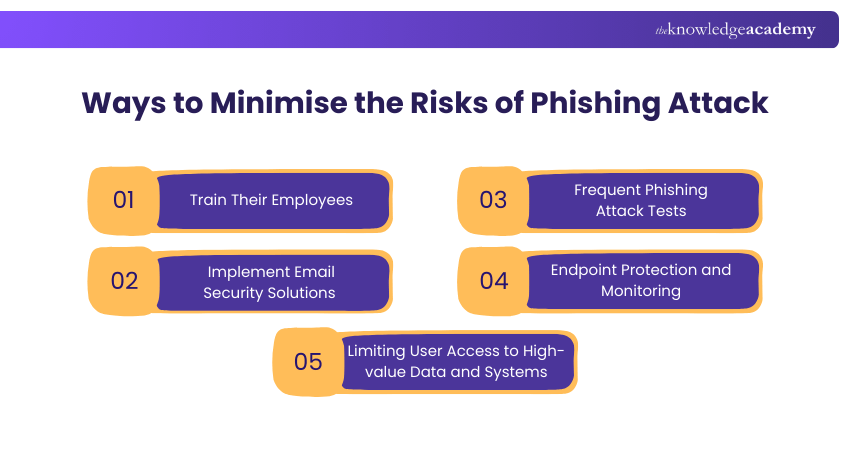
1) Train Their Employees
It is essential to impart training to your employees frequently. As a result, it will help your employees to understand how Phishing is done. Your employees will also be able to identify any Phishing signs. Eventually, it will enable them to report any suspicious activities to the IT Team.
Organisations should help employees to identify trust badges and security stickers used by antivirus or Cyber Security companies. The employees should interact only with websites with stickers or trust badges. Trust badges and security stickers indicate a website is concerned about its safety and isn’t malicious or fake.
2) Implement Email Security Solutions
Organisations should use modern email filtering solutions. An email filtering solution offers protection against malware and malicious links attached to emails. These links help to detect emails that include malicious attachments, links, inappropriate language, and spam content as they indicate Phishing attacks.
Additionally, email security solutions block suspicious emails automatically. Besides, these emails implement sandboxing technology to filter out emails that consist of malicious code. This helps organisations reduce the risk of Phishing attacks and protect sensitive data from cybercriminals.
3) Frequent Phishing Attack Tests
Phishing tests help security teams to measure the effectiveness of a security awareness training program. It also helps users to determine the source and nature of the attack. These simulated tests allow organisations to observe how employees respond to suspicious emails or links in a controlled environment.
Regular Phishing simulations allow organisations to identify gaps in employee awareness and response. These tests help employees become familiar with Phishing techniques and improve their ability to recognise and report suspicious emails or messages.
4) Endpoint Protection and Monitoring
Endpoint is a physical device that facilitates the exchange of information between different computer networks. The organisation's use of numerous personal devices and cloud-based services is introducing several new endpoints.
However, these endpoints need to be appropriately secured. So, security teams should identify endpoints that are vulnerable to attacks beforehand. Security teams should monitor endpoints regularly to find out security threats. Consequently, they should implement a security solution on compromised devices.
5) Limiting User Access to High-value Data and Systems
The objective of the Phishing method is to trick a human computer operator. Primarily, privileged user accounts are targeted by cybercriminals. Organisations can encrypt their data and systems to prevent the leakage of sensitive data.
Additionally, organisations should apply strict access control policies so that employees can only access the information necessary for their roles. Limiting permissions reduces the risk of attackers gaining access to critical systems or sensitive data.
Outsmart human-based threats with our Social Engineering Training – Get Started Now!
How to Protect Yourself From Phishing Attacks?
Phishing is designed to trick users into revealing sensitive information or clicking harmful links. Let’s look at key precautionary ways below:
1) Think Before You Click: Avoid clicking on links in unexpected emails or messages. Instead, check the link’s URL or visit the official website directly through a search engine.
2) Avoid Sharing Personal Information: Never provide sensitive details, such as passwords, bank information, or personal data, through email or unknown websites. If you are unsure, contact the organisation directly through its official channels.
3) Check if the Website is Secure: Before submitting any information online, ensure the website uses “https” and has a valid security certificate, which indicates a secure connection.
4) Install Firewalls: Firewalls help block suspicious traffic and act as a barrier against Phishing attempts. Using both desktop and network firewalls can provide stronger protection.
5) Report Phishing Attempts: If you receive a Phishing message, report it to the relevant fraud reporting authority. If you believe your financial information may be compromised, contact your bank immediately to prevent further loss.
Recent Trends in Phishing
Phishing attacks continue to evolve as cybercriminals adopt more advanced strategies to bypass security measures and deceive users. Some of the latest Phishing trends include:
1) AI Phishing
Cybercriminals are increasingly using generative AI to create realistic Phishing emails and messages with fewer spelling or grammar mistakes. Also, AI enables attackers to personalise scams at scale, making them more convincing. Some even use AI-generated voices and images to impersonate trusted individuals.
2) Quishing
Quishing, or QR code Phishing, uses malicious QR codes in emails, text messages, posters, or public places to redirect users to fake websites or install malware. Since QR codes hide the destination URL, they can make Phishing attempts more difficult to detect.
3) Hybrid Vishing
Hybrid vishing combines Phishing emails or text messages with fraudulent phone calls. Victims are instructed to call a fake customer support or government helpline, where scammers use social engineering techniques to extract sensitive information or persuade them to transfer money.
Build strong cyber defence skills today by joining the Cyber Security Courses now!

Nilotpal Sarmah is a Senior Content Writer with 11+ years of overall experience spanning engineering, operations and content development. His technical knowledge and extensive writing experience enable him to simplify specialised topics across IT and Tech, Business Skills, Project Management, Health and Safety, and ISO and Compliance.
View Detail

 If you wish to make any changes to your course, please


