


 Top Rated Course

We may not have the course you’re looking for. If you enquire or give us a call on 01344203999 and speak to our training experts, we may still be able to help with your training requirements.
14 Dynamic Search Ads Best Practices: That You Must Know
James Smith 04 February 2026Want to improve your Search Ads without constant updates? Dynamic Search Ads automatically match your content with relevant searches, saving time and increasing reach. Make your Search Ads more effective with Dynamic Search Ads! Save time, capture more traffic, and keep ads relevant with automation. Try them today!

Training Outcomes Within Your Budget!
We ensure quality, budget-alignment, and timely delivery by our expert instructors.
Table of Contents

Imagine running ads that update themselves—sounds like magic, right? That’s exactly what Dynamic Search Ads (DSAs) do! No more manually tweaking keywords; DSAs scan your website and match your content with the right searches automatically. They save time, capture more traffic, and keep your ads super relevant. Whether you're a busy marketer or just getting started, DSAs can be your secret weapon.
Table of Contents
1) What Are Dynamic Search Ads?
2) How Do Dynamic Search Ads Work?
3) 14 Best Practices for Dynamic Search Ads Explained
a) Use Clear Call-to-Actions
b) Save Time with Automation
c) Capture Additional Traffic
d) Keep Ads Highly Relevant
e) Stay in Control of Your Ads
f) Improve Website Content
g) Add Negative Dynamic Ad Targets
h) Adjust Bids When Needed
i) Group Ads by Category
j) Target Users Based on Behaviour
4) Conclusion
What Are Dynamic Search Ads?
Dynamic Search Ads (DSAs) are a type of Google Ads that automatically generate headlines and match your website content with relevant searches—no need to manually select keywords! Google scans your website and creates ads based on what users are searching for.

Example:
Let’s say you run an online bookstore. A user searches for “best mystery novels to read”, but you don’t have that exact keyword in your campaign. With DSAs, Google detects that you sell mystery books and automatically shows an ad with a relevant headline like:
"Shop Best Mystery Novels | Free Shipping Available"
This way, you reach potential customers even for searches you didn’t target manually—saving time and capturing more traffic!
How Do Dynamic Search Ads Work?
When Google identifies a match for your Dynamic Ads, it automatically generates the landing page URL and ad headline. This directs users to the most relevant page on your site.
For dynamic ad visibility, the headline is created dynamically based on the search phrases entered into Google and the most relevant landing page title. Dynamic Search Ads have longer headlines compared to regular Search Ads, making them more visible. This gives marketers more control over the ad’s display URL and description.
While Dynamic Search Ads can be super effective, the challenge lies in using them correctly. But don’t worry! By following these best practices, you can optimise your DSA campaigns like a pro.
Begin your Social Media journey with our Social Media Marketing Course– register now to enhance your Digital Marketing skills!
14 Best Practices for Dynamic Search Ads Explained
Here are the 14 Dynamic Search Ads Best Practices to follow when setting up and managing your DSA campaigns. These practices will give your campaigns the best chance for success.
Use Clear Call-to-Actions
Using Call-to-actions (CTAs) isn't new in performance marketing, especially for PPC campaigns focused on conversions. This also applies to Dynamic Search Ads (DSAs) on Google. Since your website content will be pulled to create the ad copy, make sure your page CTAs are relevant.
Whether it’s “shop now,” “download brochure,” or “submit form,” make sure these are clear and present on the page so they can show up in your DSA headlines. Be careful not to get caught by CTAs that are hidden in the footer or buried in pages with too many options.
For example, CTAs like “contact us,” “request refund,” or “book delivery” might not be useful to someone just starting their search, so limit these on DSA pages. Another smart way to use relevant CTAs is by adding them to your description copy. This is an important best practice since the description is the one part of the ad you have full control over!
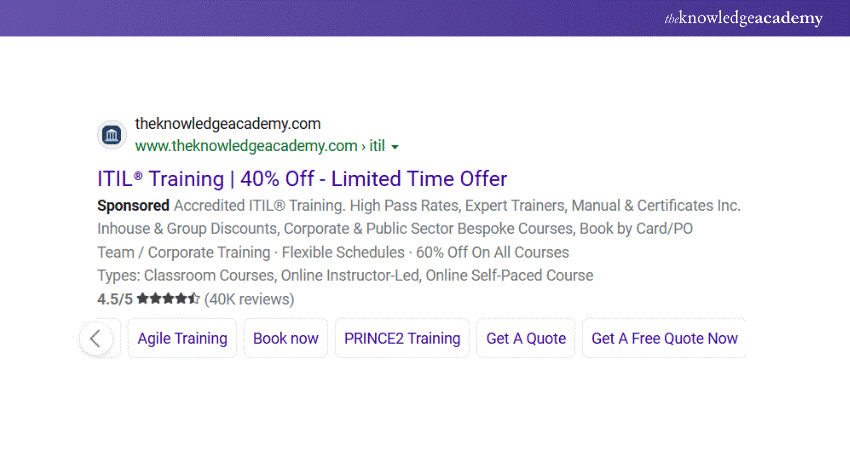
The example below uses "Book Now," "Get A Quote," and "Get A Free Quote Now." These clear and action-oriented CTAs are ideal for guiding potential customers towards taking the next step in their journey. Make sure your own CTAs are specific, relevant, and easy to spot on the page to drive better results with your DSAs.
Save Time with Automation
DSAs are automated by Google, saving time on setup and management. They crawl website content at scale, quickly delivering relevant ads. This is especially beneficial for large websites or product catalogues, as DSAs handle the heavy lifting of campaign creation and optimisation, letting you focus on other tasks.
Capture Additional Traffic
DSAs are a valuable addition to Google Ads. It complements standard campaigns by finding new search queries and keywords not covered in regular search campaigns. They act as broad-match keywords, filling gaps—especially for businesses with a large product range. This makes it hard to target every relevant keyword.
Keep Ads Highly Relevant
Google Ads automatically generates relevant ads with clear headlines based on your website's content, saving time with automation. For example, with 200+ product pages, DSAs match the most suitable page to a search, improving CTR and user experience by showing the most relevant content.
Stay in Control of Your Ads
DSAs offer automation and broad reach but still give advertisers control. You can choose which pages to target, exclude irrelevant ones, and use negative keywords to prevent ads from showing for non-relevant queries. While there's less control over headlines and URLs, targeting and negative keywords help shape effective ads.
Learn how to reach potential employers with our LinkedIn Marketing Course today!
Improve Website Content
You should pull top-quality content on your website into your Dynamic Search Ads. Ensure it's relevant and up-to-date, as it’ll be used as ad copy. Ensure your page titles and descriptions are clear, well-written, and accurate.
If you can tweak your content to make it more suitable for PPC ads, go ahead and do it. Exclude any outdated or irrelevant pages by adding a negative page target. Remember, your website content is what drives Dynamic Search Ads, so getting this right is crucial!
Add Negative Dynamic Ad Targets
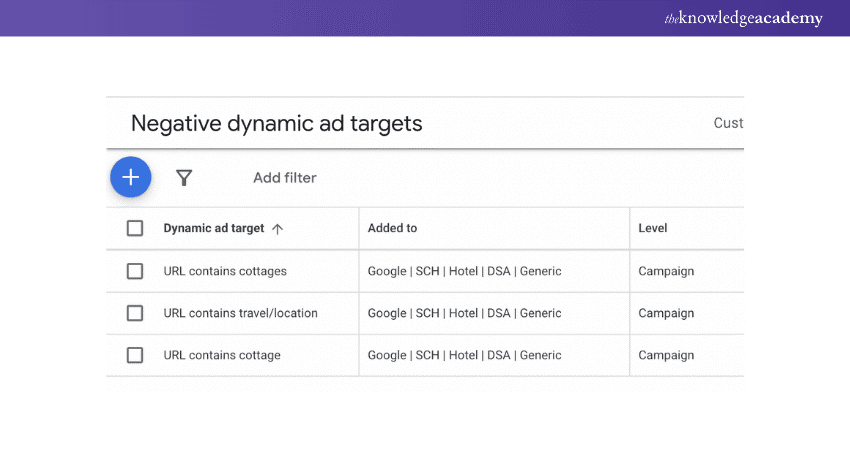
Excluding non-strategic pages is key to streamlining your DSA and focusing search terms on what matters. For conversion-focused campaigns, consider excluding blog posts, broad-topic articles, delivery/returns policy, privacy policy, and contact pages. This helps keep your ads more relevant.
Adjust Bids When Needed
DSA campaigns, just like many others, operate on a Cost-Per-Click (CPC) basis. This means you’ll pay a small fee whenever someone clicks on your ad. With DSAs, you’ll need to set bids at the auto-target level. Simply set a bid for each auto-target, and your ads will be displayed based on your ranking.
Learn about the latest tools and trends in Digital Marketing with our Digital Marketing Courses – Sign up today!
Group Ads by Category
DSA campaigns use auto-targets, which are placed in ad groups. To have better control, make sure your auto-targets are properly set up in the right ad groups. A well-organised campaign will help your ads perform better.
Target Users Based on Behaviour
It’s a good idea to target users based on their behaviour. Google suggests starting by targeting your entire website to capture all relevant search queries. By focusing on user behaviour, you'll make your audience targeting more relevant, which can help boost your conversion rates.
Add Negative Keywords
To improve your ad visibility, make sure it’s not showing up for irrelevant, non-intent keywords. Add negative keywords to your ad groups to filter out unqualified clicks. Your website might include phrases that attract the wrong audience, so be sure to add those to your negative keyword list to avoid wasting your budget.
Organise Ad Groups
Pick the best ad group structure for your business based on your products or services. If you offer a variety of products or serve different locations, create separate ad groups for each. This will help you design your ads more effectively and track performance better.
Transform your marketing strategy - join our Influencer Marketing Course and learn to leverage the power of influencers effectively!
Automate Bidding for Simplicity
Use Google’s AI-powered automated bidding to adjust your bids based on various intent signals. Pick a conversion-based bid strategy to show Google your goals and let machine learning work its magic for better results and improved performance.
Use Relevant Ad Extensions
Boost your DSAs by adding relevant ad assets like sitelinks, callouts, snippets, reviews, and images. These extras help make your ads more visible, increase click-through rates, and give users extra details to encourage engagement.
Conclusion
Following Dynamic Search Ads Best Practices can improve ad performance, drive more traffic, and increase conversions. Optimising your content for better Content Management, using relevant CTAs, and adding useful ad assets will make your campaigns more effective and help you reach your target audience more efficiently.
Do you want to learn various tactics and strategies of retargeting for engaging clients? Join our Retargeting Ads Training today!
Frequently Asked Questions
What are Two Ways Dynamic Search Ads?

Dynamic Search Ads work in two ways. Content-based targeting scans your website to match searches with relevant pages. Category-based targeting lets you choose specific site categories, so Google shows ads based on those topics. Both methods help reach the right audience without needing keywords.
What is the Simplest Method for Using Dynamic Search Ads?
The simplest way to use Dynamic Search Ads is to let Google automatically match your website content to relevant searches. Set up a broad website targeting, allow Google to generate headlines, and use ad assets like sitelinks for better engagement. Regularly monitor results and refine targeting for improved performance.
What are the Other Resources and Offers Provided by The Knowledge Academy?
The Knowledge Academy takes global learning to new heights, offering over 3,000+ online courses across 490+ locations in 190+ countries. This expansive reach ensures accessibility and convenience for learners worldwide.
Alongside our diverse Online Course Catalogue, encompassing 19 major categories, we go the extra mile by providing a plethora of free educational Online Resources like Blogs, eBooks, Interview Questions and Videos. Tailoring learning experiences further, professionals can unlock greater value through a wide range of special discounts, seasonal deals, and Exclusive Offers.
What is The Knowledge Pass, and How Does it Work?
The Knowledge Academy’s Knowledge Pass, a prepaid voucher, adds another layer of flexibility, allowing course bookings over a 12-month period. Join us on a journey where education knows no bounds.
What are the Related Courses and Blogs Provided by The Knowledge Academy?
The Knowledge Academy offers various Digital Marketing Courses, including Retargeting Ads Training, Social Media Marketing Course, and Google Analytics Certification. These courses cater to different skill levels, providing comprehensive insights into Target Audience.
Our Digital Marketing Blogs cover a range of topics offering valuable resources, best practices, and industry insights. Whether you are a beginner or looking to advance your Digital Marketing skills, The Knowledge Academy's diverse courses and informative blogs have you covered.

James Smith


Digital Marketing Manager and Trainer
James Smith is a digital marketing professional with over a decade of experience in SEO, content strategy, paid media and analytics. He has supported both SMEs and global brands in transforming their digital presence. James’s writing and training are rooted in results-driven tactics and the latest marketing trends.
View Detail
Upcoming Digital Marketing Resources Batches & Dates
Date
 Retargeting Ads Training
Retargeting Ads Training
Thu 18th Jun 2026
Retargeting Ads Training
Thu 10th Sep 2026
Retargeting Ads Training
Thu 19th Nov 2026

 If you wish to make any changes to your course, please


