


We may not have the course you’re looking for. If you enquire or give us a call on 01344203999 and speak to our training experts, we may still be able to help with your training requirements.
Top 10+ Program Management Tools: Features and Benefits
ByNilotpal SarmahLast updated on: 17 November 2026
Discover program management tools that help organisations coordinate related projects, manage resources and track programme progress. Explore the key features and benefits of platforms such as Asana, Oracle Primavera P6, Microsoft Planner and Jira. Understand how they support strategic objectives.
Quick Overview
1. Collaborative Work Management: Asana, Wrike, ClickUp and monday work management support team coordination, task tracking and flexible workflows.2. Complex Programme Planning: Oracle Primavera P6 and Planisware Enterprise support detailed scheduling, resource planning and enterprise oversight.3. Resource and Financial Management: Celoxis and Planview AdaptiveWork provide capabilities for monitoring resources, budgets and project performance.4. Familiar Work Environments: Microsoft Planner supports organisations using Microsoft 365, while Jira suits software development teams.5. Choosing the Right Platform: Consider programme complexity, essential features, integrations, subscription costs and reporting requirements.
"Can someone share the latest project update?"
"Which spreadsheet has the resource plan?"
"Wait, wasn't that deadline changed yesterday?"
"And who's handling the dependency between these projects?"
Four questions. Different answers. No clear picture!
Sound familiar? When several projects run simultaneously, even a small communication gap can create confusion across teams. A missed update, an overlooked dependency or a last-minute change can quickly disrupt everyone's plans.
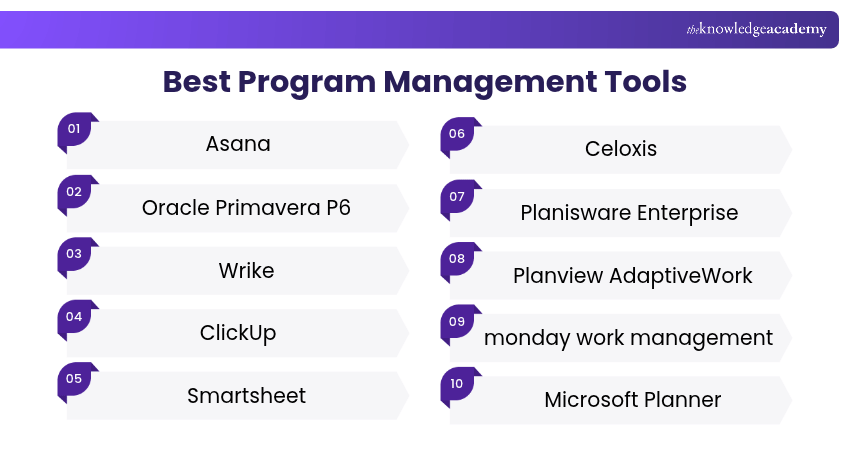
So, how do you keep everything organised without constantly chasing updates? The answer often lies in choosing the right program management tools. But with so many platforms available, finding the perfect fit can be challenging. Let's explore 11 popular tools to find out what each offers!
Top 11 Program Management Tools
Program management tools help organisations coordinate related projects, manage shared resources and monitor progress towards broader objectives. While some platforms focus on project collaboration and task management, others provide advanced programme planning, resource allocation and portfolio oversight.
Here are 11 Program Management Tools worth exploring:
1) Asana
Asana is a work management platform that helps teams organise tasks, coordinate projects and connect daily activities with broader organisational goals. It provides different views for planning and tracking work across departments.
For programme management, Asana's portfolio and goal-tracking capabilities can help managers monitor several projects together and understand how their progress contributes to strategic objectives.
Key Features:
a) Portfolio Management: Organise related projects into portfolios to monitor their status, timelines and progress.
b) Goals and Alignment: Connect project activities with organisational objectives.
c) Workload Management: Review team capacity and identify potential workload imbalances using Asana's workload features, available on eligible paid plans.
d) Collaboration: Assign tasks, share updates and coordinate responsibilities through a common workspace.
Best For: Cross-functional teams managing related projects, organisational initiatives and shared goals.

2) Oracle Primavera P6
Oracle Primavera P6 is a project planning and scheduling solution used to manage complex projects. Primavera P6 Enterprise Project Portfolio Management (EPPM) also supports enterprise-level programme and portfolio oversight. It is particularly relevant to construction, engineering, infrastructure and other schedule-intensive environments.
Key Features:
a) Advanced Scheduling: Create detailed schedules, establish baselines and monitor critical activities.
b) Resource Management: Plan resource demand, capacity and assignments across multiple projects.
c) Dependency Tracking: Identify relationships between activities and evaluate how schedule changes affect connected work.
d) Schedule and Cost Control: Monitor planned progress and relevant cost information to support project and programme oversight.
Best For: Large organisations managing complex infrastructure, engineering and capital programmes.
3) Wrike
Wrike is a collaborative work management platform that helps teams plan projects, coordinate workflows and monitor progress. Its dashboards and reporting features can provide visibility across multiple teams and activities.
Its configurable workspaces make it suitable for organisations coordinating activities across departments while maintaining visibility into ongoing projects.
Key Features:
a) Project and Workflow Management: Organise work through tasks, workflows and configurable project views.
b) Gantt Charts: Visualise schedules, milestones and task dependencies.
c) Dashboards and Reports: Review project progress and relevant performance information.
d) Resource Visibility: Examine workloads and allocation information using supported resource management features.
Best For: Organisations managing cross-functional programmes with multiple contributors, approval processes and delivery deadlines.
4) ClickUp
ClickUp is a flexible work management platform that brings tasks, documents, goals and reporting into a connected workspace. It offers customisable views that allow teams to organise work according to their requirements.
ClickUp can support programme coordination by bringing related projects into a shared workspace, where managers can review priorities, monitor dependencies and track progress across initiatives.
Key Features:
a) Custom Project Views: Organise activities using lists, boards, timelines and other supported views.
b) Task Dependencies: Link related activities to understand how one task may affect another.
c) Dashboards: Monitor project status, team activity and selected performance indicators.
d) Goals and Progress Tracking: Track defined objectives and relevant milestones through supported planning features.
Best For: Teams that need flexible workflows and configurable reporting across different types of projects.
Boost productivity by automating routine tasks and optimising workflows with our ClickUp Training. Register today!
5) Smartsheet
Smartsheet is a work management platform that combines spreadsheet-style planning with automation, dashboards and portfolio reporting capabilities.
It allows organisations to coordinate projects, track progress and share important information across departments. Its familiarity to spreadsheet users can also make structured project information easier to review.
Key Features:
a) Project Planning: Organise schedules, responsibilities and milestones using structured sheets and project views.
b) Automation: Configure reminders, notifications and approval workflows for repetitive processes.
c) Dashboards and Reporting: Consolidate important project information for stakeholders and management teams.
d) Portfolio Coordination: Monitor related projects and standardise programme reporting using Smartsheet's portfolio capabilities, available through eligible plans and products.
Best For: Programme Management Offices (PMOs) and organisations seeking structured reporting, automation and cross-project visibility.
6) Celoxis
Celoxis is a project portfolio management platform designed to help organisations coordinate projects, resources, budgets and risks.
It is particularly suitable for PMOs and project-driven organisations that require structured oversight of several projects within a single platform.
Key Features:
a) Portfolio Management: Monitor multiple projects and review relevant portfolio performance information.
b) Resource Planning: Assess resource availability, workload and allocation across projects.
c) Budget and Financial Tracking: Monitor project budgets, expenses and financial performance.
d) Custom Reports and Dashboards: Create reporting views suited to Programme Managers, PMOs and other stakeholders.
Best For: Organisations that need combined project planning, resource management and financial oversight.
Trainer Insight: Look Beyond Project Completion
A programme dashboard should show more than completed tasks and milestones. Programme Managers should also review shared dependencies, resource constraints and progress towards intended benefits. A project finishing on time does not automatically mean the programme has achieved its strategic objectives.
7) Planisware Enterprise
Planisware Enterprise is a project, programme and portfolio management platform designed to help organisations coordinate complex initiatives and align delivery with strategic objectives.
It is particularly suited to large organisations that need to connect strategic priorities with the delivery of complex, long-term initiatives.
Key Features:
a) Programme and Portfolio Planning: Coordinate related projects, roadmaps and strategic priorities.
b) Resource Management: Evaluate capacity, workloads and competing resource requirements across projects.
c) Dependency and Risk Management: Track relationships between activities and assess potential risks affecting programme delivery.
d) Financial Planning and Reporting: Monitor budgets, forecasts and performance through integrated reporting capabilities.
Best For: Large organisations and PMOs managing complex programmes that require coordinated resources, governance and financial oversight.
8) Planview AdaptiveWork
Planview AdaptiveWork, formerly known as Clarizen One, is a project and portfolio management platform designed to help organisations coordinate work, resources and reporting across teams.
Its configurable approach makes it suitable for PMOs and organisations managing complex work across departments, particularly where project visibility and consistent processes are important.
Key Features:
a) Portfolio Visibility: Monitor multiple projects and review consolidated progress information.
b) Resource Planning: Assess resource availability and allocation across planned activities.
c) Workflow Automation: Configure relevant approvals and processes to support consistent execution.
d) Reporting and Dashboards: Provide stakeholders with information about project progress, resources and delivery performance.
Best For: PMOs, professional services organisations and businesses coordinating complex, cross-functional work.
Consideration: Planview AdaptiveWork and Planview Portfolios are different offerings. Organisations requiring extensive strategic investment or portfolio optimisation capabilities should confirm which Planview product meets their needs.
9) monday work management
monday work management is a visual work management platform that helps organisations organise projects, coordinate teams and track work through configurable boards and dashboards.
Its portfolio and cross-project capabilities, available through eligible enterprise features, can support Programme Managers who need an overview of related initiatives and dependencies.
Key Features:
a) Visual Workflows: Manage tasks, project stages and deadlines using configurable boards.
b) Project Dashboards: Consolidate selected project information for progress monitoring.
c) Cross-project Dependencies: Link connected activities across projects using supported enterprise capabilities.
d) Resource Management: Assess resource assignments and capacity through available planning features.
Best For: Cross-functional organisations seeking visual programme coordination and flexible workflow management.
Pro Tip: Check Features Before Choosing a Plan
A tool may advertise portfolio management and resource planning, but those capabilities might only be available on higher subscription tiers. Check whether the chosen plan includes the features needed to coordinate several projects before committing.
10) Microsoft Planner
Microsoft Planner is a work management application within the Microsoft ecosystem that helps teams organise tasks, plans and project activities.
With an appropriate premium licence, Microsoft Planner provides advanced planning capabilities such as Gantt-style timelines, task dependencies and team workload views. These features can be useful when coordinating related projects in organisations already using Microsoft 365.
Key Features:
a) Task and Plan Management: Organise activities, assign responsibilities and track progress.
b) Timeline Planning: Use Gantt-style timeline views to understand task schedules and dependencies in premium plans.
c) Workload Visibility: Review assignments and identify potential workload imbalances through supported premium features.
d) Microsoft Integration: Coordinate work using connected Microsoft applications and services.
Best For: Organisations using Microsoft 365 that need familiar task management with options for more advanced project planning.
Trainer Insight: Match Planner Capabilities to Programme Needs
Before selecting Microsoft Planner, assess whether your organisation needs basic task coordination or more advanced scheduling and resource planning. Also check whether your licensing supports the required cross-project oversight.
11) Jira
Jira is a work management platform widely used by software development teams to plan, organise and monitor delivery activities.
With advanced planning capabilities available through eligible plans, Jira can help software development teams coordinate releases, manage cross-team dependencies and monitor delivery across multiple projects.
Key Features:
a) Agile Planning: Organise work using Scrum and Kanban boards, backlogs and relevant planning features.
b) Issue and Dependency Tracking: Track development tasks, bugs and relationships between work items.
c) Cross-team Planning: Use Jira Plans, available with Jira Cloud Premium and Enterprise, to coordinate work, timelines and dependencies across multiple teams.
d) Progress Reporting: Monitor delivery activity using supported dashboards and reports.
Best For: Software development programmes involving multiple Agile teams, shared releases and connected technical work.
Consideration
Jira's standard task boards are useful for team-level work, but advanced programme planning requires suitable capabilities and licensing.
Learn to track tasks, customise workflows, and boost team collaboration with our Jira Training – Sign up now!
Benefits of Program Management Tools
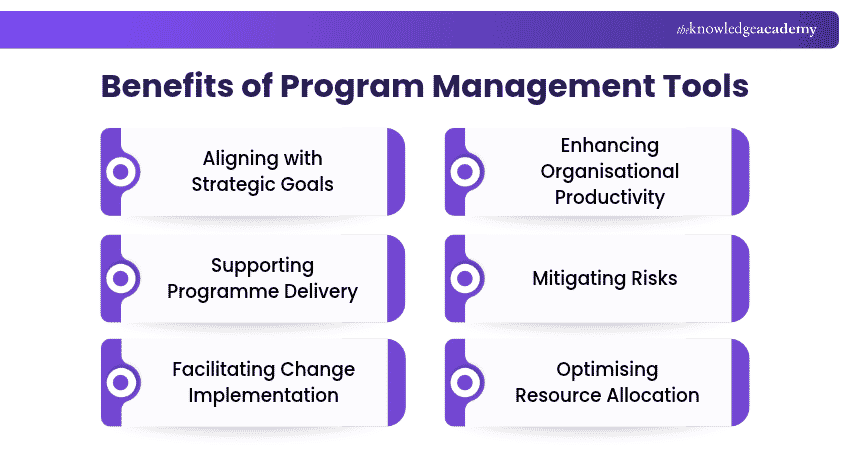
Beyond simplifying everyday work, these platforms can support better decisions and more coordinated programme delivery. Here are six important benefits:
1) Aligning with Strategic Goals
Programme management tools help organisations connect related projects with broader business objectives. They provide visibility into project progress, priorities and expected outcomes, allowing Programme Managers to evaluate whether activities continue to support strategic goals.
2) Enhancing Organisational Productivity
These tools bring project plans, responsibilities and updates into a shared environment. By reducing duplicated reporting, improving communication and automating routine activities, they can help teams coordinate work more efficiently.
3) Supporting Programme Delivery
Programme management tools help teams maintain coordinated schedules, review milestones and assess delivery progress across connected projects. This supports timely adjustments when changing priorities or project delays affect the wider programme.
4) Mitigating Risks
These tools support risk management by helping teams identify potential threats, assess their impact and monitor planned responses. This allows Programme Managers to address emerging issues before they affect other projects or overall programme delivery.
Pro Tip
A delay in one project may create risks for several others. Review shared dependencies regularly to identify issues that need programme-level attention.
5) Facilitating Change Implementation
Programme management tools help organisations manage changing priorities, schedules and responsibilities. They provide a shared record of updates and decisions, making it easier for teams to understand changes and adjust their activities accordingly.
6) Optimising Resource Allocation
These tools help managers assess resource availability, workloads and competing demands across projects. This information supports better allocation decisions and helps identify potential overbooking or resource shortages.
Example
If two projects require the same specialist during the same week, a shared resource dashboard can highlight the conflict and help managers adjust assignments or schedules.
Learn the key principles of project planning and execution with our Project Management Courses – Sign up today!

Nilotpal Sarmah is a Senior Content Writer with 11+ years of overall experience spanning engineering, operations and content development. His technical knowledge and extensive writing experience enable him to simplify specialised topics across IT and Tech, Business Skills, Project Management, Health and Safety, and ISO and Compliance.
View Detail

 If you wish to make any changes to your course, please


