




We may not have the course you’re looking for. If you enquire or give us a call on 01344203999 and speak to our training experts, we may still be able to help with your training requirements.
Top Change Management Tools for Effective Change
ByThe Knowledge AcademyLast updated on: 17 September 2026
Explore the top Change Management Tools that help organisations plan transitions, engage employees, track progress and implement change effectively.
A successful change initiative rarely fails because of technology. It often struggles because:
a) Employees aren't fully engaged
b) Stakeholders aren't aligned
c) Communication isn't reaching the right audience
d) Adoption isn't being measured effectively
e) Change activities aren't being coordinated
The solution isn't simply working harder; it's working smarter with the right Change Management Tools. From IT Change Management systems and digital adoption platforms to collaboration and change analytics software, these tools help organisations navigate change with greater confidence. Let's explore the different tools available and how they can make your change initiatives more structured and successful!
What is a Change Management Tool?
A Change Management Tool is a software solution, platform, framework, or technique that helps organisations plan, implement, monitor, and manage change effectively. These tools can also help organisations identify potential resistance, coordinate change activities, measure adoption, and understand how changes affect employees and business processes.
Depending on the purpose, Change Management Tools may include digital adoption platforms, IT Change Management systems, collaboration software, assessment tools, and stakeholder analysis frameworks.
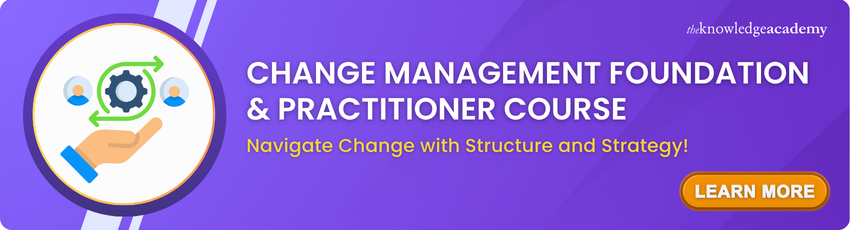
Types of Change Management Tools
Change Management Tools can be grouped into different categories based on the type of change activities they support. Some focus on employees and adoption, while others help manage IT changes, communication, collaboration, or overall change progress.
1) IT Change Management Tools
These tools help organisations plan, approve, implement, and track changes to IT systems and services. They often include risk assessment, approval workflows, audit trails, and incident management capabilities.
2) Digital Adoption Tools
Digital adoption tools help employees learn and use new software, systems, or digital processes effectively. They may provide in-app guidance, walkthroughs, training prompts, and adoption analytics.
3) Organisational Change Management Tools
These tools support the people side of organisational change, including stakeholder engagement, readiness assessments, impact analysis, resistance management, and adoption tracking.
4) Communication and Collaboration Tools
Communication and collaboration tools help teams share updates, collect feedback, coordinate activities, and keep stakeholders aligned throughout a change initiative.
5) Project and Workflow Management Tools
These tools enable organisations to assign responsibilities, schedule activities, track deadlines, and monitor progress, making it easier to coordinate different stages of a change initiative.
6) Change Analytics and Assessment Tools
These tools use surveys, dashboards, metrics, and assessments to evaluate change readiness, employee sentiment, adoption levels, and the overall impact of a change initiative.
If Your Change Tool Had a Job Description
Treat each category like a team member:
The Controller → IT Change ManagementKeeps risky IT changes under controlThe Coach → Digital AdoptionGuides employees through new systemsThe Radar → Change AnalyticsSpots impact, overload and adoption issuesThe Connector → CollaborationKeeps people involved and informedThe Organiser → Work ManagementKeeps tasks, owners and deadlines moving
Top Change Management Tools
The following Change Management Tools support different aspects of change, from IT processes and digital adoption to collaboration and organisational transformation. Let's explore them in detail:
1) ServiceNow Change Management
ServiceNow Change Management is an IT Service Management capability designed to help organisations plan, assess, approve and implement IT changes while reducing disruption. It combines structured workflows with risk assessment and scheduling capabilities.
a) Risk Assessment: Uses configurable assessments, scoring criteria and change data to evaluate the risk associated with proposed changes.
b) Change Approval Policies: Supports approval policies based on defined change conditions and requirements.
c) Change Scheduling: Provides visibility into planned changes, maintenance periods and potential scheduling conflicts.
Best for: Enterprises managing complex, governed IT changes across large service environments.
2) Jira Service Management
Jira Service Management is an IT Service Management solution that supports structured IT change processes. It enables teams to submit, assess, approve and track changes while connecting change activity with development and deployment workflows.
a) Change Request Management: Provides dedicated change requests and queues for recording and managing proposed changes.
b) Automated Risk Assessment: Helps assess change risk and determine whether additional approval may be required.
c) Approval and Deployment Workflows: Supports approvals and integrations with Continuous Integration and Continuous Delivery/Deployment (CI/CD) tools to connect service changes with software deployments.
Best for: IT, development and operations teams managing service changes alongside DevOps workflows.
3) Whatfix
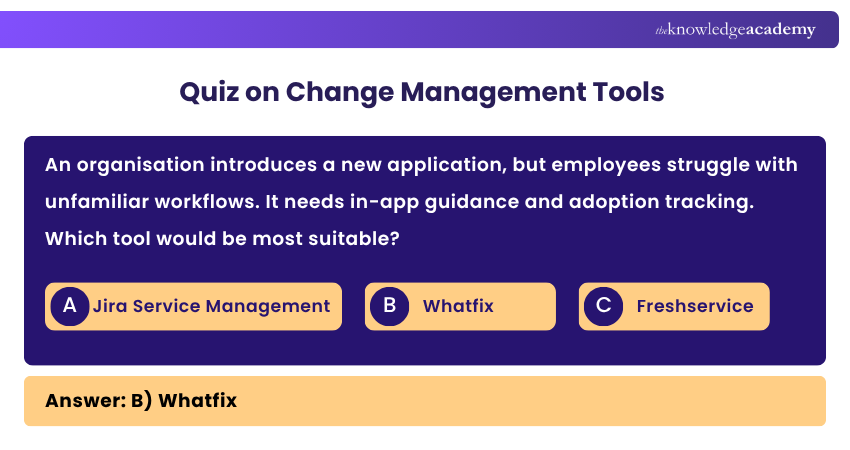
Whatfix is a Digital Adoption platform that can support Change Management when organisations introduce new applications, digital processes or system updates. It provides contextual guidance within applications to help users adapt to new ways of working.
a) Interactive Guidance: Provides step-by-step in-app guidance that helps users complete unfamiliar or changed workflows.
b) Self-help Support: Delivers contextual resources at the point of need without requiring users to leave the application.
c) Adoption Analytics: Provides usage and engagement insights that help teams identify friction points and understand how users interact with digital guidance.
Best for: Supporting employees through software rollouts, digital transformation and application changes.
4) WalkMe
WalkMe is a Digital Adoption platform designed to help organisations improve software adoption across applications and workflows. During organisational or technological change, it can provide guidance, analytics and contextual support that help employees adjust to new systems and processes.
a) In-app Guidance: Provides digital guidance within applications to help users complete unfamiliar workflows.
b) Workflow Analytics: Gives organisations visibility into how employees interact with applications and workflows.
c) Cross-application Adoption: Supports digital adoption experiences across different applications and business processes.
Best for: Large organisations managing employee adoption across multiple enterprise applications.
Ready to take your Change Management expertise to the next level? Register for the Change Management Black Belt Course today!
5) BMC Helix ITSM Change Management
BMC Helix ITSM Change Management, associated with the earlier BMC Remedy Change Management product family, supports structured IT change processes. It helps organisations plan, schedule, assess, approve, implement and track changes while managing their potential risks and impacts.
a) Change Planning and Scheduling: Helps teams plan when and how proposed IT changes should be implemented.
b) Risk Evaluation: Supports the assessment of risks associated with proposed changes.
c) Approval and Tracking: Provides structured approval and tracking throughout the change lifecycle.
Best for: Enterprises requiring governed IT Change Management within a broader ITSM environment.
6) Freshservice
Freshservice is an IT Service Management platform that includes Change Management capabilities for assessing, planning and implementing IT changes. It helps teams consider service context and risks before changes are introduced.
a) Impact and Service Context: Helps teams document change impact and identify services and assets that may be affected.
b) Risk Classification: Allows teams to record and evaluate the risk level associated with a proposed change.
c) Change Workflows: Provides structured workflows for managing changes through relevant stages.
Best for: IT teams seeking accessible ITSM and Change Management capabilities within one platform.
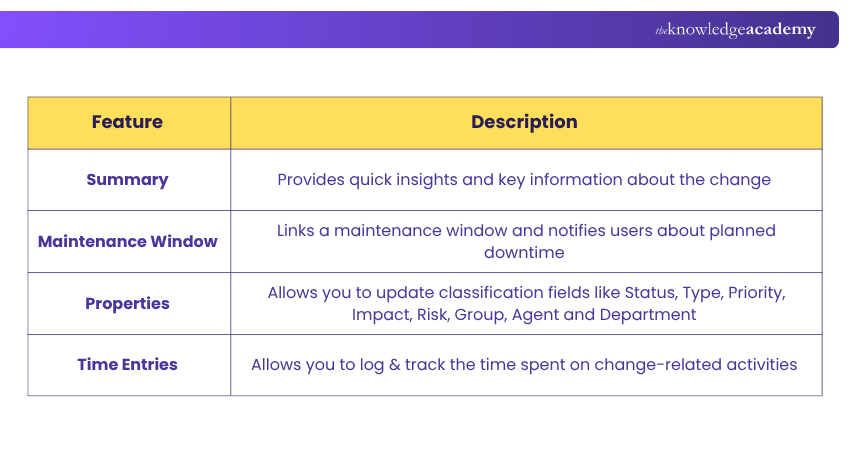
NOTE: There are four key tools in the Freshservice change form to help you manage the change efficiently by showing important insights in one place:
7) The Change Compass
The Change Compass is an organisational Change Management platform designed to help organisations understand, plan and monitor the impact of multiple changes across employees and stakeholder groups.
a) Change Impact Assessment: Helps teams assess how proposed initiatives may affect different parts of the organisation.
b) Change Portfolio Analytics: Visualises factors such as change load, stakeholder saturation and readiness across multiple initiatives.
c) Readiness and Adoption Measurement: Uses surveys, pulse checks and dashboards to monitor readiness and adoption.
Best for: Organisations managing complex change portfolios and overlapping impacts across stakeholder groups.
8) Howspace
Howspace is a collaborative learning and development platform that supports organisational Change Management, transformation and employee engagement. It focuses particularly on stakeholder involvement, collaboration and learning throughout the change journey.
a) Stakeholder Collaboration: Creates shared spaces where employees and stakeholders can discuss, contribute and co-create during change.
b) Learning and Engagement: Supports learning journeys that can help employees develop the knowledge and capabilities required by a change.
c) AI-powered Insights: Helps organisations analyse discussions and participation to identify themes and insights from stakeholder input.
Best for: People-centred organisational changes requiring participation, learning and stakeholder engagement.
9) Wrike
Wrike is a Work Management platform that can support Change Management initiatives by helping teams organise tasks, automate workflows and monitor implementation progress. It is not a dedicated Change Management system but can provide the project coordination needed to deliver organisational changes.
a) Custom Workflows: Teams can structure processes around different stages of a change initiative.
b) Dashboards and Reporting: Provide visibility into tasks, project progress, priorities and potential roadblocks.
c) Cross-functional Collaboration: Centralises tasks, responsibilities and communication across teams involved in the change.
Best for: Coordinating projects, tasks and cross-functional work during organisational change.
Discover how to optimise workflows and improve team efficiency with Wrike Training – Register today!
10) Monday.com
Monday.com is a Work Management platform that can be configured to support Change Management planning and implementation. Its Change Management template helps teams organise activities, assign responsibilities and monitor progress throughout a transition.
a) Change Planning: Enables teams to centralise objectives, action items, owners and timelines within a shared workspace.
b) Progress Tracking: Provides different views for monitoring the status and progress of change activities.
c) Automations and Integrations: Supports automated actions and connections with other workplace applications.
Best for: Teams that need a flexible visual workspace for planning and tracking change initiatives.
11) Asana
Asana is a Work Management platform that can support Change Management by organising initiatives, responsibilities, requests and implementation activities. It can help teams maintain visibility and alignment as organisational changes progress.
a) Change Planning: Helps teams organise change objectives, activities, responsibilities and deadlines in one workspace.
b) Workflow Management: Custom fields and automated workflows can support the tracking and routing of change-related work.
c) Stakeholder Visibility: Centralised project information helps stakeholders understand responsibilities, progress and upcoming actions.
Best for: Teams coordinating people, projects and tasks during organisational change initiatives.
12) Rocket Aldon Lifecycle Manager
Rocket Aldon Lifecycle Manager is a software configuration and change management solution designed to control application development, change, release and deployment processes across enterprise environments.
a) Change Request Management: Supports the gathering, routing and prioritisation of software change requests.
b) Development Process Automation: Automates workflow activities across application development and delivery.
c) Release and Deployment Management: Supports controlled promotion and deployment of application releases and updates.
Best for: Organisations managing controlled application changes, releases and deployments, particularly in IBM i and complex enterprise environments.
Trainer's Pro Tip
Choose a Change Management Tool based on the type of change you are managing and the support your teams need. Focus on usability, integration, adoption tracking, and stakeholder needs rather than simply choosing the tool with the most features.
Equip yourself with the tools to deliver successful change initiatives with the Complete Change Management Assessments Training - Sign up now!
How to Choose the Right Change Management Tool?
There is no single Change Management Tool that suits every organisation. Before choosing one, start by defining what the change initiative actually needs:
a) Define Your Change Objective: Determine whether you are implementing technology, changing processes, restructuring teams or introducing broader organisational transformation.
b) Identify the Main Challenge: Consider whether the biggest issue is communication, employee adoption, stakeholder resistance, workflow coordination or monitoring.
c) Consider Your Stakeholders: Identify who will use the tool and who will be affected by the change. A solution should be practical for the people expected to use it.
d) Assess Integration Requirements: For software platforms, consider whether the tool needs to work alongside existing Project Management, communication or business systems.
e) Evaluate Reporting Needs: Determine what information decision-makers need to monitor progress, adoption, risks or engagement.
f) Consider Scale and Complexity: A small departmental change may require a different level of functionality from an enterprise-wide transformation.
Here's a selection checklist of Change Management Tools:
Before selecting a tool, check:
□ Does it address the main change challenge?□ Is it suitable for the scale of the change?□ Can employees and stakeholders use it easily?□ Does it support required integrations?□ Does it provide appropriate reporting or analytics?□ Can it support communication and collaboration where needed?□ Can it adapt to changing requirements?□ Does it fit available resources and organisational processes?
When Should You Use Change Management Tools?
Change Management Tools can be valuable whenever an organisation needs additional structure, visibility, analysis or engagement during a significant transition.
a) Introducing New Technology: When a new system or application is introduced, suitable tools can support training, communication, adoption and implementation activities.
b) Changing Processes or Workflows: Workflow and collaboration tools can help teams assign responsibilities, monitor tasks and communicate progress during process changes.
c) Launching Major Projects or Initiatives: Change Management Tools can support communication and collaboration where a project significantly affects employees, processes or ways of working.
d) Managing Stakeholder Engagement: Stakeholder and collaboration tools can help organisations collect feedback, understand concerns and plan appropriate engagement.
e) Monitoring Change Progress: Software and assessment tools can help teams track activities, identify issues and understand how the change is progressing.
Trainer's Pro Tip
Introduce suitable tools early enough to establish clear responsibilities, communication and tracking. Waiting for adoption or delivery issues to appear can make them more difficult to resolve.
Learn how to support lasting organisational success with Change Management Certification Training – Join now!

The Knowledge Academy develops accessible learning content across Project Management, IT, Cybersecurity, Data Science, Business Analysis, HR, Accounting and Finance, Leadership and Health and Safety. Its resources combine subject research with clear explanations to help professionals build practical knowledge across a wide range of disciplines.
View Detail

 If you wish to make any changes to your course, please


