




We may not have the course you’re looking for. If you enquire or give us a call on 01344203999 and speak to our training experts, we may still be able to help with your training requirements.
What is Xero and How Does it Work?
ByOlivia TaylorLast updated on: 22 September 2026
Xero is a cloud-based accounting software designed for small businesses, used for invoicing, payroll, bank reconciliation, inventory, and financial reporting. With real-time data access and integration, it simplifies bookkeeping and enhances collaboration. Its user-friendly interface and automation save time and reduce manual errors.

Struggling to keep your business finances in order without drowning in spreadsheets or paperwork? Managing accounts, chasing invoices, and reconciling bank statements can be difficult to manage, especially for small to medium-sized businesses.
Enter Xero, a smart, cloud-based accounting solution built to simplify your entire financial workflow. From automated invoicing to insightful financial reporting, it gives you the tools to stay in control wherever you are. Ready to make your business finances easier, faster, and more accurate? Let’s explore What is Xero, how it works, and why it might be the smartest move for your business!
What is Xero Accounting Software?
Xero is a cloud-based accounting software designed for small to medium-sized businesses to manage their finances efficiently. It offers features like invoicing, bank reconciliation, payroll, inventory tracking, and financial reporting, all accessible online from any device.
It enables real-time collaboration between Business Owners, Accountants, and Bookkeepers, making Financial Management more transparent and streamlined. With automated tools and over 1,000 app integrations, it reduces manual tasks and improves accuracy.

How Does Xero Work?
Xero Accounting Software basically runs on the cloud, allowing real-time access to financial data from any device. This ensures consistent, up-to-date records and smooth remote collaboration. Here's how it works:
After creating an account, users can:
1) Link bank feeds for automatic transaction updates
2) Create and send invoices
3) Track expenses
4) Manage payroll
5) Generate financial reports in real-time
The dashboard offers a clear overview of:
1) Cash flow
2) Upcoming bills
3) Pending invoices
Xero integrates with 1,000+ third-party apps for added functionality in:
1) Inventory Management
2) Customer Relationship Management (CRM)
3) eCommerce and more
All data is securely stored in the cloud, ensuring:
1) Anytime access
2) Smooth collaboration across devices
Key Features of Xero
Xero offers a range of powerful tools that simplify Financial Management for businesses. To learn more about it, here are some of the key Xero Features:

1) Automatic Daily Bank Feeds
Automatic daily bank feeds in Xero streamline financial tracking by importing transactions from bank and credit card accounts into the software each day. This feature eliminates the entry of manual data to ensure that financial records are consistently up-to-date and accurate.
It also simplifies the reconciliation process by allowing users to quickly match transactions with their accounting records. This helps identify discrepancies early, improving the accuracy of financial reporting and supporting better decision-making.
2) Invoicing Capabilities
Xero’s invoicing capabilities feature allows the swift addition of items, services, and terms and includes automatic reminders and online payment facilitation options. The invoicing system also tracks invoice status, helping businesses monitor payments and manage cash flow effectively.
This results in streamlining the billing and payment collection process. Users can customise invoice templates with branding elements such as logos and colours. Additionally, recurring invoices can be scheduled, reducing repetitive tasks and saving time.
Simplify your business finances with ease and clarity with our Wave Accounting Training – Register today!
3) Inventory Management
Xero's Inventory Management feature helps businesses track and manage stock levels quickly. Users can easily monitor inventory movement, update item details, and view the impact on financials.
This integration into the accounting workflow allows the users to perform accurate cost tracking, better Order Management, and timely reordering. Furthermore, the system's insights into Inventory trends aid in making informed purchasing and sales decisions, enhancing overall efficiency.
4) Streamlined Payroll
Xero's streamlined payroll system simplifies employee payment processes. It allows businesses to efficiently manage pay runs, calculate taxes, and handle deductions. The feature can easily integrate payroll with accounting to ensure precise financial records and compliance with tax laws.
Additionally, employees can access pay slips and submit timesheets online in a timely manner to enhance transparency and efficiency. This automation further reduces manual effort and potential errors, making Payroll Management more effective and reliable.
5) Effortless Bill Payments
Xero simplifies bill payments by allowing users to schedule and make payments efficiently directly through the platform. It also enables tracking bills due, organising expenses, and prioritising payments. This feature helps maintain a clear view of cash flow and upcoming financial commitments.
Users can upload bills manually or via email, and Xero Accounting Software will automatically extract key information to populate bill details. Approval workflows can be set up to ensure proper authorisation before payment is made. Payment reminders help avoid late fees and strengthen supplier relationships.
6) Seamless Integrations
Xero's seamless integration capabilities improve its functionality by connecting with a wide variety of third-party applications. These include Customer Relationship Management (CRM), e-commerce platforms, time tracking, and Inventory Management.
This feature allows businesses to create a customised accounting ecosystem tailored to their specific needs. Furthermore, enabling automatic data syncing across multiple platforms reduces manual input, minimises errors, and provides a cohesive workflow.
Benefits of Using Xero
Implementing the right accounting software can revolutionise how businesses handle their financial operations. In between, Xero stands out as a top choice for small to mid-sized companies. Here's an in-depth look at the major benefits of using Xero:
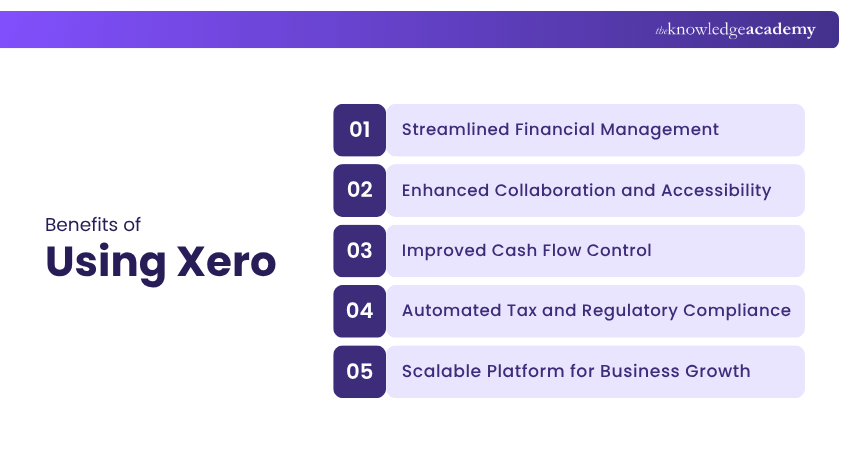
1) Streamlined Financial Management
Xero streamlines Financial Management through automation and efficiency.
1) Xero connects directly with your bank to import and reconcile transactions in real time.
2) It automatically categorises transactions, saving hours of manual bookkeeping.
3) It reduces the risk of human error and improves financial accuracy.
4) It offers a centralised dashboard for managing accounts, statements, and expenses.
5) It frees up time and resources so businesses can focus on strategic growth.
2) Enhanced Collaboration and Accessibility
Xero enhances collaboration and accessibility in a modern business environment:
1) Xero’s cloud-based access lets users work from anywhere, on desktop or mobile.
2) Its real-time data sharing improves communication between teams and Accountants.
3) Its role-based permissions allow secure access control for each user.
4) Xero enables multiple users to collaborate simultaneously without confusion.
5) It reduces delays and bottlenecks, speeding up financial decision-making.
3) Improved Cash Flow Control
From invoicing to forecasting, every feature is designed to optimise Cash Management and reduce financial stress.
1) Xero tracks payments in real time to give a clear view of your cash position.
2) It allows creation of customised invoices with automated follow-up reminders.
3) It supports online payment options to speed up customer payments.
4) Xero provides cash flow forecasting tools for better financial planning.
5) It helps manage payables and receivables to reduce late payments and improve liquidity.
4) Automated Tax and Regulatory Compliance
Here’s how Xero automates tax and regulatory compliance to keep your business audit-ready:
1) Xero automatically calculates VAT, GST, and other taxes with accuracy.
2) It generates detailed, audit-ready financial and tax reports that provide a clear view of your financial health.
3) It keeps records organised and accessible for compliance checks.
4) It regularly updates to stay aligned with changing tax regulations.
5) Xero minimises manual effort which reduces the risk of penalties or missed deadlines.
5) Scalable Platform for Business Growth
The flexibility, integrations, and customisation options make it ideal for businesses aiming for long-term success.
1) It integrates with 1,000+ third-party apps like payroll, inventory, and CRM tools.
2) Xero is easily customisable to match your growing business requirements.
3) It can handle increasing transaction volumes without compromising performance.
4) It provides real-time analytics and detailed reports for strategic decision-making.
5) Xero adapts with your business, making it a flexible and long-term solution.
Gear up to perform credit assessments the smart way - Sign up for our Introduction to Credit Control Course now!
Who Can Use Xero?
Xero, being a versatile cloud-based software caters to a diverse range of users. Here are some key points highlighting its features and benefits:
1) Small and Medium-sized Businesses: Xero can help manage finances, including invoicing, expense tracking, and payroll processing. Its intuitive interface makes it easy for business owners, even those with limited accounting knowledge, to use.
2) Accountants and Bookkeepers: Xero allows Accountants and Bookkeepers to collaborate with clients in real-time. It facilitates financial reporting and ensures compliance with tax regulations.
3) Freelancers and Sole Traders: Xero enables freelancers and sole traders to track their expenses and income. This simplifies tax preparation and Financial Management.
Tips to Use Xero Software
Xero offers a broad range of features that can significantly enhance your accounting experience. Here are the top seven tips and tricks to help you navigate Xero like a pro:
1) Customised Roles: Creating customised roles in Xero enables collaboration with team members without giving all users access to sensitive information. This allows you to control access rights and privileges effectively.
2) Xero Login Shortcut: Streamline the sign-in process by saving the login URL with your email address included. This saves time by eliminating the need to manually enter your email each time you log in.
3) Split-screen Functionality: Use the split-screen function to run multiple instances of Xero simultaneously. This allows for faster navigation and reference without switching between tabs.
4) Invoice Reminders: You can set up automatic invoice reminders to ensure timely payments from customers. Xero can send reminders based on how far an invoice is past due, reducing the need for manual follow-ups.
5) Sync With Google Sheets: Export Xero reports and budgets to Google Sheets for easy sharing and collaboration. This feature is useful for team members who need to access and edit financial documents.
Make the payroll process painless with Xero. Sign up for our Xero Payroll Training and ensure seamless staff payments!
Xero Accounting Software Third-party App Integrations
Xero doesn’t provide every accounting feature natively, but you can extend its capabilities through integration with a vast ecosystem of third‑party apps. Here are some popular integration categories:
1) AP Automation & Mass Payments: Since Xero’s accounts payable functions are largely manual, integrating with Accounts Payable (AP) automation platforms accelerates invoice processing, automates coding and Purchase Order (PO) matching, facilitates supplier onboarding, supports global payouts in multiple currencies, and ensures compliance.
2) CRM Automation: Connect Xero with CRM systems such as Salesforce to synchronise customer data, invoicing, and payment information. It ensures that sales and finance teams are always aligned, reducing errors and improving customer experience through timely communication.
3) Payroll Integration: Using Gusto with Xero enables seamless payroll processing, tax filing, and Employee Payment Management, within your accounting environment.
Xero Pricing
Xero offers flexible pricing plans tailored to businesses of various sizes and needs. Each plan provides a range of essential accounting tools, with increasing levels of features as you move up the tiers. Here’s an overview of Xero’s pricing options:
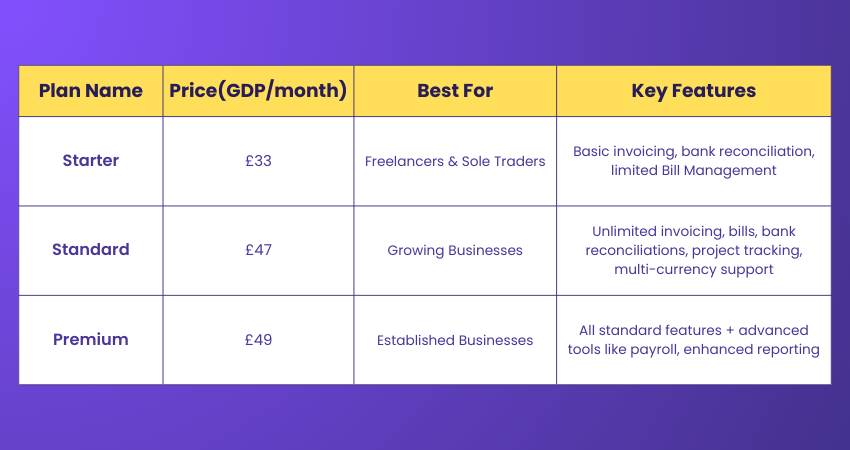
1) Starter Plan (£33/month): Ideal for freelancers and sole traders. Includes features like basic invoicing, bank reconciliation, and limited Bill Management. Suitable for smaller volumes of transactions.
2) Standard Plan (£47/month): Designed for growing businesses. Offers unlimited invoicing, bills, and bank reconciliations. Includes additional features like project tracking and multi-currency support.
3) Premium Plan (£49/month): Best for established businesses. Provides all standard plan features plus advanced tools like payroll and enhanced reporting capabilities for larger teams.
Think like a CFO, learn the language of finance and drive strategic growth. Sign up for our Financial Management Course for now!
What Makes Xero a Good Choice?
Xero is a smart choice for small and medium-sized businesses when you clearly understand What is Xero. This is due to its user-friendly interface, real-time financial insights, and robust automation features. It simplifies invoicing, bill payments, bank reconciliation, and reporting.
With cloud accessibility, strong app integrations, and flexible user permissions, Xero enhances accuracy, collaboration, and efficiency in managing everyday accounting tasks.
How Safe is Xero?
Xero is designed with robust security measures to maximise your data protection. Here are the key points about its safety:
1) End-to-end Encryption: Xero uses end-to-end encryption to ensure that all information transmitted between your device and Xero's servers is safe and secure.
2) ISO/IEC 27001 Certification: Xero is certified under ISO/IEC 27001, an internationally recognised standard for Information Security Management, which further assures users of its commitment to protecting data.
3) Two-step Authentication (2FA): Xero offers two-step authentication to put on an extra layer of security, preventing unauthorised account access.
4) Regular Security Audits: Xero regularly undergoes security audits and has a dedicated security team which monitor and address potential threats.
5) Regular Backups: Backups are taken regularly. This frequency ensures that your data can be recovered in the event of an incident or failure.
6) Compliance with Global Regulations: The platform complies with global data protection regulations like the GDPR. This ensures that your personal and financial information is handled securely and adhering to all the compliances.
Manage your business accounts confidently with our Accounting Software Training – Explore today!

Olivia Taylor makes complex financial subjects easier for professionals to understand and apply. Her content connects accounting principles with the practical requirements of financial control, organisational planning and responsible decision-making.
View Detail

 If you wish to make any changes to your course, please


