


 Top Rated Course

We may not have the course you’re looking for. If you enquire or give us a call on 01344203999 and speak to our training experts, we may still be able to help with your training requirements.
What is Software Testing: Types, Techniques and Levels
The Knowledge Academy 25 August 2026Explore the key concepts and approaches used to evaluate software quality throughout development. Learn how effective testing supports more stable, secure and user-ready software.

Training Outcomes Within Your Budget!
We ensure quality, budget-alignment, and timely delivery by our expert instructors.
Table of Contents

Key Takeaways
1. Software Testing evaluates whether software works correctly and meets defined requirements.2. Different testing types examine functionality, performance, security, usability and software changes.3. Testing techniques help determine how test conditions and test cases are identified and designed.4. Unit, integration, system and acceptance testing examine software at different levels.5. Effective testing combines suitable methods, tools and practices throughout software development.
It is just a SUBMIT button. What could possibly need testing?
Click once → Does it submit correctly?
Click twice → Does it create a duplicate submission?
Leave fields empty → Does the right validation appear?
Lose connection → How does the application respond?
Switch devices → Does it still work as expected?
A single button can create several test scenarios. Now imagine the possibilities across an entire application.
That is where Software Testing comes in. It helps teams examine software under different conditions, uncover defects and verify that it meets defined requirements. Understanding What is Software Testing reveals how these checks contribute to overall software quality.
What is Software Testing?
Software Testing evaluates software and related work products to identify defects and assess whether requirements are met. It examines areas such as functionality, reliability, performance and security throughout the Software Development Life Cycle (SDLC). Some of its main objectives include:
1) Identifying defects
2) Verifying that specified requirements are met
3) Checking expected behaviour
4) Providing information about software quality
5) Supporting better user experiences
Myth vs Fact
Myth: Software Testing only begins after developers finish building the application.Fact: Testing activities can take place throughout software development, providing feedback as software is designed, built and changed. Current ISTQB® material also treats testing in the context of the entire software development lifecycle.

Why is Software Testing Important?
Even well-designed software can contain defects caused by coding errors, misunderstood requirements, system interactions or unexpected user behaviour. Some of the main reasons Software Testing is important include:
1) Detects defects earlier
2) Improves overall software quality
3) Helps evaluate performance and reliability
4) Reduces costly late-stage fixes
5) Supports a better user experience
6) Verifies business requirements
Testing becomes particularly important where software failures can affect financial transactions, healthcare systems, logistics, e-commerce platforms and other critical operations.
How Does Software Testing Work?
Software Testing follows a structured set of activities that moves from understanding what needs to be tested to evaluating the results. A simplified Software Testing workflow looks like this:
Understand Requirements → Plan Tests → Design Test Cases → Execute Tests → Record Results and Defects → Retest and Validate
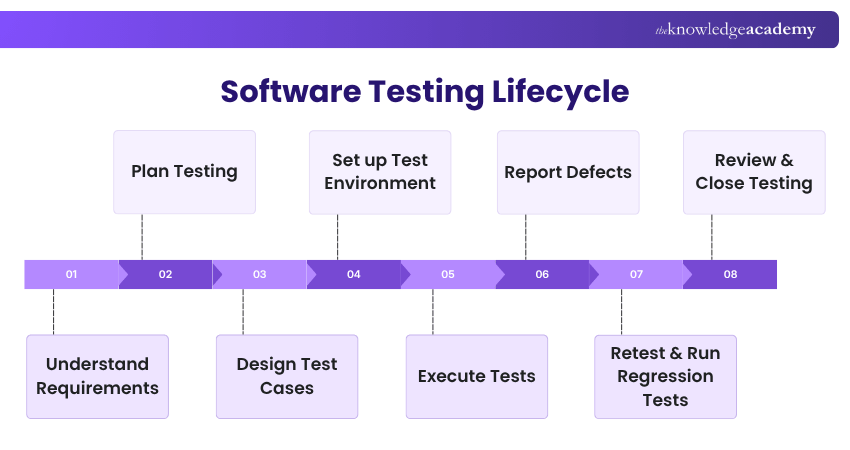
During test execution, testers compare actual software behaviour with expected results and record the outcomes. If a defect is identified, it is documented and investigated so the underlying issue can be addressed.
Once changes are made, the affected functionality can be retested. Regression Testing may also be performed to determine whether the changes have unintentionally affected previously working functionality.
Types of Software Testing
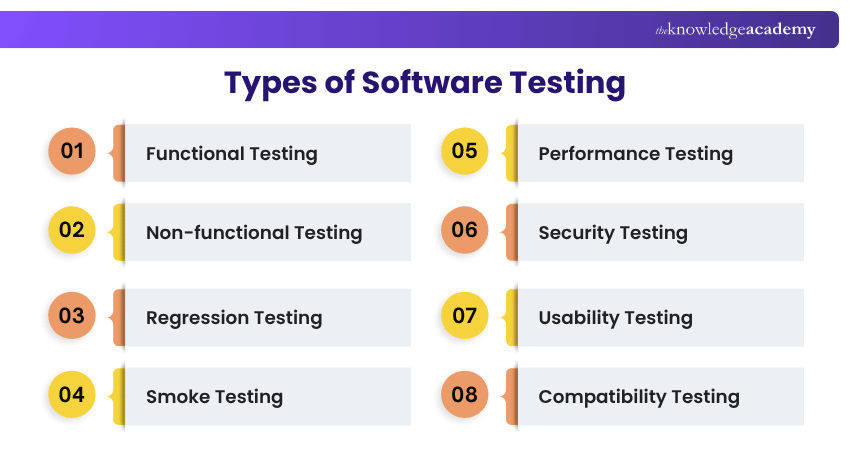
Software Testing includes broad categories and specialised testing types that examine different aspects of an application. Some are broad categories, while others focus on specific quality characteristics or changes made to the software. Let's explore them below:
1) Functional Testing
Functional Testing checks whether features operate according to defined requirements. It focuses on what the software does, such as processing a payment, authenticating a user or generating a report.
2) Non-functional Testing
Non-functional Testing evaluates quality characteristics of software beyond specific functional behaviour. It can assess areas such as performance, usability, reliability, security and scalability.
3) Regression Testing
Regression Testing checks whether software changes have negatively affected existing functionality. It is commonly performed after updates, bug fixes or new features are introduced.
4) Smoke Testing
Smoke Testing performs a broad initial check of important functions to determine whether a build is suitable for more detailed testing. It helps teams identify major failures before investing time in deeper tests.
5) Performance Testing
Performance Testing examines characteristics such as responsiveness, stability and behaviour under different workloads. It can help determine how well an application performs as demand changes.
6) Security Testing
Security Testing examines software for vulnerabilities and weaknesses that could put systems or information at risk. It helps teams assess whether suitable protections exist against potential security threats.
7) Usability Testing
Usability Testing evaluates how easily users can understand, navigate and interact with an application. It helps identify areas that may create confusion, unnecessary effort or a poor overall user experience.
8) Compatibility Testing
Compatibility Testing checks whether software works correctly across different supported environments, such as operating systems, browsers, devices and hardware configurations.
Strengthen your testing expertise with our Unit Testing Course and build more reliable software components. Register now!
Manual vs Automation Testing
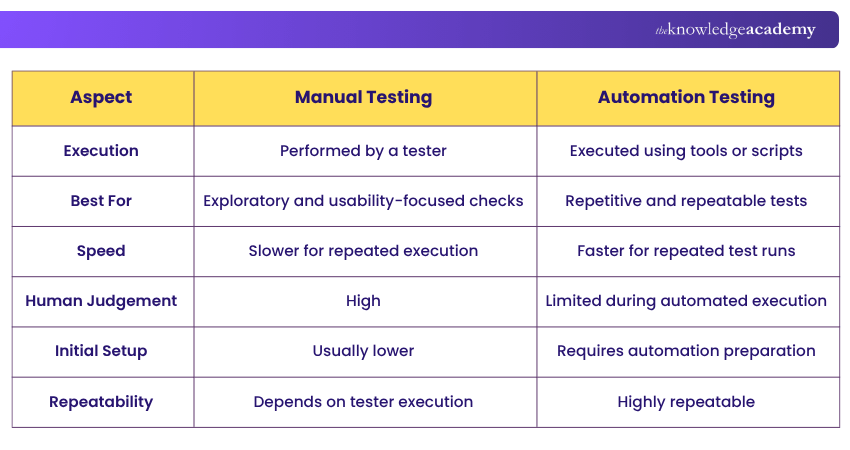
Testing can be performed manually by people or executed automatically using testing tools. The right approach depends on factors such as the test objective, frequency, complexity and need for human judgement. Here is a quick comparison:
Software Testing Techniques
Software Testing uses different approaches and test design techniques to determine what should be tested and how useful test conditions and test cases can be developed. Some approaches focus on external behaviour, others examine internal structure, while specific techniques help testers select effective test data and conditions.
1) Black Box Testing
Black Box Testing evaluates software behaviour without requiring knowledge of its internal code. Testers provide inputs and assess whether the resulting outputs match expected requirements.
2) White Box Testing
White Box Testing examines the internal structure, logic and code of an application. Knowledge of the underlying implementation helps testers design tests around paths, conditions and internal behaviour.
3) Grey Box Testing
Grey Box Testing combines elements of black box and white box approaches. Testers have partial knowledge of the internal system while still examining the application largely from an external perspective.
4) Equivalence Partitioning
Equivalence Partitioning divides possible input values into groups that are expected to behave similarly. Testers can then select representative values from each group instead of testing every possible input. It is recognised by ISTQB® as a classic test design technique.
5) Boundary Value Analysis
Boundary Value Analysis focuses testing around the edges of defined input ranges, where defects frequently appear. For example, if an accepted range is 1 to 100, testing values around the lower and upper limits can reveal boundary-related problems.
6) Exploratory Testing
Exploratory Testing combines learning, test design and execution while the tester interacts with the software. Instead of relying entirely on predefined scripts, testers investigate behaviour and adapt their testing based on what they discover. Exploratory Testing remains part of current ISTQB® testing coverage.
Trainer's Tip: Do not choose a testing technique simply because it is familiar. Start with the risk or requirement you need to verify, then select the type, technique and testing level that gives you the most useful evidence about the software.
Different Levels of Software Testing
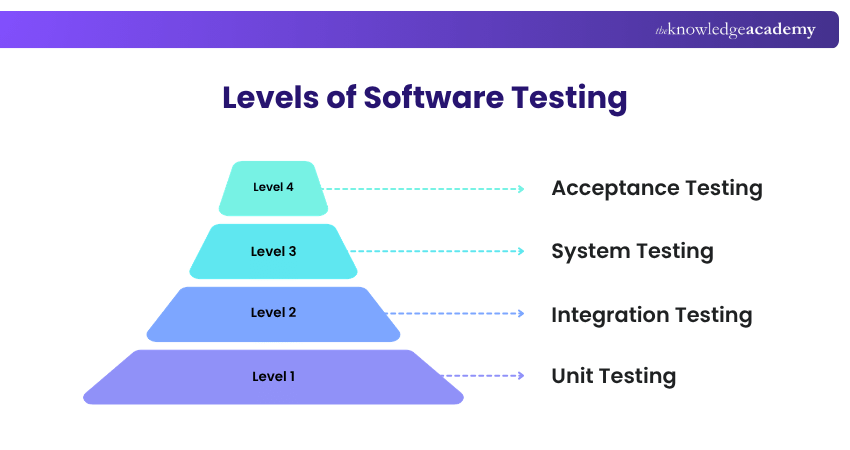
Testing levels organise testing around different stages and scopes of a software system. The focus can range from individual components and their interactions to the complete system and its suitability for intended use. Here are the different levels of Software Testing:
1) Unit Testing
Unit Testing examines individual units or components in isolation. It checks whether smaller pieces of software perform their intended functions before they are combined with other components.
2) Integration Testing
Integration Testing examines how different components or modules work together. It helps identify issues involving interfaces, communication and the movement of data between integrated parts.
3) System Testing
System Testing evaluates the complete integrated application against its specified requirements. It focuses on whether the system behaves correctly as a whole rather than examining individual components separately.
4) Acceptance Testing
Acceptance Testing assesses whether the software satisfies acceptance criteria and is suitable for its intended use. It is often performed from the perspective of users, customers or other relevant stakeholders.
Gain deeper security testing skills with the ISTQB Advanced Security Testing Training and assess threats confidently. Join now!
Best Practices for Software Testing
Good testing is not measured simply by the number of tests performed. Effective Software Testing focuses on meaningful coverage, clear objectives and timely feedback throughout development. Some useful best practices include:
1) Begin testing as early as practical
2) Define clear test objectives
3) Prioritise testing based on risk
4) Keep test cases clear and maintainable
5) Include user perspectives where appropriate
6) Perform appropriate Regression Testing after relevant changes
7) Track defects and test results consistently
8) Review and improve testing regularly
Popular Software Testing Tools
Testing tools can support activities ranging from test management to functional, performance, security and API testing. Choosing a tool should begin with the testing need rather than simply selecting the most widely known product. Common examples include:
1) Test Management: TestRail
2) Web Automation: Selenium
3) Performance Testing: Apache JMeter, OpenText Professional Performance Engineering
4) Security Testing: OWASP ZAP
5) API Testing: Postman, SoapUI
Test Your Understanding So Far
Which Software Testing technique divides input data into groups that are expected to behave similarly?
A. Regression TestingB. Equivalence PartitioningC. Integration TestingD. Smoke TestingAnswer: B. Equivalence Partitioning
Equivalence Partitioning groups inputs that are expected to be processed in the same way, allowing representative values to be selected for testing instead of checking every possible value.
Conclusion
Great software is not just built. It is tested, challenged and improved. Understanding What is Software Testing helps you see how different testing types, techniques and levels work together to uncover defects and build confidence in software quality. With the right testing practices, teams can move from simply asking “Does it work?” to “Is it ready for users?”
Build practical web security skills with OWASP Certification and strengthen your understanding of application vulnerabilities.
Frequently Asked Questions
Can Software Testing Guarantee Defect-free Software?

No. Testing can reveal defects and increase confidence in software quality, but it cannot prove that every possible defect has been eliminated. The effectiveness of testing depends on factors such as coverage, risk, test design and the conditions examined.
What is Static Testing?
Static Testing evaluates software work products without executing the software itself. It can include activities such as reviewing requirements, designs or code to identify defects before dynamic execution takes place. Static Testing is also included within the current ISTQB® Foundation Level syllabus.
Who is Responsible for Software Testing?
Testing may involve dedicated testers, developers, users, business representatives and other team members depending on the project and testing objective. Modern development approaches increasingly treat quality as a shared responsibility across the delivery team.

The Knowledge Academy


Global Training Provider
The Knowledge Academy is a world-leading provider of professional training courses, offering globally recognised qualifications across a wide range of subjects. With expert trainers, up-to-date course material, and flexible learning options, we aim to empower professionals and organisations to achieve their goals through continuous learning.


 If you wish to make any changes to your course, please


