




We may not have the course you’re looking for. If you enquire or give us a call on 01344203999 and speak to our training experts, we may still be able to help with your training requirements.
What is Jira Project Management? Explained
ByDavid EvansLast updated on: 14 July 2026
Jira Project Management helps teams plan, track, and manage projects efficiently through organised workflows and collaboration tools. Understanding Jira features, project tracking methods, and task management capabilities enables teams to improve productivity and deliver projects successfully in fast-paced work environments.

Managing projects effectively requires clear planning, organised workflows, and strong team collaboration. Jira Project Management has become a widely used solution for tracking tasks, managing Agile workflows, and improving project visibility across teams and organisations.
In this blog, you will learn about Jira Project Management and how it supports efficient project delivery. It covers key features, benefits, workflows, and essential concepts that help beginners understand how Jira improves collaboration, task management, and overall project performance.
Table of Contents
1) A Brief Introduction to Jira
2) Importance of Jira in Project Management
3) Advantages and Limitations of Jira Project Management
4) Best Practices of Jira Project Management
5) Conclusion
A Brief Introduction to Jira
Jira is a versatile Project Management tool developed by Atlassian, designed to streamline project planning, tracking, and collaboration. It facilitates agile methodologies like Scrum and Kanban, enabling teams to manage tasks efficiently. With its customisable workflows and issue-tracking system, Jira empowers teams to achieve transparency, boost productivity, and deliver successful projects.
Jira is widely used across software development, IT, and business teams to organise work and improve project visibility. Its dashboards, reporting tools, and integration capabilities help teams monitor progress, manage deadlines, and support better decision-making throughout the project lifecycle.

Importance of Jira in Project Management
Jira plays a pivotal role in modern Project Management by providing a robust and agile platform for teams to plan, track, and execute projects effectively. As a versatile tool, Jira enhances collaboration among team members, promoting seamless communication and transparency. Its customisable workflows and issue-tracking capabilities ensure that tasks are well-organised, and progress is visible to all stakeholders.
With its powerful reporting and analytics features, Jira offers valuable insights into project performance, enabling data-driven decision-making. Jira's adaptability to different project types and sizes makes it an invaluable asset for teams across various industries, empowering them to achieve efficient project delivery and successful outcomes.
Want to unlock the fundamentals of Project Management Office? Join our Project Management Office Fundamentals Certification Course today!
Advantages and Limitations of Jira Project Management
Here are the key advantages and disadvantages of Jira Project Management:
Advantages of Jira Project Management
The advantages of Jira Project Management are:
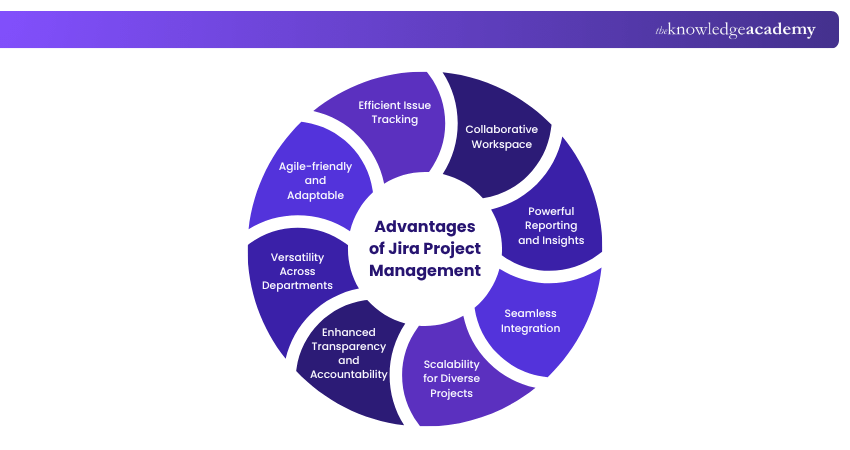
1) Agile-friendly and Adaptable: Jira is purpose-built for Agile Project Management, making it an appropriate choice for teams practising Scrum, Kanban, or other iterative methodologies. Its flexibility allows teams to adapt their workflows and processes as project requirements evolve.
2) Efficient Issue Tracking: With Jira's robust issue tracking system, teams can create, assign, and prioritise tasks with ease. The intuitive interface ensures that no critical task is overlooked, promoting a smoother workflow.
3) Collaborative Workspace: Jira promotes real-time collaboration among team members through @mentions and notifications. This feature enables quick communication and keeps everyone on the same page, reducing misunderstandings.
4) Powerful Reporting and iInsights: Jira's reporting and analytics tools offer valuable insights into project progress, team performance, and issue resolution rates. Customisable dashboards enable stakeholders to access relevant data at a glance.
5) Seamless Integration: Jira seamlessly integrates with a large number of tools and services, including version control systems like Git, CI/CD platforms, and Confluence, enhancing productivity by streamlining workflows.
6) Scalability for Diverse Projects: Whether it's a small startup project or a large-scale enterprise initiative, Jira can accommodate the diverse needs of different projects, making it suitable for teams of all sizes.
7) Enhanced Transparency and Accountability: Jira provides a transparent view of project status and individual contributions. Team members can see their assigned tasks, progress, and deadlines, promoting accountability and ownership.
8) Versatility Across Departments: While Jira is popular in software development, its versatility extends to other industries and departments, such as marketing, HR, and operations, making it a valuable asset for cross-functional teams.
Learn practical techniques to coordinate projects effectively and contribute to successful project outcomes with our Project Management for Non-Project Managers Course- Join now!
Limitations of Jira Project Management
The limitations of Jira Project Management are:
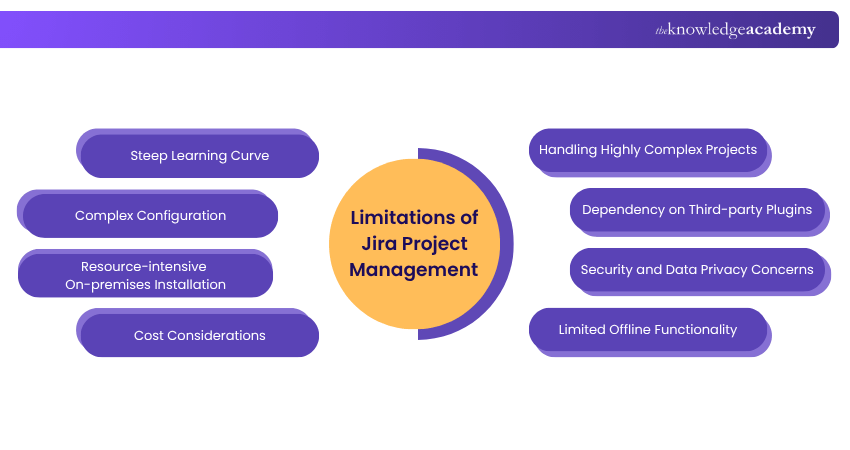
1) Steep Learning Curve: Due to its extensive features and customisability, Jira may have a steep learning curve for new users. Training and guidance are essential to harness its full potential.
2) Complex Configuration: Customising Jira to suit specific project needs can be complex, especially for users without technical expertise. Over-customisation can lead to confusion and inefficiencies.
3) Resource-intensive On-premises Installation: Running Jira on-premises may require substantial hardware resources, especially for large projects with extensive data and user activity.
4) Cost Considerations: Jira's pricing structure might be a concern for small teams or organisations with limited budgets. Careful evaluation of the pricing plans and features is necessary before making a commitment.
5) Handling Highly Complex Projects: While Jira excels in managing Agile projects, extremely complex projects with multiple dependencies may present challenges, requiring careful planning and configuration.
6) Dependency on Third-party Plugins: Some advanced features and functionalities in Jira may rely on third-party plugins, which can add complexity and additional costs.
7) Security and Data Privacy Concerns: For on-premises installations, organisations are responsible for ensuring proper security measures and data protection, which requires diligent maintenance.
8) Limited Offline Functionality: As a primarily cloud-based solution, Jira's functionality may be limited without an internet connection, which could be a hindrance in remote or offline work scenarios.
Level up your Project Management skills with our CDSPM (Certified Digital Services Project Manager) Course- Register now!
Best Practices of Jira Project Management
The following best practices help teams use Jira Project Management more effectively to improve collaboration, streamline workflows, and ensure successful project delivery:
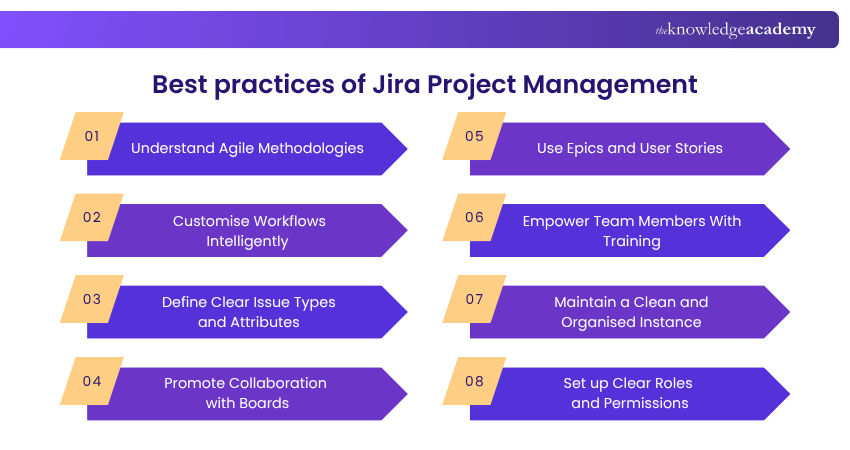
1) Understand Agile Methodologies
To effectively utilise Jira for Project Management, it is crucial to grasp the fundamentals of Agile methodologies such as Scrum and Kanban. Understand the principles of iterative development, frequent feedback, and continuous improvement. Familiarise yourself with concepts like sprints, backlogs, and daily stand-ups.
Align Jira with your team's preferred agile approach and ensure everyone involved comprehends the methodology. Agile encourages adaptability and embraces change, so be open to adjusting your processes as the project evolves. By understanding and embracing agile principles, you can make the most of Jira's features and enhance your team's productivity and collaboration throughout the project lifecycle.
2) Customise Workflows Intelligently
Jira's power lies in its customisable workflows, allowing you to personalise the tool to your team's unique requirements. However, exercise caution when customising workflows and keep them as simple as possible. Involve team members in the design process to ensure they understand and endorse the changes.
Avoid overcomplicating workflows, as this can lead to confusion and inefficiency. Focus on streamlining processes and eliminating unnecessary steps. Consider the needs of your team and project to design workflows that boost productivity and collaboration. A well-designed and intelligently customised workflow ensures smooth task management and a more cohesive Project Management experience. For further insights on optimising your Jira workflows, the Jira ebook offers valuable strategies and tips.
3) Define Clear Issue Types and Attributes
Clear issue types and well-defined attributes are vital for effective issue tracking in Jira. Establishing consistent issue types, such as tasks, bugs, or user stories, ensures clarity and consistency in Project Management. Choose relevant fields and attributes that capture essential information for each issue type.
Custom fields can be used to tailor Jira to your team's specific needs. Encourage users to provide detailed descriptions and use the appropriate attributes when creating issues. This practice streamlines issue resolution, improves reporting accuracy, and enables better analysis of project data. Clear issue types and attributes facilitate efficient collaboration and decision-making throughout the project lifecycle.
4) Promote Collaboration with Boards
Utilising Jira boards, whether Scrum or Kanban, is instrumental in promoting collaboration and visualising project progress. Boards provide a visual representation of tasks, their status, and team assignments, encouraging transparency and better communication. Encourage team members to actively participate in updating and moving tasks on the boards during daily stand-up meetings.
This practice ensures that everyone is informed about the project's status and impediments. Team members can work together efficiently, identify bottlenecks, and adjust priorities based on real-time updates. Emphasising the use of boards empowers teams to work cohesively, delivering high-quality results in a collaborative environment.
5) Use Epics and User Stories
Organising projects with epics and user stories in Jira facilitates a structured and manageable approach to task management. Epics group related tasks, representing broader project goals, while user stories capture specific end-user requirements. Breaking down work into smaller, more manageable units allows for clear tracking of progress and prioritisation.
Assigning user stories to epics provides a structured hierarchy, aiding in project planning and reporting. Ensure that epics and user stories are detailed enough for efficient implementation. This practice empowers teams to have a clear overview of project scope and progress within Jira Cloud, promoting better decision-making and successful project outcomes.
Strengthen your ability to minimise project risks and improve decision-making throughout the project lifecycle with our Project Risk Management Course- Sign in today!
6) Empower Team Members With Training
Investing in comprehensive training for team members on Jira's features and functionalities is crucial for successful Project Management. Provide hands-on training, workshops, and documentation to ensure everyone is familiar with the platform. Offer continuous support and resources to address queries and challenges that arise during implementation.
Empowering team members with training promotes confidence and proficiency in using Jira, leading to improved productivity and collaboration. A well-trained team can fully leverage the capabilities of Jira, making it an essential tool for efficient project planning, tracking, and delivery.
7) Maintain a Clean and Organised Instance
Regularly maintaining a clean and organised Jira instance is vital for optimising performance and user experience. Conduct periodic reviews to identify and remove unused projects, issues, and users. Archived or completed projects should be properly stored or deleted to declutter the system.
Ensure that issue fields, screens, and workflows are relevant and up-to-date, avoiding confusion and potential errors. Regularly update Jira and its plugins to access the latest features and security enhancements. By keeping the instance tidy and organised, you create an efficient workspace that enables users to find relevant information quickly and enhances overall productivity.
8) Set up Clear Roles and Permissions
Assigning clear roles and permissions within Jira is essential to ensure the right level of access and control for different users. Define roles based on responsibilities and team structures, such as project leads, developers, and stakeholders. Assign permissions according to these roles to maintain data security and integrity.
Review and adjust permissions periodically to accommodate team changes or project requirements. Communicate role assignments and permissions to team members so they understand their access levels and responsibilities. Setting up clear roles and permissions promotes accountability, streamlines collaboration, and minimises the risk of unauthorised actions within Jira.
Conclusion
In conclusion, Jira Project Management is a powerful tool that can transform how teams collaborate, plan, and execute projects. By understanding its features, best practices, and potential challenges, you can harness Jira's full potential to drive successful project outcomes. For deeper insights into its configuration and administration, refer to the Jira Admin Guide to optimise your workflow.
Develop practical project management skills to plan, manage, and deliver successful projects confidently with our Project Management Courses- Sign up now!

David Evans brings over a decade of hands-on experience in project delivery, Agile transformation, and team leadership. With a background in technology and business consulting, David has led cross-functional teams through Agile and Waterfall projects in both public and private sectors. He combines technical knowledge with practical insights to help readers navigate the challenges of modern project environments.


 If you wish to make any changes to your course, please


