


 Top Rated Course

We may not have the course you’re looking for. If you enquire or give us a call on 01344203999 and speak to our training experts, we may still be able to help with your training requirements.
CRM Analytics vs Tableau: Choosing the Right BI Tool
Sienna Roberts 23 December 2025CRM Analytics is Salesforce’s native BI tool for customer data, while Tableau offers broader, advanced data visualisation and analytics across platforms. CRM Analytics is great for quick actions within Salesforce. Tableau suits users who need beautiful, interactive dashboards from various data sources in real time.

Training Outcomes Within Your Budget!
We ensure quality, budget-alignment, and timely delivery by our expert instructors.
Table of Contents

Have you ever felt stuck choosing between two powerful tools that both promise to unlock your data’s true potential? In the world of Business Intelligence, two names stand out for their impact and popularity: CRM Analytics and Tableau. While both are designed to help you make sense of data, they serve different purposes. CRM Analytics delivers quick Salesforce insights, while Tableau blends data from many sources into interactive dashboards.
In this blog, we will break down the key differences between CRM Analytics vs Tableau, covering data handling, dashboard creation, live updates, and Salesforce integration. By the end, you will be able to confidently choose the tool that best suits your business needs.
Table of Contents
1) What is CRM Analytics?
2) What is Tableau?
3) Difference Between Tableau and CRM Analytics
a) CRM Analytics vs Tableau: Data Sync and Shaping
b) CRM Analytics vs Tableau: Creating the Dashboard
c) CRM Analytics vs Tableau: Live Data
d) CRM Analytics vs Tableau: Embedding and Pre-filtering the Dashboard in Salesforce
e) CRM Analytics vs Tableau: Actionability
4) Conclusion
What is CRM Analytics?
CRM Analytics is a Business Intelligence tool from Salesforce that helps organisations understand their customer data better. It is built directly into Salesforce, so users can create reports, dashboards, and insights without leaving the platform. The main goal is to make information clear, easy to access, and useful for daily decision-making.
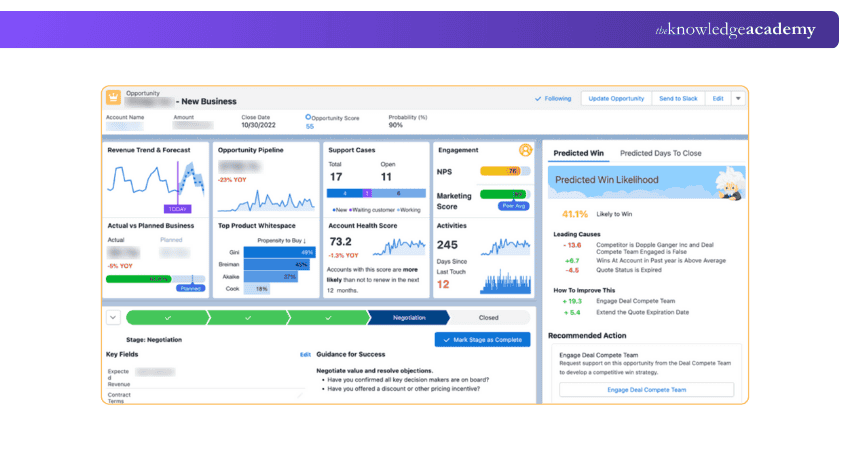
CRM Analytics helps you:
1) Create reports and dashboards directly inside Salesforce
2) Use AI to get smart predictions
3) Take quick actions from inside the dashboard (like sending emails or creating tasks)
What is Tableau?
Tableau is a data visualisation tool that turns raw information into clear, easy-to-read charts and dashboards. It helps organisations explore patterns, track performance, and share insights, making data understandable for everyone, not just technical teams. Its main goal is to simplify decision-making by showing data in a visual and meaningful way.
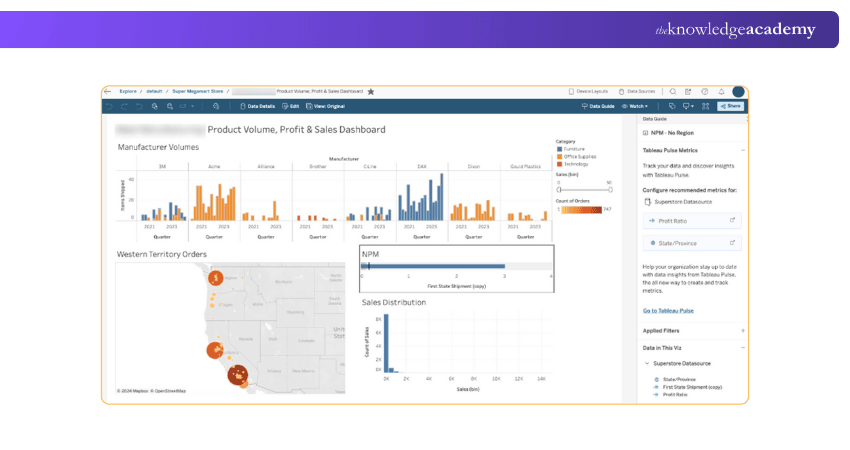
Tableau is known for:
1) Create beautiful and interactive dashboards
2) Use easy drag-and-drop features
3) Work with both small and large datasets
4) Analyse data in real time or with saved extracts
Difference Between Tableau and CRM Analytics
While both tools help you analyse data, they are made for different users and purposes. Let’s look at the difference between CRM Analytics and Tableau:

1) CRM Analytics vs Tableau: Data Sync and Shaping
CRM Analytics:
a) Built into Salesforce
b) Data comes mostly from Salesforce records
c) It can pull Salesforce data automatically without much setup
d) Limited support for data from outside Salesforce
Tableau:
a) Works with many data sources like Excel, databases, APIs, and Salesforce
b) You can shape and clean the data more freely
c) Supports large and complex data from many systems
Summary:
If your data is mostly from Salesforce, CRM Analytics works best. But if you need to sync data from many sources, Tableau is the better choice.
2) CRM Analytics vs Tableau: Creating the Dashboard
CRM Analytics:
a) Uses a builder called Salesforce Analytics Query Language (SAQL)
b) Dashboards are simpler and quicker to make if you are using Salesforce
c) Comes with templates for Salesforce objects like leads, opportunities, and cases
Tableau:
a) Has a strong drag-and-drop interface
b) Let's you build dashboards with more design options
c) You can add charts, filters, animations, and maps easily
Summary:
If you want simple, quick dashboards focused on Salesforce data, CRM Analytics is the best choice. But if you need advanced, customisable dashboards with more design options, Tableau is the better fit.
3) CRM Analytics vs Tableau: Live Data
CRM Analytics:
a) Refreshes data at scheduled times (e.g., every hour or day)
b) Works well with fresh Salesforce data
c) Doesn’t always support real-time data from other platforms
Tableau:
a) Supports live data connections (real-time updates)
b) Also supports extracts (saved data that refreshes daily or weekly)
c) You can choose how often your data updates
Summary:
If you need real-time data from multiple sources, Tableau is the better choice. But if you primarily rely on Salesforce data updated every few hours, CRMA will work well.
4) CRM Analytics vs Tableau: Embedding and Pre-filtering the Dashboard in Salesforce
CRM Analytics:
a) Seamlessly fits inside Salesforce pages
b) You can show dashboards on records (like accounts or opportunities)
c) Allows filtering by Salesforce user, region, or team
d) Makes actions from dashboards (like creating tasks)
Tableau:
a) Can be embedded in Salesforce using a special setup
b) Embedding is possible but not as smooth as CRM Analytics
c) Pre-filtering is harder unless you customise it
Summary:
Choose CRM Analytics for seamless Salesforce dashboard embedding. Choose Tableau if deep Salesforce integration isn’t required.
5) CRM Analytics vs Tableau: Actionability
CRM Analytics:
a) Dashboards are not just for viewing, you can take actions
b) Create tasks, send emails, or update records from dashboards
c) Helps sales and service teams move faster
Tableau:
a) Focused more on visualising and exploring data
b) Less support for taking direct actions inside dashboards
c) Requires other tools to act on the data
Summary:
Choose CRM Analytics if you want dashboards that enable quick actions. Choose Tableau if you only need to analyse and visualise data.
Conclusion
Choosing between CRM Analytics vs Tableau depends on your business needs. If you rely heavily on Salesforce and need built-in actions, CRM Analytics is ideal. But if you need advanced visuals and data from many platforms, Tableau is a better fit. Both tools help you understand your data better, make smarter decisions, and improve performance across teams and departments.
Acquire skills to effectively manage and organise customer data. Join our CRM Training now!
Frequently Asked Questions
Is Tableau CRM the Same as CRM Analytics?

Yes, Tableau CRM is now called CRM Analytics. Salesforce rebranded it to better reflect its focus on customer relationship data. It is not the same as Tableau, even though Salesforce owns both. CRM Analytics is designed to work inside Salesforce, while Tableau supports a wide range of external data sources.
Is Tableau Better than Salesforce?
Tableau is not better or worse; it’s just different. Tableau is a BI tool. Salesforce is a full CRM platform that manages sales, service, and marketing. You can use both together. Tableau helps you understand data from many places, while Salesforce helps you manage your customers.
What are the Other Resources and Offers Provided by The Knowledge Academy?
The Knowledge Academy takes global learning to new heights, offering over 3,000 online courses across 490+ locations in 190+ countries. This expansive reach ensures accessibility and convenience for learners worldwide.
Alongside our diverse Online Course Catalogue, encompassing 19 major categories, we go the extra mile by providing a plethora of free educational Online Resources like Blogs, eBooks, Interview Questions and Videos. Tailoring learning experiences further, professionals can unlock greater value through a wide range of special discounts, seasonal deals, and Exclusive Offers.
What is The Knowledge Pass, and How Does it Work?
The Knowledge Academy’s Knowledge Pass, a prepaid voucher, adds another layer of flexibility, allowing course bookings over a 12-month period. Join us on a journey where education knows no bounds.
What are the Related Courses and Blogs Provided by The Knowledge Academy?
The Knowledge Academy offers various CRM Training, including the Salesforce CRM Training, Salesforce Platform App Builder Training, and the Oracle CRM Training. These courses cater to different skill levels, providing comprehensive insights into Components of CRM.
Our Office Applications Blogs cover a range of topics related to CRM Analytics and Tableau, offering valuable resources, best practices, and industry insights. Whether you are a beginner or looking to advance your Analytical skills, The Knowledge Academy's diverse courses and informative blogs have got you covered.
Upcoming Office Applications Resources Batches & Dates
Date
 Salesforce CRM Masterclass
Salesforce CRM Masterclass
Fri 27th Mar 2026
Salesforce CRM Masterclass
Fri 19th Jun 2026
Salesforce CRM Masterclass
Fri 4th Sep 2026
Salesforce CRM Masterclass
Fri 4th Dec 2026

 If you wish to make any changes to your course, please


