


We may not have the course you’re looking for. If you enquire or give us a call on 01344203999 and speak to our training experts, we may still be able to help with your training requirements.
Top 10 Benefits of Google Analytics
ByThe Knowledge AcademyLast updated on: 17 November 2026
Google Analytics provides valuable insights into website and app traffic, user behaviour,campaign performance and conversions. Explore its 10 key benefits and learn how these insights help businesses make informed decisions and improve their digital performance.
Key Highlights
1. Google Analytics 4 helps businesses track website and app traffic, understand acquisition sources and analyse audience demographics.2. GA4 provides insights into user behaviour, content engagement and important actions through event-based measurement.3. Ecommerce and campaign reports help organisations evaluate product activity, marketing performance and business outcomes.4. Real-time reporting and explorations allow teams to monitor recent activity and investigate user journeys in greater detail.5. Custom reports and audience creation help businesses focus on relevant metrics and develop more targeted marketing strategies.
Every tracked click, page view, purchase, and interaction can reveal something about how people use a digital experience. But what do these actions tell you about your audience, and how can you use that information to improve your website's performance?
Google Analytics helps organisations turn these interactions into useful insights, making it easier to understand user behaviour, engagement and conversions. This blog explores its top 10 benefits and how they can improve business performance. Let's get started!
10 Key Benefits of Google Analytics
Google Analytics is an analytics platform that helps businesses track and analyse how users interact with their websites and apps. It provides insights into user behaviour, traffic sources, engagement and key events, helping organisations evaluate their digital performance and identify areas for improvement. Here are the benefits of Google Analytics 4 (GA4), the current generation of Google Analytics:
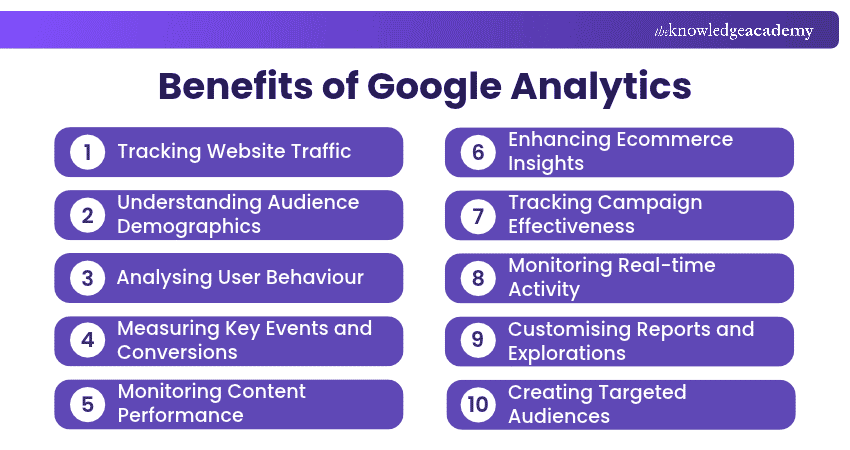
1) Tracking Website Traffic
Google Analytics helps organisations understand how users reach and interact with their websites or apps. GA4 reports provide metrics such as users, sessions, views, engagement, and traffic sources, helping teams identify traffic trends and changes in visitor activity.
Acquisition reports can also show where traffic originates, including organic search, paid campaigns, referrals, direct visits, email, and other channels. This enables teams to compare acquisition sources and understand which channels attract visitors, generate engagement and contribute to business goals.
Remember
The user acquisition report focuses on how new users first discover a website or app, while the traffic acquisition report shows where sessions originate, including visits from returning users.

2) Understanding Audience Demographics
GA4 demographic reporting provides insights into audience characteristics, including geographic location, language, age, gender and interests, depending on data availability. Age, gender and interest data may be limited by consent requirements, Google signals settings and privacy thresholds. This helps businesses understand who their users are and identify important audience groups.
By analysing these characteristics, organisations can tailor their content, marketing campaigns and digital experiences to better meet audience preferences. For example, location and language insights can help businesses develop region-specific content, while available age and interest data can support more relevant marketing strategies.
3) Analysing User Behaviour
Google Analytics helps teams understand how users interact with website pages, app screens and tracked features by examining events, views, engagement metrics and navigation paths. This provides insights into how visitors explore content and move between different sections of a website or app.
By identifying frequently visited pages, common navigation paths and areas with lower engagement, organisations can better understand user preferences and potential usability issues. These insights help teams make informed improvements to content, navigation and the overall user experience.
4) Measuring Key Events and Conversions
GA4 allows organisations to mark actions that are particularly important to their objectives as key events. Examples can include registrations, enquiries, subscriptions, purchases, or other meaningful interactions.
Key-event reports help teams measure how often users complete these actions and analyse their performance across different pages and traffic sources. This enables businesses to evaluate progress towards their objectives and identify opportunities for improvement.
GA4 key events can also be used to create advertising conversions, allowing organisations to measure campaign performance and optimise advertising strategies when the necessary integrations and conversion settings are configured.
5) Monitoring Content Performance
Google Analytics helps teams assess the performance of individual website pages and app screens using metrics such as views, active users, average engagement time, event counts and key events.
By comparing these metrics, content teams can identify high-performing pages, assess whether content supports important user actions and recognise areas that may need improvement. These findings can guide decisions about updating existing content, expanding successful topics and refining content strategies based on business objectives.
6) Enhancing Ecommerce Insights
GA4 supports ecommerce measurement through recommended events such as product views, additions to baskets, checkout activity and purchases. Once properly configured, these events help businesses track customer interactions at different stages of the online shopping journey.
When ecommerce tracking is implemented correctly, the ecommerce purchases report provides product-level metrics such as items viewed, items added to baskets, items purchased and item revenue. These insights, alongside checkout data, help businesses assess product performance, identify purchasing barriers and improve the shopping experience.
7) Tracking Campaign Effectiveness
Google Analytics helps marketers understand which campaigns attract visitors to their websites and how those visitors engage with content and complete important actions.
Using campaign tracking methods such as UTM parameters, GA4 can identify traffic sources, marketing channels and individual campaigns. Teams can then compare traffic, engagement and key-event performance to identify effective campaigns, refine marketing strategies and allocate resources more efficiently.
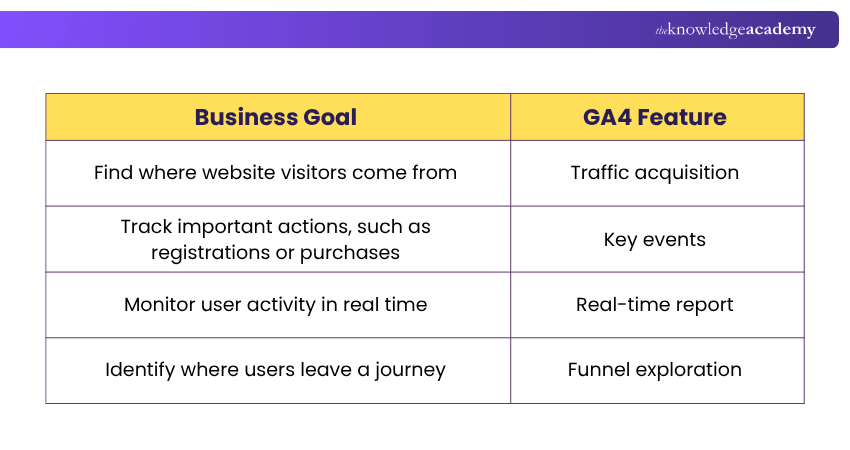
Match each business goal with the most suitable GA4 feature:
8) Monitoring Real-time Activity
GA4's real-time report allows teams to monitor activity on a website or app as it happens. It shows active users over the previous 5 and 30 minutes, traffic sources, viewed pages or screens, triggered events and completed key events.
These insights help businesses assess the immediate response to campaign launches, new content and website updates. Teams can also use real-time reporting to check whether data is being collected and identify unexpected changes in user activity.
9) Customising Reports and Explorations
Google Analytics allows organisations to tailor reports to their specific analytical needs using relevant dimensions, metrics, filters and comparisons. This helps teams focus on important performance indicators and examine data that supports their business objectives.
For deeper analysis, GA4 provides Explorations, which go beyond standard reports. These include free-form, funnel, cohort and path explorations, with segments and filters available to refine the analysis. Such capabilities help businesses investigate user behaviour, compare audience groups and uncover insights that standard reports may not reveal.
Trainer’s Tip
Define the business question before opening GA4. Focus on the few metrics and key events that answer it instead of reporting every available number. This keeps the analysis relevant and reduces reliance on vanity metrics.
10) Creating Targeted Audiences
GA4 allows businesses to create audiences based on user characteristics, behaviours and interactions. By defining specific conditions, organisations can group users who share common interests or complete particular actions, such as viewing products or making purchases.
These audiences help businesses understand different customer groups and develop more relevant marketing strategies. When GA4 is linked to Google Ads with the appropriate settings, eligible audiences can also support remarketing campaigns to reach users who have previously interacted with a website or app.
Turn marketing data into smarter campaign decisions with our Data-driven Marketing Course – Join now!

The Knowledge Academy develops accessible learning content across Project Management, IT, Cybersecurity, Data Science, Business Analysis, HR, Accounting and Finance, Leadership and Health and Safety. Its resources combine subject research with clear explanations to help professionals build practical knowledge across a wide range of disciplines.
View Detail

 If you wish to make any changes to your course, please


