




We may not have the course you’re looking for. If you enquire or give us a call on +44 1344 203 999 and speak to our training experts, we may still be able to help with your training requirements.
Essential 3D Animation Skills Every Animator Should Develop
ByThe Knowledge AcademyLast updated on: 11 September 2026
Bring creative ideas to life with essential 3D Animation skills that support convincing movement, detailed characters and polished visual storytelling.
What makes a fantasy creature come alive, a game character feel human, or an imaginary world feel strangely believable? It is not simply how these creations look. It is how they move, react, interact, and exist within their surroundings.
That magic comes from a combination of 3D Animation Skills. From modelling and rigging to creativity and attention to detail, each skill adds another layer of life to the screen. This blog explores the skills behind compelling 3D Animation and how you can develop them. Let's dive in!
What are 3D Animation Skills?
3D Animation Skills are the technical, artistic, and professional abilities used to create and animate three-dimensional digital objects, characters, and environments. They include understanding animation principles such as timing, spacing, weight, posing and movement, along with using 3D software to create convincing animated sequences.
These skills help 3D Animators transform static 3D models into characters and scenes that move, react and communicate naturally. Depending on the role, they may also involve rigging, character performance, visual storytelling and an understanding of how movement supports the mood and purpose of a scene.
Essential 3D Animation Skills
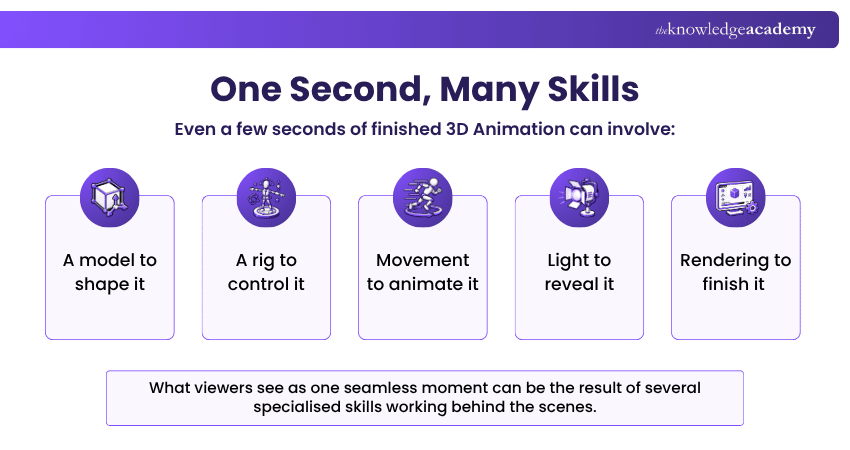
Creating convincing 3D Animation requires more than knowing how to use animation software. So, here are the essential 3D Animation Skills every animator should develop:
Technical 3D Animation Skills
Below are the key technical skills that help animators create, animate, and refine 3D content:
1) 3D Modelling
3D modelling involves creating three-dimensional digital objects, characters, props, and environments. It requires an understanding of shape, proportion, form, and topology to create models suitable for animation.
2) Rigging
Rigging involves creating a controllable skeletal structure for a 3D model. It allows animators to manipulate characters and objects while supporting natural movement and deformation.
3) Animation Principles
Understanding principles such as timing, spacing, anticipation, arcs, follow-through, and squash and stretch helps animators create movement that feels convincing and expressive.
4) Texturing and Shading
Texturing adds surface details to 3D models, while shading determines how those surfaces respond to light. A working knowledge of both skills helps animators understand how surface details and materials contribute to the final appearance of 3D models.
5) Lighting
Lighting helps establish visibility, depth, atmosphere, and visual focus within a scene. Effective lighting can also influence how viewers perceive the mood and important elements of an animation.
6) Rendering
Rendering processes a 3D scene to produce two-dimensional images or animation frames. Understanding render settings and optimisation can help balance visual quality, processing time and production requirements.
7) Compositing
Compositing combines rendered elements, backgrounds, effects, and other layers into the final visual output. It can also involve colour adjustments and other refinements.
8) Visual Effects (VFX)
Visual effects involve creating elements such as smoke, fire, particles, explosions, or simulations that enhance animated scenes.
Bring visuals to life and enhance the art of motion with our Motion Graphics Course – Sign up now!
9) Body Mechanics and Movement
Understanding body mechanics helps animators create believable movement by considering weight, balance, momentum and physical forces. This is particularly important when animating actions such as walking, running, lifting, jumping or interacting with objects.
Creative and Professional 3D Animation Skills
Below are the essential creative and professional skills that help 3D Animators produce quality work and collaborate effectively:
1) Creativity
Creativity helps animators develop original characters, environments, movements, and visual ideas. It also supports imaginative approaches to storytelling and design.
2) Attention to Detail
Attention to detail helps animators identify subtle issues in movement, timing, poses, expressions and character interactions that could affect the quality and believability of an animation.
3) Problem-solving
Problem-solving helps animators overcome technical and creative challenges. It enables them to test alternatives and find practical solutions when something does not work as expected.
4) Teamwork and Collaboration
3D Animation often involves working with modellers, riggers, designers, VFX artists, and other specialists. Teamwork and collaboration help maintain consistency and keep production moving smoothly.
5) Communication
Clear communication helps animators understand creative direction, explain ideas, discuss technical limitations, and respond effectively to feedback.
6) Time Management
Animation projects can involve several production stages and revisions. Time management helps animators prioritise tasks and complete their work within project deadlines.
7) Adaptability
Adaptability helps animators respond to changing creative requirements, new tools, feedback, and evolving production workflows without losing sight of the intended outcome.
8) Storytelling
Visual storytelling helps animators use movement, expressions, poses and timing to communicate emotions, actions and narrative ideas clearly to the audience.
9) Visual Observation
Observation skills help animators study how people, animals and objects move and interact in the real world. Paying attention to weight, balance, timing, gestures and expressions can help them create movements that feel more natural and expressive.
Design the animated worlds you've always imagined with Animation Course – Register today!
How to Improve Your 3D Animation Skills?
Developing strong 3D Animation Skills requires consistent practice rather than simply becoming familiar with software. Here are some practical ways to improve:
1) Strengthen the Fundamentals: Study movement, timing, composition, anatomy, perspective, and other visual fundamentals. Strong foundations make it easier to apply advanced techniques effectively.
2) Start With Small Projects: Short projects allow you to concentrate on individual abilities without becoming overwhelmed by a large production. For example, you could practise a bouncing ball before progressing to more complex character movement.
3) Study Real-world Movement: Observe how people, animals, objects, light, and materials behave in real environments. Using references can help you understand the details that make animated movement and scenes appear believable.
4) Practise with 3D Software: Regularly use animation software to turn theoretical knowledge into practical ability. Experimenting with different tools and features can also help you discover more efficient workflows.
5) Seek Constructive Feedback: Feedback can reveal issues that are difficult to notice when reviewing your own work. Share projects with instructors, colleagues, or creative communities and use relevant feedback to guide improvements.
6) Build a Portfolio: A portfolio gives you a reason to apply different skills to complete pieces rather than isolated exercises. Select work that demonstrates your strongest abilities and shows variety in technique or style.
Don’t Just Rewatch Your Animation
Try watching it without sound, frame by frame, and in silhouette. Each view can expose something different, from awkward timing and poses to unclear movement.
Best Tools for Practising 3D Animation Skills
Different tools support different areas of 3D production. The following tools can help you practise a range of 3D Animation Skills:
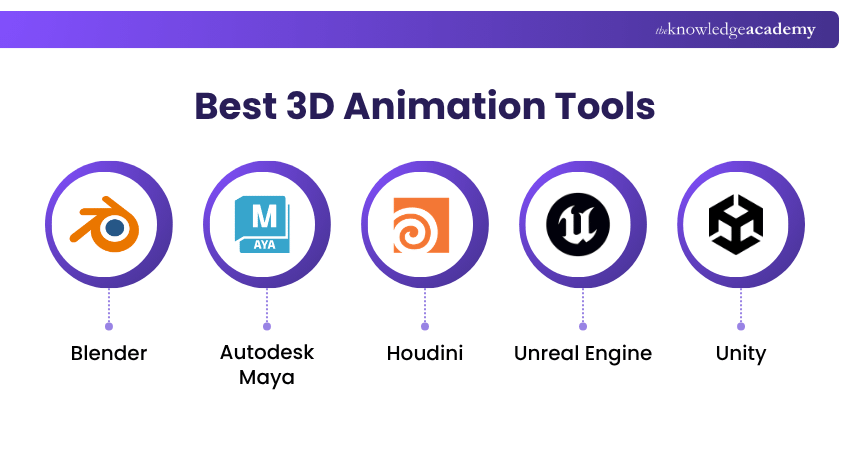
1) Blender: Blender is an open-source 3D creation suite that supports modelling, rigging, animation, simulation, rendering, compositing and other stages of 3D production.
2) Autodesk Maya: Autodesk Maya provides tools for 3D modelling, rigging, animation, simulation, and rendering. It is widely associated with professional animation and VFX workflows.
3) Houdini: Houdini is particularly known for procedural, node-based workflows and is useful for developing skills involving simulations, procedural modelling, and visual effects. It can be valuable for animators interested in effects-driven and procedural 3D production.
4) Unreal Engine: Unreal Engine supports real-time 3D creation and can be used for interactive experiences, games, virtual production, and real-time animation workflows.
5) Unity: Unity is a real-time development platform commonly associated with games and interactive 2D and 3D experiences. It can help animators understand how animated assets function within interactive environments.
Create, animate, and bring your 3D vision to life with our Blender Creator Training - Join today!

The Knowledge Academy develops accessible learning content across Project Management, IT, Cybersecurity, Data Science, Business Analysis, HR, Accounting and Finance, Leadership and Health and Safety. Its resources combine subject research with clear explanations to help professionals build practical knowledge across a wide range of disciplines.
View Detail

 If you wish to make any changes to your course, please


