


 Top Rated Course

We may not have the course you’re looking for. If you enquire or give us a call on 01344203999 and speak to our training experts, we may still be able to help with your training requirements.
Top 50+ Adobe Analytics Interview Questions and Answers in 2026
Sienna Roberts 20 January 2026Boost Adobe Analytics knowledge with expert interview questions covering tracking, segmentation, attribution, metrics, report suites and data visualisation. These questions prepare you to explain concepts clearly and apply them in real scenarios. Clear answers help you build confidence and stand out in interviews.
Training Outcomes Within Your Budget!
We ensure quality, budget-alignment, and timely delivery by our expert instructors.
Table of Contents

Have you ever struggled when faced with challenging Adobe Analytics Interview Questions? From tracking user behaviour to explaining dashboards and KPIs, it often feels like theory alone is not enough. What really matters is showing confidence and practical understanding. The key is learning how to present your knowledge in a way that proves you can apply it to real business situations.
This blog guides you through Adobe Analytics Interview Questions on tracking, segmentation, metrics, report suites, dashboards, eVars, campaigns, compliance and predictive analytics. With clear and practical answers, you will learn how to connect knowledge to real scenarios, turn difficult questions into easy conversations and walk into your interview ready to stand out.
Table of Contents
1) Adobe Analytics Interview Questions with Sample Answers
a) What is Adobe Analytics?
b) Explain the key features of Adobe Analytics
c) How do you perform Adobe Analytics on a website?
d) What is a KPI?
e) What is pathing?
f) What is a dashboard?
g) What is the use of a segment?
h) What are report suites in Adobe Analytics?
i) How will you compare date ranges?
j) List the benefits of an executive dashboard
2) Conclusion
Adobe Analytics Interview Questions with Sample Answers
These Adobe Analytics Interview Questions with sample answers provide clear explanations to help you build confidence and demonstrate your expertise. Let’s explore the key questions most often asked in interviews:
What is Adobe Analytics?

Adobe Analytics is a cloud-based digital analytics platform that helps businesses track and understand user behaviour across websites, apps and other digital channels. It collects data on interactions such as visits, clicks, and conversions, then transforms it into detailed reports and dashboards. Organisations use these insights to track performance, improve customer journeys, resolve issues, and make decisions for better results.

Explain the key features of Adobe Analytics
Adobe Analytics provides advanced features to help businesses understand digital visitor behaviour. It allows you to create segments, analyse user paths, and access real-time reports and dashboards. It tracks campaigns, sales, and journeys, supports predictive insights, and allows customised reports that integrate with Adobe Experience Cloud.
How do you perform Adobe Analytics on a website?
You add the tracking code through Adobe Experience Platform (AEP) Launch. Then, set up variables to capture actions like clicks, downloads, or sales. After that, test the setup to confirm data flows into the reports. Finally, adjust settings to match business goals for tracking.
Learn how to design logos and create branding elements. Join our Adobe Illustrator Training today!
What is a KPI?
A Key Performance Indicator (KPI) is a key number that shows if you’re meeting a goal. Examples include revenue, conversion rate, and bounce rate. In Adobe Analytics, you track KPIs in reports and dashboards to see what works, what doesn’t, and where to improve.
What is pathing?
A Key Performance Indicator (KPI) is a key number that shows if you’re meeting a goal. Examples include revenue, conversion rate, and bounce rate. In Adobe Analytics, you track KPIs in reports and dashboards to see what works, what doesn’t, and where to improve.
What is a dashboard?
A dashboard is a single screen showing multiple reports at once. It combines charts and tables to give a quick summary of performance. In Adobe Analytics, dashboards are easy to share with teams so everyone has the same important data in one place.
What is the use of a segment?
A segment focuses on a smaller part of your data. For example, you can look at mobile users, new visitors, or buyers from one region. This makes the analysis sharper by comparing groups. Segments let you answer very specific questions in reports.
What are report suites in Adobe Analytics?
A report suite is like a container for data. Each website, app, or business unit can have its own suite. This separates information into clear groups. It ensures reports stay relevant, focused, and easier to manage for each team or department.

How will you compare date ranges?
In Adobe Analytics, you can pick two date ranges in a report. Compare visits, sales, or other numbers across those periods. For example, last week versus this week. This helps you find patterns, spot changes, and track performance over time.
List the benefits of an executive dashboard
An executive dashboard gives leaders quick access to key numbers. It saves time by showing KPIs in one place. It helps with faster decisions, keeps teams aligned, and removes the need to check many reports. It is easy to share and update regularly.
How do you implement cohort analysis in Adobe Analytics?
Cohort analysis groups visitors by shared actions or time frames. In Adobe Analytics, you build a cohort table by choosing a starting event, like first purchase. Then track how that group behaves over days, weeks, or months. It helps measure retention and loyalty patterns.
What are the consequences if the S_account variable is incorrect, missing, or not defined?
If S_account has errors, data may not be collected in the right report suite. Unexpected values can send hits to the wrong suites. If it’s empty or missing, data tracking can fail completely. This leads to gaps and incorrect reports in Adobe Analytics.
What are some the best exercises for implementing Adobe Analytics?
Use clear naming for variables and tags. Track only what matches business goals. Test data collection before going live. Keep documentation updated. Set up governance so multiple teams don’t overwrite changes. Regularly audit the setup to ensure reports stay accurate and useful.
What is the process to share a dashboard?
In Adobe Analytics, dashboards can be shared directly with team members. After creating it, you click the share option, choose users or groups, and set permissions. You can also schedule email delivery. This makes it simple for others to access and use the same reports.
Do you have an idea about the utility of the SAINT API?
SAINT API allows uploading and managing classifications for variables like campaigns or products. It lets you add extra details to tracking codes. For example, you can classify campaign IDs into names or regions. This makes reports easier to read and more meaningful.
Is Omniture the same as Adobe Analytics?
Omniture was the old name. Adobe bought it and rebranded it as Adobe Analytics, adding more tools and integrations. The main job stayed the same: collect, check, and report digital data. Today, Omniture and Adobe Analytics mean the same tool, but Adobe Analytics has evolved into a more powerful enterprise-level platform.
What is the difference between metrics and dimensions in Adobe Analytics?
Metrics are numbers, like page views or sales. Dimensions describe those numbers, like the page name or device type. Together, they create meaning. For example, “Page Views” (metric) by “Device Type” (dimension) tells you how many visits came from mobiles or desktops.
How to make a custom report in Adobe Analytics?
Start by selecting the key metrics you need. Then pick dimensions like region, device, or campaign. Apply filters or segments for focus. Use drag-and-drop tools in Workspace to arrange tables or charts. Save the setup, and the custom report is ready for reuse.
How do you implement segmentation in Adobe Analytics?
Segmentation is done using the segment builder. You choose conditions like device, campaign, or purchase. Visitors who match are grouped into a segment. Reports then show only that group’s behaviour. It helps compare user types, find insights, and make better decisions for marketing.
Understand advanced techniques for seamless editing and storytelling. Join our Adobe Premiere Pro Course now!
What is the Adobe Analytics API and how do you use it?
The Adobe Analytics API allows developers to access and retrieve data programmatically. You can automate reports and build your own dashboards. You can also send the data to other tools. No need to export files by hand. It gives near real-time data, so your work is faster and smoother.
How can you fix data mismatches in Adobe Analytics?
First, check if the tracking code is firing correctly. Verify report suites and variables. Compare data with raw logs or secondary tools. Ensure filters or segments are not causing mismatches. Sometimes, delays or processing rules also create differences. Step-by-step checks usually reveal the issue.
What is the use of the “compare date” feature?
The compare date feature lets you see performance between two periods. For example, this month versus last month. It shows changes in visits, sales, or conversions. This helps spot growth, decline, or seasonal patterns. It is a simple way to measure progress over time.
How would you track a marketing campaign in Adobe Analytics?
You set tracking codes or campaign IDs in links. These codes capture details like channel, campaign name, or source. In Adobe Analytics, reports then show how each campaign performs. You can measure clicks, conversions, and revenue. This helps identify which campaigns bring better results.
Where should the S_objectID variable be set for accurate ClickMap tracking?
The S_objectID variable should be set in the code of the specific page element you want to track. It assigns a unique ID to that element, ensuring ClickMap accurately ties user clicks to the correct part of the page and provides reliable interaction insights.
How do you customise tracking for a Single-page Application (SPA) in Adobe Analytics?
For SPAs, you configure virtual page views or custom events. Each user action triggers a tracking call, even if the page doesn’t reload. Adobe Experience Platform Launch helps manage this setup. Testing is important to ensure every click or action is correctly captured.
How do you monitor e-commerce transactions in Adobe Analytics?
You set up purchase events and product variables. When a customer completes a checkout, the code sends details like order ID, product name, and revenue. These values appear in reports. Businesses then analyse sales, product performance, and conversion rates directly inside Adobe Analytics.
How do you ensure compliance with GDPR and CCPA using Adobe Analytics?
Adobe Analytics provides privacy tools. You can anonymise IP addresses, respect user consent, and support opt-out options. Businesses should configure data collection to follow rules. They must also honour deletion requests through the Data Privacy Request feature. This keeps customer data safe and compliant.
How do you customise Adobe Analytics for the retail industry?
You can set up tracking for product views, cart adds, checkouts, and returns. Create segments for new versus repeat buyers. Use merchandising eVars to track product categories. Reports show which items sell most, where shoppers drop off, and how campaigns drive store revenue.
How do you perform cross-device tracking in Adobe Analytics?
Cross-device tracking links visitor IDs across phones, tablets, and desktops. Adobe Analytics can use customer IDs or the Adobe Experience Cloud ID service. This allows you to see a single user journey across devices. It helps measure real customer behaviour instead of scattered device activity.
Gain Skills in creating text, adding effects, and replacing backgrounds. Join our Photoshop Course now!
What is the key difference between Google Analytics and Adobe Analytics?
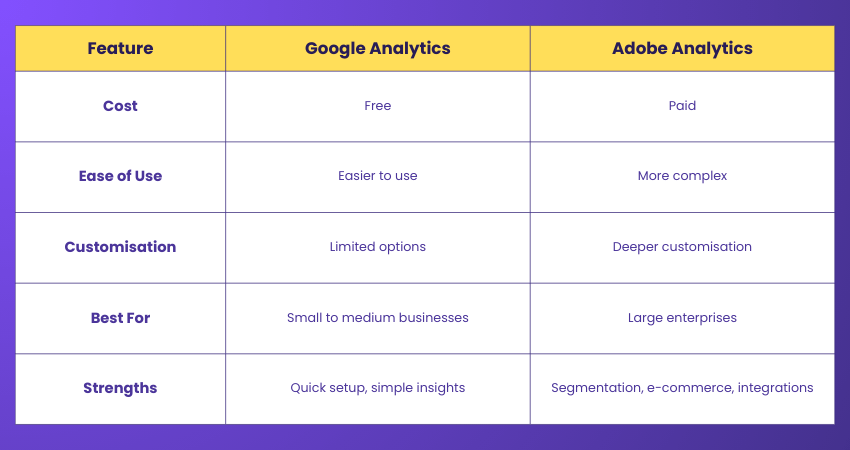
Google Analytics is free and easier to use. Adobe Analytics is paid and offers deeper customisation. Adobe is stronger for enterprises needing detailed segmentation, e-commerce tracking, and integrations. Google works well for smaller businesses. Both tools give insights, but Adobe is more advanced.
How do you utilise predictive analytics in Adobe Analytics?
Predictive analytics in Adobe Analytics is applied to improve decision-making. It helps forecast outcomes like customer churn, purchase likelihood, or lifetime value. By using these insights, teams can take proactive actions, optimise campaigns, and improve customer retention before problems arise.
What are predictive metrics in Adobe Analytics?
Predictive metrics are the specific data points generated by Adobe Analytics’ Machine Learning models. They estimate future outcomes, such as projected revenue or churn probability. These metrics convert historical data into forward-looking insights that support planning and strategy.
What are tracking beacons in Adobe Analytics?
Tracking beacons are small image requests sent when a page loads or an event happens. They carry data back to Adobe servers. Each beacon records details like page URL, visitor ID, and actions taken. This ensures accurate data collection without disturbing the user experience.
What is the function of the Adobe Experience Platform Launch in data collection?
Adobe Experience Platform Launch manages all website tags in one place. It helps add, edit, or remove Adobe Analytics tracking without changing the site code directly. This makes updates faster, reduces errors, and ensures consistent data collection across multiple websites or applications.
What is the objective of the processing rules in Adobe Analytics?
Adobe Experience Platform Launch manages all website tags in one place. It helps add, edit, or remove Adobe Analytics tracking without changing the site code directly. This makes updates faster, reduces errors, and ensures consistent data collection across multiple websites or applications.
What do you think is the primary role of an eVar?
An eVar is a custom variable used for conversion tracking. It remembers values beyond a single page view. For example, if a visitor clicks a campaign link, the eVar can track that action until they purchase. This shows campaign impact on revenue clearly.
What is the use of conversion metrics?
Conversion metrics measure actions like sales, downloads, or sign-ups. They show if campaigns, channels, or pages are driving results. In Adobe Analytics, conversion metrics help calculate revenue, lead generation, or customer growth. They are central to judging success and making better business decisions.
What is the maximum size of the variable s.channel?
The maximum size of the s.channel variable is 100 bytes. It is usually used to track site sections, like “Home” or “Products.” If values are longer than the limit, they will be cut off. Keeping names short ensures clean and useful reporting.
What is the use of multi-suite tagging?
Multi-suite tagging lets you send the same data to more than one report suite. For example, you can track data for a global suite and a regional suite at once. This helps both local and global teams view relevant reports without duplicate setups.
Can you describe when S_account is used?
The S_account variable defines the report suite where data will be sent. It ensures hits from a website or app go to the right container. Without it, data might not appear. Setting S_account correctly is critical for accurate reporting and analysis.
Elevate your career by mastering Adobe with our Adobe Audition Course – Join now!
How do you analyse user behaviour on a website with Adobe Analytics?
You can check reports on visits, clicks, and paths. Segments help break down behaviour by device, channel, or customer type. Pathing shows journeys, while conversion funnels show drop-offs. Dashboards make it simple to see patterns. These insights guide changes to improve user experience.
What is the process of collecting data in Adobe Analytics?
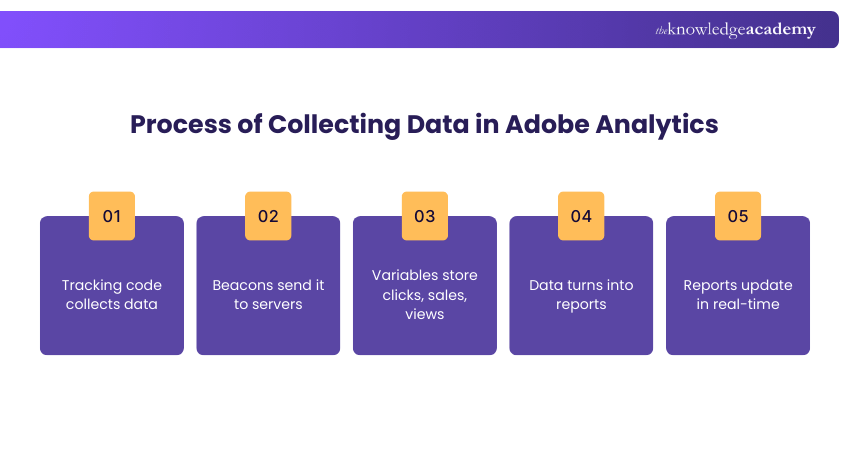
A tracking code sends information each time a page loads or an event occurs. Beacons carry details to Adobe servers. Variables store actions like campaign clicks or product views. The data is then processed into reports. This process happens in near real-time.
What is the available number of custom eVars in each report suite?
Adobe Analytics provides 250 custom eVars per report suite. These allow detailed tracking of campaigns, behaviours, or business needs. You can use them for things like search terms, form fills, or product categories. They make reports more flexible and aligned to specific goals.
What is the use of serialisation in SiteCatalyst metrics?
Adobe Analytics provides 250 custom eVars per report suite. These allow detailed tracking of campaigns, behaviours, or business needs. You can use them for things like search terms, form fills, or product categories. They make reports more flexible and aligned to specific goals.
Can you explain the “expire after” setting for newly enabled eVars (conversion variables)?
The “expire after” setting controls how long an eVar keeps its value. It could be after a visit, after a purchase, or at a fixed time. This ensures tracking matches business needs. For example, a campaign code might expire after a purchase is completed.
What do you know about SiteCatalyst?
SiteCatalyst was the earlier name for Adobe Analytics. It offered similar features like data collection, segmentation, and reporting. Adobe rebranded it after acquiring Omniture. While the platform evolved with new features, many older resources and terms still mention SiteCatalyst as part of its history.
How do you handle tags with Adobe Experience Platform Launch?
Adobe Experience Platform Launch lets you control all tags from one interface. You can add, update, or remove tags without editing the site code directly. Rules and conditions decide when tags fire. This simplifies data collection, reduces errors, and ensures faster updates across websites.
What is the maximum number of report suites a company can have?
Adobe does not set a strict maximum number for report suites. However, best practice is to keep the number manageable. Too many suites can make management harder. Most companies use a mix of global suites and smaller suites for regions or departments.
List the different types of behavioural segmentation
Behavioural segmentation can include purchase behaviour, benefits sought, usage rate, brand loyalty, and occasion-based behaviour. In Adobe Analytics, segments can be built around these patterns. This helps businesses target groups differently. For example, heavy buyers may get special offers while new users receive onboarding campaigns.
Can you share a few use cases of real-time reporting in Adobe Analytics?
Real-time reporting helps track campaign launches, flash sales, or live events. Businesses can see immediate traffic spikes, campaign clicks, or purchases. It supports quick actions, like fixing issues or adjusting promotions. This ensures opportunities are captured while events are still happening.
What is the difference between psychographic and behavioural segmentation?
Psychographic segmentation groups people by lifestyle, interests, or values. Behavioural segmentation groups them by actions, like purchase history or usage rate. For example, psychographics might show “eco-conscious buyers,” while behavioural data shows “repeat customers.” Both help businesses understand audiences and plan targeted strategies.
What is the Data Privacy Request (DPR) feature in Adobe Analytics?
Psychographic segmentation groups people by lifestyle, interests, or values. Behavioural segmentation groups them by actions, like purchase history or usage rate. For example, psychographics might show “eco-conscious buyers,” while behavioural data shows “repeat customers.” Both help businesses understand audiences and plan targeted strategies.
Where does Adobe store the data?
Adobe stores data in its secure cloud servers. Data collected from websites, apps, and campaigns is processed and then available in real-time reports. The cloud-based model ensures faster access, scalability, and strong security for customer information. It also supports global accessibility.

 If you wish to make any changes to your course, please


