


 Top Rated Course

We may not have the course you’re looking for. If you enquire or give us a call on 01344203999 and speak to our training experts, we may still be able to help with your training requirements.
What is Tableau: A Complete Guide to Tableau
The Knowledge Academy 09 December 2025Tableau is a visual analytics platform that helps users connect with and explore data to create interactive visualisations, dashboards, and reports. It helps collect, analyse and present complex data in a clear and interactive way. Understanding What is Tableau and how it works will equip you to make better decisions across industries.

Training Outcomes Within Your Budget!
We ensure quality, budget-alignment, and timely delivery by our expert instructors.
Table of Contents

Tableau has become a key tool in the field of Data Visualisation and Business Intelligence. If you are beginning your journey into data, understanding What is Tableau is crucial. It enables turning raw data into valuable insight for fostering smart and well-informed decisions.
Tableau’s simplicity, efficient performance in the domain of IT and service sector makes it a popular choice amongst professionals. So, if you are ready to explore the full potential of Tableau, keep reading this blog ahead. It will discover What is Tableau, how it works, advantages, values and more!
Table of Contents
1) Understanding What is Tableau
2) History of Tableau
3) Tableau Features
4) Merits of Tableau
5) Demerits of Tableau
6) Values on Tableau
7) Excel vs Tableau
8) Is Tableau, the Right Choice for Data Analysts?
9) Conclusion
Understanding What is Tableau
Tableau is a leading Business Intelligence (BI) and Data Visualisation tool developed to make Data analysis accessible to everyone. It helps individuals and organisations to convert raw data into dynamic, shareable dashboards to find valuable insights for strategic decision-making. It seamlessly connects a wide range of data sources, from basic spreadsheets to advanced databases.
Tableau’s intuitive interface encourages users to go deeper into their data. It aids business to identify trends and discover patterns proactively. It is available across desktops, and mobile devices to ensure insights are in reach. Ultimately, it empowers you to explore information clearly and insightfully for transforming it into valuable outcomes supporting business decisions.

History of Tableau
The journey of Tableau started in 2003 by three researchers of Stanford University- Christian Chabot, Pat Hanrahan and Chris Stolte. It began when they developed a technology, named VizQL (Visual Query Language). So, What is Tableau? Built on the idea that data must be accessible to everyone. Tableau introduced dynamic features for visualisation replacing traditional reporting methods.
Through the years, Tableau has emerged as one of reliable and popular names in the domain of Business Intelligence. From simple charts to advanced dashboards, it has evolved, offering tools, such as Tableau Filters and charts. Its user-friendly platform and simplicity have transformed how professionals work with data, establishing Tableau as a leader in modern data visualisation and analytics.
Tableau Features
Tableau provides a wide range of features, making it one of the go-to data visualisation tools for organisations and individuals. For understanding What is Tableau let's investigate the prominent features that make Tableau stand out in the world of Business Intelligence include:
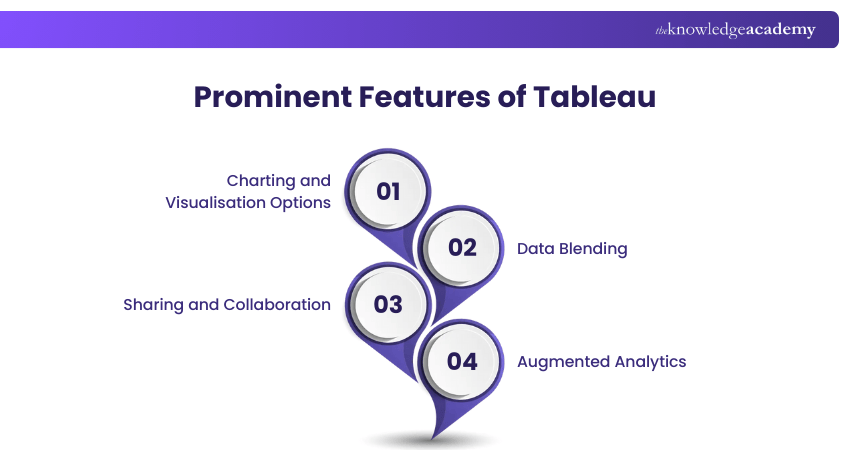
1) Charting and Visualisation Options
Tableau offers users a library of visual formats, such as line graphs, bar charts, pie charts, heat maps, histograms and much more. These visual tools make it easier for organising complex data and display patterns, trends and comparisons with clarity and engaging way.
2) Data Blending
By the integration of data blending, Tableau enables users to combine information with multiple data sources into a centralised display. This powerful feature helps to compare sets of data, spot relations and discover insights without the requirement of merging data or programming skills.
3) Sharing and Collaboration
Through its rich collaboration tools, Tableau fosters seamless teamwork. By utilising platforms, such as Tableau Server and Cloud, it enables teams to work in collaboration on dashboards and reports. Also, Tableau Public allows users to share data through interactive visualisations with a global audience publicly.
4) Augmented Analytics
Through the power of AI (Artificial Intelligence) and ML (Machine Learning), Tableau’s augmented analytics make interpreting data intuitive. It allows users to ask questions through natural language and receive insights to the queries instantly. Also, by utilising automated form of storytelling, complex data is explained simply for audiences with non-technical background.
Learn the fundamentals of Data Analytics for your projects by signing up for the Data Analytics for Project Managers Training now!
Merits of Tableau
Tableau is widely recognised for its powerful data integration, visualisation abilities and user-friendly interface. Below, users can understand What is Tableau in further detail by getting familiar with the key benefits it provides:
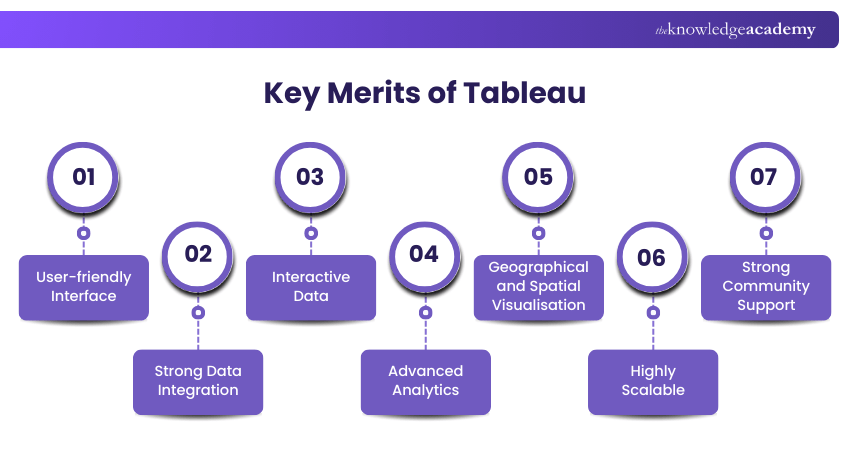
1) User-friendly Interface
Tableau known for its simple and easy to navigate design with drag and drop interface helps users to create high quality visualisation with programming skills. This makes Tableau tools accessible for beginners while offering advanced features and depth for advanced users.
2) Strong Data Integration
Tableau can connect wide range of data, such as spreadsheets, databases, cloud platforms and enterprise systems. This blending feature enables users to combine data from multiple sources. This makes analysis of data efficiency and seamless.
3) Interactive Data
Users can create dynamic dashboards allowing interaction through filters, editing options and more. This helps to find real time insights, spot trends, and identify risks. Due to its fast-processing process, it helps to foster decision-making quicker through utilising large datasheets.
4) Advanced Analytics
Tableau combines effectively with advanced analytics and statistical tools. It supports various functions, such as clustering, forecasting and trend analysis. This simplifies complex analytical tasks and help users create predictable models.
5) Geographical and Spatial Visualisation
Its ability to visualise geographical data with multiple layers and map formats makes Tableau standout. This supports use cases, such segmenting markets, planning for logistics and analysing regional performances. this enables businesses to make decisions based on the relevance of specific locations.
6) Highly Scalable
Irrespective of the size of business handling large datasets, Tableau provides scalabilities for all. It manages high volumes of data, making it reliable for organisations of any size.
7) Strong Community Support
Tableau users have access to a vast library of learning materials, such as tutorials, articles and documentation. Its active global community provides guidance, follows the best practices and offers real-time insights to foster an environment of consistent learning.
Advance your career in analytics with Business Objects Reporting Training – Join now!
Demerits of Tableau
Tableau is a powerful data visualisation tool, but it comes with its own set of demerits. Understanding these drawbacks aids in selecting the right tool and deepens clarity over What is Tableau
1) High Cost
It is a costly tool for analytics segment. Due to its high cost, it poses a challenge for small and medium-sized businesses. Although Tableau Public is free to use, it has restrictions over data privacy and sharing controls.
2) Limited Visual Customisation
Tableau offers limited design flexibility for advanced visual formats. Due to the limited options to choose from, users working with complex visual needs find customisation options limited and restrictive,
3) No In-build Scheduling for Reports
Tableau does not provide users native report scheduling. This makes users often update dashboards and manually deliver reports. For organisations or enterprises needing automated scheduling, this can pose a limitation.
4) Complicated Custom Formatting
It can be time-consuming to format in Tableau, especially when managing large reports. For instance, wanting to format multiple columns requires the changes to be made individually. This can result in a tedious process and does not work effective under time-sensitive deadlines.
5) Lack of Version Control
Tableau does not provide users with strong control on version functionality. For tracking edits or managing file version, it poses a difficulty. This increases the risk of losing data and duplication of efforts when working in teams.
6) Challenges for Preparing Data
Since, Tableau’s primary focus is on visualisation, it lacks robust built-in data preparation features. Users require external tools for certain tasks, such as transforming, segregating or cleaning data. This increases effort and is time-consuming for projects that require extensive pre-processing.
7) Limited Collaboration
Some level of collaboration is allowed on Tableau but, its co-editing and teamwork features are limited. This affects productivity levels for large teams working together on dashboards and workbooks.
Values in Tableau
Under Tableau, you will come across two fields, namely Measure Names and Measure Values. They are automatically created by Tableau to help users work with multiple measures flexibly.
1) Measure Values: This represents the measure fields in your data in a centralised continuous field. This means you can drag that field into a view and it aggregates the measures it includes by their default aggregation. By placing them on rows, columns or marks shelves, you can build visualisations, showing KPIs, such as sales, profit and discounts.
2) Measure Names: This represents the names of all measures in your data into a single discrete field. This enables you to display the measure names, such as sales or profit as part of the view. They also let you rename measure labels for bringing more clarity. This makes dashboards more readable for end-users. Also, measure Names can be filtered to show specific metrics.
Learn to power BI skills for success and insight with Microsoft Power BI Course now!
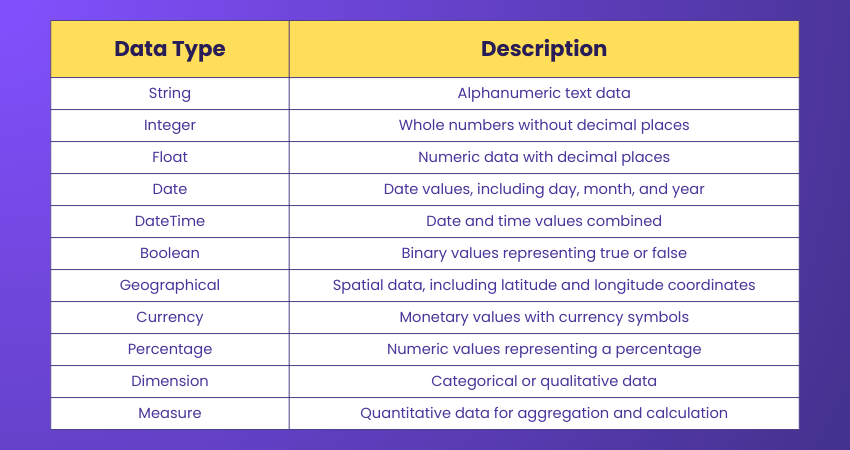
File Types used in Tableau
Tableau allows users to save and share their work using various File formats specific to Tableau. These File formats have different purposes and features, depending on users’ needs. The table below summarises the different Types of Files that Tableau supports:
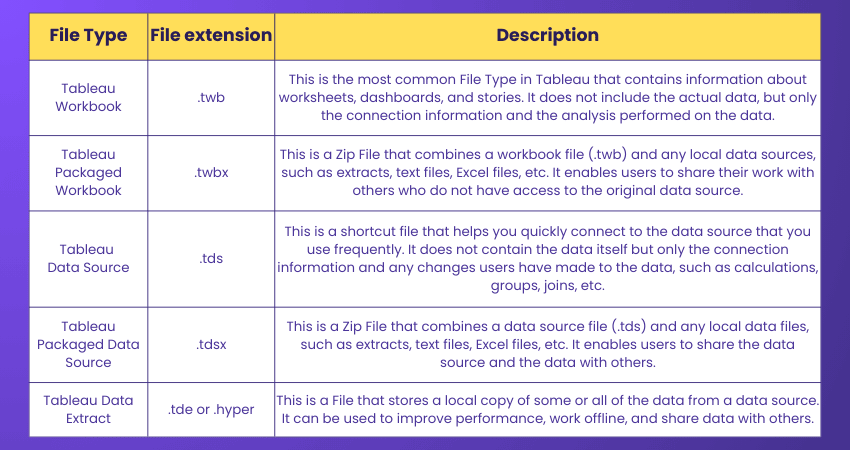
Excel vs Tableau
Excel and Tableau are popular Data Analysis tools with different strengths and weaknesses. Some of the differences and advantages of Excel and Tableau are as follows:

Is Tableau, the Right Choice for Data Analysts?
Tableau is a widely utilised tool amongst Data Analysts for its visualisation capabilities and seamless ability to present analytics in interactive dashboards. However, modifying embedded analytics after deployment can be difficult, often requiring additional tools. This can potentially slow down workflows.
While Tableau is excellent for reporting tasks, it provides less flexibility for startups. This is why Data Analysts need other platforms for advanced modelling before returning to Tableau. Since, it acts as a part of broader analysis stack rather than standalone solutions, costs and complexity may arise for small sized enterprises. Overall, it promotes a data-driven culture while tool switching, and workflow limitations can make analytical adoption difficult.
Conclusion
This platform provides a powerful and accessible space for Data Visualisation and Analysis. With its intuitive design, wide range of data connection options and interactive visual analytics, Tableau empowers users to understand and present insights with simplicity. By deeply understanding What is Tableau, you can see how it helps individuals and enterprises turn complex information into meaningful decisions.
Learn how to use the reporting functions of Business Intelligence solutions with our Business Intelligence Reporting Courses!
Frequently Asked Questions
What is Tableau Used For?

Tableau is a versatile tool for Data Visualisation and Analysis, enabling connections to diverse data sources like databases and spreadsheets. It facilitates the creation of shareable, interactive dashboards and reports.
How is Tableau Installed on Mobile Devices?
Tableau can be installed on mobile devices using the Tableau Mobile app, which is available for iOS and Android devices. The app lets users access and interact with their Tableau dashboards and reports on the go and receive alerts and notifications.
What is The Knowledge Pass, and How Does it Work?
The Knowledge Academy’s Knowledge Pass, a prepaid voucher, adds another layer of flexibility, allowing course bookings over a 12-month period. Join us on a journey where education knows no bounds.
What are the Other Resources and Offers Provided by The Knowledge Academy?
The Knowledge Academy takes global learning to new heights, offering over 3,000+ online courses across 490+ locations in 190+ countries. This expansive reach ensures accessibility and convenience for learners worldwide.;
Alongside our diverse Online Course Catalogue, encompassing 19 major categories, we go the extra mile by providing a plethora of free educational Online Resources like Blogs, eBooks, Interview Questions and Videos. Tailoring learning experiences further, professionals can unlock greater value through a wide range of special discounts, seasonal deals, and;Exclusive Offers.
What are the Other Resources and Offers Provided by The Knowledge Academy?
The Knowledge Academy offers various Business Intelligence Reporting Courses, including Tableau Desktop Training, Microsoft Power BI Course and DAX Course. These courses cater to different skill levels, providing comprehensive insights into Business Intelligence Platform.
Our Office Applications Blogs cover a range of topics related to Data Visualisation offering valuable resources, best practices, and industry insights. Whether you are a beginner or looking to advance your knowledge on Data Visualisations, The Knowledge Academy's diverse courses and informative blogs have you covered.

The Knowledge Academy


Global Training Provider
The Knowledge Academy is a world-leading provider of professional training courses, offering globally recognised qualifications across a wide range of subjects. With expert trainers, up-to-date course material, and flexible learning options, we aim to empower professionals and organisations to achieve their goals through continuous learning.

Upcoming Office Applications Resources Batches & Dates
Date
 Tableau Desktop Training
Tableau Desktop Training
Fri 20th Mar 2026
Tableau Desktop Training
Fri 15th May 2026
Tableau Desktop Training
Fri 14th Aug 2026
Tableau Desktop Training
Fri 13th Nov 2026

 If you wish to make any changes to your course, please


