




We may not have the course you’re looking for. If you enquire or give us a call on +44 1344 203 999 and speak to our training experts, we may still be able to help with your training requirements.
What is an Issue Log?
ByGrace MitchellLast updated on: 19 August 2026
An Issue Log is a structured record used in project management to document, track, and manage problems that arise during a project. Issue Logs can be maintained in spreadsheets, project management software, or collaborative online tools.

KEY TAKEAWAYS:
1. An Issue Log creates a central record of project problems and their progress towards resolution.2. Giving each issue to a responsible owner reduces the chance of problems being overlooked.3.Recording the priority of each issue helps teams focus their time and resources on the most important project concerns.4. Regular status and priority updates help teams understand unresolved issues and coordinate their work effectively.5. Recording how issues were resolved creates a useful history that teams can refer to when similar challenges arise in future projects.
If you want to know what makes an Issue Log a Project Manager's best friend, consider this:
You're managing a high-stakes Software Development project.
The launch date is just two weeks away!
Stakeholders are eagerly waiting, and everything seems to be on track.
Then, during a routine testing session, the team discovers that customers can't complete payments through the application. Panic starts to spread. Amid the chaos, one question becomes critical: How do you track the issue, assign responsibility, monitor its progress and ensure it's resolved before launch?
That's where an Issue Log comes as a structured tool that captures every challenge affecting a project. In Project Management, where even small issues can snowball into major setbacks, an Issue Log acts as the central command centre for turning obstacles into solutions.
What is an Issue Log?
An Issue Log in Project Management is a useful tool that helps to document and address issues that may occur during the project life cycle. It helps store, identify, and organise problems in a system, which is reviewed until a solution is found. A standard format may comprise the problem description, status, priority, responsible person and timeframes for closure.
Consider this when deciding if something truly belongs in the Issue Log:
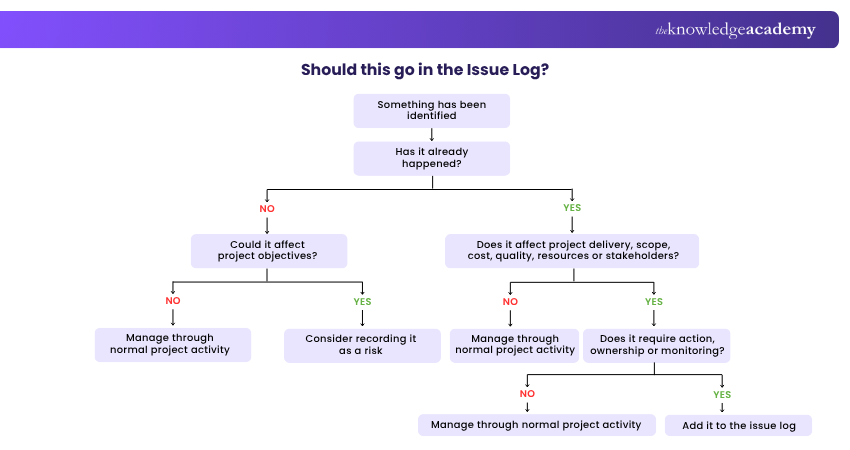
Benefits of Using an Issue Log
Using an Issue Log offers numerous benefits for effective Project Management which are listed below:
a) Enhanced Visibility: An Issue Log provides a clear overview of all issues, ensuring that Project Managers and Stakeholders are aware of current problems. This transparency helps in prioritising and addressing issues promptly.
b) Improved Accountability: Each issue in the log is assigned an owner responsible for its resolution. This clear delegation of responsibilities ensures that issues are not overlooked and that there is a designated person accountable for resolving them.
c) Efficient Problem Solving: By systematically documenting issues, their causes, and the steps taken to resolve them, the log facilitates more efficient Problem-solving. Teams can refer to past issues to identify patterns and implement proven solutions quickly.
d) Better Communication: The Issue Log serves as a communication tool among team members and stakeholders. It ensures everyone is on the same page regarding the project's challenges and progress.
e) Project Continuity: In case of team changes, the Issue Log provides a historical record of issues encountered and resolved. This continuity ensures that new team members can quickly get up to speed on past challenges and their solutions.

What are the Components of an Issue Log?
The components of an Issue Log can transform it from a plain document to a powerful Project Management tool. Each of its components has a unique purpose and can detect, manage, and resolve issues. Some of its essential components are listed below:
a) Issue Number: If you want to monitor a problem, you should be able to distinguish it from others. Furthermore, you must understand that there will always be multiple issues. Thus, giving a number to your issue can solve your problem.
b) Status: It is critical to record whether the issue is open, in progress, blocked, or resolved. This is where you'll keep track of how you're getting it resolved.
c) Issue Description: As an important factor, you should write down the problem in detail. It may seem simple, but you should not have the same issue tracked twice in your log. If you want someone to handle the issue, you should explain what happened so they don't have to chase people down and delay their response.
d) Category: You must classify issues as per the department or vendor, or by the issue itself. These may vary based on the project or team.
e) Priority: You should prioritise having the time or resources to address every Issue. This can be done by filtering the log and focusing on the most essential project concerns.
f) Assigned to: It is marked as an essential component because having no owner for the Issue can reduce its chances of getting resolved. This component lets you identify the assigned team member to follow up on the issue until it is resolved.
g) Raised by: This is distinct from the appointed owner, who will guide the issue through the project and work to resolve it. This person was the first to notice it, and they should be included here because they may be able to help later by answering questions that lead to its resolution.
h) Open Date: If you want a time frame, you must start from the day the problem was noticed. This can help you track the required time to resolve an Issue Log.
i) Closed Date: You now have a firm schedule from start to finish, which might be useful if you need to look back at historical data while dealing with a similar issue in a later project.
j) Comments: You should always have space to take down relevant information, such as how the problem was resolved, whether it was related to another task, the possibility of recurrence, and so on.
Issue Log Template
An Issue Log Template is a structured document used to record, track, and manage issues that arise during a project. It helps teams monitor problem status, assign responsibilities, and ensure timely resolution. Here’s an ideal template you can follow:
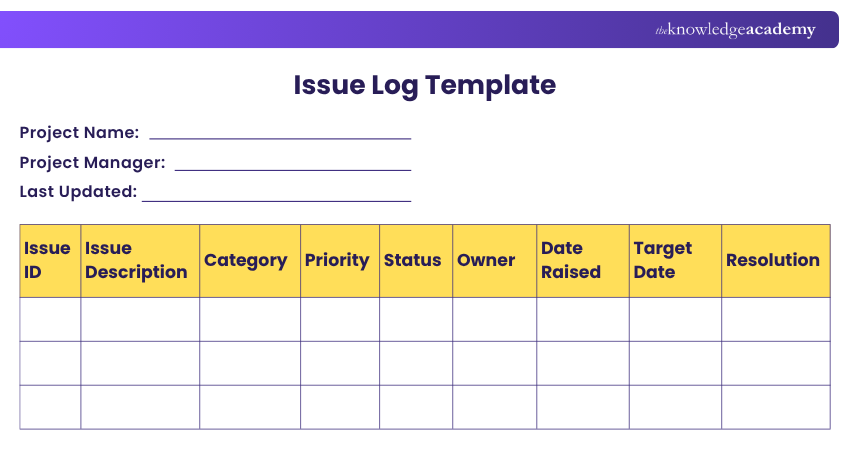
The template brings the key Issue Log components together in one place, allowing teams to record ownership, priority, status, dates, and resolution details for each issue.
Trainer Insight:
Write an issue so that someone outside the immediate conversation can understand it. Capture what happened, what it affects and why action is required. “Testing blocked because the payment gateway returns an authentication error” is far more actionable than “Payment problem”.
How to Create an Issue Log?
Creating an Issue Log involves following a clear and structured process. Here are the key steps to help you create and manage one effectively:
1) Choose a Format or Tool
An Issue Log can be maintained using a spreadsheet, database, Project Management platform, or Issue Management tool. Choose an option that suits the project's size, complexity, and collaboration requirements.
2) Establish an ID System
Create an ID system once you've decided on the type of program you'll be using for your Issue Log. Many Project Managers just assign a number to each report, but you can also create unique codes. This allows you and your team members to keep track of each Issue and helps them become more accurate and organised.
Learn how to anticipate threats through world-class Risk Management practices in our Risk Management Black Belt Training - Sign up now!
3) Create Categories
Next, you must think about the effective categories to group the reports you receive. For example, you can define categories based on the Issue type, its domain or the priority level. This can also help you swiftly filter reports and assign responsibilities. Once you've determined which categories are most useful, you must construct drop-down menus.
4) Identify key Information
As an essential step, you should consider what additional critical facts are required to address difficulties. For example, you might want to know who is reporting the problem, when the complaint was submitted, and so on. You can also include a section for extra remarks to ensure you get all the necessary information.
Interested in unlocking your potential in Project Management? Sign up now for range of our Project Management Courses!
Not every Issue Log entry is useful. As mentioned above, a vague or incomplete entry can make it harder for the team to understand, prioritise and resolve the problem. Take a look at the example below involving a website issue and see if you can spot what is missing:
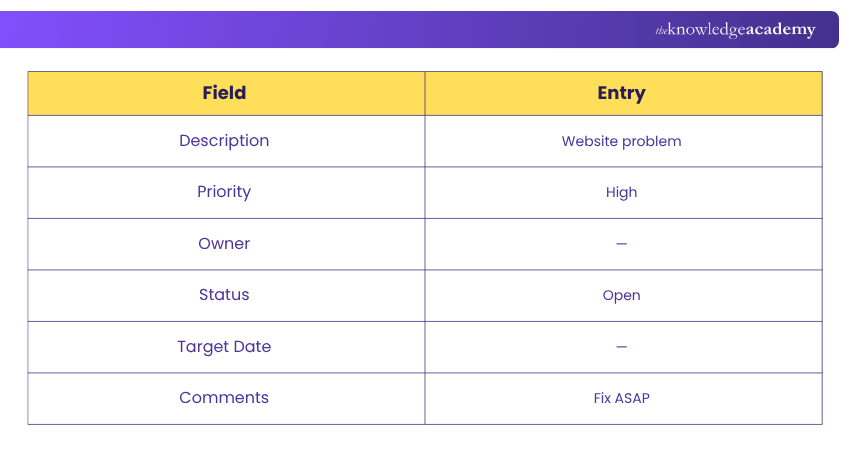
Here’s everything wrong with it:
❌ Vague Description: “Website problem” does not explain what has happened or which part of the website is affected.❌ Missing Owner: No one has been assigned responsibility for managing the issue.❌ Unclear Priority: The issue is marked “High” without explaining its impact or urgency.❌ No Target Date: There is no expected timeframe for resolving the issue.❌ No Clear Next Action: “Fix ASAP” does not tell the team what needs to happen next.
Here’s a proper version of this Issue Log entry:
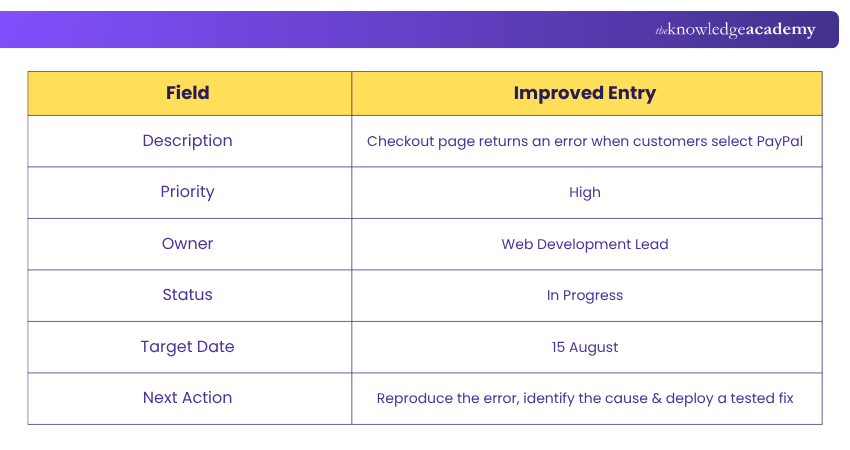
Issue Log Best Practices
Incorporating standard best practices into your Issue Management approach helps you and your team optimise your Issue Log. Here are some proven steps for maintaining an effective record:
1) Create Thorough Entries
Each challenge is embedded in a distinct environment that team members should be aware of before they proceed to solution-making. Posting in-depth about a problem early diminishes the need to search for more information about it.
2) Assign Tasks
When someone creates a new entry on their log, don’t just assume that your group is acting because of that. Organise the research and resolution tasks for individuals and run the team members accountability sessions to make sure they have the resources.
3) Make Routine Updates
Keep your log up to date by periodically updating your priorities, closing out situations, and using a task-by-task status update. It helps your teammates identify which issues are still open, adjust their workflows and expectations, and focus their efforts on resolving them.
Among all the things to look into, consider this Issue Log health check:
Is Your Issue Log Actually Working?
☐ Every open issue has an owner☐ Priorities reflect impact and urgency☐ Statuses are regularly updated☐ Target resolution dates are visible☐ Overdue or critical issues are escalated☐ Resolutions are recorded before closure☐ Closed issues can inform future projects6–7 ✓ → Well controlled
4–5 ✓ → Needs attention
0–3 ✓ → Review your Issue Management process
Conclusion
A firm grasp on What is an Issue Log in project Management is vital because this tool helps teams document, track and resolve issues that arise during a project. By providing visibility and accountability, it ensures that the challenges are addressed before they impact project success. Ultimately, a proper Issue Log keeps projects organised, stakeholders informed and the teams' focus fixed on their goals.
Learn proven Risk Management frameworks and become a trusted professional with our Certified Risk Management Professional (CRMP) Training - Sign up now!

Grace Mitchell creates practical Project Management content covering project delivery, governance, stakeholde engagement and programme coordination. Her knowledge of established methodologies helps readers understand complex project environments and approach project delivery with greater structure and confidence.
View Detail

 If you wish to make any changes to your course, please


