


 Top Rated Course

We may not have the course you’re looking for. If you enquire or give us a call on 01344203999 and speak to our training experts, we may still be able to help with your training requirements.
What is 3D Rendering? A Complete Guide
Pearl Williams 16 February 20263D Rendering is the process of using computer software to generate a 2D image from a 3D model, creating a graphically perceivable depiction of the object. It's the final step in 3D visualisation, bringing static models to life with realistic lighting and shadows. It's used in industries like Architecture, Gaming and Product Design.

Training Outcomes Within Your Budget!
We ensure quality, budget-alignment, and timely delivery by our expert instructors.
Table of Contents
Transforming imagination into striking visual reality is the power that 3D Rendering holds. It's the secret behind those jaw-dropping visuals that we enjoy in movies, games and Architecture. From photorealistic designs to animated worlds, this groundbreaking technology is the backbone of modern visualisation.
In this blog, we'll break down what is 3D Rendering, how it works and why it’s revolutionising industries everywhere. So read on, step into the world of digital artistry and turn your vision into immersive experiences.
Table of Contents
1) What is 3D Rendering?
2) 3D Rendering Process
3) How Does 3D Rendering Work?
4) Types of 3D Rendering
5) Main 3D Rendering Methods
6) Conclusion
What is 3D Rendering?
3D Rendering is the process of generating a realistic two-dimensional (2D) image from a three-dimensional model. It represents the final stage of 3D visualisation, following modelling, texturing and the application of lighting to a scene.
Rendering software processes all the data contained in the 3D model, including geometry, materials, lighting, and camera positioning, to produce a finished 2D image. With advanced lighting, shading, and texturing techniques, the final output can closely resemble a real photograph or be intentionally stylised, depending on the artist’s creative vision and project requirements.

3D Rendering Process
Essentially, 3D Rendering is a creative workflow comparable to Photography or Filmmaking. It begins with a concept, develops through composition and design, and is then shaped, lit and staged to produce a final image. The key distinction is that, in 3D Rendering, the entire scene exists only in a digital space and must be created before it can be rendered.
While this demands significant effort, it also offers complete creative control over every element in the scene. One of the most challenging aspects is rendering time, as the software must calculate each pixel individually. This involves complex computations related to light behaviour, reflections and interactions between objects.
How Does 3D Rendering Work?
3D Rendering is the final crucial stage of the 3D visualisation process. Here's a detailed breakdown of the 3D visualisation process, culminating in 3D Rendering:
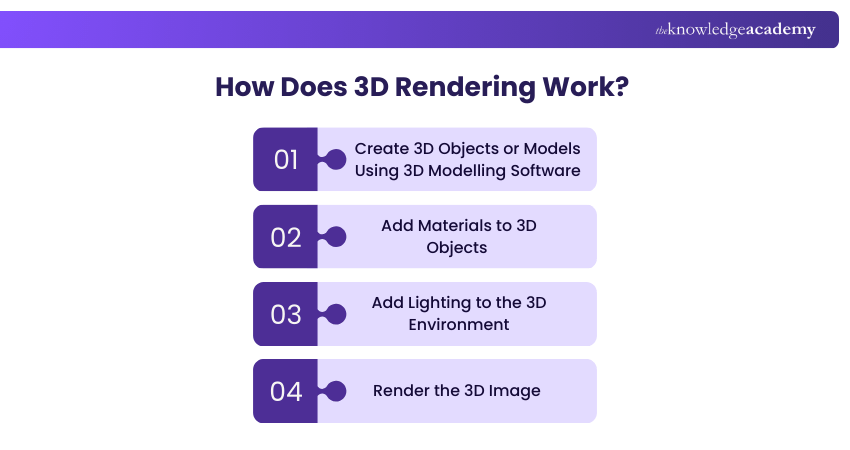
1) Create 3D Objects or Models Using 3D Modelling Software
1) Create 3D models using sculpting applications that shape polygons into detailed assets.
2) Use polygon-based modelling for organic forms such as people, animals, or plants, where artistic flexibility is important.
3) Apply surface and edge-based modelling tools for precise, mathematically accurate designs, commonly used in CAD and industrial design.
4) Scan real-world objects with specialised tools to recreate them digitally in 3D space.
5) Generate models procedurally using software-driven mathematical rules.
2) Add Materials to 3D Objects
1) Polygons define the basic shape of 3D objects but do not contain colour or surface detail on their own.
2) Textures are applied to polygons to add colour, patterns and surface characteristics.
3) Textures can represent a wide range of materials, from natural surfaces like wood and stone to metals and plastics.
4) Complex 3D models may consist of thousands or millions of polygons with initially blank surfaces.
5) Advanced 3D materials create the illusion of depth and realism without increasing the geometric complexity.
6) Textures can simulate fine details such as fabric stitching or metal rivets, thus avoiding the need to model these elements manually.
Turn the simplest ideas into stunning visuals with our Animation Course - Sign up now!
3) Add Lighting to the 3D Environment
1) 3D objects must appear realistic, especially in applications such as architectural visualisation.
2) Realistic lighting transforms simple polygon models into believable environments.
3) 3D artists define lighting through settings like direction, intensity and light type rather than manually painting light and shadow.
4) Textures created with prominent software follow Physically-based Rendering (PBR) principles for consistent realism across lighting conditions.
5) PBR ensures that the materials look natural in varied environments.
6) Certain materials interact uniquely with light, such as glass, water, and ice, adding realism and visual impact.
4) Render the 3D Image
1) Begin the 3D Rendering stage once the modelling, texturing and lighting are complete.
2) Use rendering software to capture a computer-generated snapshot of the scene from a defined viewpoint.
3) Convert the 3D scene into a final 2D image.
4) Render a single image or a sequence of frames to simulate real-time motion.
5) Apply different rendering methods, such as real-time rendering or ray tracing, to influence image quality and realism.
6) Rendering performance and output depend on available Graphics Processing Unit (GPU) and Central Processing Unit (CPU) capabilities.
Types of 3D Rendering
3D Rendering can produce a wide range of visual outputs, from highly realistic images to deliberately stylised visuals. The choice depends on the purpose of the visualisation and the intended audience.
1) Realistic
Realistic rendering focuses on creating photorealistic images that closely resemble real-world environments and objects. This style carefully simulates lighting, materials, reflections, shadows, and textures to replicate how objects behave in real life.
It is widely used in architectural visualisation, product design, and automotive rendering, where accuracy and realism are essential. Businesses rely on realistic rendering for marketing campaigns, investor presentations, and client approvals because it helps stakeholders visualise the final product before it is physically built.
2) Non-realistic
Non-realistic rendering produces stylised or illustrative visuals rather than aiming for photographic accuracy. This can include outline diagrams, cel-shaded graphics, schematic views, or cartoon-style images that intentionally retain a 2D artistic feel.
This approach is commonly used in concept art, educational materials, technical documentation, and creative storytelling. By simplifying detail and emphasising form or structure, non-realistic rendering helps communicate ideas clearly without overwhelming viewers with visual complexity.
Our comprehensive Dimensional Modelling Foundations Training is designed to make analytics effortless. Sign up now and build the backbone of Business Intelligence!
Main 3D Rendering Methods
There are two primary approaches to 3D Rendering: CPU-based rendering and GPU-based rendering. Each method uses different hardware strengths to suit different production needs. Let's explore them:
1) CPU-based Rendering
CPU rendering relies on the computer’s central processor. It is widely used in film production and architectural visualisation, where achieving high levels of realism is more important than rendering speed. CPU rendering supports advanced lighting techniques, including:
1) Ray Tracing: This simulates light interaction at the pixel level to produce realistic reflections and shadows.
2) Radiosity: This accounts for light reflected between surfaces, producing softer, more natural shadows.
3) Path Tracing: This calculates how light reaches the camera after interacting with surfaces, repeating the process for each pixel to achieve photorealism.
2) GPU-based Rendering
GPU rendering uses the computer’s graphics card to perform many calculations simultaneously. It's commonly used in video games, simulations and interactive applications where smooth motion at 30 to 120 frames per second is required.
Since real-time rendering limits complex lighting calculations, GPU workflows often use visual tricks such as motion blur or simplified lighting to maintain performance. Beyond real-time use, GPUs also support faster previews of complex scenes.
Conclusion
3D Rendering is where creativity meets technology, turning ideas into convincing visuals. From design planning to immersive storytelling, it shapes how we see and understand concepts before they exist. Understanding What is 3D Rendering opens endless possibilities, allowing Creators to build realistic, imaginative worlds.
From designing to animating, your journey to stunning visuals starts here. Sign up for our Animation and Design Training now!
Frequently Asked Questions
What is the Difference Between 3D Modelling and Rendering?

3D modelling is about creating the shape and structure of a digital object or scene. 3D Rendering converts that model into a finished 2D image by applying lighting, textures, materials and camera settings.
Is 3D Rendering Graphic Design?
3D Rendering is related to Graphic Design but is not the same. Graphic Design focuses on 2D visuals and layout, while 3D Rendering creates realistic images from 3D models using specialised software and technical processes.
What are the Other Resources and Offers Provided by The Knowledge Academy?
The Knowledge Academy takes global learning to new heights, offering over 3,000+ online courses across 490+ locations in 190+ countries. This expansive reach ensures accessibility and convenience for learners worldwide.
Alongside our diverse Online Course Catalogue, encompassing 19 major categories, we go the extra mile by providing a plethora of free educational Online Resources like Blogs, eBooks, Interview Questions and Videos. Tailoring learning experiences further, professionals can unlock greater value through a wide range of special discounts, seasonal deals, and Exclusive Offers.
What is The Knowledge Pass, and How Does it Work?
The Knowledge Academy’s Knowledge Pass, a prepaid voucher, adds another layer of flexibility, allowing course bookings over a 12-month period. Join us on a journey where education knows no bounds.
What are the Related Courses and Blogs Provided by The Knowledge Academy?
The Knowledge Academy offers various Animation and Design Training, including the Video Editing Training, Blender 3D Modelling for Unity Training and the Dimensional Modelling Foundations Training. These courses cater to different skill levels, providing comprehensive insights into 3D Modelling.
Our Office Applications Blogs cover a range of topics related to 3D Rendering, offering valuable resources, best practices, and industry insights. Whether you are a beginner or looking to advance your Animation skills, The Knowledge Academy's diverse courses and informative blogs have got you covered.
Upcoming Office Applications Resources Batches & Dates
Date
 Blender 3D Modeling for Unity Course
Blender 3D Modeling for Unity Course
Fri 24th Apr 2026
Blender 3D Modeling for Unity Course
Fri 31st Jul 2026
Blender 3D Modeling for Unity Course
Fri 30th Oct 2026

 If you wish to make any changes to your course, please


