




We may not have the course you’re looking for. If you enquire or give us a call on 01344203999 and speak to our training experts, we may still be able to help with your training requirements.
What is a Network Database and How Does It Work?
ByThe Knowledge AcademyLast updated on: 19 September 2026
A Network Database organises data as interconnected records, where each record can link to multiple parent and child records, enabling complex relationships. It helps businesses manage complex data efficiently and reduces duplication. Commonly used in banking, manufacturing, and telecommunications, it ensures smooth data handling.
The Gist
1. Structure: Unlike a strict hierarchy, the network model allows data to form interconnected relationships.2. Navigation: Applications retrieve related information by following established paths between records.3. Key Strength: The model is well suited to complex data relationships with predictable access patterns4. Main Limitation: Changes to established structures and access paths can require additional effort.5. Notable Systems: IDMS, IDS, TurboIMAGE and DMS-1100 are recognised examples of the network database model.
Ever found yourself wondering how businesses manage large amounts of connected data without confusion? That’s where network databases come in. Unlike simple databases, they create flexible links between data, allowing multiple connections for better organisation. This means a single record can be linked to several others, forming a web of relationships that mirrors real-world data interactions.
Whether it's a customer linked to multiple orders, or a supplier connected to various products, a network database handles it seamlessly. By using pointers to connect related records, it can provide efficient data retrieval when applications follow predefined access paths. This structure has been particularly useful in established enterprise and transaction-processing systems where data follows well-defined relationships and access paths.
What is a Network Database?
A Network Database Management System (NDBMS) is based on a network data model, which allows records to participate in multiple relationships, including relationships in which a record can be linked to multiple parent or owner records. This structure creates a flexible model of relationships between entities.
The network database model evolved from Charles Bachman’s pioneering work on Integrated Data Store (IDS) and was later formalised through specifications developed by the CODASYL Data Base Task Group (DBTG).
Unlike hierarchical databases that follow a tree structure, network databases support multiple relationships using defined links between records. The word “network” in this context refers to the connections between data entities, not to computer or software networks. Network database systems helped shape the development of later database technologies.
Trainer Insight
A network database and a graph database may both represent connected data, but they are not the same. Traditional network databases rely on predefined navigational relationships and access paths, while graph databases are designed around nodes, edges, and flexible relationship traversal.

How Does a Network Database Work?
A network database organises data as interconnected records linked through defined relationships. It can be visualised as a graph-like structure, where records act like nodes, and their relationships act like connections between them. This setup allows records to participate in multiple relationships, making it possible to represent complex data structures.
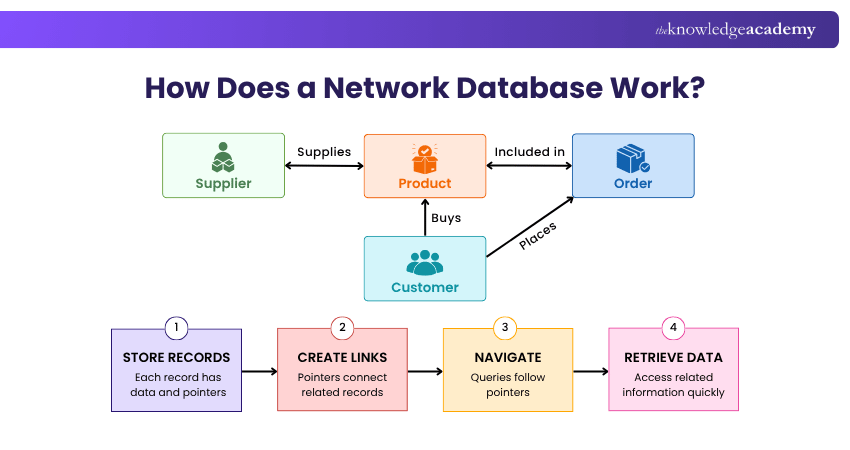
Each record typically contains data fields (attributes) and participates in defined relationships with other records. These connections establish relationships and support navigational access between connected records.
To retrieve data, an application can start at a particular record and follow the defined links to related records. This can be efficient when the access path is known in advance.
Network Database Model Pros and Cons
The network database model offers both advantages and disadvantages. It depends on the complexity of the data and system requirements. Below is a detailed overview of its key strengths and limitations.
1) Network Database Model Pros
a) Supports Complex Relationships: The network database model allows records to participate in multiple relationships, making it suitable for representing complex and interconnected data structures.
b) Efficient Navigational Access: Direct links between related records can provide efficient data retrieval when applications follow predefined access paths.
c) Supports Relationship Integrity: Well-defined relationships between records can help maintain consistent connections between related data when supported by appropriate database controls.
d) Handles Many-to-many Relationships: The network model can represent many-to-many relationships using multiple defined relationships between record types.
e) High Performance for Defined Access Patterns: Direct navigational access between related records can provide strong performance for applications with stable, predefined access paths, particularly in established transaction-processing systems.
2) Network Database Model Cons
a) Complex Design and Implementation: Designing a network database can be challenging due to the need to define records, relationships and access paths carefully.
b) Rigid Navigation Paths: Users must follow predefined access paths, which can limit flexibility in querying and adapting to new requirements.
c) Lack of Standard Query Language: Unlike relational databases, which commonly use SQL, traditional network databases do not share one widely used native query language. Some implementations also offer SQL access.
d) Difficult to Maintain and Modify: Updating the structure or adding new relationships often requires extensive changes, leading to higher maintenance costs.
e) Steep Learning Curve: Working with network databases requires advanced knowledge, making it more difficult for new developers or administrators to adopt.
Pro Tip
When learning the network model, focus on the path an application takes from one record to another. The model becomes easier to understand when you think in terms of “Which record do I start with, and which relationship do I follow next?”
Learn how to integrate Redis in your web applications with the Redis Cluster Database Training – Join today!
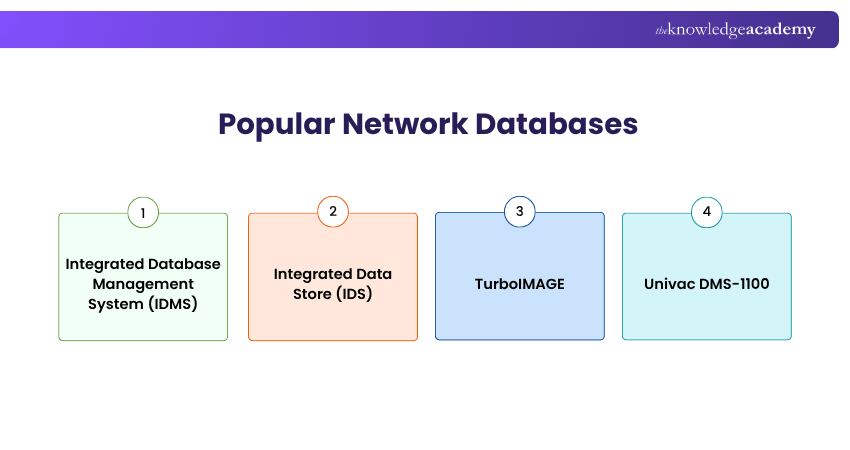
Popular Network Databases
Here are some well-known network databases and their features:
1) Integrated Database Management System (IDMS)
IDMS is a network database system used to manage large amounts of structured data. It continues to support established enterprise and mainframe applications, including high-volume workloads.
Features:
a) Supports complex data relationships
b) Provides transaction-processing capabilities
c) Provides mechanisms that support data security and integrity
2) Integrated Data Store (IDS)
IDS was developed by Charles Bachman and is one of the earliest database management systems associated with the network database approach. It influenced the development of the CODASYL network data model and later database systems.
Key Characteristics:
a) Supports interconnected record relationships
b) Uses navigational access between records
c) Influenced later network database systems
3) TurboIMAGE
TurboIMAGE was developed for Hewlett-Packard systems and is based on the network database model for managing related data. It became closely associated with HP 3000 business applications.
Features:
a) Supports relationships between interconnected records
b) Provides direct access to related data
c) Designed for efficient business data processing
4) Univac DMS-1100
DMS-1100 was a database management system developed for UNIVAC systems and is an established example of the network database model. It supported interconnected records and navigational access to relationships between data.
Key Characteristics:
a) Uses the network database model
b) Supports relationships between interconnected records
c) Provides navigational access to related data
Gain an understanding of databases and their role in managing data efficiently with our Introduction to Database Training – Join now!
Examples of Network Database Model
Here are some scenarios that illustrate how the network database model can represent interconnected data:
1) Airline Reservation Systems
Airline reservation data can illustrate how a network database handles interconnected records. Flights, passengers, bookings, and schedules can have multiple relationships, making them useful examples for understanding the network model.
a) Links passenger and flight details for bookings
b) Connects flights with schedules and availability
c) Allows an application to follow these links to find related booking details
2) Telecommunication Networks
Telecommunications data can also demonstrate the network database model because customers, services, accounts, and usage records may have multiple interconnected relationships.
a) Connects customers with multiple services and accounts
b) Links usage records with customers and services
c) Allows related account and usage details to be retrieved through defined paths
3) Library Management Systems
A library management scenario can illustrate a network database by connecting records for books, members, loans, and branches through multiple relationships.
a) Connects books with members and loan records
b) Links copies of books with different branches
c) Represents relationships among books, borrowers and transactions
How Does a Network Database Differ from a Relational Database?
A network database uses pointers to connect records in a graph-like structure, allowing records to participate in multiple interconnected relationships. Unlike a relational database, which stores data in tables and uses keys with SQL for querying.
Network databases can provide efficient navigational access for predefined relationships, while relational databases generally provide greater flexibility for ad hoc querying and data access.
When Does a Network Model Make Sense?
Consider the network model characteristics when:☐ Data contains several interconnected relationships☐ Access paths are known and relatively stable☐ Applications frequently navigate between related records☐ Predictable navigational performance is important☐ An organisation maintains an established network-model system
Acquire advanced skills to fortify database security and safeguard sensitive information with our Database Training – Join now!

The Knowledge Academy develops accessible learning content across Project Management, IT, Cybersecurity, Data Science, Business Analysis, HR, Accounting and Finance, Leadership and Health and Safety. Its resources combine subject research with clear explanations to help professionals build practical knowledge across a wide range of disciplines.
View Detail

 If you wish to make any changes to your course, please


