




We may not have the course you’re looking for. If you enquire or give us a call on 01344203999 and speak to our training experts, we may still be able to help with your training requirements.
Microsoft Planner vs Project: Which Tool Should You Use?
ByGaurav KalitaLast updated on: 12 October 2026
Microsoft Planner vs Project compares Planner’s collaborative basic and premium plans with Microsoft Project desktop, covering scheduling, Gantt charts, resources, reporting, integrations, and pricing.
In the bustling world of project management, the right tool can make all the difference between success and chaos. Have you ever stood at the crossroads of Microsoft Planner vs Project, wondering which path to take? With each tool offering unique features and advantages, making the right choice is crucial. This blog explores the key differences to help you understand which tool suits your needs.
Choosing between Microsoft Planner and Microsoft Project becomes easier when their current capabilities are clearly understood. Microsoft has moved project for the web capabilities into Planner, while Microsoft Project continues as desktop project management software. This Microsoft Planner vs Project comparison explores their current features, uses, pricing, and key differences.
What is MS Project?
Microsoft Project is desktop project management software designed for detailed scheduling, task management, cost tracking, and resource planning. Current desktop editions include Project Standard 2024 and Project Professional 2024. They support features such as Gantt charts, dependencies, baselines, milestones, critical path analysis, and resource management.

The tool gives deep insights into current projects and tasks, the names of the team members assigned to each task, project durations, due dates, and even start dates. Using various features of MS Project, the users can perform the following tasks:
1) Plan detailed project schedules and task dependencies
2) Create Gantt charts, timelines, and project milestones
3) Track baselines, deadlines, and critical paths
4) Manage project resources and workloads
5) Monitor costs and project progress
6) Generate built-in reports and run what-if scenarios
Microsoft Project desktop is installed on Windows rather than operating as a standalone cloud project platform. Project Professional 2024 also supports broader resource management, timesheets, Project Server connectivity, and Microsoft Teams presence and communication features when appropriately licensed.
Remember
Microsoft Project Online retired on 30 September 2026, but Microsoft Project desktop and Project Server Subscription Edition remain available.
What is MS Planner?
Microsoft Planner is a collaborative work and project management application available through Microsoft 365. It supports both basic and premium plans, allowing teams to manage everyday tasks as well as more structured projects. Basic Planner capabilities are included with eligible Microsoft 365 subscriptions, while additional premium capabilities are available through paid Planner plans.
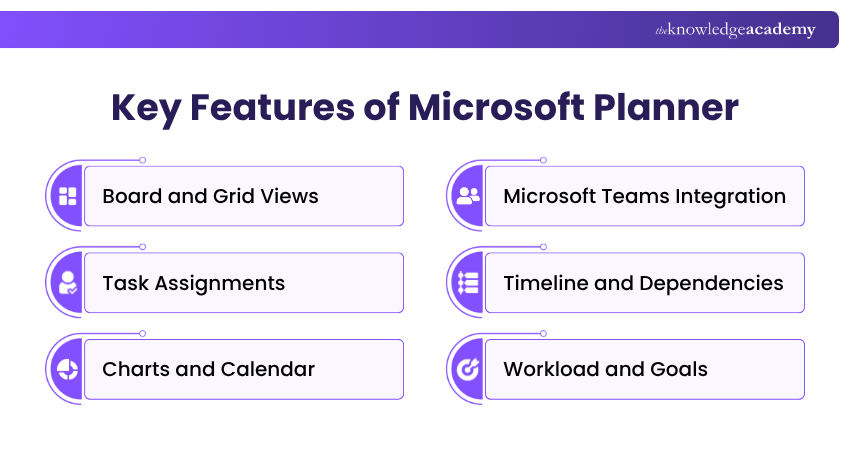
Microsoft Planner supports the following task and project management activities:
1) Create and organise tasks using Board and Grid views
2) Assign tasks to team members
3) Add labels, checklists, attachments, and comments
4) Set start dates, due dates, priorities, and task status
5) Review progress through Charts and Calendar views
6) Filter and group tasks based on project needs
7) Use Timeline, dependencies, milestones, and custom fields with premium plans
8) Review workload and project goals with premium capabilities
Microsoft confirms that premium plans add features including Timeline/Gantt view, dependencies, milestones, critical path, custom fields, People view, sprints, and goals.
Microsoft Planner has an accessible interface for users who are new to Microsoft 365. Its web application allows teams to access and manage plans through a browser without installing separate desktop software.
Microsoft Planner integrates with Microsoft Teams and can also be accessed directly through the Planner web application. Teams can create, assign, update, and review tasks collaboratively while keeping project information accessible in one place.
Additionally, its streamlined interface helps users create Kanban boards and manage tasks collaboratively. This makes Microsoft Planner accessible to users who are new to the platform.

Microsoft Project vs Planner: Key differences
Project managers and other professionals often ask how these tools differ when both support project management. Here’s a detailed comparison of Microsoft Planner vs Project:
1) Use in Project Management
Both tools support project management, but their capabilities and use cases differ significantly.
Microsoft Planner supports collaborative task and project management through Board, Grid, Charts, and other views. Basic plans focus on everyday task coordination, while premium plans add capabilities such as Gantt charts, dependencies, milestones, critical path analysis, custom fields, and workload views.
Microsoft Project desktop focuses on detailed project scheduling, cost and resource management, baselines, critical paths, and structured project planning. It remains useful when projects require extensive desktop scheduling and project control features.
2) Complexity of Functions
Microsoft Planner offers different levels of functionality depending on the plan. Basic plans support straightforward task management, while premium plans add features such as dependencies, Timeline view, milestones, custom fields, sprints, project goals, and workload management. Microsoft Project desktop provides more detailed scheduling, resource, cost, and customisation controls.
3) Collaboration
One of the crucial aspects of MS Planner is that it promotes team collaboration. It provides features such as task assignments, file attachments, and team discussions to keep the entire team informed about the project’s status. Teams can also add or remove members within their organisation while working on a project. Therefore, it is a better option for teams requiring continuous internal communication and collaboration during a project.
Microsoft Planner places collaboration at the centre of task management and works closely with Microsoft Teams. Microsoft Project desktop focuses more heavily on detailed planning and scheduling, although Project Professional 2024 can display team members' online presence and start chats or calls through Microsoft Teams for Business when licensed separately.
4) Variety of Configurations
Microsoft Project offers extensive customisation through custom fields, views, filters, tables, and groupings. Microsoft Planner Basic provides a more streamlined set of task fields, while premium plans add capabilities such as custom fields, milestones, conditional colouring, and custom calendars.
5) Reporting
Microsoft Planner Basic provides Charts for reviewing task status, priority, buckets, and team assignments. Premium plans add advanced project views and reporting features, while Planner and Project Plan 3 includes broader reporting and portfolio capabilities.
6) Integration
Microsoft Planner works closely with Microsoft Teams and other Microsoft 365 experiences, helping teams manage and communicate around tasks. Microsoft Project desktop supports Microsoft Office workflows, while Project Professional 2024 also provides Teams communication features and connectivity with Project Server Subscription Edition.
Strengthen team collaboration skills with our Microsoft Teams Training - Register now!
7) Resource and Budget Management
Microsoft Planner Basic focuses primarily on task assignment and progress tracking. Premium Planner adds People view and workload capabilities, while higher Planner and Project plans provide additional resource management features. Microsoft Project desktop supports detailed resource allocation, costs, workload management, and project financial tracking.
8) Gantt Charts
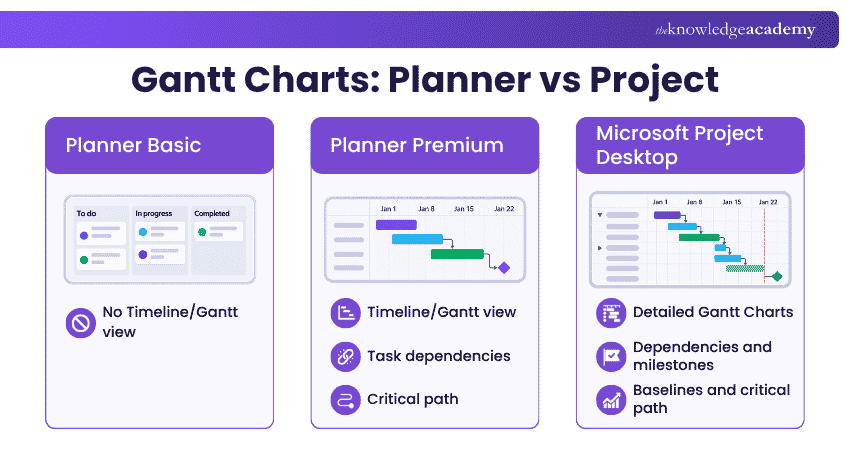
Microsoft Planner Basic does not include a Gantt Chart, but Premium plans provide a Timeline view that displays tasks and dependencies in a Gantt format. Microsoft Project desktop also provides detailed Gantt charts for tracking schedules, dependencies, milestones, and project timelines.
Quick Check
Which options support Gantt-style planning?A. Planner Basic onlyB. Planner Premium onlyC. Planner Premium and Microsoft Project desktopD. Planner Basic and Project desktopCorrect Answer: C. Planner Premium and Microsoft Project desktop
9) Pricing
Basic Planner capabilities are included with eligible Microsoft 365 subscriptions at no additional cost. Premium capabilities require an appropriate Planner licence. Planner also supports guest collaboration when Microsoft 365 Groups guest access is enabled.
10) Platform
Microsoft Planner can be accessed through the web, Microsoft Teams, and supported mobile applications. Microsoft Project remains available as a Windows desktop application through Project Standard 2024, Project Professional 2024, or eligible subscription licences.
Project or Planner – Which one Should you Choose?
Choosing between Microsoft Planner and Microsoft Project depends on the level of planning, collaboration, and control required. Planner Basic works well for collaborative task management, everyday work, and visual task tracking.
Planner Premium extends these capabilities with Timeline view, task dependencies, milestones, critical path analysis, custom fields, sprints, goals, and workload management. This makes Planner suitable for more structured project management as well as everyday task coordination.
Microsoft Project desktop remains useful for professionals who require detailed desktop scheduling, cost and resource management, baselines, what-if scenarios, extensive customisation, and established Project file workflows.
The distinction is therefore no longer simply “Planner for basic projects and Project for advanced projects”. The appropriate option depends on the specific Planner plan, required desktop functionality, collaboration needs, and project controls.
Build practical Microsoft workplace skills with our Microsoft Office Courses - Join today!
Keep This in Mind
Microsoft Planner and Microsoft Project now overlap in several project management capabilities, particularly through Planner Premium. Planner emphasises collaborative work management across Microsoft 365, while Project desktop provides detailed scheduling, resource, cost, and project control features for desktop-based workflows.

Gaurav Kalita is a Content Writer with 2+ years of experience in content development, research and storytelling. His background in English literature and teaching, combined with his growing interest in AI and Machine Learning, supports his writing across Business Skills and IT and Tech.
View Detail

 If you wish to make any changes to your course, please


