


 Top Rated Course

We may not have the course you’re looking for. If you enquire or give us a call on 01344203999 and speak to our training experts, we may still be able to help with your training requirements.
Kubernetes Monitoring Tools: Features, Comparison & Benefits
Lily Turner 02 March 2026Kubernetes Monitoring Tools include essential solutions like Prometheus, Grafana, and Datadog that track cluster performance, health, and resource usage. These tools provide real-time insights, automated alerts, and visual dashboards. They help teams detect issues, optimise workloads, and keep containerised applications running smoothly.Title: Best Kubernetes Monitoring Tools

Training Outcomes Within Your Budget!
We ensure quality, budget-alignment, and timely delivery by our expert instructors.
Table of Contents
Have you ever asked yourself what could happen if a pod fails, a node crashes, or your application starts consuming too many resources and you have no idea? It’s a risky situation no one wants to face. Running Kubernetes without proper visibility is like flying a plane blindfolded. That’s exactly where Kubernetes Monitoring Tools come in - they act as your essential co-pilot, helping you track and control your containerised environments in real-time.
In this blog, we’ll explore the most reliable Kubernetes Monitoring Tools that can keep your system safe and efficient. Are you ready to discover the tool that can save your setup before disaster strikes? Let’s dive in and make your Kubernetes monitoring smarter, faster, and easier.
Table of Contents
1) What is Kubernetes?
2) What are Kubernetes Monitoring Tools?
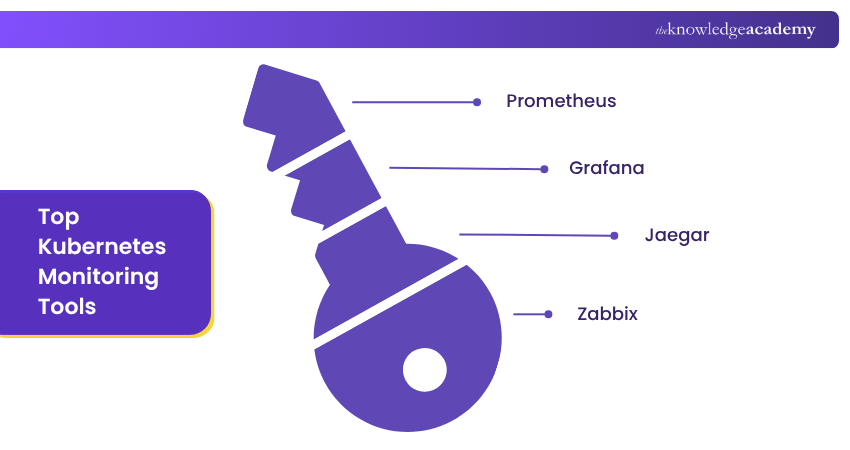
3) Top Kubernetes Monitoring Tools
4) Comparison of Kubernetes Monitoring Tools
5) Why is Kubernetes Monitoring Essential?
6) What are the Key Metrics to Monitor in Kubernetes?
7) Conclusion
What is Kubernetes?
Kubernetes, commonly known as K8s, is a popular open-source platform designed for container orchestration, transforming the way modern applications are deployed. It automates the scaling and management of containerised applications, making it ideal for various environments. Kubernetes streamlines container operations, making app management easier. This lets developers focus on building and scaling without dealing with complex infrastructure.
Kubernetes offers an architecture that supports high availability, self-healing, and flexible workload distribution. These capabilities make Kubernetes a preferred choice for businesses seeking agility and resilience. Kubernetes offers features like automatic rollouts, rollbacks, and service discovery. These tools help teams deliver software faster and with greater reliability.
What are Kubernetes Monitoring Tools?
Kubernetes Monitoring Tools are essential for keeping an eye on your containerised applications and clusters. These tools serve several crucial purposes. They help maintain application reliability by tracking performance in real-time and resolving issues promptly.
Security monitoring is another vital aspect, as these tools keep your applications secure by monitoring and enforcing security policies. Moreover, they play a role in cost management by tracking resource usage and optimising expenses.
Learn how to streamline software delivery with DevOps best practices. Join our Certified DevOps Professional (CDOP) Course now!
Top Kubernetes Monitoring Tools
When managing Kubernetes, the right monitoring tools are essential to maintain system health and performance. Below is a list of the top monitoring tools for Kubernetes to help you make the best choice for your setup.
1) Prometheus
Prometheus is highly favoured in the Kubernetes ecosystem. It is one of the best monitoring tools for Kubernetes. Let’s explore its key features:
a) Real-time Monitoring: It scrapes metrics at specified intervals. This provides real-time insight into system health.
b) Query Language: PromQL allows you to perform complex queries. This feature is vital for deep Data Analysis.
c) Integration: Prometheus has native support for Kubernetes. This means easy setup and robust data collection.
d) Alerting: You can configure alerts based on specific conditions. Notifications are sent through different channels, such as email or Slack.
e) Scalability: It easily handles both small and large clusters. This makes it versatile for any setup.
f) Community Support: A strong community backs Prometheus. Regular updates and extensive documentation are available.
g) Exporter Feature: Custom exporters let you monitor various services. It can even track non-standard applications.
h) Storage: Time-series database storage is a feature. This format is great for real-time monitoring.
i) Alert Manager: This subsystem allows complex alert configurations. It integrates well with most notification services.
j) Visualisations: While it doesn't rival Grafana, Prometheus does offer basic visualisations. This is useful for quick checks.
2) Grafana
Grafana is one of the go-to tools for monitoring resources in Kubernetes for many people due to its visualisation capabilities. If you're preparing for a job in this field, it's important to understand how Grafana integrates with Kubernetes, and Grafana Interview Questions and Answers can be a great resource for this knowledge. let’s take a look at some of its key features:
a) Custom Dashboards: You can visualise your data in various formats. Choose from graphs, histograms, and more.
b) Alerting: Grafana enables you to set up alerts on your dashboards. You’ll be notified when metrics hit certain thresholds.
c) Plug-ins: It supports a wide range of data sources. You can even integrate it with Prometheus for more comprehensive metrics.
d) Data Sources: Multiple data sources are supported. You can integrate databases, Prometheus, and more.
e) Templates: Pre-built dashboard templates are available. They accelerate the monitoring setup process.
f) Annotations: Graph annotations add context to your metrics. They can help during incident retrospectives.
g) Community Plugins: A variety of community plugins are available. These extend Grafana’s core functionality.
h) User Management: Granular user permissions are available. This helps in role-based access management.
i) Alerting: Grafana's alerting feature complements Prometheus. It offers flexible notification channels.
3) Jaeger
Jaeger is excellent for microservices architecture.
a) Distributed Tracing: This feature is crucial for microservices. It helps you trace requests across various services.
b) Root Cause Analysis: Quickly identify where issues occur. This is helpful for resolving issues in complex distributed systems.
c) Performance Optimisation: Jaeger can help you identify bottlenecks. Use this data to optimise your applications.
d) Data Collection: Its agent-based model allows detailed monitoring. Agents collect metrics directly from services.
e) Scripting: Custom scripts offer specialised monitoring. This enables unique monitoring scenarios.
f) Visualisations: Multiple types of graphs and charts are available. This allows for customisable dashboards.
g) User Roles: Role-based access control is a feature. It ensures that team members see relevant data.
h) Inventory Management: Zabbix helps you keep track of all monitored elements. This is useful for large deployments.
i) Multi-tenancy: It supports multiple isolated users on a single instance. This is beneficial for larger teams.
Understand CI/CD pipelines, tools, and application release automation with our DevOps Engineering Foundation Course – Join now!
4) Zabbix
Zabbix is an open source tool ideal for monitoring large and complex systems.
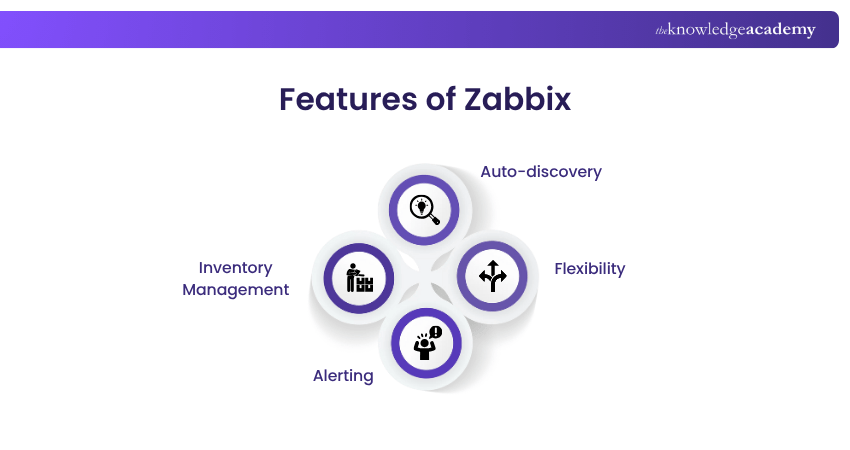
a) Auto-discovery: It automatically identifies new elements in your system. This saves time on manual configuration.
b) Flexibility: From simple metrics like CPU usage to custom metrics, Zabbix can handle it all.
c) Alerting: Custom alerts can be set up easily. You can get notifications through SMS, email, or even custom scripts.
d) Inventory Management: Zabbix helps you keep track of all monitored elements. This is useful for large deployments.
5) Datadog
Datadog offers a full-stack monitoring solution.
a) Integration: It has out-of-the-box Kubernetes support. Integrating Datadog is simple and straightforward.
b) Custom Metrics: You can define metrics that are specific to your use case. This enables more focused monitoring.
c) Dashboard: The Datadog dashboard is intuitive. It makes real-time monitoring easier for all team members.
6) New Relic
New Relic provides comprehensive application monitoring.
a) APM Features: Advanced application performance monitoring tools are available, including error tracking and user monitoring.
b) Real-time Analytics: New Relic gives you real-time analytics. Make data-driven decisions more effectively.
c) Custom Dashboards: Design dashboards to show the metrics that matter most to you. This allows for targeted monitoring.
7) Sysdig
Sysdig has both commercial and open source offerings.
a) Security Features: Sysdig is known for its focus on security. Monitor for suspicious activity and potential breaches.
b) Container Insights: Get in-depth metrics for your containers. This is vital for optimising container performance.
c) Easy to Use: The Sysdig interface is user-friendly. This makes it accessible even for those new to Kubernetes monitoring.
8) InfluxDB
InfluxDB is an open source time series database designed for high-speed data ingestion and real-time analytics. It is particularly well-suited for monitoring metrics in Kubernetes environments.
a) Time-series Data: Specialisation in this data type makes it ideal for monitoring. It's excellent for tracking metrics over time.
b) Data Retention Policies: Storage management is easier with these policies. You can automatically delete older data.
c) Continuous Queries: These provide real-time analytics. They can run in the background without affecting performance.
d) High Availability: Redundancy and high availability are built in. This ensures that data loss risks are minimised.
e) Scalability: Designed to scale horizontally, it can grow with your cluster. This is useful for expanding.
9) Fluentd
Fluentd is an open source log collector ideal for Kubernetes. It efficiently aggregates, filters, and routes logs to various destinations, making it a flexible and reliable tool for centralised log management.
a) Data Routing: It can route logs to multiple destinations. This includes databases and cloud storage solutions.
b) Plug-and-play Architecture: This feature allows easy integrations. Fluent works well with various data sources.
c) Community Support: The open-source community actively contributes to Fluentd. This assures future updates and features.
d) Data Transformation: You can modify and filter data as it gets processed. This enables more sophisticated Data Analytics.
e) Reliability: Fluentd has a robust buffering mechanism. This prevents data loss during transient network issues.
10) Dynatrace
Dynatrace is a leading observability platform for real-time Kubernetes monitoring solutions and infrastructure. It stands out as one of the best monitoring tools for Kubernetes tools available.
a) End-to-End Visibility: Dynatrace provides full-stack monitoring across applications, services, and infrastructure components.
b) AI-Powered Insights: It uses Artificial Intelligence for automatic anomaly detection and root cause analysis.
c) Proactive Issue Resolution: Performance issues are identified and addressed early, reducing downtime and disruption.
d) User Experience Monitoring: Offers deep insights into user behaviour, application paths, and dependencies.
e) Multi-Cloud Support: Seamlessly supports microservices, multi-cloud environments, and containerised applications.
f) Custom Dashboards: Allows the creation of tailored dashboards and reports for focused performance analysis.
g) Team Collaboration: Facilitates better coordination between DevOps and IT teams for faster resolutions.
h) Digital Experience Optimisation: Helps businesses deliver high-performing, reliable digital services to users.
Become familiar with the workings of configuration integration and Jenkins. Join our Jenkins Training For Continuous Integration now!
11) Sensu
Sensu provides an end-to-end observability pipeline, allowing you to collect, filter, and transform monitoring events and send them to your preferred database. Here's how Sensu enhances your monitoring experience:
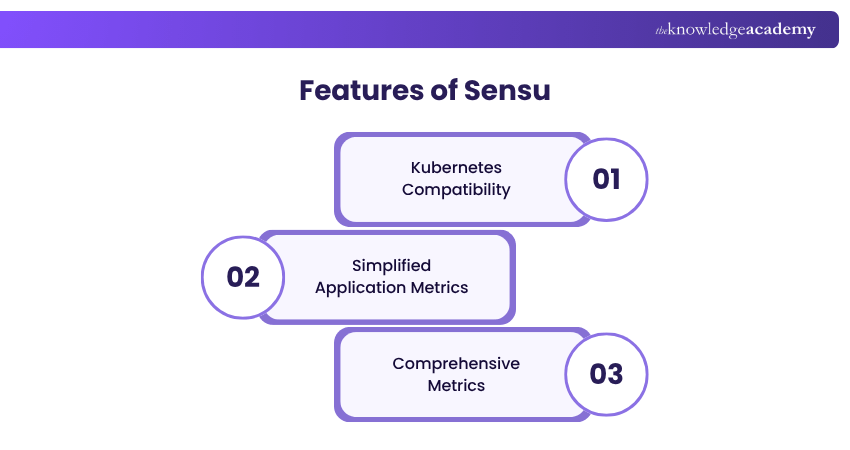
1) Kubernetes Compatibility: Sensu seamlessly operates within your Kubernetes cluster. It can coexist with Prometheus, offering a comprehensive solution for monitoring.
2) Simplified Application Metrics: Deploying Sensu as a DaemonSet alongside Prometheus is an efficient choice. It eliminates the need to integrate the Prometheus SDK into your application codebase and expose a metrics endpoint. Instead, the Sensu agent, working as a sidecar, continuously collects and exposes metrics to the Prometheus server.
3) Comprehensive Metrics: Sensu provides various metrics, including system metrics like CPU, memory, and disk usage. You can also access custom application metrics and logs, which can be conveniently directed to your chosen database.
Sensu's approach simplifies and streamlines Kubernetes monitoring, saving you from the complexities of altering your application codebase and ensuring a hassle-free monitoring experience.
12) cAdvisor
cAdvisor, or Container Advisor, is an open-source monitoring agent with a primary focus on collecting and exporting resource usage and performance data from containers. Notably, it is an integral part of Kubernetes, tightly integrated into the Kubelet binary. It is considered one of the best Kubernetes Monitoring Tools on the market. Here are some key aspects of cAdvisor:
1) Node-level Deployment: Unlike many other monitoring agents that operate at the pod level, cAdvisor functions at the node level. This means it automatically identifies and tracks all containers running on a specific machine, effectively capturing essential system metrics like memory, CPU, and network usage.
2) Simplicity and Integration: cAdvisor is favoured for its simplicity and user-friendliness. It effortlessly exposes Prometheus metrics by default, making it an easily accessible monitoring tool. However, it's important to note that cAdvisor, while straightforward, might lack the comprehensive features needed for a comprehensive monitoring solution in complex or enterprise-level environments.
cAdvisor's niche is in offering basic Kubernetes-native container monitoring capabilities. It may be the right choice for simpler setups, thanks to its straightforward integration with Prometheus. Still, organisations may need to complement more extensive and demanding monitoring requirements; organisations may need to complement it with additional monitoring solutions.
13) Kube-state-metrics
Kube-state-metrics is a Kubernetes-native service that monitors the Kubernetes API and exposes metrics about objects like pods, nodes, and deployments. These metrics are available in plain text via an HTTP endpoint, making them easy to scrape, especially with Prometheus. While useful, it's only one part of a full Kubernetes monitoring setup. Let's look at its key features:
1) Kubernetes-native Metrics: Kube-state-metrics is tailored to generate metrics that reflect the state and status of various Kubernetes objects, making it an ideal choice for Kubernetes environments.
2) Prometheus Integration: The metrics generated by kube-state metrics are designed to be seamlessly integrated with Prometheus, enabling straightforward consumption and scraping.
3) Easy Access: Metrics are easily accessible through the /metrics HTTP endpoint in plaintext format, allowing for straightforward monitoring and analysis.
4) Complementary Component: Kube-state-metrics serves as a valuable component in a complete Kubernetes monitoring solution but is typically used alongside other tools to create a comprehensive system.
5) Insights Into Kubernetes Objects: The service provides metrics related to different Kubernetes objects, helping users gain in-depth visibility into their cluster's health and performance.
Comparison of Kubernetes Monitoring Tools
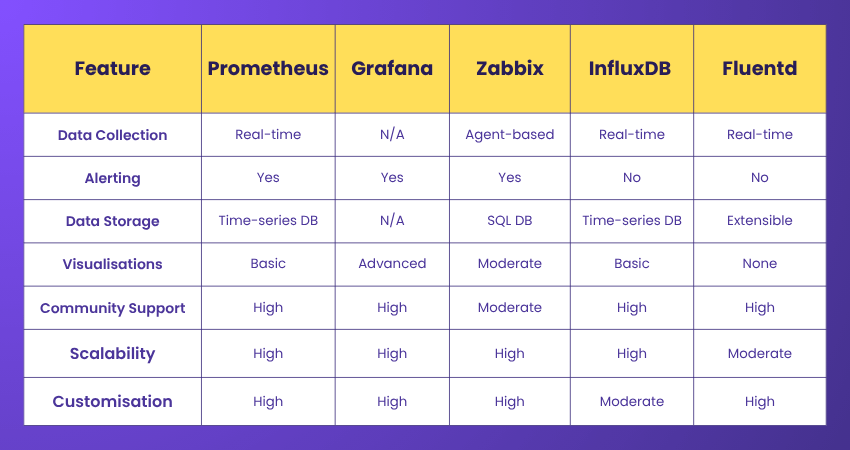
A comparison table can help you quickly evaluate open-source monitoring tools for Kubernetes. Below, we compare key features to aid your decision-making.
Features to Compare
These are the key features to look for in monitoring tools for Kubernetes, and each plays a vital role in ensuring effective and flexible monitoring.
a) Data Collection: The method used to gather metrics from your environment
b) Alerting: Types of alerts supported and how they can be configured
c) Data Storage: Storage methods and locations for collected data
d) Visualisation: Available options for displaying and analysing data
e) Community Support: Strength of community involvement and frequency of updates
f) Scalability: The tool’s ability to handle growing workloads and environments
g) Customisation: Flexibility to tailor the tool to your specific requirements
Comparison Table
The comparison table below highlights the core features of the top Kubernetes Monitoring Tools. It provides a quick overview to help you evaluate and select the best fit for your needs.
Why is Kubernetes Monitoring Essential?
Kubernetes Monitoring Tools provide real-time insights into pod health, resource usage, and system performance. They’re essential for managing dynamic workloads, helping teams detect issues early, optimise operations, and maintain reliable apps, delivering key benefits highlighted by Google Cloud.
What are the Key Metrics to Monitor in Kubernetes?
Key metrics to monitor using Kubernetes Monitoring Tools include CPU and memory usage, pod status, restart counts, network traffic, and disk Input/Output (I/O). According to Google Cloud, tracking these metrics helps detect issues early, optimise resources, and ensure application stability in dynamic environments.
Conclusion
Choosing the right Kubernetes Monitoring Tools is essential for maintaining cluster health, optimising resources, and detecting issues early. These tools provide real-time insights and improve application stability. Use this blog and comparison to confidently select the best tool that fits your team’s needs and operational goals.
Learn how to use the Ansible Vault with custom scripts and commands with our Ansible Essentials Training – Register today!
Frequently Asked Questions
Which is one of the Best Kubernetes Monitoring Tools for Real-time Tracking?

Google Cloud Operations is one of the best monitoring tools for Kubernetes real-time tracking. It offers deep integration with Kubernetes Engine, providing real-time metrics, logs, and alerts. Ideal for dynamic environments, it helps monitor pod health, resource usage, and performance, enabling faster troubleshooting and uptime.
How do I Choose the Right Kubernetes Monitoring Tool for my Needs?
To choose the right Kubernetes Monitoring Tool, consider your infrastructure size, budget, and need for real-time metrics, alerts, and integration. Google suggests tools that support auto-scaling, dashboards, and multi-cluster monitoring. Options like Google Cloud Operations, Prometheus, and Grafana suit various use cases and complexity levels.
What are the Other Resources and Offers Provided by The Knowledge Academy?
The Knowledge Academy takes global learning to new heights, offering over 3,000+ online courses across 490+ locations in 190+ countries. This expansive reach ensures accessibility and convenience for learners worldwide.
Alongside our diverse Online Course Catalogue, encompassing 17 major categories, we go the extra mile by providing a plethora of free educational Online Resources like Blogs, eBooks, Interview Questions and Videos. Tailoring learning experiences further, professionals can unlock greater value through a wide range of special discounts, seasonal deals, and Exclusive Offers.
What is The Knowledge Pass, and How Does it Work?
The Knowledge Academy’s Knowledge Pass, a prepaid voucher, adds another layer of flexibility, allowing course bookings over a 12-month period. Join us on a journey where education knows no bounds.
What are the Related Courses and Blogs Provided by The Knowledge Academy?
The Knowledge Academy offers various DevOps Certification, including the Kubernetes Training, DevOps Foundation Certification Course, and the Jenkins Training for Continuous Integration. These courses cater to different skill levels, providing comprehensive insights into Kubernetes Tools.
Our Programming & DevOps Blogs cover a range of topics related to Kubernetes, offering valuable resources, best practices, and industry insights. Whether you are a beginner or looking to advance your Programming & DevOps skills, The Knowledge Academy's diverse courses and informative blogs have got you covered.

Lily Turner


Senior AI/ML Engineer and Data Science Author
Lily Turner is a data science professional with over 10 years of experience in artificial intelligence, machine learning, and big data analytics. Her work bridges academic research and industry innovation, with a focus on solving real-world problems using data-driven approaches. Lily’s content empowers aspiring data scientists to build practical, scalable models using the latest tools and techniques.
View Detail
Upcoming Programming & DevOps Resources Batches & Dates
Date
 Kubernetes Training
Kubernetes Training
Fri 10th Apr 2026
Kubernetes Training
Fri 10th Jul 2026
Kubernetes Training
Fri 9th Oct 2026

 If you wish to make any changes to your course, please


