


We may not have the course you’re looking for. If you enquire or give us a call on 01344203999 and speak to our training experts, we may still be able to help with your training requirements.
ITIL® Incident Management: A Comprehensive Guide
ByNilotpal SarmahLast updated on: 23 October 2026
Explore ITIL incident management, its seven practical workflow steps, key benefits and best practices for restoring disrupted IT services. Learn how organisations identify, prioritise, investigate and resolve incidents while minimising business impact.
The Gist
1. ITIL incident management restores IT services quickly while minimising disruption.2. The workflow covers identification, logging, categorisation, prioritisation, investigation, resolution and closure.3. Incident management restores services, while problem management addresses underlying causes.4. Incident priority depends on business impact and urgency.5. Clear communication, automation and defined responsibilities support effective incident handling.
Imagine your computer crashes while working on an important task; what happens next? This is where ITIL incident management comes in. It is a step-by-step process that helps businesses fix IT problems quickly, ensuring work continues without long delays. Whether it’s a system failure or network issue, incident management helps restore normal service as fast as possible.
In this blog, we will discuss how ITIL incident management works, its benefits, and key steps. We will also cover best practices to help organisations handle IT issues smoothly and effectively. Let’s get started!
What is ITIL® Incident Management?
ITIL incident management is an IT service management practice focused on minimising the negative impact of incidents by restoring normal service operation as quickly as possible. An incident refers to an unplanned interruption to a service or a reduction in its quality.
The practice provides a structured approach to recording, assessing, prioritising, and responding to incidents. It helps IT teams coordinate activities, communicate with affected users and restore services within appropriate targets.
For example, if a business application becomes unavailable, the IT team may investigate the disruption, apply a suitable workaround or implement a fix to restore access. The underlying cause can be investigated separately through problem management when necessary.

ITIL® Incident Management Process
A practical incident management workflow can be organised into seven steps. The flow of these steps is as follows:
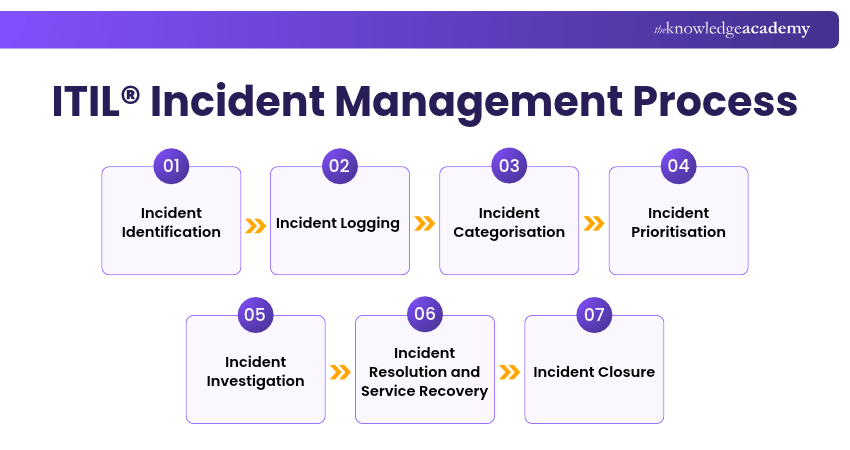
1) Incident Identification
An incident may be identified through user reports, service desk notifications or automated monitoring tools. The aim is to recognise an unplanned service interruption or reduction in service quality so the appropriate response can begin.
Key Activities:
a) Detect issues through reports or monitoring tools
b) Assess whether the reported issue qualifies as an incident
c) Notify the appropriate support team so investigation can begin
2) Incident Logging
Once an incident is identified, it is recorded in an incident management system or another authorised tracking mechanism. The record typically includes the reporting time, affected service, symptoms, impact and relevant user information. Accurate logging supports incident tracking, communication and future reporting.
Key Activities:
a) Keep a record of reported issues
b) Assign an incident reference number and maintain its status
c) Update the record as investigation and recovery progress
3) Incident Categorisation
After logging, incidents are grouped into different categories based on type, such as hardware, software, or network issues. Categorisation supports consistent reporting, helps direct incidents to suitable support groups and allows organisations to analyse patterns across recorded incidents.
Key Activities:
a) Group incidents based on type
b) Use classification information to support appropriate assignment and routing
c) Support the analysis of recurring incident patterns
4) Incident Prioritisation
Some incidents require immediate attention, while others can be handled through standard response procedures. Incidents are prioritised based on business impact and urgency. For example, a server failure affecting a critical business service may receive higher priority than an isolated issue affecting one user. This helps IT teams allocate resources to incidents requiring the most urgent response.
Key Activities:
a) Determine which incidents need urgent attention
b) Reduce business disruption by prioritising high-impact incidents
c) Assign an appropriate priority and apply relevant response and escalation targets
5) Incident Investigation
The IT team investigates the incident to identify its symptoms, assess possible causes and determine suitable recovery actions. They may check system logs, run diagnostic tests and gather information from affected users. The immediate priority is restoring service, while underlying causes may be investigated separately through problem management.
Key Activities:
a) Investigate the symptoms and identify possible causes of the incident
b) Identify possible fixes or existing workarounds
c) Escalate the incident to specialist teams when additional expertise is required
Bonus Tip
Don't delay service recovery solely to identify the root cause. When an approved workaround can safely restore service, consider applying it while the underlying issue is investigated separately through problem management.
6) Incident Resolution and Service Recovery
Following investigation, IT teams apply an appropriate fix or workaround. They may correct software errors, replace faulty hardware or restart affected systems. After applying the recovery action, they verify that the affected service is functioning as expected. The goal is to restore normal service as quickly as possible.
Key Activities:
a) Apply a suitable fix or workaround to restore service
b) Verify that the affected service has been restored
c) Record the recovery actions and communicate the outcome to affected users
7) Incident Closure
After service recovery, the IT team verifies that the incident has been resolved according to the organisation's agreed closure procedure. Where appropriate, confirmation may be obtained from affected users. The incident record is then updated and closed, with relevant recovery details documented for future reference.
Key Activities:
a) Verify that the affected service has been restored to an acceptable level
b) Update incident records with relevant recovery details
c) Capture relevant information to support continual improvement
Upgrade your ITIL expertise and embrace the future of service management with the ITIL® Version 5 Foundation Bridge Training now!
ITIL® Incident Management Example
Consider an organisation where employees suddenly lose access to their email service. The IT support team follows a structured incident management workflow to restore access and minimise disruption. Let's look at the example below:
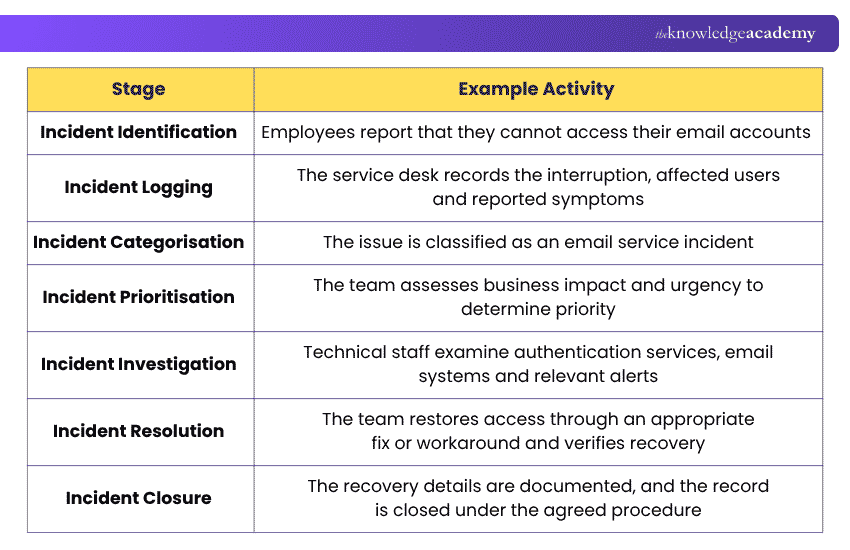
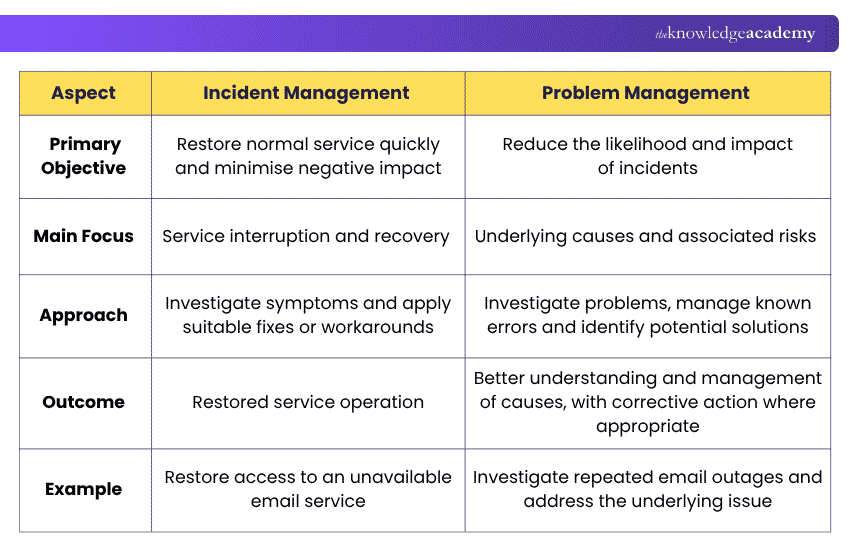
Difference Between Incident Management and Problem Management
Incident management and problem management are closely related ITIL practices, but they serve different purposes. Incident management focuses on restoring services, while problem management aims to reduce the likelihood and impact of incidents. Let's look at their key differences below:
Benefits of Implementing ITIL® Incident Management
ITIL incident management offers several benefits that support reliable IT service delivery. These include the following:
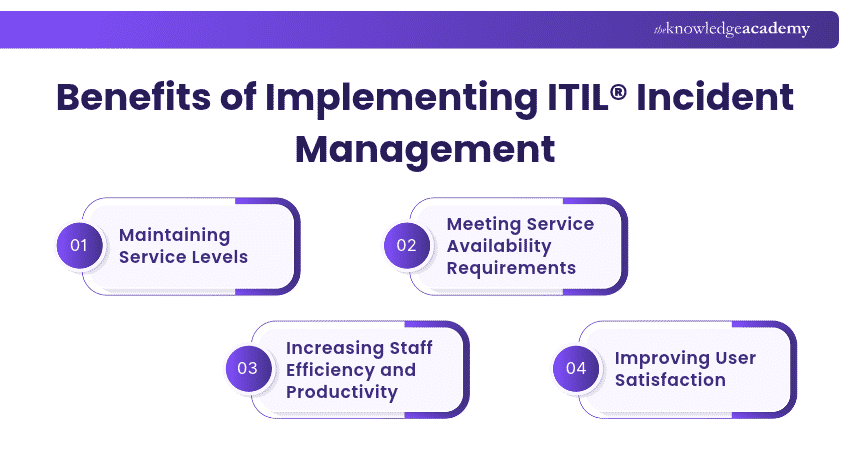
1) Maintaining Service Levels
ITIL incident management helps organisations respond to service disruptions consistently and work towards agreed service-level targets.
By categorising and prioritising incidents, IT teams can allocate resources according to business impact and urgency. This supports timely responses, reduces unnecessary delays and helps organisations manage service performance against established targets.
2) Meeting Service Availability Requirements
Downtime and disruptions can severely impact a business's reputation. ITIL incident management helps support service availability by enabling timely detection, response, escalation and recovery.
A structured incident workflow helps teams restore affected services and reduce the duration of disruption. Although incident management does not guarantee uninterrupted availability, it contributes to achieving the organisation's availability objectives.
3) Increasing Staff Efficiency and Productivity
Implementing a structured incident management workflow provides IT staff with clear guidelines for handling incidents, reducing confusion and duplicated effort.
Incident documentation and knowledge repositories further support consistent troubleshooting and enable teams to reuse proven recovery procedures. This can reduce unnecessary manual work and allow staff to focus on incidents requiring specialist attention.
4) Improving User Satisfaction
User satisfaction is crucial in modern business. Timely incident resolution and clear communication help users understand what has happened, what actions are being taken and when further updates can be expected.
By minimising service disruptions and managing expectations effectively, organisations can improve confidence in IT support and strengthen relationships between service providers and users.
Gain skills to optimise incident response and minimise disruptions with the ITIL® 4 Practitioner: Incident Management Training – Join today!
Best Practices for Implementing Incident Management
Effective incident management requires clear procedures and consistent practices. Here are some key recommendations:
1) Establish a Clear Incident Management Workflow
A documented workflow helps IT teams manage incidents consistently from initial reporting through service restoration and closure. It involves:
a) Creating clear steps to handle incidents from start to finish
b) Making sure all team members know how to follow the process
c) Keeping records of every incident for future reference
d) Reviewing and updating the process regularly to improve efficiency
2) Clearly Define Team Roles and Tasks
Clearly assigned responsibilities improve coordination and reduce uncertainty during incident response. It involves:
a) Assigning specific responsibilities to each team member
b) Training staff on how to handle different types of incidents
c) Making sure everyone knows who to contact for help
d) Avoiding confusion by setting clear job expectations
3) Assign Priority to Different Issues
Establishing a consistent priority matrix helps IT teams assess incidents against defined business impact and urgency criteria. Reviewing priorities as incident conditions change also supports appropriate escalation and resource allocation. It involves:
a) Define consistent priority levels based on business impact and urgency.
b) Establish response and escalation targets for each priority level.
c) Review incident priorities when business impact or urgency changes.
d) Ensure lower-priority incidents are tracked against agreed targets.
4) Use Automation for Faster Incident Handling
Automation can improve efficiency by reducing repetitive work, supporting incident routing and providing timely notifications. It involves:
a) Automating ticket creation to log issues instantly
b) Using AI-assisted tools to detect incidents and suggest suitable resolution actions
c) Reducing manual work so teams can focus on complex issues
d) Supporting faster incident handling through automated workflows
5) Offer Self-service Options for Users
Self-service resources allow users to report incidents, access approved troubleshooting guidance and monitor the progress of their requests. It involves:
a) Providing a knowledge base for common issues
b) Allowing users to track their incident status online
c) Creating an easy way for employees to report problems
d) Reducing pressure on IT teams by enabling user self-help
Pro Tip
Create knowledge articles using clear symptoms, simple troubleshooting steps and guidance on when to contact IT support. Review articles after relevant incidents to ensure users and support teams can rely on accurate, up-to-date instructions.
6) Monitor Incidents to Detect Problems Early
Monitoring tools can identify service interruptions quickly, while incident records help organisations recognise patterns that may require further investigation. It involves:
a) Using monitoring tools to identify issues before they escalate
b) Identifying recurring incidents that may require further problem investigation
c) Analysing data to improve response times
d) Setting up alerts for faster incident detection
7) Keep Stakeholders Updated on Progress
Effective communication ensures users, support teams and relevant stakeholders understand incident status, business impact and recovery progress. It involves:
a) Sending regular updates about the incident status
b) Informing users when an issue is resolved
c) Keeping communication clear and simple for all teams
d) Managing expectations by providing realistic timelines
Understand governance, AI, automation, and DevOps in product-driven service delivery with the ITIL® 5 Product Certification Training – Join now!
Incident Management Tools
Here are some of the tools that can be used for effective incident management:
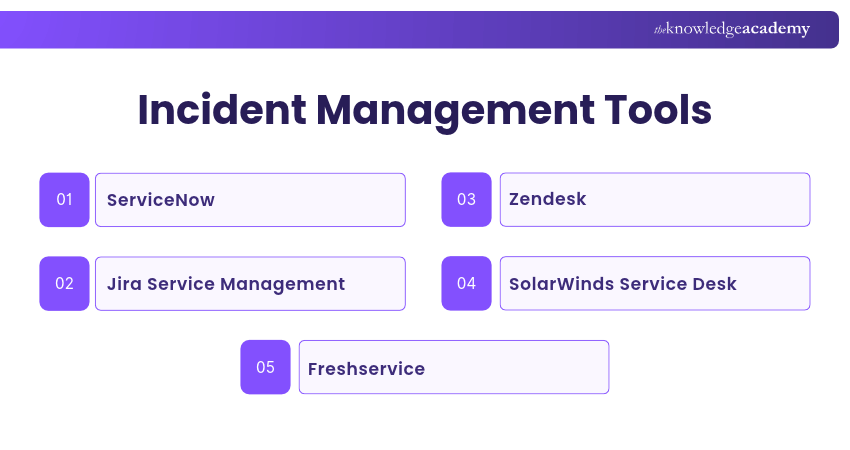
1) ServiceNow
ServiceNow is an IT service management platform that supports incident handling through centralised workflows, automation and integration with related ITSM practices. This tool:
a) Automates ticket creation and tracking
b) Supports incident prioritisation based on impact and urgency
c) Provides a central dashboard for issue management
d) Integrates with other IT tools for smooth workflows
2) Jira Service Management
Jira Service Management supports incident response through ticket management, collaboration, alerting and escalation capabilities. This tool:
a) Tracks and manages incidents in real time
b) Assigns priority levels to different issues
c) Supports collaboration between IT teams
d) Provides detailed reports for process improvement
3) Zendesk
Zendesk is primarily a customer and employee service platform that can support incident reporting, ticket tracking and communication workflows. This tool:
a) Simplifies customer service incident tracking
b) Offers a self-service portal for users
c) Automates responses for common issues
d) Allows easy integration with other support tools
4) SolarWinds Service Desk
The service desk provides ITSM capabilities for recording, categorising, prioritising and resolving incidents. This tool:
a) Supports automated incident creation through configured workflows and integrations
b) Helps IT teams manage issues from a single dashboard
c) Provides alerts for critical problems.
d) Stores past incidents for future reference
5) Freshservice
Freshservice is an ITSM platform that supports incident management through workflow automation, service visibility, knowledge resources and AI-assisted capabilities. This tool:
a) Uses AI to suggest solutions for reported issues
b) Automates workflows to speed up resolution
c) Helps track assets linked to IT issues
d) Provides analytics to improve incident handling
Turn service management challenges into opportunities for lasting transformation with the ITIL® 5 Transformation Certification Training now!
Key Roles in Incident Management
ITIL incident management involves coordinating people, processes and technology to restore affected services while minimising business impact.
Organisations may assign incident management responsibilities to different teams or individuals depending on their size, service structure and operating model. The following are common roles rather than mandatory positions prescribed for every ITIL implementation:
1) Incident Manager
The Incident Manager oversees or coordinates incident management activities within the organisation's defined operating model.
Responsibilities may include:
a) Coordinating incident response and escalation activities
b) Ensuring incidents are appropriately categorised and prioritised
c) Monitoring incident progress and facilitating collaboration between support teams
d) Ensuring relevant stakeholders receive appropriate updates
2) Incident Analyst/Coordinator
The Incident Analyst or Coordinator supports the operational handling of incidents, including initial assessment, documentation and assignment.
Responsibilities may include:
a) Receiving and acknowledging incident reports
b) Reviewing incident details and identifying affected services
c) Recording relevant information in the incident management system
d) Routing or escalating incidents according to their impact, urgency and technical requirements
3) Technical Support Teams
Technical support teams consist of specialists who possess the necessary technical expertise to identify and address incidents. These teams investigate incidents, troubleshoot technical issues and apply suitable fixes or workarounds to restore affected services.
Responsibilities may include:
a) Responding to incident assignments promptly and acknowledging receipt
b) Investigating incident symptoms and identifying suitable recovery actions
c) Collaborating with other teams and stakeholders to implement temporary workarounds
d) Updating incident records with relevant information and progress
e) Escalating incidents to higher-level support or management if necessary
4) Communication Liaison
A Communication Liaison, where the organisation uses this role, coordinates incident-related information for users, customers and other stakeholders.
Responsibilities may include:
a) Providing regular updates to users, customers, and stakeholders about Incident status
b) Creating and maintaining communication channels to disseminate incident information
c) Crafting clear and concise Incident communication messages
d) Making sure that communication aligns with the organisation's policies and guidelines
e) Managing user expectations regarding Incident resolution timelines
Incident Closure Checklist
Before closing an incident, verify the following:
☐ Has the affected service been restored to an acceptable level?☐ Has service recovery been verified using the agreed procedure?☐ Have the recovery actions and incident details been documented?☐ Have affected users or stakeholders been informed as appropriate?☐ Have unresolved underlying issues been referred for further investigation where needed?☐ Has the incident record been updated and closed correctly?
Build practical understanding of service lifecycles, relationships, and governance by joining the ITIL® 5 Service Certification Training today!

Nilotpal Sarmah is a Senior Content Writer with 11+ years of overall experience spanning engineering, operations and content development. His technical knowledge and extensive writing experience enable him to simplify specialised topics across IT and Tech, Business Skills, Project Management, Health and Safety, and ISO and Compliance.
View Detail

 If you wish to make any changes to your course, please


