


 Top Rated Course

We may not have the course you’re looking for. If you enquire or give us a call on 01344203999 and speak to our training experts, we may still be able to help with your training requirements.
How to Raise a Bug in Jira: Explained
David Evans 14 July 2026Gain a comprehensive understanding of "How to Raise a Bug in Jira." Start with the fundamentals by exploring what bugs are in the context of Jira and understanding their importance. Then, follow a detailed step-by-step blog on reporting a bug in Jira effectively. By the end, you'll be well-versed in the intricacies of raising bugs in Jira.

Training Outcomes Within Your Budget!
We ensure quality, budget-alignment, and timely delivery by our expert instructors.
Table of Contents

Jira, developed by Atlassian, is a potent Project Management tool extensively utilised by software development teams for task, issue, and bug tracking. Learning How to Raise a Bug in Jira is a crucial aspect of the software development process, facilitating efficient defect identification and resolution.
According to Statista, Atlassian, the company behind Jira, generated over 3.4 billion GBP in revenue in 2024. This growth of Atlassian shows the popularity and impact Jira and other tools created by it. If you wish to go through a step-by-step blog on raising Bugs in Jira, this blog is just for you. Keep reading to learn how to How to Raise a Bug in Jira effortlessly! Discover Jira's bug tracking tool, log defects, and start defect management process with great proficiency.
Table of Contents
1) Understanding Bugs in Jira
2) The Importance of Raising Bugs in Jira
3) Step-by-Step Guide on How to Report a Bug in Jira
4) Best Practices for Writing a Bug Report
5) Advantages of Resolving Bugs in Jira
6) Conclusion
Understanding Bugs in Jira
Jira, developed by Atlassian, is a highly versatile platform that empowers software development teams to plan, track, and release projects efficiently. At the heart of Jira lies its robust bug-tracking system, which serves as a fundamental feature in the software development lifecycle. This system streamlines the process of identifying, documenting, and resolving bugs, ensuring the delivery of high-quality software products.
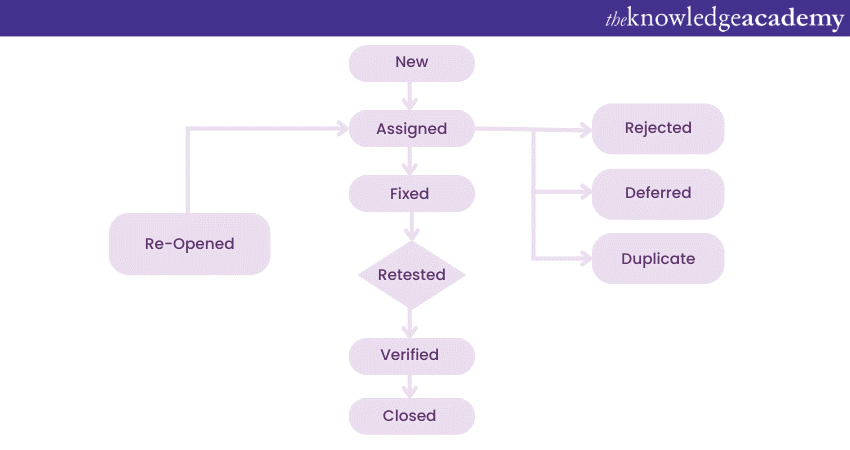
Bugs in Software Testing can vary from minor glitches that cause slight inconveniences to users to critical errors that significantly impact functionality. Precise and accurate Bug Reporting is crucial for developers and testers to thoroughly understand the bug life cycle and prioritize their resolution. Jira's bug-tracking system not only helps maintain product quality but also enhances collaboration among team members, ultimately leading to improved productivity and successful project outcomes.
Boost your managerial skills a notch with our various Project Management Courses!
The Importance of Raising Bugs in Jira
Raising Bugs in Jira holds immense value as it ensures the seamless functioning of software products. When end-users encounter issues, reporting them through Jira allows the development team to gain valuable insights into the software's performance and usability. By knowing how to raise Bugs in Jira and meticulously documenting these bugs, teams can accurately understand the nature and frequency of the problems, enabling them to prioritise bug fixes effectively.
Prompt Bug Reporting in Jira also aids in resource allocation, as developers can channel their efforts towards addressing the most critical and widespread issues first. This proactive approach results in quicker bug resolutions and ultimately leads to heightened user satisfaction. Promptly addressing bugs enhances the overall reliability of the product. A well-maintained and bug-free software instils confidence in users, encouraging long-term loyalty and positive feedback.
Boost your managerial skills a notch with our various Project Management Courses- Sign up now!
Step-by-step Guide on How to Report a Bug in Jira
Jira, a powerful Project Management tool, offers a straightforward and efficient process for raising bugs. Here are some step-by-step instructions which will brief you on how to manage Bugs in Jira and ensure a smoother bug resolution process.
1) Accessing Jira
To initiate the Bug Reporting process, you must first gain access to your organisation's Jira instance. If you don't already have an account, create one by providing your email address and choosing a secure password. Once your account is set up, log in to Jira using your credentials.
2) Navigating to the Project
Upon logging in, you will be directed to the Jira dashboard. Identify the project in which you encountered the bug. Jira conveniently organises tasks into projects, allowing for easy management of different aspects of software development. Once you have located the relevant project, navigate to it.
In the project interface, locate the prominent "Create" button, usually positioned in the top navigation bar. Clicking on this button will reveal a dropdown menu with various issue types. Among these options, select "Bug" as the issue type.
3) Filling out the Bug Details
Now that you have selected the "Bug" issue type, a Bug Reporting form will appear. Provide a descriptive and concise summary of the bug in the designated field. A clear and detailed summary is crucial for developers to understand the nature of the issue at a glance.
Next, fill out the relevant bug details, such as the affected component or module, the version of the software in which the bug was identified, and the severity level. The severity level helps prioritise bug fixes, ensuring that critical issues are resolved promptly.
4) Assigning the Bug
To ensure timely bug resolution, assign the bug to the appropriate development team or individual responsible for addressing it. The proper assignment notifies the concerned team members, enabling them to take immediate action.
In Jira, you can assign the bug to a specific user or a team by selecting the corresponding option from the "Assignee" dropdown menu. Make sure to choose wisely, as this step influences the bug's progress and resolution.
5) Adding Additional Information
In this step, you can enrich the Bug Report by providing additional context and supporting materials. Offer clear and comprehensive steps to reproduce the bug, including the expected behaviour versus the actual behaviour. Precise reproduction steps help developers isolate and understand the issue effectively.
Additionally, consider attaching relevant files, such as screenshots, error logs, or any other documentation that aids in bug identification and resolution. These attachments offer valuable insights and accelerate the bug-fixing process.
Build foundational project management skills to plan, organise, and deliver projects successfully. Joinour Introduction to Project Management Certification Course today!
Best Practices for Writing a Bug Report
Writing a well-structured and informative Bug Report is crucial for effective bug tracking and resolution. By adhering to these best practices, you can create comprehensive Bug Reports that expedite the bug-fixing process and foster seamless collaboration among development teams and stakeholders:
a) Be Specific: Provide detailed information when reporting a bug, ensure to include all relevant details. Describe the bug's behaviour precisely, including the steps to reproduce it. Clear and detailed reproduction steps enable developers to understand the issue quickly and accurately, leading to faster resolution.
Additionally, provide information about the environment in which the bug was encountered. Specify the software version, operating system, browser, and any other relevant configurations. This data assists developers in replicating the bug and identifying potential causes.
b) Use clear Language: Avoid technical jargon Bug Reports should be written in straightforward language that is easily understandable by all stakeholders, including non-technical team members and project managers. Avoid using complex technical terms or acronyms that might confuse or mislead readers.
Utilise concise and unambiguous language to describe the bug's behaviour and impact on the software's functionality. A clear Bug Report eliminates unnecessary back-and-forth communication, ensuring developers can focus on resolving the issue promptly.
c) Include Screenshots: Visuals can help whenever possible, include screenshots that illustrate the bug's manifestation. Visuals provide developers with additional context and a clearer understanding of the problem. Screenshots can be especially helpful when describing visual defects or user interface-related bugs.
To enhance clarity, consider adding annotations or highlighting relevant areas in the screenshots. This visual aid can streamline the bug resolution process and foster efficient communication among team members.
d) Prioritise Severity: Clearly state the impact by communicating the severity level of the bug in the report. Assess the bug's impact on the software's functionality and indicate whether it is a critical issue that requires immediate attention or a minor glitch with minimal impact.
Prioritising the severity level allows development teams to allocate resources effectively and address critical bugs first, ensuring that the most impactful issues are resolved promptly.
Try our Project Management Office Fundamentals Certification Course today!
Advantages of Resolving Bugs in Jira
Jira offers a plethora of powerful tools for tracking and managing bugs throughout their lifecycle. As bugs are reported and assigned to development teams, Jira becomes the central hub for bug resolution, ensuring a smooth and efficient process.
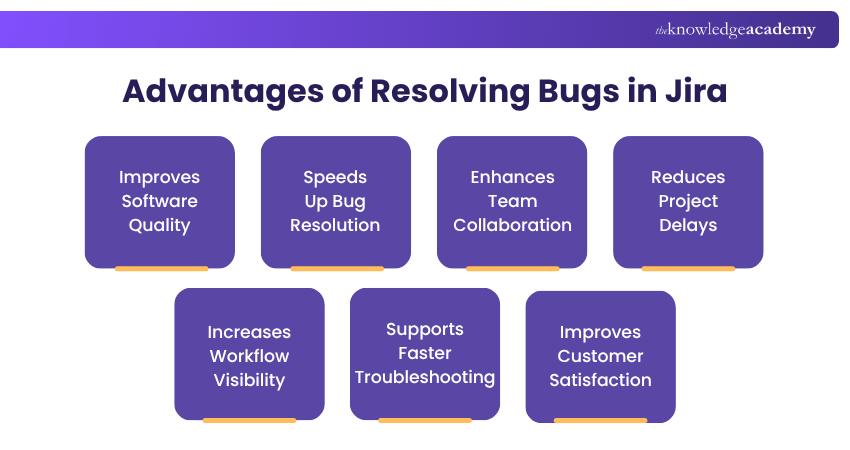
Developers can update the bug's status in real-time within Jira, enabling stakeholders to monitor progress and stay informed about the bug's resolution journey. Jira's notification system keeps team members updated about any changes related to the bugs they are working on, encouraging clear communication.
One of the key advantages of using Jira for Bug Tracking is the platform's ability to facilitate discussions around specific bugs. Team members can leave comments, ask questions, and share insights directly on the bug's page, promoting effective collaboration. Jira also allows teams to link bugs with related tasks, user stories, and epics, providing a holistic view of bug impact on the project. The platform's reporting and analytics capabilities enable teams to gain insights, identify patterns, and optimise bug resolution processes.
Conclusion
In conclusion, Jira's comprehensive bug-tracking capabilities, combined with its collaborative features, enable teams to efficiently manage and resolve bugs. Following the step-by-step guide on How to Raise a Bug in Jira mentioned in this blog and leveraging the platform's tools will allow you to enhance productivity and deliver top-notch software products.
Learn practical risk management techniques to identify threats and improve project success outcomes with our Project Risk Management Course- Sign in now!
Frequently Asked Questions
What is the Difference Between a Bug and a Defect in Jira?

A bug is an unintended error found during development or testing, while a defect is a deviation from requirements identified after a build is released for testing. In Jira, both are typically logged as issue types but differ in when and how they are discovered.
How to Raise Defect in Jira with Example?
To raise a defect in Jira, click "Create Issue", select the issue type as "Bug" or "Defect", and fill in details like summary, description, severity, and steps to reproduce. For example: "Login button unresponsive on Chrome v120, expected to redirect to dashboard, actual result: no action triggered."

David Evans


Certified Project Trainer and Agile Delivery Expert
David Evans brings over a decade of hands-on experience in project delivery, Agile transformation, and team leadership. With a background in technology and business consulting, David has led cross-functional teams through Agile and Waterfall projects in both public and private sectors. He combines technical knowledge with practical insights to help readers navigate the challenges of modern project environments.


 If you wish to make any changes to your course, please


