


 Top Rated Course

We may not have the course you’re looking for. If you enquire or give us a call on 01344203999 and speak to our training experts, we may still be able to help with your training requirements.
How to Hide Chats on Instagram for More Privacy
James Smith 16 July 2026To Hide Chats on Instagram means using features like Vanish Mode, Message Requests, and archiving to make conversations less visible. These tools allow users to maintain privacy without deleting messages. Discover how each method works and when to use them for better control over your inbox. Read ahead to know more!

Training Outcomes Within Your Budget!
We ensure quality, budget-alignment, and timely delivery by our expert instructors.
Table of Contents

Picture this: you’re planning a surprise, hiding a secret, or just avoiding an awkward conversation. The last thing you want is someone snooping through your Instagram Direct Messages (DMs). But here’s the catch: Instagram doesn’t have a built-in “hide chat” option. So, How to Hide Chats on Instagram without deleting them?
Luckily, there are some clever tricks! From Vanish Mode to restricting accounts, you can keep messages out of sight while staying connected. If you’ve ever wondered How to Hide Chats on Instagram without making it obvious, you’re in the right place. Stick around as we uncover the best ways to keep your DMs private; because some conversations are meant to stay under the radar!
Table of Contents
1) Can You Hide Conversations on Instagram?
2) Ways to Hide Instagram Chats
3) How Do You Hide Chat Activity on Instagram?
4) How Do I Block Chats on Instagram?
5) Conclusion
Can You Hide Conversations on Instagram?
Instagram doesn’t have a direct hide chat option, but you can keep conversations private using Vanish Mode, restricting users, or moving chats to the General tab (for professional accounts). You can also mute notifications or delete chats to keep them out of sight.

Ways to Hide Instagram Chats
There’s no single button to “hide” chats on Instagram, but there are multiple tricks you can use to keep your conversations discreet. Whether you want to temporarily hide a message, move chats to a different section, or even remove them entirely, Instagram offers several features that can help. Instagram Tips like these can help you maintain your privacy while managing your messages effectively.
1) Use Vanish Mode to Archive Instagram Chats
One of Instagram’s best-kept secrets is Vanish Mode. This feature allows messages to disappear once they’ve been viewed and the chat is closed. If you want a conversation to be temporary and leave no trace behind, Vanish Mode is the way to go.
Here’s how to enable it:
1) Open Instagram and go to your Direct Messages (DMs)
2) Open a chat with the person you want to message
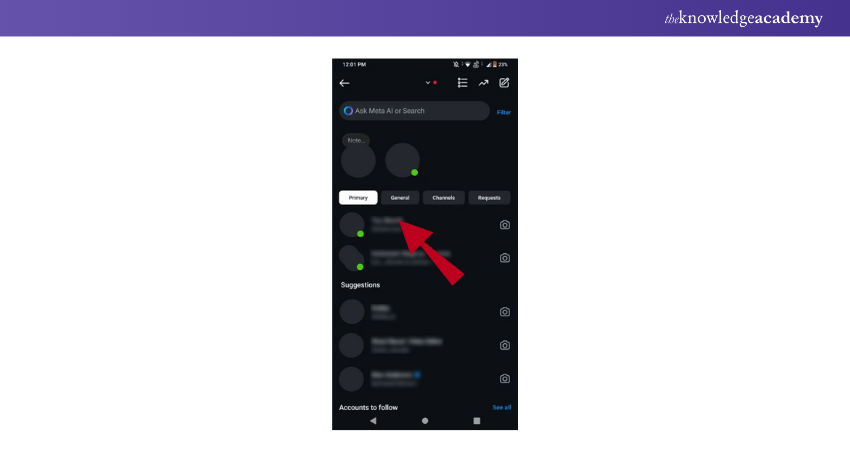
3) Swipe up on the chat screen until the background turns black; this means Vanish Mode is activated
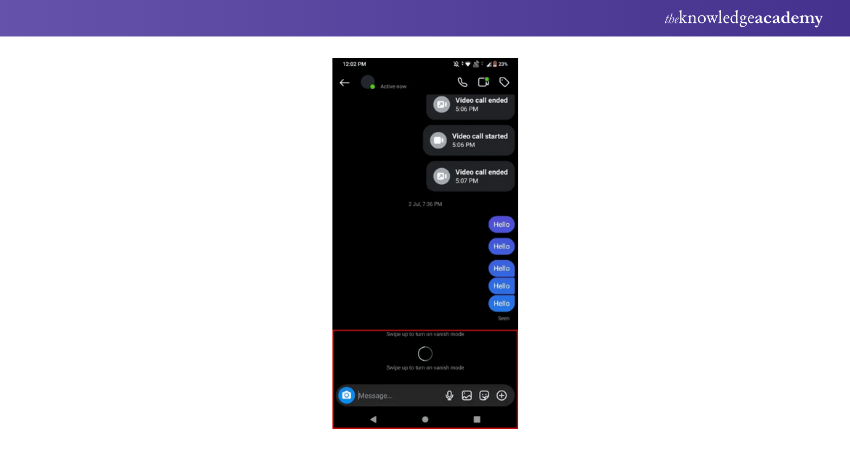
4) Send your messages, and once the chat is closed, they’ll disappear
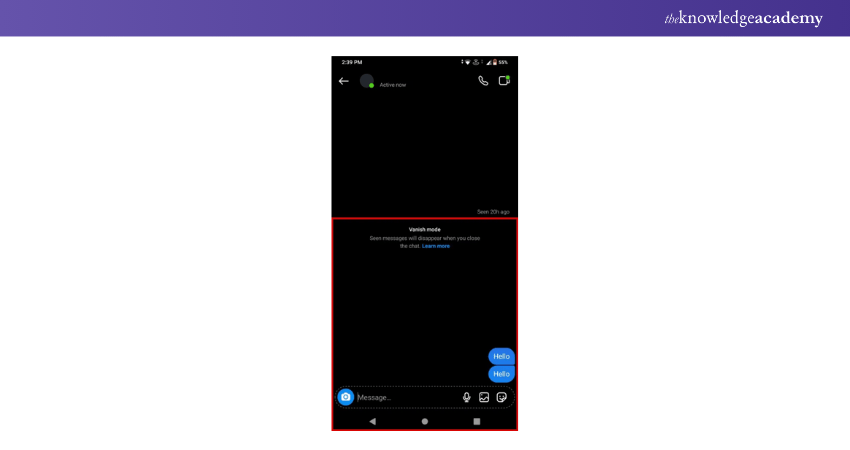
To disable Vanish Mode, simply swipe up again, and the chat will return to normal.
2) Switch Account Type to Hide Instagram Chats
If privacy is your priority, switching your account type can offer more control. Business or Creator accounts allow you to separate conversations into Primary and General tabs, making it easier to manage and hide messages from your main inbox.
To switch your account type:
1) Go to Settings & Privacy in Instagram
2) Tap Account type and tools
3) Choose Switch to Professional Account and follow the steps
Once switched, you can move chats to the General tab, keeping them out of sight from your main inbox.
Turn views into value - master the game with our YouTube Marketing Course today!
3) Restrict a User's Profile to Conceal Messages on Instagram
If you don’t want to block someone but still want to limit their access to your profile and messages, the Restrict feature is perfect. When you restrict someone:
1) Their messages go to your Message Requests instead of your main inbox
2) They won’t see when you’re online
3) They won’t be notified when you’ve read their messages
To restrict a user:
a) Go to their Instagram profile
b) Tap the three dots in the top right corner
c) Select Restrict
This keeps their messages hidden from your inbox while still allowing you to check them when needed.
4) Hide Instagram Chats Without Deleting Them
While Instagram doesn’t have a direct “hide” option, you can make your conversations less visible by moving them out of your main inbox. Methods like moving chats to the General tab (for professional accounts) or restricting a user can help keep your messages private.
5) Move Messages to the General Tab
For professional accounts, Instagram offers two inboxes: Primary and General.
1) Primary: Important messages you want to be notified about
2) General: Messages that you don’t need notifications for and can check later
To move a conversation to the General tab:
a) Open your DMs
b) Long-press the chat you want to move
c) Select Move to General
This is a subtle way to keep messages out of sight without deleting them.
Unlock the secrets to online success - Join our Digital Marketing Courses today!
6) Archive Conversations
Unlike other platforms, Instagram doesn’t have a built-in archive feature for chats, but there’s a workaround.
1) You can mute notifications and move the chat to the General tab
2) If you don’t want someone to find your chat, restricting them will move the messages to Message Requests
Although not a true archive feature, these methods help keep your messages hidden.
7) Delete Chats
If you want to permanently remove a conversation, deleting the chat is an option. However, keep in mind:
1) Deleting a chat removes it from your inbox but not from the other person’s
2) Once deleted, it cannot be recovered
To Delete a Chat on Instagram:
a) Open the Instagram DMs
b) Find the conversation you want to remove
c) Swipe left (on iPhone) or long-press (on Android)
d) Tap Delete and confirm
For extra privacy, you can also delete individual messages within a chat instead of removing the entire conversation.
8) Download Instagram Chats
Before you delete any conversations, it’s a good idea to download your chat history; especially if it contains important information. Instagram allows you to request a full download of your account data, including messages.
To download your chats:
1) Open Instagram and go to Settings & Privacy
2) Scroll down and tap Your Activity
3) Select Download your information
4) Enter your email address and request the download
5) Instagram will send you a link within 48 hours with all your data
This is useful if you’re deleting conversations but still want to keep a record of your messages.
9) Mute Notifications for Specific Chats
Muting a chat prevents message alerts from popping up on your screen, allowing you to check the conversation at your convenience without unwanted interruptions.
To mute a chat:
1) Open Instagram DMs
2) Select the conversation you want to mute
3) Tap on the person’s name at the top
4) Toggle Mute Messages and Mute Call Notifications on
This way, messages will still be there when you need them, but they won’t disturb you with notifications.
How Do You Hide Chat Activity on Instagram?
To hide chat activity on Instagram, turn off your activity status by going to Settings > Privacy > Activity Status and toggling off Show Activity Status. This prevents others from seeing when you're online. You can also mute notifications for specific chats by opening the conversation, tapping the user's name, and selecting Mute Messages. You may also choose to Switch Back to Personal Account on Instagram to maintain better control over privacy and message visibility.
How Do I Block Chats on Instagram?
To block someone from messaging you, open their profile, tap the three dots, and select Block. This prevents them from sending messages or viewing your profile. If you only want to restrict their messages, use the Restrict option instead.
Conclusion
Keeping your conversations private just got easier. Now that you know How to Hide Chats on Instagram, you can take control of your privacy without missing a beat. Be it for peace of mind or just a cleaner inbox; you're all set to chat smarter! Go ahead; organise your DMs your way.
Boost your brand and build powerful connections - join our LinkedIn Marketing Course today!
Frequently Asked Questions
Can I Lock Instagram Chats?

Instagram doesn’t have a built-in chat lock feature, but you can use Vanish Mode for disappearing messages, restrict users to move chats to Message Requests, or mute notifications to keep conversations private. Alternatively, locking your phone with a password adds an extra layer of security.
Can We Turn Off Messages on Instagram?
Yes, you can limit who can message you by adjusting your settings. Go to Settings & Privacy > Messages & story replies > Message controls and choose who can send you messages. You can also switch off message requests from unknown users to reduce unwanted chats.

James Smith


Digital Marketing Manager and Trainer
James Smith is a digital marketing professional with over a decade of experience in SEO, content strategy, paid media and analytics. He has supported both SMEs and global brands in transforming their digital presence. James’s writing and training are rooted in results-driven tactics and the latest marketing trends.
View Detail

 If you wish to make any changes to your course, please


