


 Top Rated Course

We may not have the course you’re looking for. If you enquire or give us a call on 01344203999 and speak to our training experts, we may still be able to help with your training requirements.
How to Delete AWS Account: Complete Guide
Sienna Roberts 05 December 2025AWS offers a wide range of services, so it's important to manage your account settings carefully. To close an AWS account, log in as root, go to account settings, select “Close Account”, confirm your details, accept terms, and finish via the console. Before proceeding, make sure all data is backed up. Dive in to learn more!

Training Outcomes Within Your Budget!
We ensure quality, budget-alignment, and timely delivery by our expert instructors.
Table of Contents
Thinking of saying goodbye to Amazon Web Services (AWS)? Whether you're switching platforms or scaling down operations, deleting your AWS account isn’t as simple as clicking a button. It requires thoughtful planning and a few essential precautions to avoid data loss or billing issues. But don’t worry, we’ve got you covered! In this blog on How to Delete AWS Account, we’ll walk you through every step of the process, from securing your data to completing the final closure. Let’s get started!
Table of Contents
1) Factors to Evaluate Before Removing an AWS Account
2) Steps to Deleting a Suspended AWS Account
3) How Can You Remove a Credit Card from an AWS Account?
4) What to Expect After You Close Your Account?
5) How Do I Delete AWS Member Accounts?
6) Can I Delete my AWS Account Permanently?
7) Conclusion
Factors to evaluate before removing an AWS Account
Before removing an AWS Account, it's essential to carefully evaluate several factors to ensure an easy transition and prevent unintended consequences. Here are key points to consider:
1) Data Backup: External backup of AWS data (S3, EC2); data retrieval post-account closure is impossible
2) Active Services: Terminate all active AWS services (EC2, RDS) to prevent further charges
3) Financial Obligations: Settle all balances and review reserved instances/subscriptions for Account closure
4) Domain Names: Transfer Route 53 domain names or confirm they are unnecessary
5) IAM Users/roles: Arrange alternatives for critical IAM users/roles used elsewhere
6) Third-party Applications: Unlink any third-party apps connected to the AWS Account
7) Compliance/Legal: Consider data deletion's effect on compliance and legal obligations
Steps to Deleting a Suspended AWS Account
Deleting a suspended AWS account involves specific steps to ensure the process is smooth and AWS policy compliant. Here’s a brief overview of what to do:
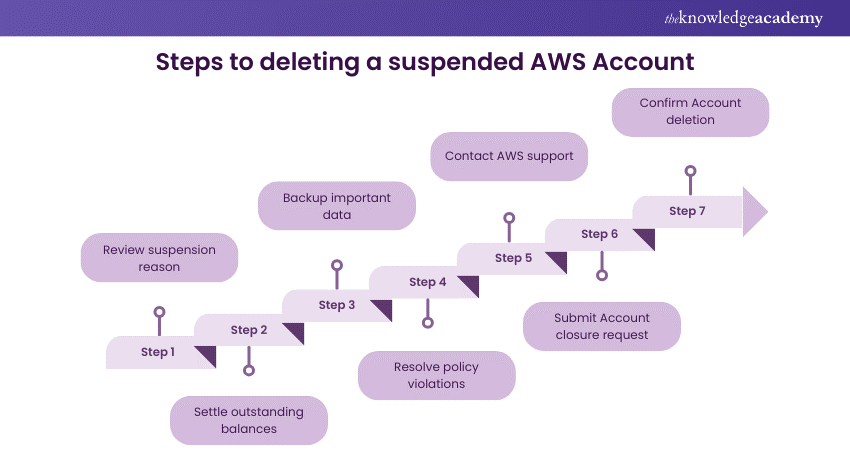
1) Review Suspension Reason: Understand why the account was suspended. Common reasons include billing issues or policy violations. Addressing the root cause is essential before proceeding.
2) Settle Outstanding Balances: If the suspension was due to unpaid bills, ensure all outstanding payments are cleared. This may involve updating payment methods or contacting AWS support for billing disputes.
3) Backup Important Data: Even though the Account is suspended, consider backing up essential data if possible. Contact AWS support if you need temporary access to retrieve data.
4) Resolve Policy Violations: If the suspension resulted from policy violations, work with AWS support to understand them and confirm that they have been addressed.
5) Contact AWS Support: Since direct access to Account settings might be restricted, it is crucial to contact AWS support. They can help you resolve the suspension and move towards Account deletion.
6) Submit Account Closure Request: Once the suspension issues are resolved, ask AWS support for the procedure to close the Account. Follow their guidance, as the standard account closure process might differ.
7) Confirm Account Deletion: After submitting the request, AWS will process the account closure. Confirm with AWS support that the Account has been successfully deleted.
Strengthen your Cloud Security skills – Take the first step with our Introduction to AWS Security Training.
How Can You Remove a Credit Card from an AWS Account?
Before proceeding with removing a credit card, it's important to ensure that your AWS account has an alternative payment method set up to prevent any service interruptions. Removing a credit card from your AWS Account requires following a set of steps:
1) Log into AWS Console: Log into your AWS Management Console using root account credentials, as IAM users cannot alter billing information.
2) Access Account Settings: Navigate to the "My Account" section, accessible from the menu in the top-right corner of the console.
3) Open Payment Methods: Under the Billing and Cost Management dashboard, click on the "Payment Methods" option. This will display all the payment methods linked to your Account.
4) Select Credit Card to Remove: Identify the credit card you wish to remove. Before proceeding with its removal, ensure that you have another valid payment method set up if it's the only card linked to your Account; AWS mandates at least one payment method to be on file.
5) Confirm Removal: Click the "Delete" or "Remove" button next to the credit card details you want to delete. AWS might prompt you for confirmation and confirm the action to proceed.
6) Set Default Payment Method: After removal, it's a good practice to set another payment method as your default to prevent service interruptions. AWS may send a confirmation email or display a notification in the console confirming the successful removal of your credit card.
Step up with the AWS Security prowess – Sign up for our AWS Identity and Access Management (IAM) Training now!
What to Expect After You Close Your Account?
When you close your AWS account, it’s important to know the steps that you follow to avoid any surprises. Once the process is complete, your access to AWS services will be terminated, and data will be deleted. Here’s what you can expect after closing your account:
1) Service Termination: Access to all AWS services will be immediately terminated after account closure.
2) Final Billing: Your account enters a grace period for final billing adjustments, and you will receive a final bill.
3) Data Deletion: Personal and billing information will be retained as required by law, but most data will eventually be permanently deleted.
4) No Data Recovery: Access restoration or data retrieval won’t be possible once the account is closed.
5) Backup and Settlement: Ensure data is backed up and all financial obligations are settled before closing the account to avoid complications.
Accelerate your Cloud Management with our AWS CloudFormation Training – Register today!
How Do I Delete AWS Member Accounts?
To remove a member account from AWS Organizations, sign in to the AWS Organiations console using your management account. Navigate to "Accounts," select the member account you want to remove and choose "Remove account."
Can I Delete my AWS Account Permanently?
Yes, you can permanently delete your AWS account by contacting AWS Support. Before proceeding, ensure all resources are terminated and any outstanding bills are paid. AWS will deactivate the account, and it cannot be recovered once deleted.
Future-proof your Cloud career – Join our Certified Artificial Intelligence (AI) for Cloud Professionals Training today!
Conclusion
We hope this blog has clarified how to Delete AWS Account. Before proceeding, keep in mind that account deletion is irreversible, meaning you can restore the account later. Thus, you must back up vital data, settle any outstanding charges, and fully understand the implications of service termination and data loss. Proper preparation will help you transition smoothly, protecting both your digital footprint and financial responsibilities.
Become a Cloud Computing Pro with our Cloud Computing Training – Register today!
Frequently Asked Questions
How Do I Delete a Payment Method on AWS?

To delete a payment method on AWS, log into the AWS Management Console as the root user, navigate to the "Billing Dashboard," select "Payment Methods," then choose the payment method you wish to delete and click "Delete" or "Remove." Confirm the deletion to complete the process, ensuring you have an alternate payment method if needed.
How Do I Delete My Payment History Online?
Deleting your online payment history can vary by platform. Generally, access your Account settings or billing section, look for payment history or transactions, and select the option to delete or remove history if available. Note that some platforms do not allow the deletion of payment history due to legal or policy requirements.
What are the other resources and offers provided by The Knowledge Academy?
The Knowledge Academy takes global learning to new heights, offering over 3,000 online courses across 490+ locations in 190+ countries. This expansive reach ensures accessibility and convenience for learners worldwide.
Alongside our diverse Online Course Catalogue, encompassing 19 major categories, we go the extra mile by providing a plethora of free educational Online Resources like Blogs, eBooks, Interview Questions and Videos. Tailoring learning experiences further, professionals can unlock greater value through a wide range of special discounts, seasonal deals, and Exclusive Offers.
What is the Knowledge Pass, and how does it work?
The Knowledge Academy’s Knowledge Pass, a prepaid voucher, adds another layer of flexibility, allowing course bookings over a 12-month period. Join us on a journey where education knows no bounds.
What Are Related Courses and Blogs Provided by the Knowledge Academy?
The Knowledge Academy offers various AWS certifications, including AWS Cloud Practitioner Training, Introduction to AWS Security Course, and AWS CloudFormation Training. These courses cater to different skill levels, providing comprehensive insights into Informatica Cloud.
Our Cloud Computing Blogs cover a range of topics related to AWS, offering valuable resources, best practices, and industry insights. Whether you are a beginner or looking to advance your Cloud Computing skills, The Knowledge Academy's diverse courses and informative blogs have got you covered.
Upcoming Cloud Computing Resources Batches & Dates
Date
 AWS RoboMaker Training
AWS RoboMaker Training
Fri 24th Apr 2026
AWS RoboMaker Training
Fri 31st Jul 2026
AWS RoboMaker Training
Fri 30th Oct 2026

 If you wish to make any changes to your course, please


