




We may not have the course you’re looking for. If you enquire or give us a call on 01344203999 and speak to our training experts, we may still be able to help with your training requirements.
Google Docs vs Microsoft Word: What’s the Difference?
ByThe Knowledge AcademyLast updated on: 21 September 2026
Curious to learn about Google Docs vs Word differences? Both Google Docs and Microsoft Word are handy tools for performing daily corporate tasks, such as collaborative writing and document formatting. Read this blog to understand Google Docs vs Word, their pros and cons, and which is the right tool for your professional needs.
Tired of choosing between Google Docs and Microsoft Word for effective collaboration and productivity? This blog will probably be your lifesaver in the uncertainty, chaos and confusion about the correct application tool. Both Google Docs and Microsoft Word are two prominent tools in any professional’s armoury.
Whether you’re a Software Developer, Data Scientist, or Digital Marketer, or any professional working with documents, choosing the right tool can make a significant difference to productivity and collaboration. Continue reading this blog to explore Google Docs vs Microsoft Word, their benefits and limitations, and choose the right tool for your professional needs. Let’s climb up this knowledge mountain!
Google Docs vs Microsoft Word: Key Differences
Google Docs and Microsoft Word are two widely used word-processing tools designed for creating, editing, formatting, and sharing documents. While both offer many similar functions, they differ in areas such as collaboration, accessibility, offline use, advanced formatting, and integration with other applications.
Understanding these differences can help users choose the tool that best fits their work or personal needs.
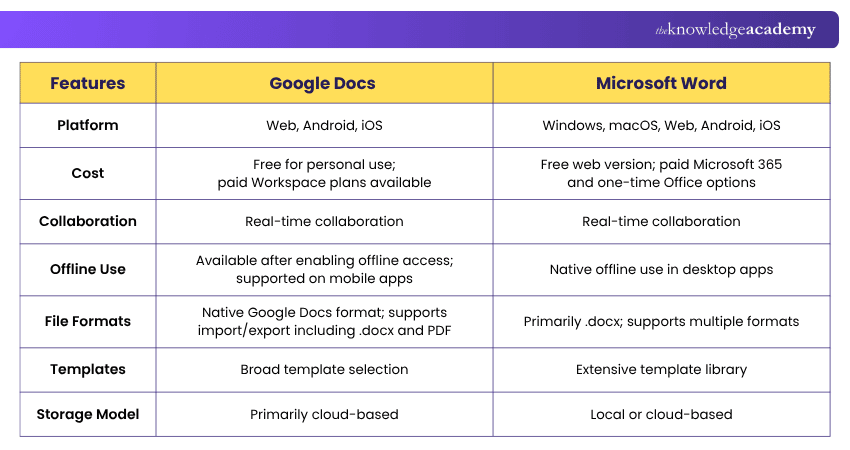
1) Access: Google Docs is available on the web, mobile devices, and offline when enabled, while Microsoft Word is available through desktop, web, and mobile applications.
2) Collaboration: Google Docs supports real-time editing, comments, and suggestions. Microsoft Word offers co-authoring, comments, and Track Changes.
3) Formatting: Google Docs provides essential formatting tools, whereas Microsoft Word offers more advanced formatting, layout, and document-design options.
4) Offline Use: Google Docs can be used offline when offline access is configured. Microsoft Word's desktop application provides full offline editing.
5) Integrations: Google Docs integrates closely with Google Workspace, while Microsoft Word works seamlessly with Microsoft 365 tools.
6) Best For: Google Docs is well suited to cloud-based collaboration and sharing, while Microsoft Word is generally more suitable for advanced editing and professional document creation.

What are the Features of Google Docs vs Microsoft Word?
We have made a comprehensive table to help you differentiate between Google Docs and Microsoft Word's features. This will help you decide which of these applications will be most suitable for you:
Features of Google Docs
Google Docs offers a range of features for document creation, collaboration, sharing, and cloud-based work. Key features include:
a) Templates: Google Docs provides templates for documents such as resumes, reports, letters, and project proposals.
b) Collaboration: Google Docs is renowned for its real-time collaboration capabilities, like allowing editing, comments, suggestions, and revision history.
c) Cloud Storage: Documents are stored in Google Drive, making them easy to access, share, and manage across supported devices.
d) Voice Typing: Google Docs also provides a built-in voice recognition tool for dictation.
e) Integration with Google Workspace: It can seamlessly integrate with other Google services like Google Sheets, Slides, and Forms.
f) Offline Access: Google Docs supports offline viewing and editing when offline access is enabled, making it possible to work without an active internet connection.
Features of Microsoft Word
Microsoft Word, in contrast, has several features that distinguish it from Google Docs. Here are the key features of MS Word you must know:
a) Document Creation and Formatting: MS Word offers extensive formatting options, including styles, themes, and design ideas.
b) Advanced Editing Tools: Microsoft Word offers advanced editing features such as Editor for checking grammar, clarity, conciseness, and inclusivity.
c) Templates: It provides numerous templates for various document types, such as reports, resumes, and newsletters.
d) Collaboration: MS Word also allows for real-time collaboration with others, with key features such as comments, and change tracking.
e) Add-ins and Integration: Word supports add-ins and integrates closely with Microsoft 365 applications such as Excel, PowerPoint, Outlook, and OneDrive.
f) Offline Access: Microsoft Word’s Windows and macOS desktop apps allow users to create, edit, and save documents offline.
Strengthen document creation and formatting skills with our Microsoft Word Course for workplace productivity.
How Can You Access Google Docs and Microsoft Word?
To work in either Microsoft Word or Google Docs, you should know the methods to access them. Accessing both can be different and therefore might affect your decision about which one to choose among these two tools. Below, we have described the ways to access Google Docs and Microsoft Word in a detailed manner.
Accessing Google Docs
Google Docs is a web-based application, and it can be used anywhere. So, to access Google Docs, you need to follow the steps mentioned below:
a) Log in: You can easily sign in with your Google account on any web browser.
b) Device Compatibility: It can be accessed from any desktop, laptop, or smartphone.
c) Google Workspace Plans: Organisations can use paid Google Workspace plans for additional storage, administration, security, and business features.
Accessing Microsoft Word
To access Microsoft Word, you can utilise the following ways:
a) By Getting a Microsoft 365 Subscription: You can avail yourself of several Microsoft Office 365 subscription plans. These plans are designed for personal, family, or business use and range from basic to premium versions for diverse user preferences.
b) By One-time Office Purchase: You can purchase Office 2024 for a one-time fee and install its included desktop applications on one PC or Mac. Unlike Microsoft 365 subscriptions, one-time purchases do not receive new feature upgrades to future major releases.
c) By Microsoft 365 for the Web: Users with a Microsoft account can access Word for the web without purchasing a desktop licence. It supports document creation, editing, sharing, and collaboration, although some advanced desktop features are unavailable.
Bonus Tip: Before choosing a tool, consider where your team already works. Google Workspace users may find Docs more convenient, while Microsoft 365 users may benefit from Word's wider integration with Microsoft applications.
Google Docs vs Microsoft Word: Advantages and Disadvantages
Both Google Docs and Microsoft Word offer strong document creation and collaboration features, but each has different strengths and limitations. Here is a balanced look at their pros and cons:
1) Advantages and Disadvantages of Google Docs
Advantages of Google Docs:
a) Free to Use: Google Docs is a web-based word-processing application with no subscription fees. To avail this service, you need to log in with your Gmail account. However, if you have a business account, you may want to subscribe to the premium version of Google Workspace (previously known as G Suite) for maximum storage capacity and improved security measures.
b) Easily Shareable and Collaborative: Since Google Docs is a web-based software, it can be used 24/7 by number of people. There is no requirement to share or copy the documents to another device. They can be accessed by the link provided by the document's author.
c) User-friendly: If you are a beginner or searching for a simple interface for a Word processor, Google Docs is one of the Word processor applications you can use because of its simple interface and intuitive tools that are easy to understand.
d) Seamless Integration with Google Drive: You don’t have to save the files separately, as they can be automatically saved in Google Drive, a cloud storage service provided by Google. You only need to set up your Google Drive and sign in with your Gmail account. Once your files are saved, you can share the links with your team members or the relevant stakeholders, who can easily access them.
e) Multi-Format Support: Google Docs supports formats such as .doc, .docx, and .pdf. You can use it to convert your files to any of these formats. Google Docs is especially useful when you share your files with Docs beginners or when using other Word processing software.
Disadvantages of Google Docs:
a) Limited Features: The obvious noticeable limitation of Google Docs is its lack of capability to create more complex documents.
b) No Desktop Application: Google Docs is primarily browser-based on desktop, unlike Microsoft Word's native Windows and macOS applications. Users who prefer a dedicated desktop application may find this less convenient.
c) Lack of Template Variety: Compared to other word-processing software with a template-rich system, Google Docs lacks the ability to provide template choices.
d) Requires a Strong Internet Connection: Google Docs works best with an internet connection for syncing and real-time collaboration. Offline editing is available, but it must be enabled beforehand on supported browsers or mobile apps.
2) Advantages and Disadvantages of Microsoft Word
Advantages of Microsoft Word:
a) Rich Feature Set: Microsoft Word offers a wide array of tools for document creation, formatting, and editing, ranging from simple text formatting to advanced design and layout capabilities.
b) Integration with Office Suite: Word integrates seamlessly with other Microsoft Office applications, such as Excel and PowerPoint. This integration makes embedding charts, tables, and presentations in Word documents easier.
c) Extensive Template Library: Word has a vast collection of templates for various document types, helping users get started quickly.
d) Compatibility: Given its widespread use, most organisations and individuals widely accept and recognise Word files (.doc and .docx).
e) Advanced Editing Tools: The software provides tools like 'Editor' for grammar and style suggestions. It also has robust review features, including 'Track Changes' and 'Comments', which are especially valuable for collaborative editing.
f) Add-ins and Plugins: Users can extend Word's capabilities using various third-party add-ins and plugins available on the Microsoft Store and other sources.
Disadvantages of Microsoft Word:
a) Higher Cost: Microsoft Word isn’t completely free, unlike other Word Processing Software, including Google Docs. Users typically need a Microsoft 365 subscription to access its advanced features.
b) Complexity: With its extensive features, Word can sometimes confuse beginners. Some users might find it less intuitive than other Word Processors like Google Docs.
c) Resource-intensive: Microsoft Word can be more resource-intensive compared to streamlined Word Processors. This can sometimes cause performance issues on older versions of computers.
d) Automatic Formatting: Microsoft Word's automatic formatting can often hinder rather than help, especially when it makes unexpected document layout or style changes.
Improve collaboration and productivity across essential tools with our practical Microsoft Office 365 Training today.
Google Docs or Microsoft Word: Which Should You Choose?
The right choice depends on how you create, edit, and share documents. Google Docs prioritises simple cloud-based collaboration, while Microsoft Word provides more extensive formatting and document creation capabilities. Here is a quick way to decide:
1) Choose Google Docs for real-time teamwork, quick sharing, simple editing, and close integration with Google Workspace.
2) Choose Microsoft Word for advanced formatting, detailed layouts, professional documents, and extensive editing tools.
3) Use both when your workflow involves collaborative drafting in Google Docs and advanced formatting or final document preparation in Word.
Ultimately, both are capable word processors, so the better option depends on your workflow, collaboration needs, and document complexity.
Keep This in Mind
Google Docs and Microsoft Word continue to serve different document needs, from quick collaborative work to detailed professional formatting. As both platforms continue to evolve, users can benefit from understanding their strengths and choosing features that support the way they create, edit, and manage documents.

The Knowledge Academy develops accessible learning content across Project Management, IT, Cybersecurity, Data Science, Business Analysis, HR, Accounting and Finance, Leadership and Health and Safety. Its resources combine subject research with clear explanations to help professionals build practical knowledge across a wide range of disciplines.
View Detail

 If you wish to make any changes to your course, please


