




We may not have the course you’re looking for. If you enquire or give us a call on 01344203999 and speak to our training experts, we may still be able to help with your training requirements.
What is Customer Service Software?
ByAishwarya UnniLast updated on: 18 September 2026
Customer Service Software helps businesses manage customer enquiries across multiple channels from one place. Explore its types, benefits and uses and learn how the right solution can improve support efficiency and customer experiences.
A customer emails your support team in the morning, starts a live chat in the afternoon and calls later about the same problem. But each time, they have to explain everything again! For the customer, it is frustrating. For the support team, it creates duplicated work.
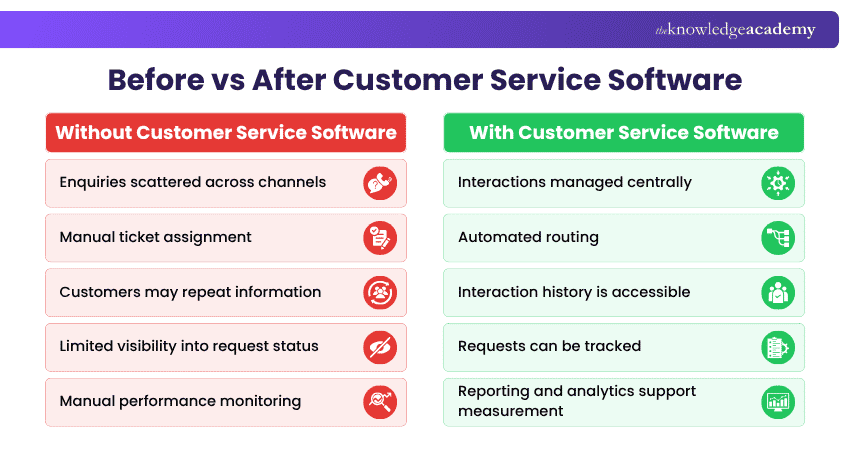
This is where Customer Service Software can help. It brings customer interactions together, automates routine processes and gives agents the information they need to provide consistent support. In this blog, we'll explore the major types, benefits and popular tools of modern customer support.
What is Customer Service Software?
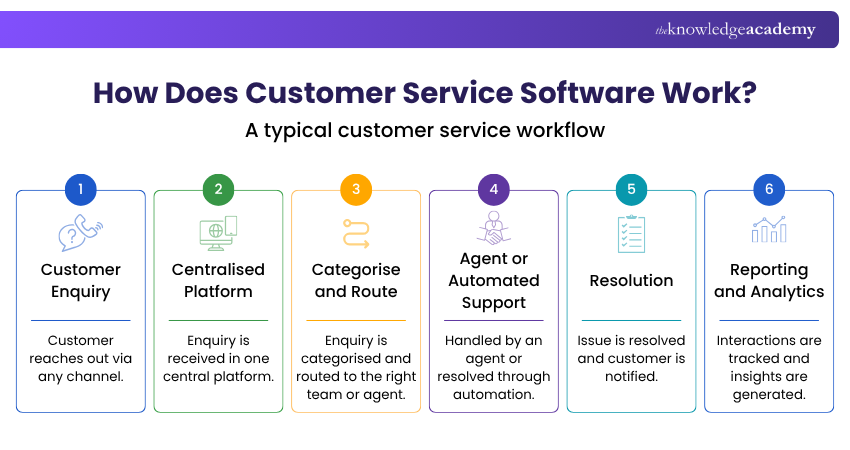
Customer Service Software is a specialised platform designed to manage, track and resolve customer interactions across channels such as email, chat, voice and social media. It gives support teams a centralised environment for organising enquiries and maintaining consistent communication.
These platforms can also automate routine tasks and provide agents with relevant customer context. Cloud-based solutions can support distributed teams and scale as customer service requirements grow.

Types of Customer Service Software
Customer Service Software comes in different forms because businesses do not all provide support in the same way. Some teams primarily manage tickets, while others depend on live chat, phone calls, social media or self-service resources. Here are the main types of Customer Service Software:
1) CRM Software
Customer Relationship Management (CRM) software stores and organises customer information, including interaction histories, preferences and previous support requests. This gives teams a more complete view of each customer and can support more personalised communication.
Best suited for: Businesses that need customer information and interaction history in one place.
2) Help Desk and Ticketing Software
Help desk software converts customer enquiries into structured tickets that teams can track, prioritise and resolve. It improves visibility across the support process and helps teams manage larger volumes of enquiries efficiently.
Best suited for: Teams handling high volumes of customer requests or support cases.
3) Live Chat and Conversational Software
Live chat software enables customers to communicate with businesses in real time through websites or applications. It can help resolve straightforward queries quickly and allows businesses to provide assistance while customers are actively browsing or purchasing.
Best suited for: Businesses that need fast, real-time digital customer support.
Behind every successful brand is a deep understanding of its audience. Start your Customer Insight journey with our Customer Insight Training - Sign up now!
4) Knowledge Base and Self-service Software
Knowledge base software gives customers access to resources such as guides, FAQs and troubleshooting information. Customers can find answers independently instead of contacting a support agent for every issue.
Best suited for: Businesses receiving large numbers of repetitive or straightforward questions.
5) Call Centre and Voice Support Software
Voice support software helps teams manage customer interactions over the phone. Depending on the platform, it may provide capabilities such as call routing, recording, Interactive Voice Response (IVR) and call analytics.
Best suited for: Organisations where phone support remains a major customer service channel.
6) Social Media Customer Service Software
Social customer service tools help teams monitor and manage customer interactions across Social Media channels. They can centralise messages and help support teams respond to customer enquiries without constantly switching between platforms.
Best suited for: Businesses receiving significant customer enquiries through social media.
7) Customer Feedback and Experience Software
Customer feedback software helps organisations collect and analyse customer opinions from sources such as surveys, reviews and other feedback channels. These insights can help teams identify recurring concerns and opportunities to improve customer experiences.
Best suited for: Organisations that want deeper insight into customer satisfaction, sentiment and recurring issues.
Five Benefits of Customer Service Software
Customer Service Software offers several advantages that help businesses improve support quality and operational performance. It enables organisations to manage interactions efficiently while delivering consistent and timely service across channels. Here are the key advantages:
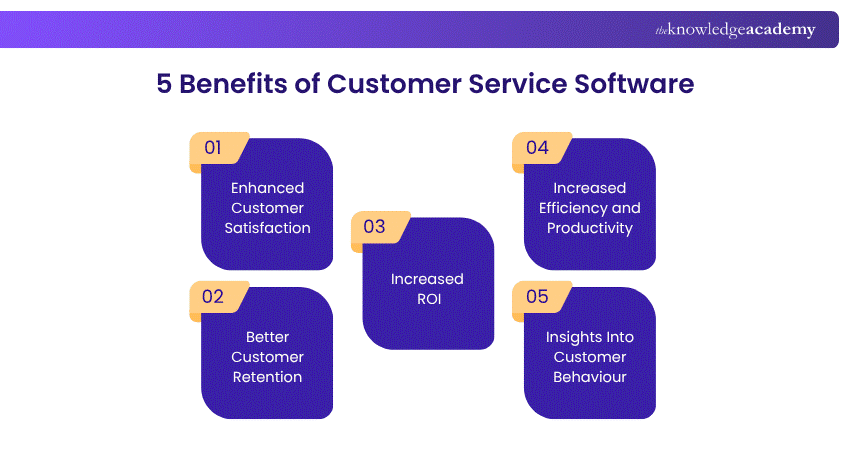
1) Enhanced Customer Satisfaction
Customer Service Software enables faster and more personalised support through features like ticket management, omnichannel communication, and self-service options. It helps resolve queries quickly while maintaining consistency across all customer touchpoints.
2) Better Customer Retention
Providing efficient and reliable support encourages customers to stay loyal to a business. Quick response times and personalised assistance help build trust, reduce churn, and strengthen long-term customer relationships.
3) Increased ROI
By automating repetitive tasks and streamlining workflows, Customer Service Software reduces operational costs and improves productivity. Satisfied customers are more likely to return and recommend services, contributing to higher revenue.
4) Increased Efficiency and Productivity
Automation and centralised systems allow teams to handle more queries in less time. This improves response rates, reduces manual effort, and enhances overall support performance across the organisation.
5) Insights Into Customer Behaviour
Advanced reporting and analytics tools provide valuable insights into customer needs and preferences. These insights help businesses improve services and deliver more targeted customer experiences.
Before You Choose a Customer Service Software: 5 Questions to Ask
1. Where do customers contact us most?
Identify whether most interactions happen through email, chat, phone, social media or multiple channels.
2. How many enquiries do we handle?
Consider your current support volume and how it may change as the business grows.
3. Which tasks should we automate?
Identify repetitive activities such as ticket routing, acknowledgements and common responses.
4. Which systems must it work with?
Check whether the platform can integrate into your existing CRM and other important business systems.
5. What do we need to measure?
Decide which service metrics, reports and customer insights your team needs before selecting a solution.
Best Customer Service Software and Tools
Customer service teams have different requirements, from managing support tickets and live chats to handling phone calls and analysing customer feedback. Choosing the right solution depends on the channels your customers use, the size of your support team and the type of assistance you provide. Here are some popular Customer Service Software and tools, grouped according to their primary functions:
1) Help Desk and Ticketing Software
Help desk and ticketing platforms centralise customer enquiries and turn them into organised support requests. They help teams assign, prioritise, track and resolve issues while maintaining a clear history of customer interactions.
a) Zendesk
Zendesk is a Customer Service platform that brings customer interactions from multiple channels into one place. It supports ticket management, messaging, automation, self-service and reporting, helping teams manage enquiries more efficiently.
Key Features:
a) Multichannel customer support
b) Ticket management and automation
c) Knowledge base and self-service
d) Analytics and reporting
e) Integrations with business tools
Learn proven techniques to handle challenging behaviours with confidence and professionalism with our Dealing with Difficult People Training - Sign in today!
b) Freshdesk
Freshdesk is a Customer Service Software platform designed to help businesses manage support across channels such as email, chat, phone and social media. It combines ticketing, automation and collaboration tools to simplify support workflows.
Key Features:
a) Multichannel support
b) Ticket management
c) Workflow automation
d) AI-assisted support
e) Team collaboration tools
c) Zoho Desk
Zoho Desk provides a centralised environment for managing customer enquiries across email, Social Media, live chat and phone. Its automation, knowledge base and reporting capabilities can help support teams improve resolution processes.
Key Features:
a) Multichannel support
b) Ticket automation
c) Knowledge base
d) Reports and analytics
e) Customer service management
INFO:
The Customer Service Software market size is projected to grow to £19.4 billion by 2030.
d) LiveAgent
LiveAgent combines email, chat, phone, Social Media and self-service support within one platform. It also provides automation, customer history and analytics features to help teams manage customer interactions effectively.
Key Features:
a) Multichannel communication
b) Customer interaction history
c) Knowledge base
d) Workflow automation
e) Reporting and analytics
e) Jira Service Management
Jira Service Management supports structured service request and incident management. It is particularly useful for IT and service teams that need to track issues, manage service workflows and monitor Service Level Agreements (SLAs).
Key Features:
a) Incident management
b) Service request management
c) SLA management
d) Workflow automation
e) Knowledge base integration
f) Groove
Groove is a help desk platform designed to help smaller teams organise and respond to customer enquiries. It combines shared inboxes, self-service resources and automation with collaboration features.
Key Features:
a) Shared inbox
b) Knowledge base
c) Rules and automation
d) Team collaboration
e) Customer satisfaction tracking
Pro Tip
Don't start by asking which software has the most features. First identify where your support process experiences the most friction. High ticket volumes may require a help desk, repeated enquiries may benefit from self-service and phone-heavy support may need dedicated voice software.
2) CRM-based Customer Service Platforms
CRM-based platforms connect customer service activities with wider customer information. This gives support teams greater context about previous interactions and can help them deliver more personalised assistance.
a) Salesforce
Salesforce combines CRM capabilities with tools for managing customer interactions across multiple channels. Its automation, analytics and integration capabilities can help teams coordinate support and manage customer relationships at scale.
Key Features:
a) Multichannel interaction management
b) Customer information management
c) Automation
d) Analytics
e) Business integrations
b) HubSpot
HubSpot combines CRM with marketing, sales, service and operations capabilities. Its customer data, automation and analytics tools can help service teams understand interactions and provide more consistent support.
Key Features:
a) Centralised CRM
b) Service tools
c) Automation
d) Customer analytics
e) Business integrations
3) AI Chatbot and Conversational Support Tools
AI and conversational support tools help businesses communicate with customers through live chat and automated conversations. They are useful for answering common questions, routing enquiries and providing quicker digital support.
a) Intercom
Intercom combines messaging, automation and AI to support customer conversations. It can help businesses respond to common queries, route customers to suitable agents and automate parts of the support process.
Key Features:
a) Real-time messaging
b) Intelligent routing
c) AI-powered support
d) Automated ticket creation
e) Integrations
Unlock your potential and build essential skills to grow confidently in your career with our Personal Development Courses - Join today!
b) Tidio
Tidio combines live chat, ticketing and automation within a single customer service platform. Its AI chatbot can assist with common enquiries while automated workflows help teams organise incoming requests.
Key Features:
a) Live chat
b) Unified ticketing
c) AI chatbot
d) Ticket automation
e) Customer satisfaction surveys
c) LiveChat
LiveChat enables businesses to communicate with website visitors in real time. It provides features for accelerating responses, maintaining conversation histories and gathering feedback after support interactions.
Key Features:
a) Customisable chat widget
b) Chatbot support
c) Canned responses
d) Chat archives
e) Ratings and surveys
4) Voice and Communication Tools
For businesses that provide customer support primarily through phone calls, voice and communication platforms can help manage conversations, route calls and monitor service performance.
a) JustCall
JustCall is a cloud-based phone system that supports customer calls and messaging. It integrates with CRM and help desk platforms, helping businesses connect voice communication with wider customer service workflows.
Key Features:
a) Call recording and transcription
b) Call routing
c) Call analytics
d) SMS and MMS
e) Click-to-call functionality
Did You Know?
Customer Service Software has roots in the help-desk and customer management systems of the 1980s. Early tools such as TeleMagic and ACT! helped digitise customer information, while dedicated customer support platforms expanded during the 1990s.
b) Aircall
Aircall is a cloud-based phone platform designed to support virtual call operations. Its call routing, conferencing and integration capabilities can help customer service teams manage voice interactions.
Key Features:
a) Cloud-based phone numbers
b) IVR and call routing
c) Call transfers
d) Conferencing
e) CRM and help desk integrations
c) RingCentral
RingCentral combines cloud phone, messaging, video and contact centre capabilities. It can help organisations manage customer communications while supporting collaboration between internal teams.
Key Features:
a) Cloud phone system
b) Contact centre capabilities
c) Intelligent routing
d) Team messaging
e) Analytics and automation
5) Social Media Customer Service Tools
Social Media customer service tools help organisations monitor conversations, respond to enquiries and understand what customers are saying across social platforms.
a) Sprout Social
Sprout Social helps businesses manage Social Media interactions from a centralised environment. Its inbox, social listening and analytics capabilities can support teams in monitoring and responding to customer conversations.
Key Features:
a) Unified social inbox
b) Social listening
c) Customer engagement
d) Reporting and analytics
e) Social Media monitoring
b) Chatdesk
Chatdesk supports customer enquiries across email, chat, Social Media and phone. Its AI capabilities can help automate responses, route tickets and analyse customer feedback across different channels.
Key Features:
a) Multichannel support
b) AI-assisted responses
c) Ticket routing
d) Feedback analysis
e) Customer sentiment insights
6) Customer Feedback and Experience Tools
Customer feedback tools focus on collecting and analysing customer opinions. They can help organisations identify recurring concerns, understand sentiment and discover opportunities to improve the overall customer experience.
a) Thematic
Thematic uses AI to analyse customer feedback from sources such as surveys, reviews, Social Media and emails. It identifies recurring themes and sentiment to help businesses understand what influences customer satisfaction.
Key Features:
a) Multi-source feedback collection
b) Automated theme recognition
c) Sentiment analysis
d) Root cause analysis
e) Interactive reporting
b) TeamSupport
TeamSupport is designed around B2B customer support. It combines ticket management, customer information, collaboration, self-service and reporting capabilities to help teams manage ongoing client relationships.
Key Features:
a) Ticket management
b) Customer database
c) Team collaboration
d) Self-service portal
e) Reporting and analytics

Aishwarya Unni is a Copywriter with 2+ years of experience in reporting, web content, blogs, email marketing, and case studies. Her journalism background, combined with her research and writing experience across Business Skills and Human Resources, helps her create clear, engaging content for different audiences.
View Detail

 If you wish to make any changes to your course, please


