




We may not have the course you’re looking for. If you enquire or give us a call on +44 1344 203999 and speak to our training experts, we may still be able to help with your training requirements.
Arrays in C Programming: A Comprehensive Overview
ByGaurav KalitaLast updated on: 02 October 2026
Arrays in C programming are collections of variables of the same type stored in contiguous memory locations, allowing efficient data management and manipulation. This blog will explore how arrays work, their declaration, initialisation, and common operations performed on arrays.

Quick Look
1. What are arrays in C? Collections of elements of the same data type kept in contiguous memory locations.2. How are elements accessed? Through indices, starting from 0.3. How can arrays be organised? As one-dimensional or multi-dimensional arrays.4. Why are arrays useful? They help organise and work with multiple related values using a single array name.5. What should you remember? Array indices must stay within their valid range when accessing elements.
Have you ever found yourself needing to store and manipulate large sets of data in C programming? Arrays in C programming offer a powerful solution to this common challenge. Whether you're working with simple data sets or handling complex structures, understanding how to use arrays effectively can significantly enhance your coding capabilities.
By the end, you'll be equipped to implement arrays confidently, making your programs more efficient and easier to manage. Dive in and unlock the potential of arrays in C programming projects. Let's begin!
What is an Array in C?
An array in C refers to a collection of elements of the same data type kept in contiguous memory locations. Arrays enable you to store and manage multiple values using a single variable name, accessed via indices. This structure simplifies data handling and manipulation, making it easier to perform operations on large datasets.
Arrays are useful when you need to work with a collection of data elements of the same type, such as a list of numbers, characters, or more complex data structures. By using arrays, you can avoid the need to declare multiple variables for each data element, thereby making your code more organised and manageable.

Array Declaration and Initialisation in C
Arrays in C can be declared and initialised in various ways. Understanding these methods is crucial for effectively utilising arrays in your programs. Let's look at it below:
1) Declaration With Specified Size
In this method, the array is declared with a specified size, but the elements are not initialised. For a fixed-size array, the size can be specified using a positive integer constant expression. C also supports variable-length arrays in certain standards and contexts, where the size can be determined at runtime. The array size defines how many elements the array can hold.
int array[10];
Here, an integer array named array is declared with a size of 10. This means that the array can hold ten integers. However, the elements of the array are not initialised, and their values are indeterminate until explicitly assigned.
2) Declaration With Initialised Elements
Here, the array is declared and initialised with specific values. The compiler determines the size on the basis of the number of elements provided. This method is useful when you know the values that the array should hold at the time of declaration.
int array[] = {1, 2, 3, 4, 5};
In this example, an integer array named array is declared and initialised with five elements: 1, 2, 3, 4, and 5. The size of the array is determined by the number of elements provided, which is five in this case.
3) Declaration With Size and Initialised Elements
In this method, the array is declared with a specified size and initialised with specific values. If the number of elements is less than the size, the remaining elements are set to zero.
int array[10] = {1, 2, 3};
Here, an integer array named array is declared with a size of 10 and initialised with three values: 1, 2, and 3. The remaining elements of the array are automatically set to zero. This method ensures that the array has a fixed size, but you can initialise only a subset of elements if desired.
4) Initialisation via Loop
Arrays can also be initialised using loops, which is useful for large arrays or when the values follow a pattern. This method provides a flexible way to initialise array elements programmatically.
int array[10];for (int i = 0; i < 10; i++) {array[i] = i * 2;}
In this example, an integer array named array is declared with a size of 10. A for loop is used to initialise the array elements with values that are twice the index value. The resulting array will contain the values: 0, 2, 4, 6, 8, 10, 12, 14, 16, and 18.
Types of Arrays in C
Arrays in C can be classified based on their dimensions, enabling storage and management of data in different structures. The most common types of arrays in C are one-dimensional and multidimensional arrays. Let's learn about them below:
1) One-dimensional Array
A one-dimensional array refers to a linear collection of elements accessed via a single index. This type of array is the simplest form and is used for storing a list of elements of the same type.
int array[5] = {1, 2, 3, 4, 5};
In this example, an integer array named array is declared with five elements: 1, 2, 3, 4, and 5. Each element in the array can be accessed using its index, starting from 0. For example, array[0] will return 1, and array[4] will return 5.
Trainer's Insight
Array indexing starts from 0. This means that an array containing five elements has valid index positions from 0 to 4. A common beginner mistake is to treat 5 as the final valid index simply because the array contains five elements. That position falls outside the array. Keeping the rule “size minus one = last valid index” in mind can help prevent indexing mistakes.
2) Multi-dimensional Array
Multidimensional arrays store data in a grid or matrix-like structure, facilitating complex data organisation. The most common types of multidimensional arrays are two-dimensional and three-dimensional arrays.
a) Two-dimensional Array
A two-dimensional array is like a table with rows and columns. Each element in the array is accessed utilising two indices: one for the row and one for the column.
int matrix[3][3] = {{1, 2, 3},{4, 5, 6},{7, 8, 9} };
In this example, an integer array named matrix is declared with three rows and three columns. The array is initialised with values in a tabular format. Each element can be accessed using two indices, such as matrix[0][0] for the first element (1) and matrix[2][2] for the last element (9).
b) Three-dimensional Array
A three-dimensional array extends the concept to three levels, like a cube of values. This type of array is useful for representing data that requires three dimensions, such as 3D graphics or spatial data.
int cube[2][2][2] = {{{1, 2},{3, 4}},{{5, 6},{7, 8}}
In this example, an integer array named cube is declared with two layers, each containing two rows and two columns. The array is initialised with values in a cubic format. Each element can be accessed using three indices, such as cube[0][0][0] for the first element (1) and cube[1][1][1] for the last element (8).
Bonus Tip
Think about array dimensions in terms of how the data is organised.
1. A one-dimensional array can be thought of as a list.2. A two-dimensional array can represent rows and columns, similar to a table.3. A three-dimensional array adds another level and can be thought of as multiple layers of two-dimensional data.
Characteristics of Arrays in C
Arrays possess specific characteristics that make them useful for data storage and manipulation. Understanding these characteristics is essential for effectively utilising arrays in your programs. Let's learn about them below:
1) Homogeneous Collection
Arrays store elements of the same data type, ensuring consistent data handling. This characteristic simplifies data management, as you do not need to worry about different data types within the same array.
2) Indexed Access
Elements in an array are accessed using indices, enabling efficient retrieval and modification of data. The index of the first element in an array is always 0, and the index of the last element is the array size minus one.
3) Multi-dimensional Structure
Arrays can be multi-dimensional, allowing complex data structures and organisation. This characteristic makes arrays suitable for representing data in various dimensions, such as matrices, tables, and 3D models.
4) Contiguous Storage
Array elements are kept in contiguous memory locations, facilitating efficient data access and manipulation. This layout places the elements consecutively in memory and can provide good memory locality when array elements are processed sequentially.
5) Random Access
Arrays allow random access to elements using indices, enabling quick data retrieval. This characteristic means that any element in the array can be accessed directly by its index without traversing the entire array, resulting in faster access times.
Learn C step by step and build the programming foundation that supports more advanced technologies with the C Programming Training now!
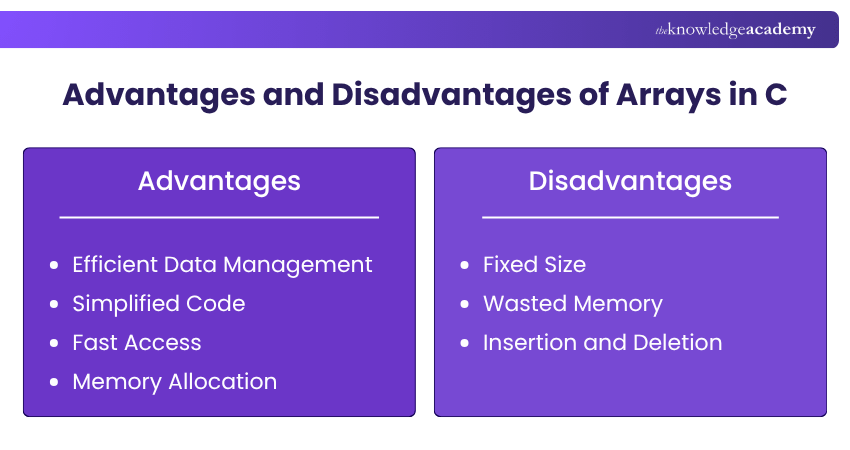
Advantages and Disadvantages of Arrays in C
Here are the pros and cons of arrays in C:
1) Advantages
a) Efficient Data Management: Arrays allow efficient storage and retrieval of data. By using arrays, you can manage large datasets in a structured manner, making it easier to perform operations on the data.
b) Simplified Code: Using arrays simplifies code by reducing the need for multiple variables. Instead of declaring individual variables for each data element, you can use a single array variable to store all elements, resulting in cleaner and more readable code.
c) Fast Access: Arrays provide fast access to elements through indexing. You can quickly retrieve or modify any element in the array by specifying its index, which is particularly useful for time-critical applications.
d) Memory Allocation: Arrays allocate memory in a contiguous block, enhancing performance. Contiguous memory allocation ensures that the entire array is stored in a single block of memory, which can reduce memory access times and improve overall performance.
2) Disadvantages
a) Fixed Size: The size of an array is fixed at the time of declaration, limiting flexibility. Once an array is declared, its size cannot be changed, which means you must know the required size in advance.
b) Wasted Memory: If the array size is overestimated, memory is wasted. Allocating more memory than needed can result in unused memory, leading to inefficient memory utilisation.
c) Insertion and Deletion: Inserting or deleting elements in an array can be cumbersome and inefficient. Arrays do not provide built-in mechanisms for inserting or deleting elements, which means you must manually shift elements to accommodate the changes, resulting in increased complexity and reduced performance.
Take your coding skills to the next level - Register for the C++ Programming (C Plus Plus) Course today!

Gaurav Kalita is a Content Writer with 2+ years of experience in content development, research and storytelling. His background in English literature and teaching, combined with his growing interest in AI and Machine Learning, supports his writing across Business Skills and IT and Tech.
View Detail

 If you wish to make any changes to your course, please


