




We may not have the course you’re looking for. If you enquire or give us a call on 01344203999 and speak to our training experts, we may still be able to help with your training requirements.
Best Time Management Tools for Professionals
ByThe Knowledge AcademyLast updated on: 11 September 2026
Time Management Tools help you plan tasks, organise priorities, track how your time is spent and build more structured schedules.
You start the morning with a clear plan. Then meetings, emails and urgent requests begin competing for your time. By the afternoon, your to-do list may have grown rather than shrunk.
The problem is not always having too much to do. It can be having no clear system for deciding what to do, when to do it and where your time is going. Time Management Tools can help organise tasks, protect focus time, track work and manage schedules.
This blog explores top Time Management Tools, what they are designed to do and how to choose the type that best fits your workflow.
What are Time Management Tools?
Time Management Tools are applications designed to help individuals and teams organise, schedule, prioritise or track their activities. Depending on their purpose, they can support everything from managing daily tasks to monitoring how working hours are distributed.
Some tools specialise in one area, such as time tracking, while others combine scheduling, Project Management, collaboration and reporting features. The goal is not simply to do more in less time. A useful tool should help you organise your workload and direct your available time towards the activities that matter most.

AI-powered Tools for Time Management
AI-powered Time Management Tools can automate scheduling, organise priorities and adjust plans as workloads change. They can be particularly useful for users who want to reduce manual planning and protect time for important work.
Now, let's explore the Time Management Tools that can support different productivity needs:
1) Reclaim.ai
Reclaim.ai is an AI calendar assistant designed to help users plan, protect and adapt their time. Reclaim 2.0 combines calendar planning, an AI Assistant and scheduling agents that can help protect focus time, manage routines and respond to changing priorities.
Key Features:
a) Protects time for focused work and priorities
b) Helps identify and resolve scheduling conflicts
c) Supports focus time, habits, meetings and AI-assisted task prioritisation
d) Integrates with tools such as Outlook Calendar, Google Calendar, Todoist, Asana and ClickUp
2) Motion
Motion is an AI-powered productivity and Task Management platform that automatically plans tasks around deadlines, priorities and schedules. It can reorganise work as plans change, helping users decide what to work on and when.
Key Features:
a) Automatically schedules tasks based on priorities and deadlines
b) Reorganises schedules when plans change
c) Supports recurring tasks and calendar-based planning
d) Helps identify workload bottlenecks and blockers
Pro Tip
Use AI scheduling to protect important work rather than simply squeezing more activities into an already crowded calendar.
Task Management Tools
Task Management tools help individuals and teams organise, prioritise and monitor work. They can provide greater visibility over deadlines, responsibilities and project progress.
3) Trello
Trello uses boards, lists and cards to provide a visual way of organising tasks and workflows. Its structure makes it particularly useful for users who prefer seeing work progress through different stages.
Key Features:
a) Boards, lists and cards for organising work
b) Comments, tags and attachments for collaboration
c) Integrations and automation through Power-Ups
4) Notion
Notion combines note-taking, Task Management and collaboration within a flexible workspace. Users can customise how information, projects and tasks are organised.
Key Features:
a) Customisable blocks for text, tables and other content
b) Deadlines, reminders and Task Management features
c) Real-time collaboration and integrations
5) Todoist
Todoist focuses on straightforward task organisation for individuals and teams. Users can create tasks, assign priorities and manage recurring responsibilities.
Key Features:
a) Tasks with due dates and priorities
b) Recurring tasks and reminders
c) Productivity and progress tracking
6) ClickUp
ClickUp combines Task Management, documentation and collaboration in a highly customisable workspace. It can suit teams that want multiple productivity functions within one platform.
Key Features:
a) Custom views, workflows and statuses
b) Built-in time tracking and reporting
c) Integrations and collaborative features
7) Asana
Asana helps teams organise projects, assign work and monitor progress. It focuses on creating visibility around tasks, responsibilities and goals.
Key Features:
a) List and board views
b) Goal and progress monitoring
c) Comments and integrations for collaboration
8) Monday.com
Monday.com provides customisable boards and workflows for managing tasks and projects. Its flexible structure can support teams managing more complex processes.
Key Features:
a) Customisable boards
b) Workflow automation and tracking
c) Integrations with other workplace tools
9) Teamwork
Teamwork combines Project Management, time tracking and resource management capabilities. It can help teams monitor project progress, deadlines and workload.
Key Features:
a) Time tracking and reporting
b) Project and deadline visibility
c) Resource allocation and collaboration
Pro Tip: Keep your Task Management system simple. Too many boards, statuses and labels can create additional administrative work instead of saving time.
Secure a brighter future for yourself with our range of Personal Development Courses- Sign up now!
Time Tracking Tools
Time tracking tools help users record or monitor how time is distributed across projects and activities. This can provide useful information for planning, reporting and identifying patterns in how working time is used.
10) Toggl Track
Toggl Track allows individuals and teams to record work hours and analyse how time is distributed across tasks and projects.
Key Features:
a) One-click timers
b) Reports and productivity insights
c) Integrations with other workflow tools
11) Clockify
Clockify provides timers, timesheets and reporting features for tracking work across different activities and projects.
Key Features:
a) Timers and manual time entry
b) Project and task reporting
c) Cross-platform access and integrations
12) RescueTime
RescueTime automatically monitors activity across applications and websites to provide information about productivity patterns and potential distractions.
Key Features:
a) Automatic activity tracking
b) Productivity reports and summaries
c) Focus features designed to reduce distractions
Trainer's Insight
Don't track time simply to collect data. Review the results to identify recurring distractions, underestimated activities and tasks that consistently consume more time than expected.
13) Timely
Timely automatically tracks work activity in the background and uses AI-assisted features to help generate timesheets.
Key Features:
a) Automatic background tracking
b) AI-assisted timesheets and reports
c) Workload and resource insights
Calendar and Time Blocking Tools
Calendar and time-blocking tools help users assign activities to specific periods rather than relying solely on a to-do list. They can be useful for organising meetings, protecting focus periods and building structure into the working day.
Pro Tip
Avoid filling every available calendar slot. Leave buffer time for unexpected work, breaks and activities that take longer than planned.
14) Google Calendar
Google Calendar provides scheduling, reminders and shared calendar capabilities for managing events and daily activities.
Key Features:
a) Event scheduling, reminders and notifications
b) Shared calendars
c) Integration with other Google applications
15) Outlook Calendar
Outlook Calendar provides meeting scheduling, availability management and shared calendar capabilities, particularly within Microsoft-based working environments.
Key Features:
a) Meeting scheduling and availability tracking
b) Integration with Microsoft Office applications
c) Shared calendars and team coordination
16) Vimcal
Vimcal is a calendar and scheduling tool designed to streamline meeting coordination. It helps individuals and teams organise appointments, manage availability and simplify scheduling across different time zones.
Key Features:
a) AI-powered scheduling suggestions
b) Google and Outlook calendar integration
c) Time-zone management and availability sharing
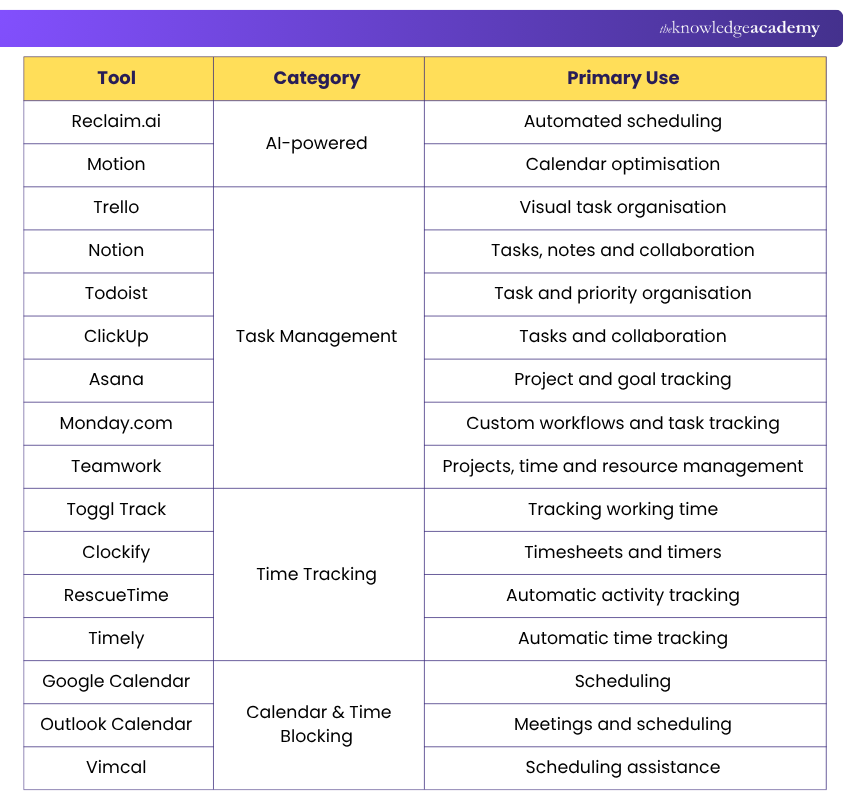
Here's a quick summary of which Time Management Tools will help you:
How to Choose the Right Time Management Tool?
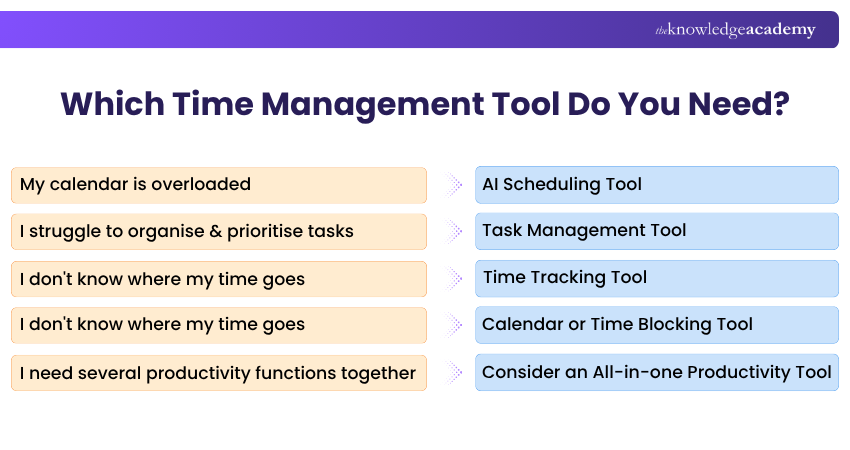
The best Time Management Tool is not necessarily the one with the longest feature list. It should solve the specific problems you experience and fit naturally into your existing workflow.
a) Identify Your Main Challenge: Start by determining what is causing the biggest difficulty. Do you need help prioritising tasks, tracking time, organising meetings or protecting periods for focused work?
b) Consider Ease of Use: Choose a tool that is straightforward enough to use consistently. A complicated platform may provide advanced functionality but offer little value if people avoid using it.
c) Compare Relevant Features: Focus on the features that address your actual requirements, such as deadlines, reminders, time tracking, automation, reporting or collaboration.
d) Check Integrations: Consider whether the tool works with the calendars, communication platforms and other applications already used in your workflow.
e) Consider Individual vs Team Needs: An individual may only need task lists and reminders, while teams may require shared projects, permissions, reporting and collaboration features.
f) Compare Cost and Value: Compare available features with the cost of the tool. Paying for advanced capabilities you rarely use may provide limited value.
g) Review Support Options: Help documentation, tutorials and customer support can be particularly useful when implementing more complex tools across a team.
Use this checklist before making your final decision on the tool:
□ What specific Time Management problem am I trying to solve?□ Do I need task planning, scheduling, tracking or multiple functions?□ Is the tool simple enough to use consistently?□ Does it integrate with my existing applications?□ Do I need individual or team functionality?□ Are reporting and productivity insights important?□ Will automation or AI genuinely improve my workflow?□ Does the tool provide sufficient value for its cost?
Turn the busiest days into productive victories with our Productivity and Time Management Training – Sign up now!

The Knowledge Academy develops accessible learning content across Project Management, IT, Cybersecurity, Data Science, Business Analysis, HR, Accounting and Finance, Leadership and Health and Safety. Its resources combine subject research with clear explanations to help professionals build practical knowledge across a wide range of disciplines.
View Detail

 If you wish to make any changes to your course, please


