


We may not have the course you’re looking for. If you enquire or give us a call on 01344203999 and speak to our training experts, we may still be able to help with your training requirements.
Best Online Teaching Tools for Teachers
ByThe Knowledge AcademyLast updated on: 11 November 2026
Online teaching tools can help educators create more interactive and organised virtual classrooms. From lesson planning and live sessions to assessments and student engagement, these tools simplify everyday teaching tasks. Explore useful platforms and discover how to choose the right ones for your virtual classroom.
At a Glance
1. Google Classroom, Moodle and Canvas LMS help teachers organise courses, assignments and learning materials.2. Zoom, Google Meet and Microsoft Teams for Education support live virtual classes and student communication.3. Nearpod, Pear Deck and LessonUp make lessons more interactive through presentations, quizzes and activities.4. Socrative, Formative and BookWidgets help teachers assess understanding and provide feedback.5. Padlet, Whiteboard.fi and Edpuzzle encourage collaboration, active participation and interactive learning.
A classroom no longer needs four walls, rows of desks, or even a physical whiteboard. A teacher can explain a complex concept through an interactive video, turn a quick question into a classroom game, and provide personalised feedback without collecting a single paper assignment.
But with so many digital platforms available, which ones actually make teaching easier?
Whether you teach school students, university classes or professional courses, the right online teaching tools can help you deliver engaging lessons, manage assignments, and keep students involved. Let's look at some of the best tools available and how they can support your teaching.
Online Teaching Tools for Teachers
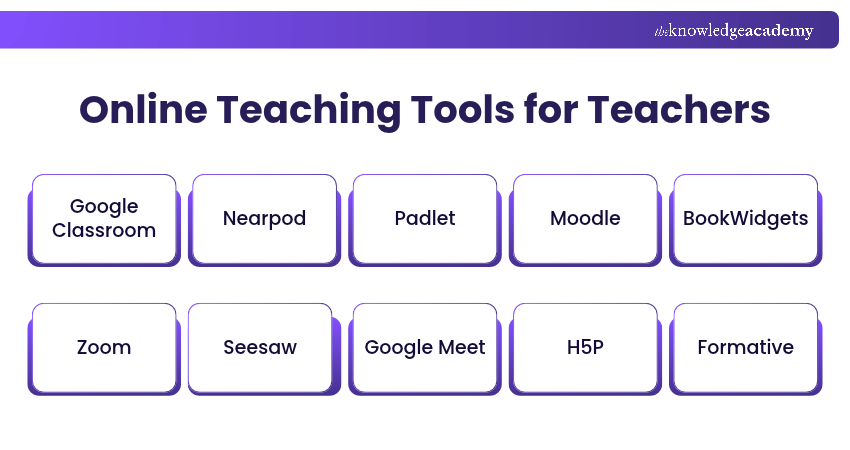
Online teaching tools are digital platforms and applications that help educators deliver lessons, manage learning activities and interact with students in virtual or blended classrooms. They offer features that support different teaching methods, encourage student participation and simplify everyday classroom tasks. The following are some of the useful online teaching tools for teachers:
1) Google Classroom
Google Classroom is an online teaching platform that helps educators organise lessons, distribute assignments and manage student activities in one place. It integrates with Google Workspace applications such as Google Docs, Google Drive and Google Forms, making it easier to share learning materials, collect submissions and provide feedback.
Teachers can create classes, post announcements, set assignment deadlines and monitor students' progress. The platform also supports grading and classroom communication, helping educators manage everyday teaching tasks more efficiently. It is particularly useful for schools and institutions looking for a centralised way to support online and blended learning.

2) Nearpod
Nearpod is an interactive online teaching platform that helps teachers create engaging lessons using quizzes, polls, videos and collaborative activities. Educators can deliver lessons live or allow students to complete them at their own pace.
The platform also provides real-time assessment insights, helping teachers monitor student understanding and adjust their teaching methods. It is particularly useful for interactive lessons and formative assessments.
3) Padlet
Padlet is a collaborative online teaching tool that allows teachers and students to share ideas, learning materials and responses on digital boards. Students can contribute using text, images, audio, videos and links, making classroom discussions more interactive.
Teachers can use Padlet for brainstorming activities, group projects, lesson discussions and collaborative assignments. Its real-time collaboration features make it suitable for both virtual and blended classrooms.
4) Moodle
Moodle is an open-source Learning Management System (LMS) that helps teachers create and manage virtual learning environments. It allows educators to organise course materials, assignments, quizzes, discussions, and learning activities in one place.
Teachers can monitor student progress, provide feedback, and customise course structures based on different learning requirements. Moodle also supports plugins and integrations, making it useful for schools, universities, and training organisations.
5) BookWidgets
BookWidgets is an online teaching tool that allows educators to create interactive exercises, digital worksheets and assessments. It offers more than 40 activity templates, including quizzes, flashcards, puzzles and educational games.
Teachers can automatically grade selected question types, track student progress in real time and provide personalised feedback. It also integrates with Google Classroom, making it useful for managing interactive learning activities and assessments.
6) Zoom
Zoom is an online teaching tool that helps you conduct live video sessions with students. Its free basic plan supports meetings with up to 100 participants for up to 40 minutes. Teachers can also share their screens, use whiteboarding features, and create breakout rooms for group discussions.
Zoom offers features such as chat, reactions and hand raising, along with polling capabilities on supported plans, to help teachers engage students and facilitate interaction. Recording options and other advanced capabilities vary depending on the plan.
Trainer's Insight
Always prepare a downloadable lesson outline or alternative activity before conducting a live class. If technical difficulties interrupt the session, students can continue learning without losing valuable instructional time.
7) Seesaw
Seesaw is an online learning platform that helps teachers create interactive lessons, assign activities and monitor student progress. Students can demonstrate their understanding through drawings, videos, audio recordings and written responses, making learning more engaging.
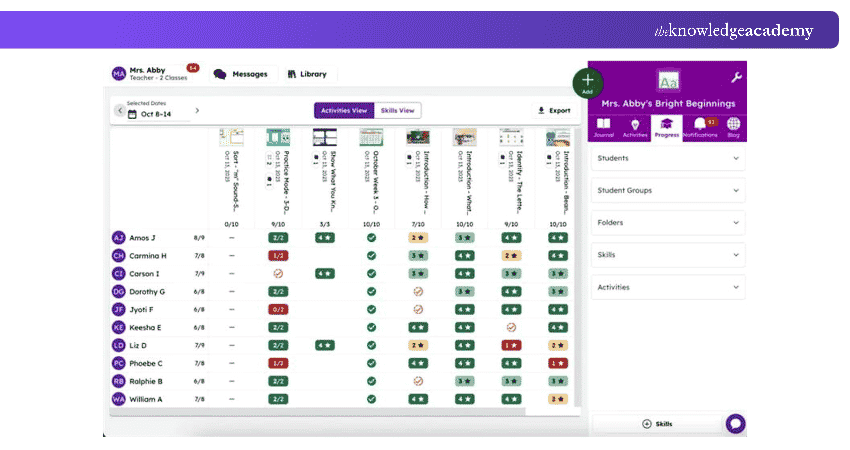
Teachers can also provide feedback, conduct assessments and maintain digital portfolios of student work. Seesaw is particularly useful for primary school teachers who want to support creative learning and communicate with families.
8) Google Meet
Google Meet is a video conferencing platform that allows teachers to conduct virtual lessons, host discussions, and communicate with students in real time. It integrates with Google Workspace applications, making it convenient for educators already using Google Classroom, Gmail, and Google Calendar.
Teachers can use features such as screen sharing, live captions, and meeting chat to support online instruction. Depending on the Google Workspace edition, additional capabilities may include breakout rooms, polls, attendance tracking, and meeting recordings.
9) H5P
H5P is an interactive content creation tool that allows teachers to develop digital learning materials, including quizzes, interactive videos, presentations and educational games. It helps educators turn traditional learning resources into activities that encourage active participation.
Teachers can integrate H5P content into learning management systems such as Moodle and Canvas. This makes it particularly useful for creating self-paced lessons, interactive course materials and formative assessments.
10) Formative
Formative is an online teaching and assessment platform that allows educators to create interactive lessons, quizzes and learning activities. Teachers can monitor student responses in real time, identify learning gaps and provide immediate feedback.
The platform supports teacher-paced and student-paced activities, making it suitable for live lessons and independent learning. It is particularly useful for assessing student understanding throughout a lesson rather than relying only on final examinations.
11) Pear Deck
Pear Deck is an online teaching tool that helps educators make presentations more interactive by adding questions, polls and learning activities to Google Slides or PowerPoint Online.
Teachers can use Pear Deck to collect student responses, assess understanding and provide feedback during lessons. It supports both instructor-paced and student-paced learning, making it suitable for live virtual classes and independent activities. These features help educators encourage participation and identify learning gaps more effectively.
12) Microsoft Teams for Education
Microsoft Teams for Education is an online teaching and collaboration platform that helps educators conduct virtual classes, organise learning materials and communicate with students. It combines video meetings, messaging, file sharing and classroom management features in one place, making it suitable for online and blended learning.
Teachers can create assignments, deliver quizzes through Microsoft Forms, provide feedback and track student progress using built-in grading tools. The platform also includes collaborative class notebooks and dedicated channels for organising discussions and group activities. These features help educators manage lessons, encourage student participation and support learning beyond live classroom sessions.
Learn how to use Microsoft Teams effectively through our Microsoft Teams Training – Sign up soon!
13) Socrative
Socrative is an online teaching and assessment tool that helps educators evaluate student understanding through interactive quizzes, polls and learning activities. It allows teachers to conduct real-time assessments, collect responses and identify areas where students need additional support.
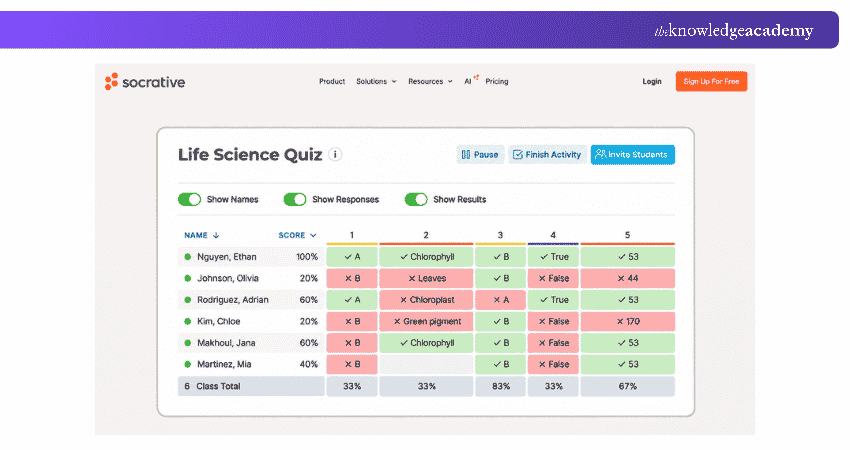
Teachers can create multiple-choice questions, short-answer activities and exit tickets to check learning progress. The platform also supports automatic grading, instant feedback and performance reports, helping educators adjust their teaching methods based on student responses. Socrative is particularly useful for formative assessments in both virtual and traditional classrooms.
14) Whiteboard.fi
Whiteboard.fi is an interactive online whiteboard tool that allows teachers to explain concepts, conduct learning activities and assess student understanding in real time. It provides each student with an individual digital whiteboard where they can write answers, draw diagrams and solve problems during lessons.
Teachers can view students' whiteboards simultaneously, monitor their progress and provide immediate feedback. These features make Whiteboard.fi particularly useful for interactive exercises, problem-solving activities and formative assessments in virtual and blended classrooms.
15) Canvas LMS
Canvas LMS is an online learning management platform that helps teachers create, organise and deliver educational courses. It provides a centralised space for sharing learning materials, managing assignments and communicating with students, making it suitable for schools, universities and professional training institutions.
Teachers can create quizzes, conduct discussions, grade assignments and provide feedback using built-in assessment tools. The platform also offers course analytics to help educators monitor student engagement and identify areas requiring additional support.
Trainer's Insight:
A predictable lesson structure can help students focus on the subject instead of figuring out what comes next. Starting classes with a clear objective, following a familiar sequence and ending with a recap can create a more supportive online environment.
16) LessonUp
LessonUp is an online teaching platform that helps educators create, deliver and manage interactive lessons. Teachers can incorporate quizzes, polls, word clouds, videos and open-ended questions into their presentations to encourage active student participation.
The platform also allows teachers to adapt existing PowerPoint presentations and access ready-made educational content. Its interactive assessment features help educators check student understanding, while reporting capabilities available on supported plans provide further insights into learning progress. This makes it suitable for online and blended learning.
17) Edpuzzle
Edpuzzle is an interactive online teaching platform that allows educators to turn educational videos into engaging learning activities. Teachers can use existing videos or upload their own content, adding questions, notes and audio explanations to assess student understanding throughout the lesson.
The platform supports self-paced video assignments and live classroom activities, allowing students to learn at their own pace or participate in group sessions. Teachers can also track video completion, review responses and monitor student progress through detailed reports.
18) Quizlet
Quizlet is an online learning and teaching platform that helps educators create interactive study materials using digital flashcards, practice questions and learning games. Teachers can create their own study sets or use existing resources to help students revise concepts, understand terminology and strengthen their knowledge.
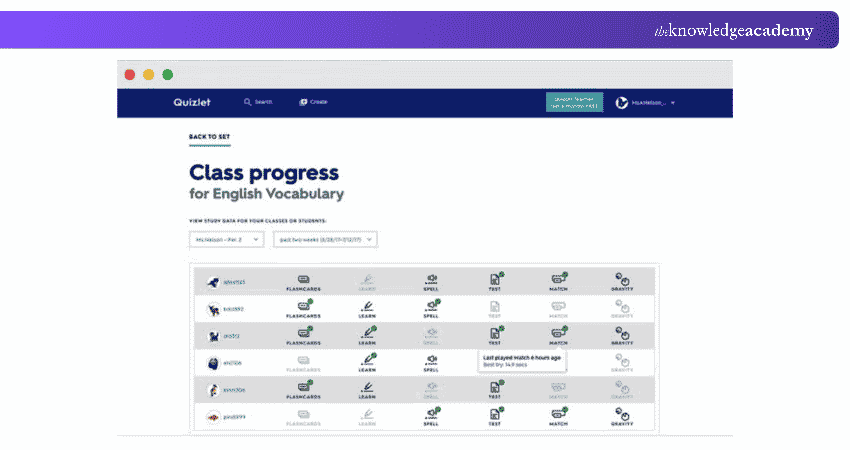
The platform offers activities such as Quizlet Live, matching games and personalised practice sessions to encourage student participation. Teachers can also organise study materials into classes, assign learning activities and monitor students' study activity through reporting features available on supported subscriptions. These insights are intended to support learning rather than formal assessment.
Factors to Consider When Choosing Online Teaching Tools
Online teaching tools offer different features, capabilities and subscription options. Choosing the right platform involves considering your teaching objectives, students' needs and available resources. Here, we will explore five factors to help you make an informed decision.
1) Features and Teaching Requirements
You should look for online teaching tools that offer capabilities aligned with your learning objectives, such as interactive activities, assessments, feedback and personalisation.
2) Ease of Use and Accessibility
You should look for online teaching tools that are easy to use and accessible to you and your students. Consider the learning curve, interface design, device compatibility and accessibility features for students with diverse needs.
3) Cost and Availability
You should look for tools that are affordable and available to you and your students. Compare free and paid options, feature restrictions, subscription requirements, and the number of users supported.
4) Privacy and Security
You should look for tools that protect the privacy and security of teachers and students. Consider the platform's privacy policy, data protection measures, access controls and compliance with relevant requirements, especially when handling children's information.
5) Feedback and Reviews from Other Users
You should look for online teaching tools with credible feedback and reviews from other educators. Consider independent user experiences, reliability, technical support and how well the tool meets different classroom requirements.
Drive better team outcomes through effective virtual leadership with Managing Virtual Teams Training – Join now!

The Knowledge Academy develops accessible learning content across Project Management, IT, Cybersecurity, Data Science, Business Analysis, HR, Accounting and Finance, Leadership and Health and Safety. Its resources combine subject research with clear explanations to help professionals build practical knowledge across a wide range of disciplines.
View Detail

 If you wish to make any changes to your course, please


