




We may not have the course you’re looking for. If you enquire or give us a call on 01344203999 and speak to our training experts, we may still be able to help with your training requirements.
Top Ethical Hacking Tools: A Complete Guide
ByVishnu SankarLast updated on: 17 September 2026
Discover the top Ethical Hacking ToSols for network scanning, vulnerability assessment, web security, password auditing and wireless testing.

Picture this: you’re sitting with a Cyber Security colleague after a long day of troubleshooting.
They turn to you and ask:
“If you had to test a system for security weaknesses tomorrow, which tool would you trust?”
Nmap? Wireshark? Burp Suite? Maybe something completely different?
The tricky part is that there isn’t one tool built for every security challenge. Some uncover exposed services, others inspect network traffic, test web applications, find vulnerabilities or audit passwords. Choosing the right one starts with knowing exactly what you need to test.
That’s where Ethical Hacking Tools become essential.
Here, we’ll look at the top options for different security tasks, what each one does and how to choose the right tool for an authorised security assessment. Let’s begin!
What are Ethical Hacking Tools?
Ethical Hacking Tools are specialised software applications used by Ethical Hackers or White-hat Hackers to identify and assess security vulnerabilities in computer systems and networks. They support authorised penetration testing and security assessments, helping organisations detect weaknesses before malicious hackers can exploit them.
These tools strengthen an organisation’s Cyber Security by proactively identifying and addressing potential threats. Common examples include vulnerability scanners, password auditing tools and network analysers, which help assess different areas of security and improve Cyber Security resilience.

Why are Ethical Hacking Tools Important?
Ethical Hacking Tools are crucial for several reasons. Let’s learn about them below:
a) Risk Management: They help organisations identify the most valuable and vulnerable parts of their IT ecosystem, making it easier to prioritise and protect critical assets.
b) Regulatory Compliance: These tools can support security assessment and testing activities required by applicable security standards, policies or regulatory frameworks.
c) Enhanced Cyber Security: Ethical Hacking Tools help organisations proactively identify and address vulnerabilities, reducing opportunities for weaknesses to remain undetected.
d) Security Validation: Testing can help organisations determine whether existing security controls work as expected rather than relying only on assumptions about their effectiveness.
e) Better Remediation Priorities: Findings from security assessments can help teams understand which weaknesses require attention and provide evidence for remediation decisions.
Trainer’s Insight
Always confirm the testing scope, systems included, permitted testing methods and any restrictions before using an Ethical Hacking Tool. Authorisation should be clear before testing begins.
Top Ethical Hacking Tools by Type
Ethical Hacking Tools are designed for different stages and objectives of a security assessment. The following categories group important tools according to their primary security-testing role. Let’s learn about them below:
1) Network Scanning and Reconnaissance Tools
Network scanning and reconnaissance tools help security professionals understand an authorised target environment. They can identify active hosts, exposed ports, available services and other information that helps establish what exists within the testing scope. Some key tools under this type include:
1) Nmap
Nmap, short for Network Mapper, is a widely used open-source utility for network discovery and security auditing. It can identify hosts available on a network, discover exposed services and versions, gather information about Operating Systems and examine other network characteristics.
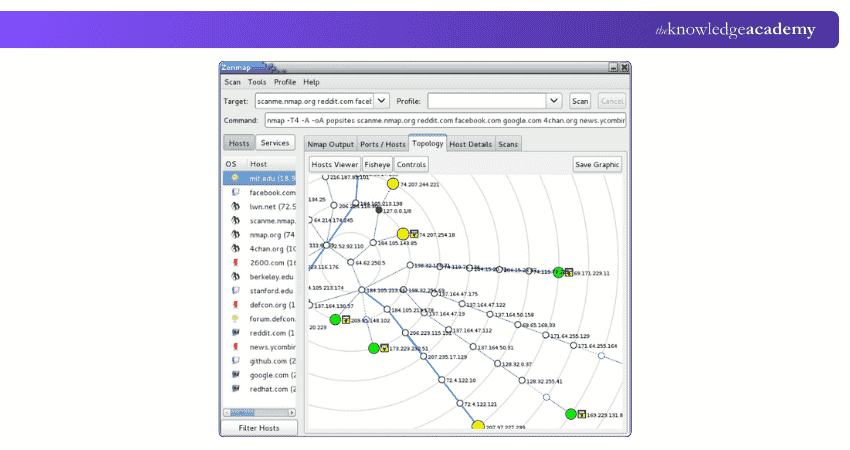
Key Capabilities of Nmap:
a) Host and network discovery
b) Port scanning
c) Service and version detection
d) Operating System detection
e) Network inventory
f) Extensible scanning through the Nmap Scripting Engine
Best For: Network discovery, reconnaissance, service enumeration and security auditing.
2) Angry IP Scanner
Angry IP Scanner is an open-source, cross-platform network scanner designed for fast and straightforward IP address and port scanning. It can scan local networks as well as specified IP ranges and allows results to be exported into several formats. Its relatively simple interface makes it useful when the primary objective is discovering reachable hosts.
Key Capabilities of Angry IP Scanner:
a) IP address scanning
b) Port scanning
c) Network host discovery
d) Configurable IP ranges
e) Result exporting
f) Cross-platform operation
Best For: Fast host discovery and straightforward IP and port scanning.
2) Network Traffic Analysis and MITM Testing Tools
These tools help security professionals examine network communication. Some focus primarily on observing and analysing packets, while others can support authorised Man-in-the-Middle (MITM) security testing. Some key tools that fall under this type include:
1) Wireshark
Wireshark is an excellent tool for analysing data packets and performing deep inspections of numerous established protocols. It allows users to capture network traffic in real time or analyse previously saved packet captures.
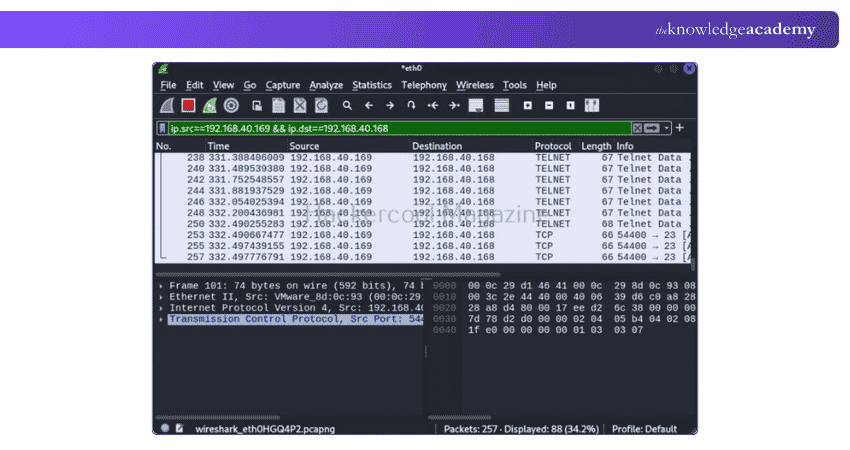
Key Capabilities of Wireshark:
a) Live packet capture
b) Offline capture analysis
c) Deep protocol inspection
d) Capture and display filters
e) Traffic visualisation and analysis
f) Support for widely used packet capture formats
Best For: Detailed network traffic and protocol analysis.
Trainer’s Insight
Wireshark becomes far more useful when you understand protocols such as TCP, DNS and HTTP. Knowing what normal traffic looks like makes unusual behaviour easier to recognise.
2) Ettercap
Ettercap is a multipurpose network security tool designed around sniffing, content filtering and Man-in-the-Middle testing. It supports active and passive protocol dissection and includes capabilities for network and host analysis. Unlike Wireshark, which primarily focuses on observing and analysing network traffic, Ettercap can be used during authorised assessments to test how networks respond to MITM scenarios.
Key Capabilities of Ettercap:
a) Network sniffing
b) MITM security testing
c) Active and passive protocol analysis
d) Host and network analysis
e) Content filtering
f) Plugin-based extensibility
Best For: Authorised MITM testing and network traffic assessment.
3) Vulnerability Assessment Tools
Vulnerability assessment tools systematically examine systems and infrastructure for known security weaknesses. They help security teams identify potential exposures before deciding whether deeper validation or remediation is required. A key tool that falls under this type is:
1) OpenVAS
OpenVAS is Greenbone's vulnerability-scanning technology and forms part of its current OPENVAS security product portfolio. It is used to scan IT environments for known vulnerabilities and support systematic vulnerability assessment.
Key Capabilities of OpenVAS:
a) Vulnerability scanning
b) IT infrastructure assessment
c) Regular vulnerability-test updates
d) Security weakness identification
e) Reporting and remediation information
f) Risk prioritisation
Best For: Broad vulnerability assessment of IT infrastructure.
Trainer’s Insight
A scanner finding does not always mean a vulnerability has been confirmed. Results should be reviewed and validated to identify false positives and understand the actual security risk.
4) Exploitation and Penetration Testing Tools
Exploitation tools help authorised security professionals validate whether identified vulnerabilities can actually be exploited within the agreed testing scope. They are commonly used during controlled penetration tests to assess the real-world impact of security weaknesses.
1) Metasploit Framework
Metasploit Framework is a modular penetration testing platform used to test and validate security vulnerabilities. It provides modules for tasks such as vulnerability validation, exploitation and post-exploitation within authorised environments.
Key Capabilities of Metasploit Framework:
a) Vulnerability validation
b) Exploit modules
c) Payload management
d) Network and service enumeration
e) Post-exploitation capabilities
f) Modular penetration-testing workflow
Best For: Controlled vulnerability validation and penetration testing.
5) Web Application and Web Server Security Testing Tools
Web security tools focus on websites, web applications, HTTP/S communication and web servers. Some provide comprehensive application-testing environments, while others specialise in automated scanning or server-focused checks. Key tools under this category are:
1) Burp Suite
Burp Suite is a comprehensive platform for web application security testing. It is widely used by security professionals to examine how web applications communicate with users and servers and to identify application-layer vulnerabilities. One of its best-known capabilities is its intercepting proxy, which allows authorised testers to inspect and modify HTTP/S traffic.
Key Capabilities of Burp Suite:
a) Intercepting proxy
b) Web application crawling and mapping
c) Request and response analysis
d) Vulnerability scanning in supported editions
e) Repeater and other manual testing tools
f) Extensibility through integrations and extensions
Best For: Comprehensive manual and automated web application security testing.
Trainer’s Insight
Don’t focus only on automated scanning. Understanding how requests and responses behave can reveal application security issues that require manual investigation.
2) ZAP
ZAP is an open-source web application security testing tool. It can act as an intercepting proxy and provides automated and manual capabilities for identifying security issues in web applications. Its combination of automation and hands-on testing features makes it useful for developers, testers and security professionals.
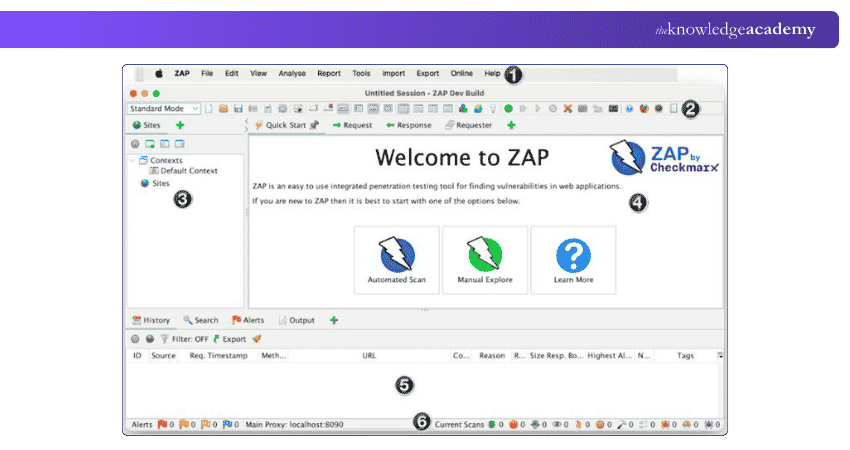
Key Capabilities of ZAP:
a) Intercepting proxy
b) Automated web application scanning
c) Passive scanning
d) Spidering and application discovery
e) Manual security testing support
f) Extensible add-ons
Best For: Open-source web application security assessment and security testing within development workflows.
3) Nikto
Nikto is an open-source web server scanner. It focuses on identifying security issues associated with web servers. It can check for potentially dangerous files, outdated server components, configuration problems and other server-related security concerns.
Key Capabilities of Nikto:
a) Web server scanning
b) Outdated component checks
c) Potentially dangerous file and CGI checks
d) SSL and certificate checks through available functionality
e) Server configuration assessment
f) Plugin-based checks
Best For: Focused web server security assessment.
6) Password Auditing and Recovery Tools
Password auditing tools help authorised security teams evaluate password strength and determine whether stored password hashes or protected credentials are resistant to recovery attempts. These tools should be used only against credentials and data included within an authorised assessment. Key tools under this type are:
1) John the Ripper
John the Ripper is an open-source password security auditing and password recovery tool available for multiple Operating Systems. It supports a broad range of hash and cipher types and can be used to evaluate password strength across different systems.
Key Capabilities of John the Ripper:
a) Password security auditing
b) Password recovery
c) Support for numerous hash and cipher formats
d) Multiple testing modes
e) Customisable rules
f) Cross-platform availability
Best For: Flexible password auditing across varied password and encrypted-data formats.
2) Hashcat
Hashcat is a password recovery and auditing tool designed for high-performance password testing. It supports a wide range of hash types and can make effective use of available computing hardware, including GPU acceleration, for supported workloads.
Key Capabilities of Hashcat:
a) Broad hash support
b) GPU-accelerated processing
c) Dictionary-based testing
d) Rule-based testing
e) Mask-based testing
f) Session restoration and workload management
Best For: High-performance password and hash auditing.
Pro Tip
Define the purpose of the password audit before testing. This keeps the assessment focused on evaluating password strength rather than simply attempting recovery.
7) Wireless Network Security Testing Tools
Wireless security tools focus on Wi-Fi and other radio-based environments. They can help authorised testers discover wireless networks, capture relevant traffic and evaluate wireless security controls. Key tools under this category include:
1) Kismet
Kismet is an open-source wireless sniffer, Wireless Intrusion Detection System (WIDS), wardriving and packet-capture tool. Although it is strongly associated with Wi-Fi security assessment, current Kismet capabilities extend beyond Wi-Fi to technologies when suitable hardware and drivers are available.
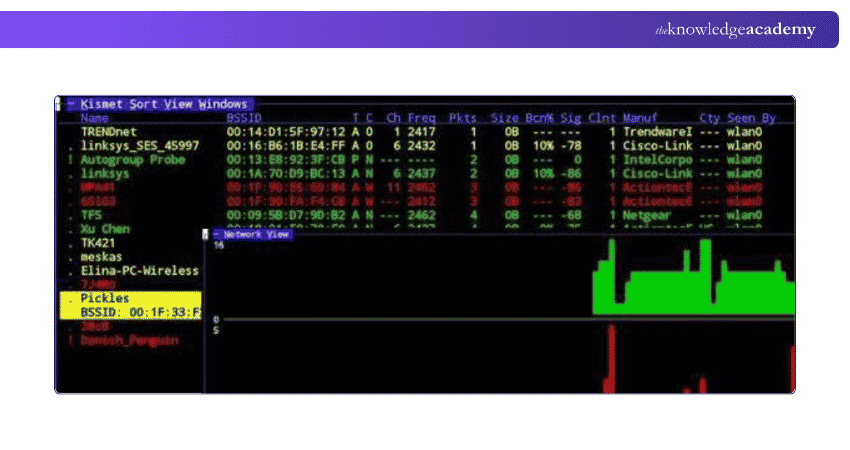
Key Capabilities of Kismet:
a) Wireless network discovery
b) Packet capture
c) Wireless intrusion detection
d) Wardriving
e) Distributed capture
f) Support for multiple wireless and RF data sources
Best For: Wireless discovery, monitoring and passive security assessment.
2) Aircrack-ng
Aircrack-ng is a suite of command-line tools designed to assess Wi-Fi network security. Its capabilities cover several areas of wireless assessment, including monitoring, testing, packet capture and authorised evaluation of wireless security. Different utilities within the suite perform different functions, making Aircrack-ng more accurately described as a suite of wireless security tools
Key Capabilities of Aircrack-ng:
a) Wireless packet capture
b) Wi-Fi monitoring
c) Wireless adapter and driver testing
d) Packet injection capabilities
e) WEP and supported WPA/WPA2-PSK security assessment
f) Command-line automation
Best For: Detailed Wi-Fi security auditing and controlled wireless security testing.
Go beyond the basics of Ethical Hacking! Join the Ethical Hacking Professional Training and learn how to assess security with a professional mindset now!
How to Choose the Right Ethical Hacking Tool?
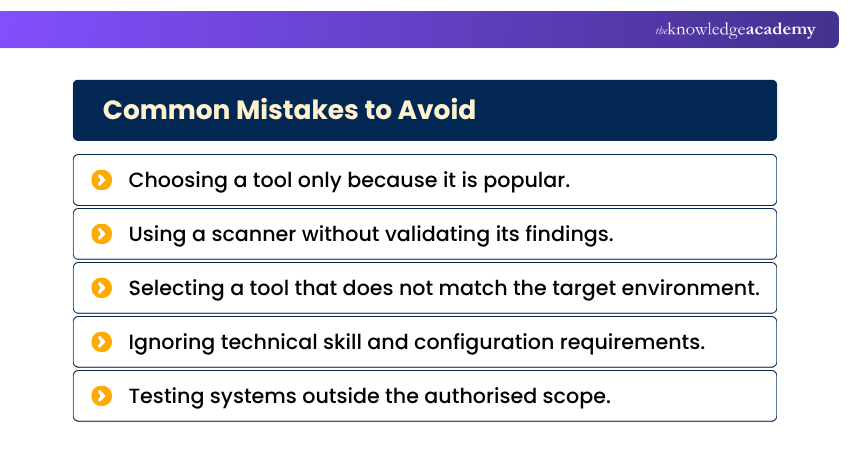
There is no single Ethical Hacking Tool that is suitable for every assessment. Choosing the right tool begins with understanding what you need to test and what the authorised scope allows. Consider the following factors:
Pro Tip
Don’t choose a tool simply because it is popular. Start by defining what you need to test, then select a tool designed for that specific security task.
a) Testing Objective: Choose a tool based on the task, such as network scanning, web application testing or password auditing.
b) Target Environment: Consider whether you are testing networks, servers, web applications, credentials or wireless infrastructure.
c) Depth of Testing: Determine whether you need basic scanning, detailed analysis or more advanced security testing.
d) Automation vs Manual Testing: Choose between automated scanning, manual analysis or a combination of both based on the assessment.
e) Technical Skills: Select a tool that matches the user's expertise, from graphical interfaces to more advanced command-line tools.
f) Integration: Check whether the tool can work with your existing security, development and reporting systems.
g) Licensing and Cost: Compare open-source and commercial options based on required features, support and budget.
h) Authorisation and Scope: Use Ethical Hacking Tools only on systems you are authorised to test and remain within the agreed scope.
Recognise potential security risks with our Cyber Security Awareness Training – Join now!

Vishnu Sankar is a Senior Content Writer with 5+ years of experience across content development, software development, web development and system administration. His technical background and professional training support his expertise in IT and Tech, while his extensive research and writing experience covers Project Management and Health and Safety.
View Detail

 If you wish to make any changes to your course, please


