




We may not have the course you’re looking for. If you enquire or give us a call on 01344203999 and speak to our training experts, we may still be able to help with your training requirements.
Digital Transformation Tools -All You Need to Know
ByThe Knowledge AcademyLast updated on: 11 September 2026
Digital Transformation Tools help organisations modernise operations, improve collaboration and manage information more efficiently. Choosing the right tools can support automation and good customer experiences.
Your sales team stores customer information in spreadsheets.
Employees share files through long email chains.
Managers manually collect updates before every meeting.
Each system may work on its own, but together they can create delays along with lots of duplicated work and disconnected information.
This is where Digital Transformation Tools can make a difference. They help organisations connect people, processes and data through technologies that are designed to make everyday work more efficient.
However, Digital Transformation is not simply about adding more software. The real value comes from choosing the tools that address specific business needs and ensuring employees can use them effectively.
What are Digital Transformation Tools?
Digital Transformation Tools are technologies that can replace manual processes, connect previously separate systems and give employees easier access to the information they need. These tools can support many areas of a business. For example, communication platforms connect teams, Customer Relationship Management (CRM) systems organise customer information and cloud tools provide flexible access to data.
Digital Adoption Platforms can also help employees learn how to use new software through in-app guidance and support. The purpose is not simply to digitise an existing task. Organisations can use these technologies to rethink how work is performed and create more connected and efficient processes.

Why are Digital Transformation Tools Important?
Organisations often manage large amounts of information across different departments, systems and locations. When processes remain manual or disconnected, employees may spend unnecessary time searching for information, repeating tasks or moving data between systems.
Digital Transformation Tools can bring these activities together. Depending on the technology and how it is implemented, they can support improved access to information and better customer and employee experiences.
Key Benefits of Digital Transformation Tools
Here are the key benefits of Digital Transformation Tools:
1) Improved Efficiency: Automation and connected workflows can reduce repetitive manual work and save employees time.
2) Better Collaboration: Communication and collaborative workspace tools allow teams to share information and work together across locations.
3) Improved Customer Experience: CRM and customer service technologies help organisations understand interactions and provide more consistent support.
4) Greater Access to Data: Cloud platforms and connected systems make information easier for authorised users to access when needed.
5) More Informed Decisions: Analytics, reporting and AI-enabled capabilities can help organisations turn business data into useful insights.
6) Greater Scalability: Digital platforms can make it easier to expand processes, storage and services as organisational needs change.
Types and Examples of Digital Transformation Tools
Digital Transformation involves more than one type of technology. Different tools address different business challenges, from improving communication to automating repetitive processes. Here are the key categories:
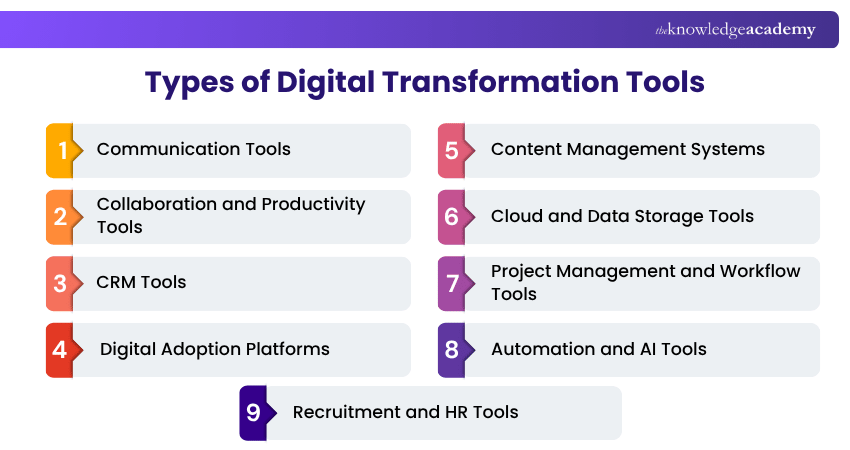
1) Communication Tools
Communication tools help employees exchange information through messaging, voice calls, video meetings and email. They generally support two forms of communication:
a) Synchronous communication: Takes place in real time, such as instant messaging, voice calls and video meetings.
b) Asynchronous communication: Does not require people to communicate at the same time, such as email.
Examples include Microsoft Teams, Slack, Zoom, Gmail and Outlook.
Best suited for: Organisations that need to improve communication between employees, departments or distributed teams.
2) Collaboration and Productivity Tools
Collaboration tools provide shared digital environments where employees can create documents, manage information and work together. Google Workspace, for example, includes tools such as Google Docs, Gmail, Google Calendar and Google Drive.
Microsoft 365 provides applications including Word, Excel, Teams, OneDrive and Outlook. These platforms can reduce the need to move information between separate applications and make shared work easier to manage.
Best suited for: Organisations with teams that regularly create, review and share information.
Encourage innovation and shape the digital leaders of tomorrow with our range of Digital Transformation Courses - Sign up now!
3) CRM Tools
Customer Relationship Management (CRM) tools help organisations manage customer information and interactions. They can centralise information from areas such as sales, marketing and customer service. Common capabilities include contact management, lead tracking, workflow automation and reporting. Examples include Salesforce, HubSpot and Microsoft Dynamics 365.
Best suited for: Organisations that need a clearer and more centralised view of customer relationships.
Trainer's Insight
The platform with the longest feature list is not necessarily the best choice. A simpler tool that fits existing workflows and is widely adopted can provide greater value.
4) Digital Adoption Platforms
Digital Adoption Platforms (DAPs) help employees and users learn how to use software more effectively. They can provide in-app walkthroughs, contextual guidance, task lists and self-help resources. Some platforms can also provide information about how users interact with applications, thus helping organisations identify adoption difficulties.
DAPs can be particularly useful when an organisation introduces new technology across multiple teams.
Best suited for: Organisations experiencing low software adoption or introducing complex digital systems.
5) Content Management Systems
A Content Management System (CMS) helps organisations create, organise and publish website content without requiring users to code every update manually. Common CMS capabilities include content editing, publishing, media management, user permissions and extensions for functions such as Search Engine Optimisation (SEO). Examples include WordPress, Joomla, Drupal and other website management platforms.
Best suited for: Organisations that regularly create and manage digital or website content.
6) Cloud and Data Storage Tools
Cloud storage tools allow organisations to store and access information through remote infrastructure rather than relying only on local hardware. They can support remote access, flexible storage capacity, backups and collaboration.
Encryption, Access controls and various other security measures are important considerations when choosing a cloud service. Examples include Google Drive, Microsoft OneDrive and enterprise cloud storage services.
Best suited for: Organisations that need scalable storage or secure access to information across different locations.
Make our Google Cloud Platform Fundamentals Training your first step toward limitless innovation - Sign up now!
7) Project Management and Workflow Tools
Project Management tools help teams organise tasks, responsibilities, deadlines and project information. Depending on the platform, teams may use dashboards, task boards, calendars, workflow automation and reporting features to monitor progress. These tools can also improve visibility by giving project teams and stakeholders a shared view of work.
Best suited for: Organisations managing multiple projects, tasks or cross-functional workflows.
8) Automation and AI Tools
Automation tools help organisations reduce repetitive manual work by allowing predefined actions or workflows to run automatically. AI-enabled tools can extend these capabilities by supporting activities such as information analysis, content assistance, customer support and pattern identification. The appropriate use of AI depends on factors such as data quality, security, governance and the business process involved.
Best suited for: Organisations with repetitive processes or large amounts of information that require analysis.
9) Recruitment and HR Tools
Recruitment tools help hiring teams manage activities such as job applications, candidate information, interview stages and recruitment reporting. Applicant Tracking Systems (ATS) can centralise candidate records and make it easier for hiring teams to follow applicants throughout the recruitment process. Examples include SmartRecruiters and Zoho Recruit.
Best suited for: Organisations that want to manage recruitment workflows more consistently and efficiently.
Pro Tip
Avoid building a technology stack simply by adding more tools. Prioritise platforms that solve the defined problems and work effectively with the systems your organisation already uses.
How to Choose the Right Digital Transformation Tools?
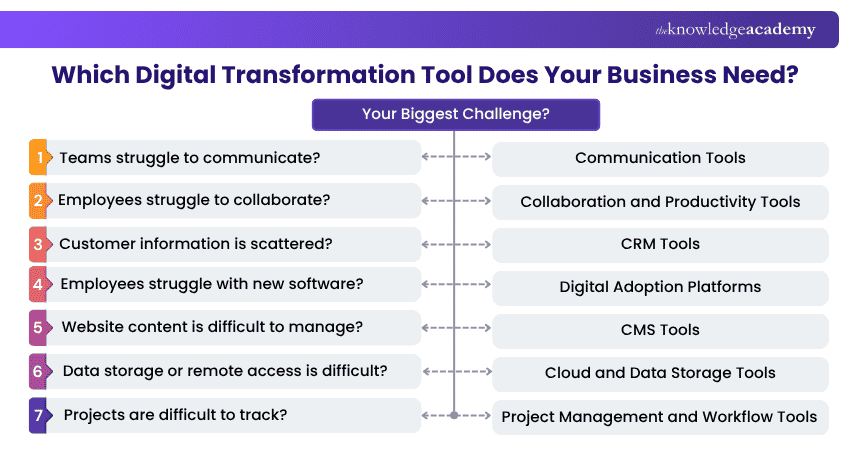
There is no single technology stack that works for every organisation. The right choice comes down to your existing systems, processes, employees, customers and business objectives. Start by identifying the challenge you are trying to solve. You can then compare tools based on how effectively they address that need. Here’s a quick way to make your decision:
How to Implement Digital Transformation Tools Successfully?
Choosing the right technology is only part of Digital Transformation. Organisations also need to introduce it in a way that encourages adoption and produces measurable improvements. A practical implementation process can include the following steps:
1) Assess Current Processes: Identify inefficient, repetitive or disconnected processes and understand where improvement is needed.
2) Define Clear Objectives: Determine what the organisation expects the technology to achieve. Objectives could include reducing processing time, improving collaboration or providing better access to customer information.
3) Select the Right Tool: Compare available technologies against your requirements, existing systems, budget and security needs.
4) Run a Pilot: Test the technology with a smaller team or process before deploying it across the organisation.
5) Train Employees: Provide employees with appropriate training, documentation and support so they understand how the technology fits into their work.
6) Integrate Existing Systems: Where appropriate, connect the new platform with existing applications to reduce information silos and duplicated work.
7) Measure Results: Track relevant measures such as adoption, process time, customer outcomes or productivity depending on the original objective.
8) Review and Improve: Use employee feedback and performance information to refine your workflows and identify further improvements.
Pro Tip
Start small when possible. A controlled pilot can reveal usability, integration and training issues before organisation-wide implementation.
Common Mistakes When Choosing Digital Transformation Tools
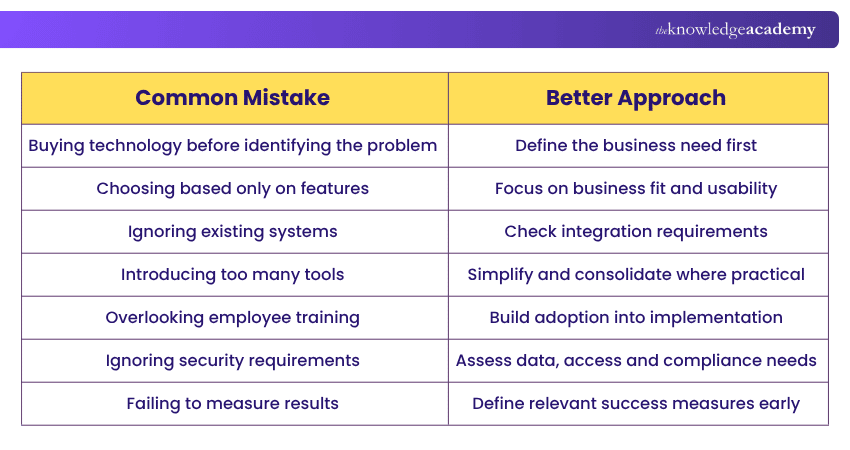
Introducing technology without sufficient planning can create additional complexity rather than improving the organisation. Here are the mistakes to look out for and the better approach you can take:
Harness AI automation and derive extraordinary outcomes from everyday operations. Sign up for our AI Automation Course for Operations now!

The Knowledge Academy develops accessible learning content across Project Management, IT, Cybersecurity, Data Science, Business Analysis, HR, Accounting and Finance, Leadership and Health and Safety. Its resources combine subject research with clear explanations to help professionals build practical knowledge across a wide range of disciplines.
View Detail

 If you wish to make any changes to your course, please


