


We may not have the course you’re looking for. If you enquire or give us a call on 01344203999 and speak to our training experts, we may still be able to help with your training requirements.
Top 12 AWS Security Tools and Their Features
ByThe Knowledge AcademyLast updated on: 10 November 2026
Explore 12 essential AWS security tools, including Amazon GuardDuty, AWS Security Hub, AWS WAF and Amazon Inspector. Discover their key features, how they support cloud threat detection, access control and data protection, and how to select suitable tools.
Quick Preview
1. AWS security tools support threat detection, access management, vulnerability assessment and data protection across cloud environments.2. Amazon GuardDuty identifies suspicious activity, while Amazon Inspector detects vulnerabilities in supported workloads.3. AWS IAM controls resource permissions, while AWS Secrets Manager protects application credentials.4. AWS WAF filters malicious web requests, while AWS KMS supports encryption key management.5. Choosing the right security tools depends on organisational risks, cloud infrastructure, compliance needs and budgets.
Imagine running your entire business in the cloud, only to discover that a misconfigured setting has exposed sensitive information. Even a small security gap can create serious challenges for an organisation. In today's cloud computing environment, strong security is essential for protecting applications, resources and business data.
This is where AWS security tools become valuable. From detecting suspicious activity to managing access and identifying vulnerabilities, each tool serves a specific purpose. Let's explore the tools that can help strengthen your organisation's cloud security.
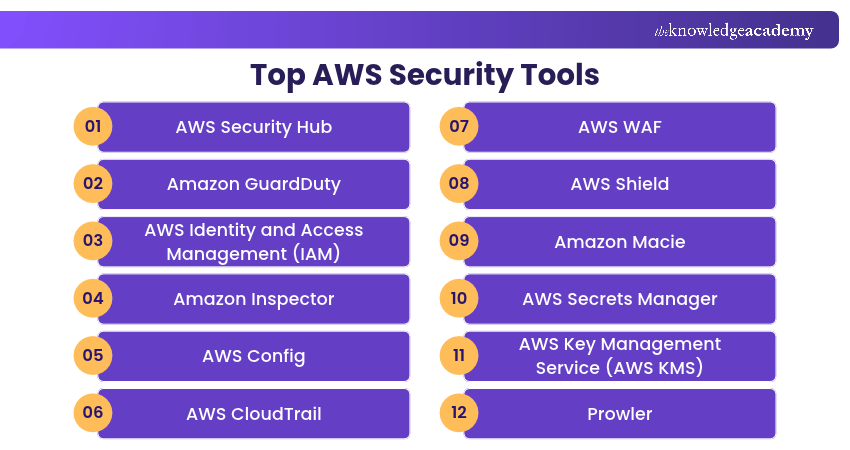
Top 12 AWS Security Tools
AWS environments can be protected using a combination of AWS security services and third-party tools. These tools support different security requirements, from identifying threats and managing vulnerabilities to protecting sensitive information. Here are 12 AWS security tools and their key features:
1) AWS Security Hub
AWS Security Hub is a unified cloud security service that helps organisations identify, prioritise and respond to critical security risks across their AWS environments. By correlating findings from different sources, Security Hub helps security teams understand risks that may not be obvious when individual alerts are examined separately.
AWS Security Hub CSPM focuses specifically on assessing cloud security posture through security best-practice checks and compliance-related controls. These complementary capabilities help organisations identify misconfigurations, understand exposures and prioritise remediation activities.
Features:
a) Correlates security findings from supported AWS security services.
b) Provides risk prioritisation and visibility across AWS accounts and resources.
c) Supports automated security response workflows through configurable rules and integrations.
Trainer Insight
Not every security finding represents the same level of risk. Consider resource exposure, business importance and related vulnerabilities rather than prioritising alerts by severity alone. This helps security teams focus on issues that could have the greatest impact.
Discover how AWS Security Hub simplifies cloud security management in the AWS Security Hub Training – Sign up now!
2) Amazon GuardDuty
Amazon GuardDuty is a threat detection service that continuously analyses supported AWS data sources to identify potentially malicious or unauthorised activity. It uses threat intelligence, machine learning and anomaly detection techniques to identify suspicious behaviour.
Depending on the protection features enabled, GuardDuty can help detect threats affecting AWS accounts, workloads and supported services. For example, it may identify unusual API activity, suspicious network communications or signs of compromised resources. These findings help security teams investigate potential threats and take appropriate action.
Features:
a) Continuously analyses supported security signals for suspicious activity.
b) Uses threat intelligence and behavioural analysis to identify potential threats.
c) Generates security findings that can support investigation and automated response workflows.
3) AWS Identity and Access Management (IAM)
AWS Identity and Access Management (IAM) helps organisations securely control access to AWS services and resources. It allows administrators to define permissions through policies and manage how identities access AWS resources. IAM roles can provide temporary security credentials, reducing the need to distribute long-term access keys.
For example, an organisation can use IAM to allow a development application to access a specific Amazon S3 bucket without granting unnecessary permissions to other resources. IAM plays an important role in implementing least-privilege access and reducing the risks associated with excessive permissions.
Features:
a) Manages permissions for users, roles and supported AWS resources.
b) Supports fine-grained access control through IAM policies.
c) Enables temporary credentials through IAM roles.
Pro Tip
Avoid granting broad permissions when creating IAM policies. Provide only the access required for specific tasks, review unused permissions regularly and prefer temporary credentials wherever practical. This helps reduce the potential impact of compromised identities.
4) Amazon Inspector
Amazon Inspector is an automated vulnerability management service that helps organisations identify security weaknesses in supported AWS workloads. It continuously scans supported Amazon EC2 instances, Amazon Elastic Container Registry (Amazon ECR) container images and AWS Lambda functions for software vulnerabilities.
It also identifies network reachability issues affecting supported Amazon EC2 instances. When a vulnerability is identified, Amazon Inspector generates findings containing relevant information, including severity and remediation details. This helps security teams prioritise vulnerabilities and address weaknesses before they can be exploited.
Features:
a) Continuously scans supported AWS workloads for software vulnerabilities.
b) Identifies network reachability issues affecting supported Amazon EC2 instances.
c) Provides prioritised findings and remediation information.
5) AWS Config
AWS Config is a service that helps organisations assess and audit the configurations of their AWS resources. It records supported resource configurations and changes, allowing security teams to review how infrastructure settings evolve over time.
AWS Config rules can also evaluate resource configurations against specified requirements or desired settings. This helps organisations identify configuration issues and assess compliance with internal security policies. For example, AWS Config can help identify Amazon S3 buckets that do not meet defined configuration requirements.
Features:
a) Records supported resource configurations and changes.
b) Evaluates configurations using managed or custom AWS Config rules.
c) Supports compliance monitoring and automated remediation through integrations.
6) AWS CloudTrail
AWS CloudTrail helps organisations record and review activity across their AWS accounts and supported services. It captures information about AWS API activity, including actions performed through the AWS Management Console, AWS Command Line Interface (AWS CLI), SDKs and other supported AWS services.
CloudTrail provides an event history for recent management activity and supports additional logging through trails and event data stores. For example, security teams can use CloudTrail records to investigate changes to IAM permissions or identify actions taken during a potential security incident.
Features:
a) Records supported AWS account and API activity.
b) Supports auditing, security investigations and governance requirements.
c) Provides logging and event analysis capabilities for monitoring account activity.
7) AWS WAF
AWS WAF is a web application firewall that helps protect supported web applications and APIs from malicious HTTP and HTTPS requests. It allows organisations to create rules that inspect incoming web traffic and block or challenge requests that match specified conditions.
AWS WAF can help reduce exposure to common web attacks, including certain SQL injection and cross-site scripting attempts. For example, an organisation can configure AWS WAF to filter suspicious requests directed towards an application delivered through Amazon CloudFront.
Features:
a) Filters web requests using configurable security rules.
b) Provides managed rule groups for common web security threats.
c) Supports rate-based rules and other traffic management controls.
8) AWS Shield
AWS Shield is a managed Distributed Denial of Service (DDoS) protection service designed to help protect supported AWS applications and resources. It provides protection against network-, transport- and application-layer DDoS attacks, with the level of protection depending on the AWS Shield tier and supported resources.
AWS Shield offers two primary protection tiers: Standard and Advanced. AWS Shield Standard provides baseline DDoS protection automatically at no additional charge, while AWS Shield Advanced offers enhanced capabilities for eligible resources.
Features:
a) Provides managed DDoS protection for supported AWS resources.
b) Offers automatic detection and mitigation of supported DDoS attacks.
c) Provides advanced protection features through AWS Shield Advanced.
9) Amazon Macie
Amazon Macie is a data security service that helps organisations discover sensitive information stored in Amazon Simple Storage Service (Amazon S3). It uses machine learning and pattern matching to identify sensitive data, including certain types of personally identifiable information.
Sensitive data discovery can be performed through configured discovery jobs or automated discovery, depending on the organisation's requirements. Macie also provides visibility into S3 bucket security and access-related settings, helping organisations identify potential data exposure risks.
For example, a company can use Amazon Macie to discover S3 objects containing sensitive customer information and review whether appropriate protection measures are in place.
Features:
a) Discovers sensitive data stored in Amazon S3.
b) Uses machine learning and pattern matching for sensitive data identification.
c) Provides findings and visibility into S3 data security risks.
10) AWS Secrets Manager
AWS Secrets Manager helps organisations securely store, manage and retrieve sensitive application credentials. It supports secrets such as database passwords, API keys and other authentication information. Instead of embedding credentials directly into application code, Developers can retrieve them through supported APIs.
AWS Secrets Manager also supports secret rotation, including managed rotation for supported services and custom rotation workflows. For example, an application can retrieve its database credentials from Secrets Manager without storing the password in its source code.
Features:
a) Securely stores and retrieves application secrets.
b) Supports automated rotation for supported secret types.
c) Integrates with AWS services and applications through APIs.
11) AWS Key Management Service (AWS KMS)
AWS Key Management Service (AWS KMS) helps organisations create, manage and control cryptographic keys used to protect data. It provides centralised key management and supports integration with numerous AWS services that use encryption.
AWS KMS also allows organisations to control access to keys through policies and monitor relevant key usage activities. For example, an organisation can use AWS KMS keys to support the encryption of sensitive data stored in Amazon S3 or other integrated AWS services.
Features:
a) Supports the creation and management of cryptographic keys.
b) Provides access controls and policies for key usage.
c) Integrates with supported AWS services for data encryption.
12) Prowler
Prowler is a third-party cloud security platform with an open-source foundation that helps organisations assess security configurations and identify potential risks. It supports AWS security assessments and checks cloud environments against security best practices and compliance-related requirements.
Prowler can help teams identify misconfigurations, review security posture and generate findings that support remediation. For example, an organisation can use Prowler to assess AWS account configurations and identify resources that do not align with selected security recommendations.
Features:
a) Assesses AWS configurations against security best practices.
b) Supports security posture evaluation and compliance-related checks.
c) Provides security findings and reporting capabilities.
AWS Security Tools Selection Checklist
Use the following checklist before selecting tools for your cloud environment:□ Identify the most important cloud security risks□ Review the AWS resources and workloads requiring protection□ Determine identity, access and data protection requirements□ Identify relevant compliance obligations□ Check integration with existing AWS services□ Evaluate pricing, monitoring requirements and operational costs□ Confirm that your team can configure and maintain the selected tools
Strengthen your AWS knowledge and build cloud expertise with the AWS Certification Training – Register now!

The Knowledge Academy develops accessible learning content across Project Management, IT, Cybersecurity, Data Science, Business Analysis, HR, Accounting and Finance, Leadership and Health and Safety. Its resources combine subject research with clear explanations to help professionals build practical knowledge across a wide range of disciplines.
View Detail

 If you wish to make any changes to your course, please


