




We may not have the course you’re looking for. If you enquire or give us a call on 01344203999 and speak to our training experts, we may still be able to help with your training requirements.
Time Management Template
ByThe Knowledge AcademyLast updated on: 11 September 2026
Time Management Templates provide ready-made structures for organising tasks, priorities, schedules and progress.
Planning tomorrow, organising an entire week and tracking a three-month project are all Time Management tasks, but they do not need the same tool.
A Daily Planner can help organise a busy workday, while an Eisenhower Matrix can clarify priorities and a Project Timeline can keep longer-term work on track. Choosing the right Time Management Template means matching the structure to the problem you are trying to solve rather than forcing every task into the same planner.
What Is a Time Management Template?
A Time Management Template is a ready-to-use framework for organising how you plan, allocate, prioritise or track your time. Instead of creating a planning system from scratch every time, you start with predefined fields such as tasks, dates, priorities, time slots, deadlines or progress indicators.
Templates can be simple or detailed. A Daily Planner may organise one working day into scheduled activities, while a Time Log records how that time was actually spent. A Goal Tracker focuses on progress towards an outcome, whereas a Project Timeline shows how several activities fit together across a longer period.

11 Time Management Templates and When to Use Them
No single template works for every situation. The most useful option depends on the scale of your workload and the decision you need the template to support.
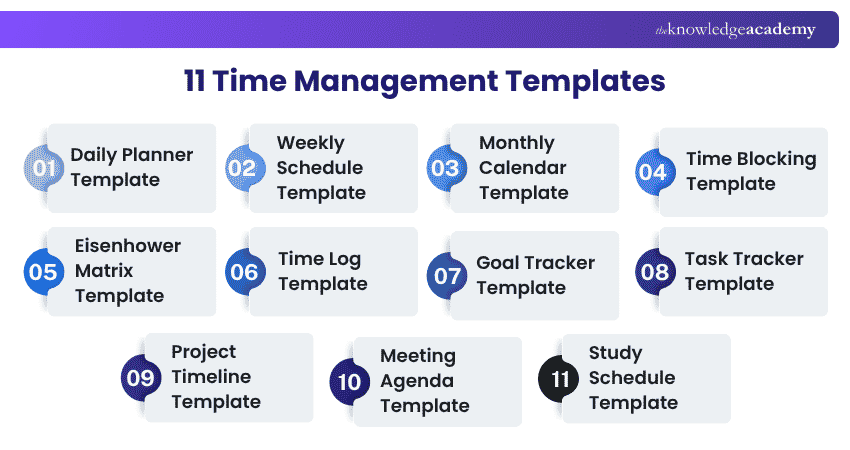
1) Daily Planner Template
A daily planner template is a practical Time Management tool that helps individuals efficiently organise and prioritise their tasks and activities.
Best for: Managing busy working days, appointments, and daily priorities.
A useful Daily Planner can include:
1) Date
2) Priority tasks
3) Time slots
4) Meetings or appointments
5) Smaller administrative tasks
6) Notes
7) End-of-day carry-over tasks
Rather than simply writing a long to-do list, assign important activities to realistic parts of the day. This creates a clearer link between what you intend to complete and the time actually available.
2) Weekly Schedule Template
A Weekly Schedule Template helps organise tasks, appointments and other commitments across an entire week.
Best for: Balancing several responsibilities across different days.
A typical weekly template might include columns for each day and rows divided into morning, afternoon and evening periods or specific hourly blocks.
The broader view can help reveal workload imbalances before they create scheduling conflicts.
3) Monthly Calendar Template
A monthly calendar template is versatile for staying organised and managing time effectively. It provides a visual outline of the entire month.
Best for: Deadlines, recurring commitments, events and longer-range planning.
Unlike a Daily Planner, it should not contain every small task. Its strength is visibility.
Useful entries include:
1) Major deadlines
2) Appointments
3) Project milestones
4) Recurring events
5) Important personal commitments
6) Review dates
A monthly view can also help you identify busy periods before they arrive. For example, seeing several deadlines concentrated in the final week of the month may prompt you to begin some work earlier.
4) Time Blocking Template
A Time Blocking Template divides your available day into blocks reserved for specific types of work.
Best for: Protecting focused work and reducing constant task-switching.
Instead of asking, “What should I do next?” throughout the day, the template answers that question in advance.
For example:
|
Time
|
Planned Activity
|
|
09:00-10:30
|
Focused project work
|
|
10:30-11:00
|
Email and administration
|
|
11:00-12:00
|
Meeting
|
|
13:00-14:30
|
Focused project work
|
|
14:30-15:00
|
Buffer
|
|
15:00-16:00
|
Follow-ups
|
|
16:00-16:30
|
Review and plan tomorrow
|
5) Eisenhower Matrix Template
An Eisenhower Matrix Template helps prioritise tasks by categorising them according to urgency and importance.
The four quadrants are:
1) Urgent + Important: Do it now
2) Important + Not Urgent: Plan it
3) Urgent + Not Important: Delegate it where appropriate
4) Not Urgent + Not Important: Remove or minimise it
6) Time Log Template
A time log template is a practical Time Management tool for tracking and analysing daily activities. It provides a structured format to record tasks, start and end times, and additional notes, enabling individuals to monitor how they spend their time.
Useful fields include:
1) Activity
2) Start time
3) End time
4) Duration
5) Category
6) Notes
A Time Log can reveal patterns that memory easily misses. You might discover that a supposedly short administrative task regularly takes much longer, or that fragmented meetings leave less uninterrupted work time than expected.
Time Log Template:
|
Activity
|
Start Time
|
End Time
|
Duration
|
Category
|
Notes
|
|
|
|
|
|
|
|
7) Goal Tracker Template
A goal tracker is a versatile Time Management tool that helps individuals and teams plan, schedule, and track progress toward their objectives.
Best for: Monitoring progress towards a defined personal, professional or team objective.
A practical Goal Tracker can include:
1) Goal
2) Target date
3) Milestones
4) Next action
5) Progress
6) Obstacles
7) Review date
For example, “Complete professional qualification” is too broad to manage as one task. A Goal Tracker can divide it into milestones such as completing learning modules, finishing practice exercises, and scheduling revision periods.
Goal Tracker Template:
|
Goal
|
Target Date
|
Next Milestone
|
Next Action
|
Progress
|
Review Date
|
|
|
|
|
|
|
|
8)Task Tracker Template
A Task Tracker Template monitors individual pieces of work from creation through completion.
Best for: Managing multiple tasks, statuses, deadlines, and owners.
Common fields include:
1) Task name
2) Priority
3) Owner
4) Start date
5) Due date
6) Status
7) Dependencies
8) Notes
A Task Tracker differs from a Goal Tracker because its focus is the work itself rather than progress towards one larger objective.
Task Tracker Template:
|
Task
|
Priority
|
Owner
|
Due Date
|
Status
|
Dependencies
|
|
|
|
|
|
|
|
9) Project Timeline Template
A Project Timeline Template shows how project phases, tasks, milestones and deadlines fit together over time.
Best for: Coordinating multi-stage work with connected activities.
A useful timeline can contain:
1) Project phases
2) Start and end dates
3) Key tasks
4) Milestones
5) Owners
6) Dependencies
For example, a product launch may involve research, content preparation, testing and release activities. A timeline shows not only what needs to happen but when each stage should happen in relation to the others.
This makes it different from a Task Tracker. The tracker tells you the status of individual work items; the timeline emphasises sequence and timing across the project.
Plan ahead with greater confidence with our Strategic Planning and Thinking Course - Join now!
10) Meeting Agenda Template
A Meeting Agenda Template structures a meeting before it begins.
Best for: Keeping meetings focused, purposeful and within the available time.
Useful fields include:
1) Meeting objective
2) Date and time
3) Attendees
4) Agenda topics
5) Time allocation
6) Topic owner
7) Decisions required
8) Actions and owners
Assigning time to agenda items helps prevent one discussion from consuming the whole meeting.
An agenda is also more useful when it identifies the purpose of each topic. “Project update” is vague. “Confirm launch date and resolve two outstanding dependencies” gives participants a clearer expectation.
11) Study Schedule Template
A Study Schedule Template organises learning activities across available study periods.
Best for: Students, certification candidates and anyone balancing several subjects or learning objectives.
A useful structure might include:
1) Subject or topic
2) Study date
3) Start and end time
4) Learning objective
5) Practice activity
6) Review session
7) Completion status
Instead of allocating identical time to every topic, learners can give additional attention to areas that require more practice while maintaining regular review of stronger subjects.
A Study Schedule also makes the workload visible. This can help prevent large amounts of revision from being left until immediately before an assessment.
How to Choose the Right Time Management Template?
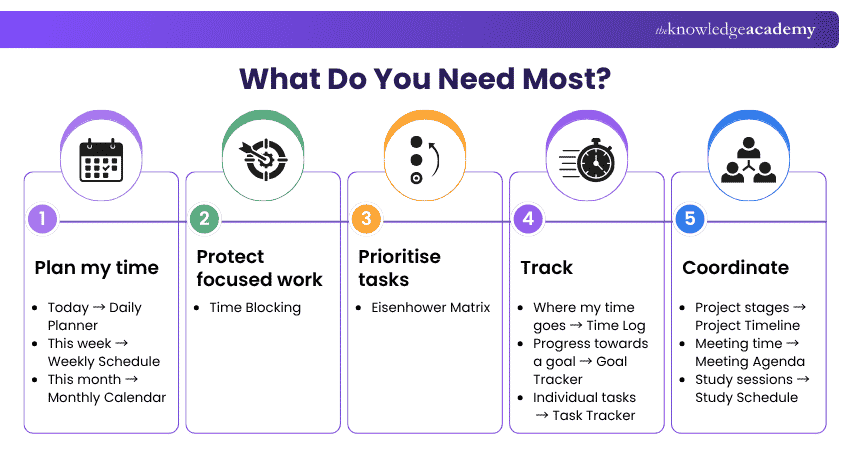
The best template is not necessarily the most detailed one. It is the one that solves the specific planning problem you currently have.
Use the guide below as a starting point:
How to Use a Time Management Template Effectively
A template provides structure, but the quality of the plan still depends on how realistically you use it.
1) Add fixed commitments first: Start with meetings, appointments and deadlines that cannot easily move. This shows how much flexible time actually remains.
2) Prioritise before filling the schedule: Avoid treating every task as equally important. Decide what genuinely requires attention before allocating time.
3) Estimate the effort, not just the task: “Prepare report” may require two hours rather than one line on a checklist. Use realistic estimates when assigning time.
4) Leave some capacity unallocated: A completely full schedule leaves no room for overruns, urgent requests or unexpected problems.
5) Update the template when circumstances change: A plan is a working tool, not a fixed contract. Reschedule incomplete work rather than allowing outdated entries to accumulate.
6) Review what actually happened: Compare planned activities with completed activity. Repeated differences can reveal unrealistic estimates, competing priorities, or recurring interruptions.
7) Adjust the template rather than abandoning it: If one format does not work, identify why. You may need fewer fields, a different time horizon or another template rather than no planning system at all
Trainer's Tip
If maintaining your Time Management Template starts taking more effort than managing the work itself, simplify it. Remove unnecessary categories, fields or colour codes until the system becomes easy to update again.
Develop practical stress management skills with our Stress Management Course – Join now!

The Knowledge Academy develops accessible learning content across Project Management, IT, Cybersecurity, Data Science, Business Analysis, HR, Accounting and Finance, Leadership and Health and Safety. Its resources combine subject research with clear explanations to help professionals build practical knowledge across a wide range of disciplines.
View Detail

 If you wish to make any changes to your course, please


