




We may not have the course you’re looking for. If you enquire or give us a call on 01344203999 and speak to our training experts, we may still be able to help with your training requirements.
What is AWS Lambda: A Complete Beginner’s Guide
ByGaurav KalitaLast updated on: 17 September 2026
AWS Lambda is a serverless compute service that lets you run code without provisioning or managing servers. It supports event-driven Lambda Functions as well as isolated Lambda MicroVM environments for workloads that need a different compute model.

Picture a photo-sharing application at 2:00 AM.
Nobody from the development team is sitting there waiting. But a user uploads an image.
The upload itself can become the signal:
Image Arrives → Code Runs → Image Processed → Task Finished
No one had to manually start a server for that individual event. The infrastructure needed to execute the function is handled behind the scenes.
That is the idea that makes AWS Lambda interesting. Instead of asking, “Which server should run my application?”, developers can increasingly ask, “What should happen when this event occurs?”
This blog explores AWS Lambda, how it works, its components, triggers, use cases, advantages, limitations, pricing, and when it makes sense to use it.
What is AWS Lambda?
Most applications follow a familiar pattern: keep computing resources available, then wait for work to arrive. AWS Lambda turns that idea around. For many workloads, the work arrives first, and the code runs in response.
AWS Lambda is a serverless compute service from Amazon Web Services (AWS) that lets you run code without provisioning or managing servers. AWS handles much of the underlying infrastructure, including capacity provisioning, scaling, maintenance and patching.
Lambda now supports two main compute approaches: Lambda Functions and Lambda MicroVMs. Lambda Functions run code in response to events or API calls, while Lambda MicroVMs provide isolated compute environments for workloads that need a dedicated environment and retained state.
For example, a Lambda Function can run when a file is uploaded to Amazon Simple Storage Service (S3), an API request arrives through Amazon API Gateway, or another supported event occurs. A Lambda MicroVM, on the other hand, can provide an isolated environment for an individual user or job.
The term serverless does not mean there are no servers. It means you do not manage them directly. AWS handles much of the underlying infrastructure while you focus on the code and what it needs to accomplish.
Trainer’s Insight: The Lambda Function Mindset
Traditional: Keep resources ready for work.
Lambda Function: Let the work trigger the code.
Event happens → Code responds.

Lambda Functions vs Lambda MicroVMs
Not every workload needs the same type of compute.
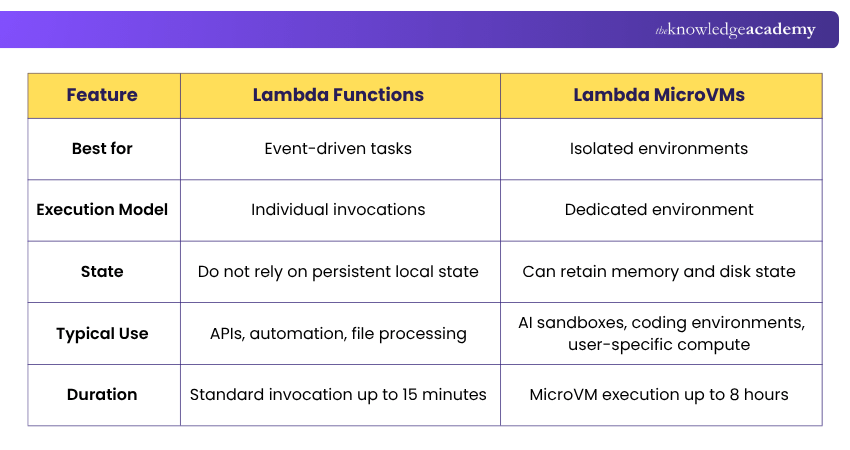
Some applications need code to wake up, perform a task and finish. Others need an isolated environment that can stay available for longer and retain its state.
AWS Lambda now supports both patterns.
Lambda Functions
Lambda Functions run code in response to events or API calls. Each invocation performs a defined task, making Functions a natural fit for workloads such as APIs, file processing, queues, scheduled jobs and automation.
Think:
Event happens → Function runs → Task completes
Lambda MicroVMs
Lambda MicroVMs provide isolated compute environments for individual users or jobs. They can retain memory and disk state and are designed for workloads that need more than a short, stateless invocation.
Think:
Environment starts → Work continues → State stays availableHere’s a quick comparison of Lambda Functions and Lambda MicroVMs:
The Simple Difference
Need code to respond to an event? → Think Lambda FunctionNeed an isolated environment that keeps state? → Think Lambda MicroVM
How Do AWS Lambda Functions Work?
AWS Lambda follows an event-driven execution model. Instead of keeping a traditional application server running simply to wait for work, a Lambda Function can be invoked when there is something for it to process.
Here is how the process works:
Step 1: An Event Occurs
Something happens in an application or AWS service. For example, a file may be uploaded to an S3 bucket.
Step 2: Lambda Receives the Invocation
The configured trigger or service invokes the appropriate Lambda Function and provides information about the event.
Step 3: An Execution Environment is Prepared
Lambda runs the function inside a secure, isolated execution environment containing the resources and runtime required by the function. Existing execution environments can sometimes be reused for subsequent invocations.
Step 4: The Handler Processes the Event
The function handler acts as the entry point for the code. It receives the event information and performs the programmed task.
Step 5: The Function Finishes
Once processing is complete, the invocation ends. Lambda manages execution environments and scaling as further requests arrive.
Build the Lambda Function Picture
Event → What happened?
Trigger → What starts the function?
Function → What task should the code perform?
Runtime → What runs the code?
Execution Environment → Where does it run?
Once these pieces connect, Lambda becomes much less mysterious.
Build smarter event-driven applications with our Developing Serverless Solutions on AWS Training Course. Join now!
What Can Trigger an AWS Lambda Function?
AWS Lambda can be triggered by different events across an application or AWS environment. When the configured event occurs, the function is invoked to perform the required action.
Some common examples include:
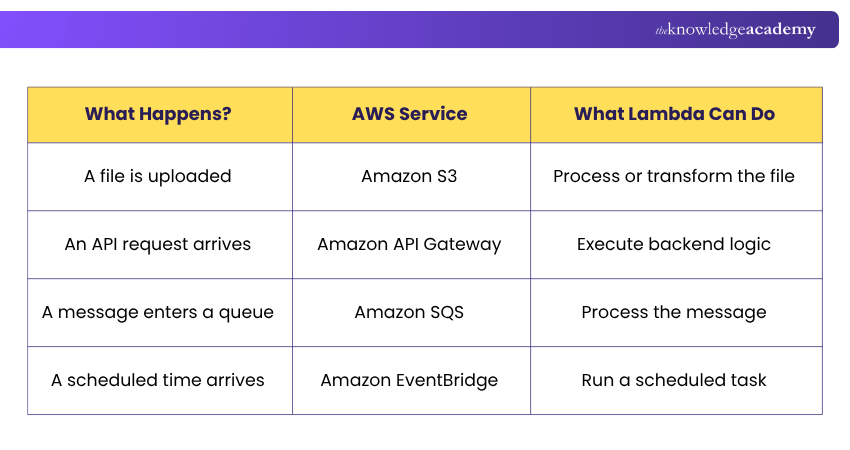
Lambda can also be invoked directly through the AWS Management Console, AWS CLI, or AWS SDKs.
How to Create an AWS Lambda Function?
Creating a Lambda Function involves defining what the function does, where it runs, and what should trigger it. Here is the basic process:
Step 1: Open AWS Lambda
Sign in to the AWS Management Console and navigate to the Lambda service.
Step 2: Create a Function
Open the Functions page and choose the option to create a new function.
Step 3: Configure the Basics
Give the function a name and select an appropriate runtime and architecture for the application.
Avoid relying on outdated tutorials that specify an old runtime version. AWS updates and deprecates runtimes over time, so the currently supported runtime list should be checked when creating production functions.
Step 4: Add the Code
Write the function code or provide it through a supported deployment method. Lambda supports .zip archive and container-image deployment packages.
Step 5: Configure Permissions
Use the function's AWS Identity and Access Management (IAM) role to provide only the permissions required to interact with other AWS resources.
Step 6: Test the Function
Create a test event and invoke the function to check whether it produces the expected result.
Step 7: Add a Trigger
Connect the function to the service or event that should invoke it in the real application.
Step 8: Monitor the Function
After deployment, monitor the function to check execution results, errors, performance and unexpected behaviour. AWS monitoring tools such as CloudWatch can help you review logs and operational metrics.
Code → Configure → Test → Trigger → MonitorCreating the function is only the beginning. The real design decision is determining when it should run and what it should be allowed to do.
Strengthen access control and permissions management with our AWS Identity and Access Management (IAM) Training. Sign up now!
Top 5 Use Cases of AWS Lambda Functions
AWS Lambda can support many workloads where code needs to run in response to an event, request, or schedule. Here are five common use cases:
1) File and Image Processing
When a file is uploaded to Amazon S3, Lambda can automatically process it. For example, it can resize an image, transform a file, or extract required information.
2) Serverless API Backends
Lambda can execute backend logic for web and mobile applications. Combined with Amazon API Gateway, it can process requests and return responses without requiring a dedicated application server.
3) Data Processing
Lambda can process incoming records or events, transform data, validate information, and pass the results to another service for storage or further processing.
4) Scheduled Tasks
Functions can run at configured times or intervals to perform activities such as generating reports, cleaning up resources, or carrying out routine maintenance tasks.
5) Workflow Automation
Lambda can connect AWS services by automatically performing the next action when an event occurs, helping build event-driven workflows with less manual intervention.
Where Do Lambda MicroVMs Fit?Not every Lambda workload starts with an event.MicroVMs can support situations where an individual user or job needs its own isolated compute environment. Examples include AI-agent sandboxes, interactive development environments and applications that need state to remain available during a session.Function: Run the task.MicroVM: Provide the environment.
Advantages of AWS Lambda
AWS Lambda can simplify application development by reducing infrastructure responsibilities and allowing resources to respond dynamically to demand. For traditional Lambda Functions, the key advantages include:
1) Less Infrastructure Management
AWS manages the underlying servers, including infrastructure maintenance and capacity provisioning, allowing developers to spend less time managing compute infrastructure.
2) Automatic Scaling
Lambda automatically scales function execution as incoming requests or events increase and reduces capacity as demand falls.
3) Usage-based Pricing
Instead of paying for an idle dedicated server, Lambda's standard pricing is primarily based on requests and the compute time used to execute functions.
4) Strong AWS Integration
Lambda integrates with services such as Amazon S3, Amazon SQS, Amazon API Gateway, and Amazon EventBridge, making it useful for building connected, event-driven applications.
5) Focus on Application Logic
With much of the underlying infrastructure handled by AWS, developers can focus more on application logic, functionality, and user requirements.
What Lambda Removes from the To-do ListProvision Server → AWS handles itPatch Server → AWS handles itScale Infrastructure → AWS manages itWrite Application Logic → That's your jobThe attraction of Lambda is not that infrastructure disappears. It is that much less of it becomes your responsibility.
Limitations and Considerations of AWS Lambda
AWS Lambda removes much of the work involved in managing servers, but serverless does not mean limitless. Its execution model comes with several considerations:
1) Standard Functions Have an Execution Limit
A standard Lambda Function can run for a maximum of 15 minutes per invocation, making it unsuitable for certain long-running workloads.
That does not mean every Lambda workflow must finish within 15 minutes. AWS also provides Durable Functions for long-running workflows that need to pause, resume and preserve progress across multiple Function invocations.
Important Distinction
Standard Function invocation: Up to 15 minutes
Durable execution: Can continue for up to one year
2) Resource Limits
Functions operate within configurable limits for resources such as memory and temporary storage. AWS currently allows standard Lambda Function memory configuration from 128 MB to 10,240 MB.
3) Cold-start Considerations
When Lambda needs to initialise a new execution environment, additional startup time can occur before the function handles the request. The effect varies according to factors such as runtime, configuration, and application design.
4) Stateless Design is Usually Preferred for Standard Functions
Execution environments can be reused, but applications should not assume that a particular environment will persist indefinitely. AWS recommends designing functions without relying on persistent local state between invocations.
MicroVMs follow a different model. They can retain memory and disk state during their lifecycle, which makes them better suited to some workloads that need a more persistent environment.
5) Less Infrastructure Control
Lambda intentionally abstracts much of the underlying infrastructure. Applications that require extensive operating-system or server-level control may therefore be better suited to another compute option.
Does the Workload Fit a Lambda Function?
Short, event-driven work? → Strong candidateNeed automatic scaling? → Strong candidateNeed a permanently running process? → Consider alternativesNeed extensive server control? → Consider alternativesThe right question is not “Can Lambda run code?” It is “Which Lambda model, if any, fits the workload?”
How Does AWS Lambda Pricing Work?
AWS Lambda follows a pay-per-use pricing model, meaning costs are linked to how the service is used rather than keeping a dedicated server running continuously.
Lambda Functions
For standard Lambda Functions, the main pricing factors include:
Number of Requests → How often the function is invoked
Execution Duration → How long the function runs
Allocated Memory → Resources assigned during execution
AWS also provides a free tier, while features used alongside Lambda and other AWS services can create additional charges.
Lambda MicroVMs
Lambda MicroVMs use a different pricing model. Here’s how it works:
Compute → Resources used while the MicroVM is running
Snapshots → Data written when state is preserved and read when the environment resumes
Storage → Space used to keep snapshots
Data Transfer → Network usage where applicable
When a MicroVM is suspended, its state can be preserved without continuing to pay the normal running compute charge, although snapshot-related costs may still apply.
Learn to track, manage and optimise AWS costs with our AWS Billing and Cost Management Training – Join now!
When Should You Use AWS Lambda?
AWS Lambda can support different workload patterns, but the right model depends on what the application needs to do.
When to Use Lambda Functions
Consider Lambda Functions when you need to:
1) Respond to Events: Run code when a file is uploaded, a message arrives, an API is called, or a scheduled event occurs.
2) Handle Variable Demand: Scale automatically when workload increases and reduce execution when demand falls.
3) Run Short, Focused Tasks: Execute functions that complete within Lambda's runtime and resource limits.
4) Reduce Server Management: Avoid provisioning and maintaining dedicated servers for suitable workloads.
5) Connect AWS Services: Use Lambda as part of automated workflows involving services such as Amazon S3, SQS, API Gateway, or EventBridge.
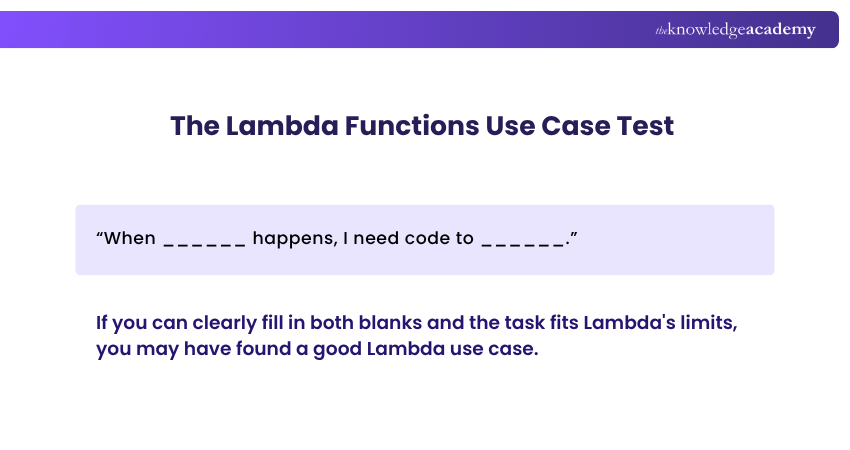
When to Consider Lambda MicroVMs
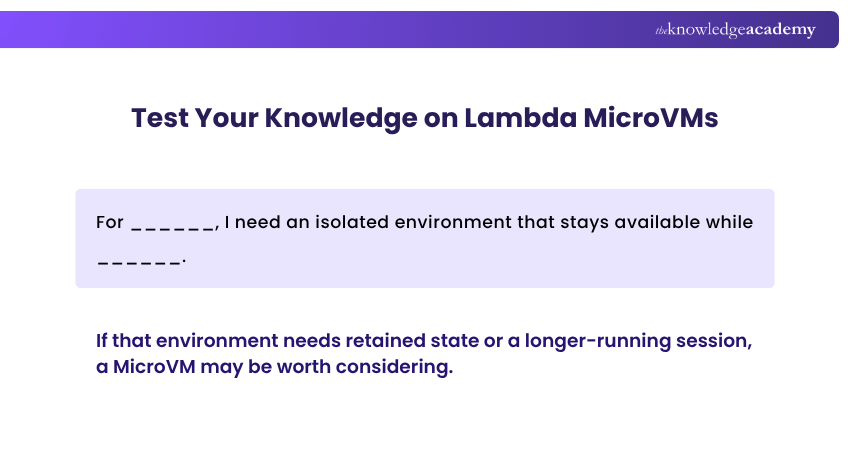
MicroVMs may be worth considering when a workload needs:
1) An Isolated Environment: A separate compute environment for an individual user or job.
2) Retained State: Memory or disk state that needs to remain available during a session.
3) Longer-running Compute: A workload that does not fit the short invocation model of a standard Function.
4) AI or Code Sandboxing: An isolated environment for AI agents, development tools or user-generated code.
5) Interactive Sessions: Applications where users or jobs need their own ongoing compute environment.
Build AWS development skills with our AWS Developer Associate Training – Register now!

Gaurav Kalita is a Content Writer with 2+ years of experience in content development, research and storytelling. His background in English literature and teaching, combined with his growing interest in AI and Machine Learning, supports his writing across Business Skills and IT and Tech.
View Detail

 If you wish to make any changes to your course, please


