


 Top Rated Course

We may not have the course you’re looking for. If you enquire or give us a call on 01344203999 and speak to our training experts, we may still be able to help with your training requirements.
What is Regex? Meaning, Syntax, Examples, and Use Cases
The Knowledge Academy 23 July 2026Regex is a sequence of characters used for pattern matching, data validation, and efficient text processing in programming and data analysis. It helps automate repetitive text-based tasks with accuracy and speed. Regular Expressions are widely used across the fields of Software Development and data processing.

Training Outcomes Within Your Budget!
We ensure quality, budget-alignment, and timely delivery by our expert instructors.
Table of Contents

Behind every powerful search, data filter, and text transformation lies a hidden language called Regular Expressions, or Regex. Think of it as a smart pattern-matching tool that helps computers quickly find and manipulate text with precision. From checking email formats to extracting valuable data, Regex plays a vital role in modern programming and automation.
In this guide, we’ll break down What is Regex, explore its syntax, review practical examples, and uncover real-world use cases showing how it makes tasks faster and more accurate. So read on and learn why Regex is an essential skill for developers and tech enthusiasts alike!
Table of Contents
1) What is a Regex (Regular Expression)?
2) Special Characters and Flags in Regex
3) How to Write a Regular Expression Pattern?
4) Examples of Regular Expressions
5) Regex Implementation in Java
6) Using Regex in Shell Script
7) Popular Use Cases of Regex
8) Tools for Testing Regex
9) Best Practices in Regex
10) Advantages and Disadvantages of Regular Expression
11) Common Regex Mistakes to Avoid
12) Can you use Regex in Microsoft Word?
13) Conclusion
What is a Regex (Regular Expression)?
A Regex is a sequence of characters used to match a specific pattern in text. It may also be combinations of special character operators (symbols controlling the search) that we can use for advanced find and replace searches. The Regex is applied to the text from left to right. Once a source character has been utilised in a match, it can't be reused. For example, the regex ‘ded’ will match ‘dedededed’ only two times (ded_ded__).

Special Characters and Flags in Regex
Regular Expressions rely on special characters and flags to create flexible and accurate search patterns. Special characters define how text is matched, grouped, or repeated, while flags modify how the Regex engine interprets a pattern. Let’s explore them in detail to further your understanding of What is Regex:
1) Special Characters in Regex
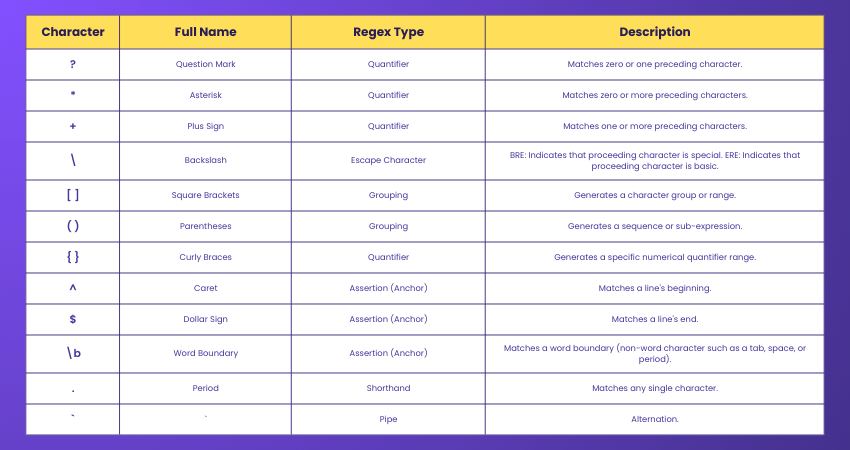
Special characters are the core elements of Regex patterns that control how text is searched and matched. They define repetition, grouping, positioning, and alternation, making it easier to create precise and efficient search expressions.
2) Regex Flags
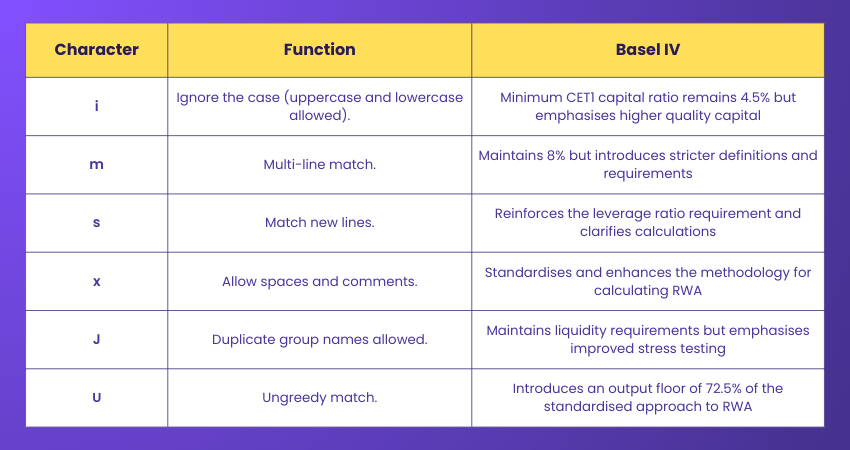
Regex flags modify the behaviour of a pattern without changing the expression itself. They enable features such as case-insensitive matching, multiline searches, matching newline characters, and improved pattern readability.
How to Write a Regular Expression Pattern?
Now that you have a basic grasp on What is Regex, it’s time to learn how to write a Regex pattern. To write a Regex pattern, you must define a specific sequence of characters that describes the text you seek to match. The following tools will help you write a Regex pattern with ease:
1) Assertions in Regex
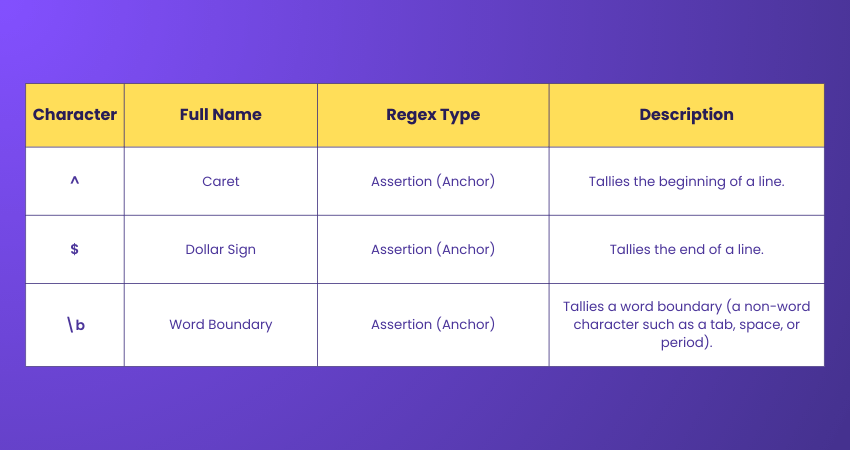
Assertions are special characters in Regex that remove partial matching or ambiguity from an expression. Without assertions, you could match a portion of the user's input to a document or field, yielding unwanted results. Assertions come as either anchors or lookarounds. The two most essential anchors are the caret and dollar sign:
2) Quantifiers in Regular Expression
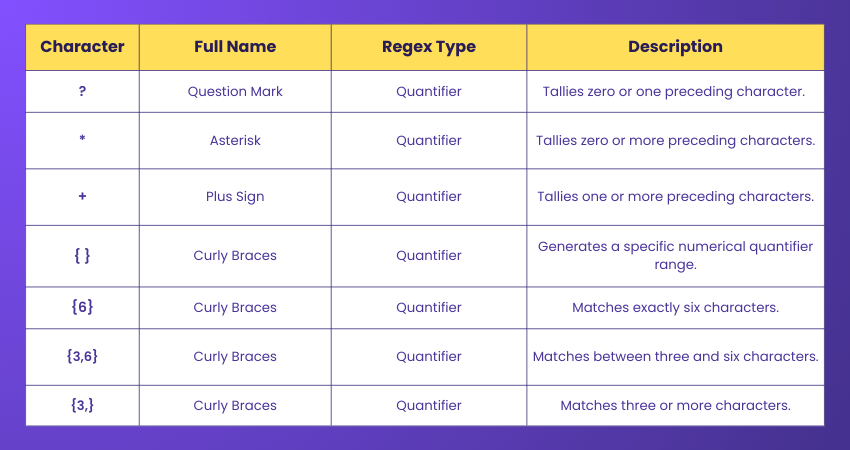
Quantifiers offer flexibility in matching as they define the number of times a pattern, character, or group appears in a Regex match. Here are some popular quantifiers:
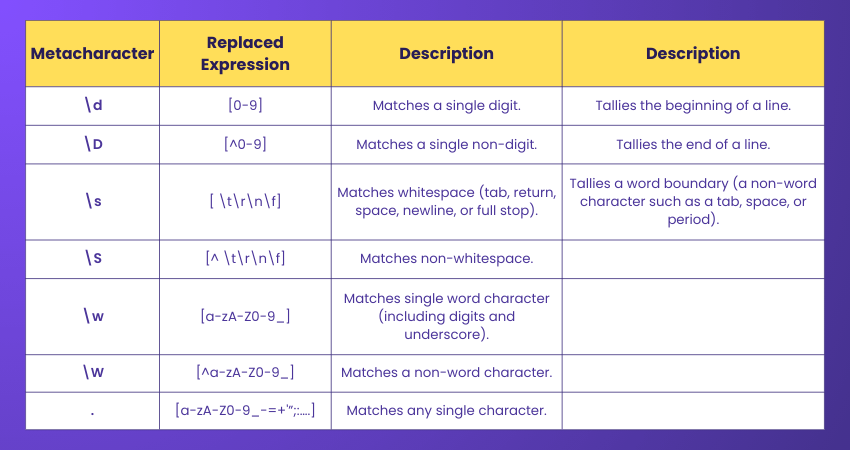
3) Metacharacters in Regex
Metacharacters, or shorthand, are additional special characters that replace longer Basic Regular Expressions (BRE) expressions. The table below lists some important metacharacters:
4) Escaping in Regrex
Escaping involves using a backslash () to give special characters a literal meaning instead of their predefined Regex functions. This is important when you match characters with special meanings in Regex. For example, if you want to match a literal dot (.) in a string, you can use . in your Regex pattern.
5) Parentheses in Regualr Expression
In Regex, parentheses () are used for grouping and capturing. They allow you to group parts of your regular expression to apply quantifiers or to treat multiple characters as a single unit. Additionally, parentheses capture the matched content, making it accessible for later use, such as when extracting data or in backreferences, similar to how the Diamond Pattern in Java groups elements in a structured manner, enabling easier access and manipulation of code components.
6) Groups and Alternation in Regex
Groups and alternation are important concepts in pattern matching, especially in regular expressions. It allows you to treat multiple characters as a single unit by placing them inside brackets. This is useful when you want to apply repetition, capture specific parts of a match, or organise complex patterns.
For example, (cat) groups the letters "cat" together. Alternation, on the other hand, is like saying "this or that" in a pattern. You use the pipe symbol | to offer multiple matching options. For example, cat|dog will match either "cat" or "dog" in a text. Together, groups and alternation make it easier to create flexible and powerful search patterns.
Hone the power of data analysis, visualisation and statistical computing with our R Programming Course - Sign up now!
Examples of Regular Expressions
Here are some prominent examples to boost your grasp on What is Regex:
1) Matching Email Addresses: The Regex pattern for a basic email address can look like this: [w.-]+@w+.w+. This pattern matches email addresses like “abc.def@example.com”
2) Matching URLs: To match URLs, you may use a pattern like (https?|ftp)://S+. This matches URLs starting with “https,” “http,” or “ftp.”
3) Matching Dates: d{2}/d{2}/d{4} could be a Regex pattern for matching dates in the format “mm/dd/yyyy”.
4) Extracting Phone Numbers: To extract phone numbers in the format “+44 111-2222,” you can use the pattern (d{3}) d{3}-d{4}.
5) Finding HTML Tags: To locate HTML tags in a text, you can use a pattern like < [^>]+ >. it matches any HTML tag, including < div >, < p >, etc.
Regex Implementation in Java
In Java, Regex is used for pattern matching, string matching, searching, manipulating and editing a string. Regular expression differs for each language. Java has no built-in Regular Expression class, but you can import the java.util.regex package to work with regular expressions. In terms of Regex implementation in Java, three classes and one interface are essential:
1) Pattern Class: It's a compiled representation of regular expression used to define a pattern for the Regex engine.
2) Matcher Class: It is used to search a text for multiple instances of a regular expression or to find the same regular expression in different texts.
3) Pattern Syntax Exception Class: This involves an unchecked or runtime Exception thrown when a syntax error occurs in a regular expression.
4) Match Result Interface: This interface contains query methods for determining the results of a match against a regular expression. The match boundaries and group boundaries can be viewed but not modified through a MatchResult.
Learn to identify and fix bugs like a pro- join our Software Testing Courses now!
Using Regex in Shell Script
Regular expressions (Regex) in shell scripts are used to search, match, and manipulate text patterns. They make it easy to validate inputs, find specific Data, or automate tasks involving text processing. In shell scripts, Regex is often used with commands like grep, sed, and awk, or inside conditional statements. Let’s understand with an example:

Popular Use Cases of Regex
Regex is widely used to automate text processing, improve data accuracy, and simplify repetitive tasks across software development and data management. Some of its most common applications include:
1) Data Validation
Regex validates user input by checking whether it matches a predefined format. It is commonly used to verify email addresses, phone numbers, passwords, and dates before processing or storing data.
2) File Naming
Regex helps identify, organise, and rename files based on specific naming patterns. This is particularly useful when managing large collections of documents, images, or log files.
3) Log File Parsing
Regex extracts specific information from system and application logs, making it easier to monitor events, detect errors, and troubleshoot issues efficiently.
4) Web Scraping
Regex identifies and extracts relevant data from web pages, such as links, email addresses, prices, or other text patterns, supporting automated data collection and analysis.
5) Text Cleaning
Regex removes unwanted characters, corrects formatting inconsistencies, and standardises text. It is widely used during data preprocessing to prepare clean and consistent datasets for analysis or reporting.
Master the major Programming languages such as PHP, R, Ruby, Visual Basic, Perl, Python, and more in our Programming Training – Sign up now!
Tools for Testing Regex
Regex can be tricky, so using Regex testing tools makes it easier to write, test, and understand patterns. These tools let you type in a Regex and sample text to instantly see what matches, helping you spot mistakes and fine-tune your pattern.
Some Popular Tools Include:
1) Regex101: Gives real-time matches, explanations, and quick reference
2) RegExr: User-friendly, with examples and a community pattern library
3) Regex Tester: Simple tools that let you test Regex directly in your browser
Best Practices and Pitfalls to Avoid in Regex
Regular expressions are powerful, but if not used carefully. They can become hard to read, buggy, or inefficient. Here are some key best practices and common mistakes to avoid when using Regex:
1) Start simply, then build complexity gradually
2) Use anchors (^, $) to control match position
3) Use character classes like [0-9] for clarity
4) Group with () for reuse and structure
5) Escape special characters properly (. for a literal dot)
6) Test with real data to ensure accuracy
7) Add comments (if supported) for complex patterns
Let Python is your gateway to a bright future as a Programming pro — Join our Python Course now!
Advantages and Disadvantages of Regular Expression
Regular Expressions offer a powerful way to search, validate, and manipulate text patterns. However, like any tool, they have both strengths and limitations that should be considered before implementation.
1) Advantages of Regular Expression
1) Powerful and Flexible: Matches complex text patterns using a combination of rules and symbols.
2) Cross-platform Compatibility: Supported by most programming languages and software applications.
3) Efficient and Convenient: Simplifies searching, replacing, and validating text with concise patterns.
4) Widely Supported by Development Tools: Compatible with editors such as Sublime Text and Notepad++ for easier implementation.
2) Disadvantages of Regular Expression
1) Complex Syntax: Learning and mastering Regex can be challenging for beginners.
2) Difficult to Maintain: Long or complex expressions can become hard to understand and update.
3) Prone to Errors: Even minor syntax mistakes can cause matching failures or unexpected results.
Common Regex Mistakes to Avoid
Writing effective Regular Expressions requires attention to detail. Avoiding these common mistakes can help improve pattern accuracy, readability, and overall performance.
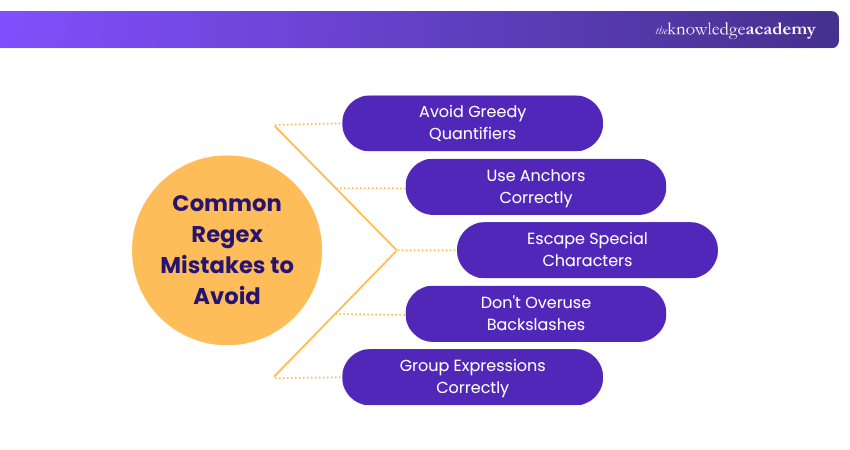
1) Avoid Greedy Quantifiers: Use lazy quantifiers (*?, +?) when you want to match the minimum amount of text.
2) Use Anchors Correctly: Apply ^ and $ carefully to match the intended start or end of a string.
3) Escape Special Characters properly: Escape characters such as ., *, and + when matching their literal values.
4) Don't Overuse Backslashes: Only use backslashes where required to avoid unnecessary complexity and incorrect matches.
5) Group Expressions Correctly: Use parentheses to define repetition, alternation, and the intended scope of a pattern.
Can you use Regex in Microsoft Word?
Yes, Microsoft Word supports a limited version of Regex through its “Advanced Find” feature using wildcards. While not as powerful as full Regex engines, you can match patterns like digits, repeated letters, or specific formats. Enable wildcards in Find and Replace to use basic pattern matching in Word.
Conclusion
Regex serves as a powerful shortcut for mastering text. By understanding What is Regex, its syntax and practical applications, you can simplify complex searches, automate repetitive tasks and improve data accuracy with ease. Whether you're a Developer or Analyst, Regex is a valuable skill that transforms the way you work with text and helps you write cleaner, more efficient, and reliable code.
Discover how MapReduce powers scalable data processing across distributed systems. Sign up for our MapReduce Programming Model Training now!
Frequently Asked Questions
What Does *$ Mean in RegEx?

In Regex, the *$ means zero or more occurrences of the preceding element at the end of the string. For example, b*$ matches any string that ends with zero or more ‘b’ characters, such as “”, “b”, “bb”, “bbb”, etc.
Is Regex Case Sensitive?
By default, Regex is case sensitive, meaning uppercase and lowercase characters are treated as different values. However, you can enable case-insensitive matching by using options such as the i flag (or equivalent regex options, depending on the programming language) to match text regardless of letter case.

The Knowledge Academy


Global Training Provider
The Knowledge Academy is a world-leading provider of professional training courses, offering globally recognised qualifications across a wide range of subjects. With expert trainers, up-to-date course material, and flexible learning options, we aim to empower professionals and organisations to achieve their goals through continuous learning.


 If you wish to make any changes to your course, please


