


 Top Rated Course

We may not have the course you’re looking for. If you enquire or give us a call on 01344203999 and speak to our training experts, we may still be able to help with your training requirements.
What is Proofreading: A Complete Guide to Error-free Writing
Sienna Roberts 25 August 2026Proofreading is the quality check that helps turn finished writing into polished, reader-ready content. It focuses on finding errors in spelling, grammar, punctuation, formatting, and consistency before the content is published, submitted, or shared.

Training Outcomes Within Your Budget!
We ensure quality, budget-alignment, and timely delivery by our expert instructors.
Table of Contents
Key Takeaways
1. A Jenkins CI/CD Pipeline automates tasks between source code changes and software delivery.2. Pipelines commonly include checkout, build, test, package and deployment stages.3. A Jenkinsfile stores Pipeline instructions as code and can be kept in source control.4. Jenkins supports both Declarative and Scripted Pipeline syntax.5. Agents, stages, steps, plugins and integrations work together to execute the Pipeline.
Send. Submit. Publish. Print.
Four buttons that can instantly turn a small overlooked error into a visible one.
Before that moment, a typo is fixable. An inconsistent heading can be corrected. A missing word can be restored. Afterwards, the reader may find it first.
That small window between "finished writing" and "ready for readers" is where Proofreading becomes essential.
This blog explores the complete Proofreading process, from its history and different types to effective techniques, common mistakes, and the growing role of digital and AI-assisted tools.
What is Proofreading?
Proofreading is the final quality check of written content before it is published, submitted, printed, or shared. It involves carefully examining the text for errors in spelling, grammar, punctuation, typography, formatting, and consistency.
Unlike editing, Proofreading is not primarily about restructuring ideas or rewriting entire sections. It takes place when the content is nearly complete, focusing on the smaller details that could otherwise reach the reader unnoticed.
It is used across books, Reports, academic work, websites, marketing materials, business documents, and other forms of written communication.
The Proofreading Zone
Think of a document's journey like this:
WRITING
Build the content
↓
EDITING
Improve the content
↓
PROOFREADING
Catch what remains
↓
PUBLISHING
Release the content
Proofreading begins when the writing is nearly finished, but the checking isn't.
Why is Proofreading Important?
Readers experience the final version of a document, not the hours of work that went into creating it. Errors left at the final stage can therefore affect clarity, consistency, and the overall quality of the content.
Here are some of the main reasons Proofreading matters:
1) Improves Accuracy: Proofreading helps identify spelling, grammar, punctuation, and typographical errors that remain after writing and editing.
2) Supports Clear Communication: A misplaced word or punctuation mark can change or obscure meaning. Proofreading helps ensure the intended message reaches the reader clearly.
3) Maintains Consistency: It helps identify inconsistencies in elements such as capitalisation, terminology, headings, numbering, spacing, and formatting.
4) Strengthens Presentation: A carefully checked document appears more polished and professional than one containing avoidable errors or inconsistent formatting.
5) Protects the Final Version: Proofreading provides one final opportunity to catch mistakes before content is published, submitted, printed, or distributed.
Small Error. Big Difference."Let's eat, Grandma."vs"Let's eat Grandma."Same words. One comma. Very different message.That is why Proofreading pays attention to details that can look small but make a meaningful difference.
What are the Different Types of Proofreading?
Proofreading is not identical across every document. What needs to be checked depends on the purpose, audience, subject, and publishing requirements.
Some common types include:
1) Academic Proofreading
Academic Proofreading focuses on dissertations, essays, research papers, theses, and other scholarly work. Alongside language errors, it can involve checking consistency in citations, references, headings, and academic formatting.
2) Business Proofreading
Business Proofreading applies to Reports, proposals, presentations, correspondence, policies, and other professional documents. Particular attention is given to clarity, consistency, formatting, and professional presentation.
3) Publishing Proofreading
This involves reviewing books, magazines, articles, and other material before publication. Proofreaders can check language as well as layout elements such as headings, page references, captions, and consistency.
4) Website Proofreading
Website Proofreading examines digital content such as landing pages, articles, menus, buttons, and other on-page copy. It can also involve checking consistency across related pages.
5) Technical Proofreading
Technical Proofreading applies to manuals, documentation, instructions, and specialist content. Alongside language, consistency in terminology, units, labels, numbering, and technical presentation can be particularly important.
Same Skill. Different Lens.
Essay → Language + ReferencesBusiness Report → Clarity + ConsistencyBook → Text + LayoutWebsite → Copy + On-page ElementsManual → Terminology + Technical Detail
The document changes what the Proofreader needs to notice.
A Brief History of Proofreading
Proofreading has changed alongside the way written content is produced. What began with manually checking handwritten texts eventually developed into the digital, technology-assisted process used today. Below are the key stages that shaped the evolution of Proofreading over time:
1) Manuscript Era
Before printing, texts were copied by hand. Scribes and copyists checked their work for mistakes because every new handwritten copy created another opportunity for errors to appear.
2) Printing Era
The development of movable-type printing in Europe during the 15th century transformed text production. Proof impressions could be checked and corrected before larger numbers of copies were printed, making Proofreading an important part of the printing process.
3) Industrial Publishing
As printing became faster and publishing expanded, Proofreading became increasingly established within professional publishing workflows. Proofreaders reviewed proofs and marked corrections before final production.
4) Digital Era
Word processors and digital publishing shifted much of Proofreading from paper to screens. Search functions, tracked changes, spellcheckers, and collaborative tools made corrections easier to identify, communicate, and apply.
5) AI-assisted Era
Today, AI and language tools can flag potential issues involving spelling, grammar, consistency, and wording. Human judgement remains important for deciding whether suggestions are appropriate for the meaning, audience, tone, and context.
Proofreading Through the Ages
Quill & Manuscript → Type & Printing Press → Red Pen & Printed Proof → Keyboard & Screen → AI & Human Review
The method kept changing. The final question didn't: "Is this ready for the reader?"
Improve focus and productivity with Attention Management Training – Register now!
What Does a Proofreader Check?
Errors do not appear in just one place. Some sit inside a sentence, others appear across different sections, while formatting mistakes can affect the document as a whole. That is why Proofreaders examine several areas during the final review.
1) Language: Spelling, grammar, punctuation, capitalisation, missing words, repeated words, and incorrect word choices are checked for accuracy.
2) Consistency: Terminology, abbreviations, numbers, dates, capitalisation styles, and other repeated elements are checked to ensure they follow the same conventions throughout.
3) Formatting and Layout: Headings, fonts, spacing, alignment, lists, numbering, and layout are reviewed to identify inconsistencies in presentation.
4) Supporting Elements: Tables, captions, labels, page numbers, cross-references, and links are checked where they form part of the document.
5) Final Presentation: The completed document is reviewed as a whole to catch anything that appears incorrect, inconsistent, misplaced, or unfinished.
Where Can an Error Hide?
In a word → SpellingIn a sentence → Grammar & punctuationAcross the document → ConsistencyOn the page → FormattingIn the finer details → References, captions & links
Proofreading means knowing where to look, not simply reading the same words again.
How to Proofread Step by Step?
Proofreading works best when you slow the process down and give each review a clear purpose. Instead of trying to catch every type of error in one read, work through the document in stages.
Step 1: Finish the Main Editing
Complete major rewriting and structural changes before Proofreading. Otherwise, new errors can be introduced after the final check.
Step 2: Take a Break
Where time allows, step away from the document before Proofreading it. Returning with fresh attention can make familiar errors easier to notice.
Step 3: Review the Content Carefully
Read the document slowly rather than reading only for meaning. Pay attention to individual words, punctuation marks, sentence endings, and small inconsistencies.
Step 4: Check One Error Type at a Time
Instead of trying to identify everything simultaneously, perform focused passes.
For example:
Pass 1 → SpellingPass 2 → Grammar and punctuationPass 3 → ConsistencyPass 4 → Formatting
This keeps your attention focused instead of asking your brain to check everything at once.
Step 5: Check Names, Numbers, and Details
Pay particular attention to elements that can be easy to overlook, such as names, dates, figures, abbreviations, headings, and references.
Step 6: Review the Formatting
Check fonts, headings, spacing, numbering, lists, tables, captions, and other layout elements for consistency.
Step 7: Use Digital Tools as Support
Spelling, grammar, search, and other checking tools can highlight potential issues. Review their suggestions rather than accepting every recommendation automatically.
Step 8: Perform a Final Read
After corrections are complete, read the final version again to make sure the changes have not introduced new errors.
The Fresh-eyes Method
A useful rule is to change what you are looking for each time:
First read: Does anything look wrong?Second read: Is anything inconsistent?Third read: Did my corrections create another problem?
Proofreading becomes more effective when each read has a different purpose.
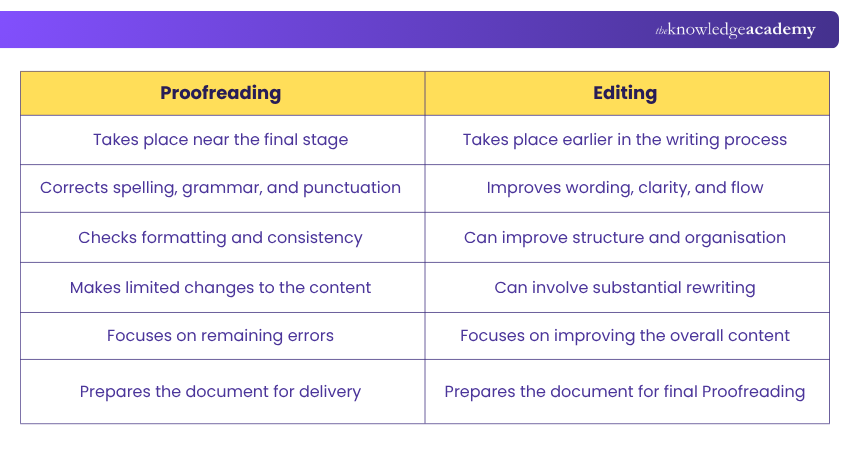
Proofreading vs Editing
Proofreading and editing both improve written content, but they serve different purposes. Editing develops and strengthens the content, while Proofreading checks the near-final version for remaining errors.
The Simplest Difference
Editing asks:"Can this be written better?"Proofreading asks:"Is the final version correct?"Editing improves the writing. Proofreading protects the finished version.
Common Proofreading Mistakes
Even careful Proofreading can miss errors when the review itself is rushed or unfocused. Here are some common mistakes that can reduce its effectiveness:
1) Proofreading Immediately After Writing
Reviewing immediately after writing makes errors harder to spot because the content is still familiar. Where possible, create some distance before the final check.
2) Reading Too Quickly
Reading quickly encourages you to follow the meaning rather than inspect individual words. Slow down and pay attention to what is actually written.
3) Checking Everything in One Pass
Trying to assess spelling, grammar, formatting, numbers, consistency, and meaning simultaneously can make the review less focused.
4) Relying Entirely on Automated Tools
Proofreading tools can identify potential errors, but their suggestions are not always correct for the context.
For example:
Intended: The meeting is scheduled for 15 March.
Written: The meeting is scheduled for 16 March.
Both versions are grammatically possible, so software cannot necessarily know which one matches the intended information.
5) Ignoring Formatting
A document can be grammatically correct and still contain inconsistent headings, spacing, fonts, numbering, or layout.
6) Making Large Rewrites During Proofreading
Proofreading is not the stage for major restructuring. Large last-minute changes can introduce fresh errors and create the need for another complete review.
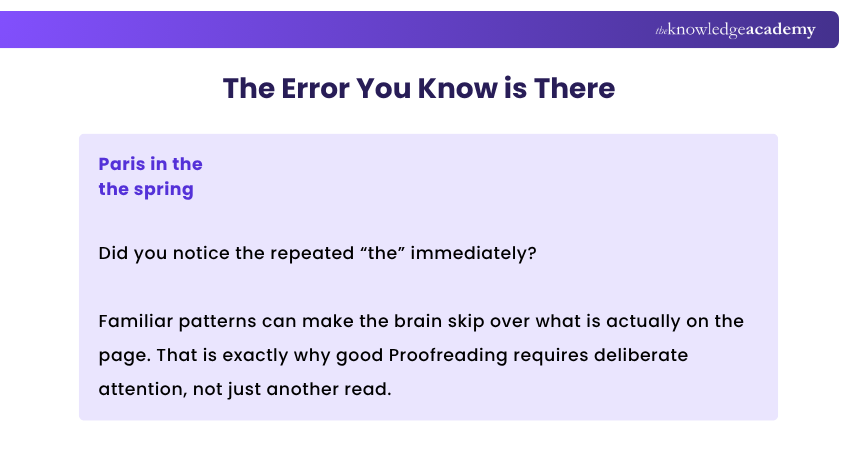
Tips for Effective Proofreading
Good Proofreading is not just about reading more carefully. Changing how you review the content can make familiar errors easier to notice. Try these practical techniques:
1) Change the View
Adjust the zoom, font size, or viewing format before reviewing. A different visual appearance can make familiar content feel less predictable and help errors stand out.
2) Read Aloud
Hearing the text can reveal missing words, repetition, awkward sentences, and punctuation issues that are easy to overlook when reading silently.
3) Search for Your Usual Mistakes
Know the words, phrases, or formatting issues you commonly get wrong. Use search functions to locate and check them throughout the document.
4) Build a Personal Error List
Keep a record of mistakes you repeatedly make, such as confused words, inconsistent capitalisation, unnecessary spaces, or punctuation habits. Turn these into a personal Proofreading checklist.
5) Read Backwards for Spelling
When checking individual words, try reading from the end of a paragraph or page towards the beginning. Breaking the normal flow can stop you from becoming absorbed in the meaning and help you focus on spelling.
6) Give Critical Details Their Own Check
Review names, dates, figures, titles, links, and references separately. These details can be correct grammatically while still containing factual or transcription errors.
Break Your Reading HabitYour brain expects:Sentence → Meaning → Next SentenceA Proofreader needs:Word → Detail → Error? → Next DetailSo change the way you review:Read it → Hear it → Search it → Inspect itThe less predictable the review feels, the harder it becomes for familiar errors to hide.
How Technology and AI are Changing Proofreading?
Technology has changed Proofreading from a largely manual search for errors into a process where potential problems can be surfaced before the Proofreader even reaches them.
Modern tools can flag spelling and grammar issues, locate repeated words, compare terminology, track corrections, and highlight possible inconsistencies. AI-assisted tools go further by considering context and suggesting changes to wording, clarity, tone, and style.
However, finding something unusual and deciding that it is wrong are two different tasks. A suggested correction still needs to be considered against the meaning, audience, context, specialist terminology, and required style of the document.
Technology can make potential errors easier to find, but the final decision about what needs changing still depends on context.
Conclusion
A document can survive several drafts, rounds of editing, and formatting changes, yet one overlooked detail can still make it to the final version. Proofreading is the last opportunity to stop that from happening.
Whether the check happens with a red pen, on a screen, or with support from AI, the principle remains the same: examine the details, question inconsistencies, and make every final check count.
Because once you press Publish, Print, Send, or Submit, the reader becomes the Proofreader.
Build confidence, communication, and productivity with our Personal Development Courses – Join now!
Frequently Asked Questions
Can You Proofread Your Own Work?

Yes, but it can be harder to notice errors in content you have written yourself because you already know what you intended to say. Creating some distance from the document before reviewing it can help you approach it with fresher attention.
What Skills Does a Good Proofreader Need?
A good Proofreader needs strong attention to detail, language awareness, consistency, concentration, and the ability to review content systematically. Familiarity with style guides and digital Proofreading tools can also be valuable depending on the type of content being reviewed.
When is a Document Ready for Proofreading?
A document is ready for Proofreading once the main writing and editing are complete and no major structural changes are expected. Proofreading too early can create unnecessary work because later revisions can introduce new errors.

 If you wish to make any changes to your course, please


