




We may not have the course you’re looking for. If you enquire or give us a call on 01344203999 and speak to our training experts, we may still be able to help with your training requirements.
What is GIMP: A Complete Overview
ByVishnu SankarLast updated on: 12 October 2026
Discover the power of GIMP in our blog! What is GIMP? Unravel the mystery as we break down the features and functionalities of this versatile graphic editing tool. From image manipulation to design creation, learn how GIMP empowers users with a free and open-source platform. Elevate your digital creativity with a brief exploration into the world of GIMP.
What You’ll Discover
1. GIMP is a free and open-source raster graphics editor.2. It supports photo editing, image manipulation and digital artwork.3. Users can work with layers, selections, brushes, filters and effects.4. GIMP works across multiple operating systems.5. It provides a flexible editing environment for different creative projects.
Welcome to the world of digital creativity! Ever wondered what is GIMP? GNU Image Manipulation Program (GIMP) is a super cool and free software that lets you play with images, create stunning artwork, and tweak photos effortlessly. So, what is GIMP, and why is it a game-changer for anyone eager to dive into the world of digital design? In this journey, we'll unravel the mysteries behind GIMP, exploring its features and discovering why it's a go-to tool for artists and designers. Curious about what is GIMP? Let's find out together!
Understanding What is GIMP?
GIMP, short for GNU Image Manipulation Program, is a robust and versatile open-source raster graphics editor. Serving as a powerful alternative to commercial image editing software, GIMP is renowned for its accessibility, as it is freely available for use on various operating systems. At its core, GIMP empowers users to manipulate digital images, offering a diverse set of tools for tasks ranging from photo retouching to Graphic Design.
With features comparable to premium software, GIMP stands out for its commitment to being free and open source, fostering a collaborative community. Its user-friendly interface and extensive features make it a top choice for designers of all levels, providing a platform to unleash creativity and bring visual ideas to life. Whether you're enhancing photographs or creating original artwork, GIMP's flexibility and accessibility make it an asset in the world of digital design.
GIMP in Practice
Imagine you have a product photograph that needs a cleaner background, improved colours and additional design elements for a social media post. GIMP lets you select and modify parts of the image, organise elements using layers, apply adjustments and export the finished graphic.
What is the Purpose of Using GIMP?
The purpose of using GIMP can be summarised in these key points:
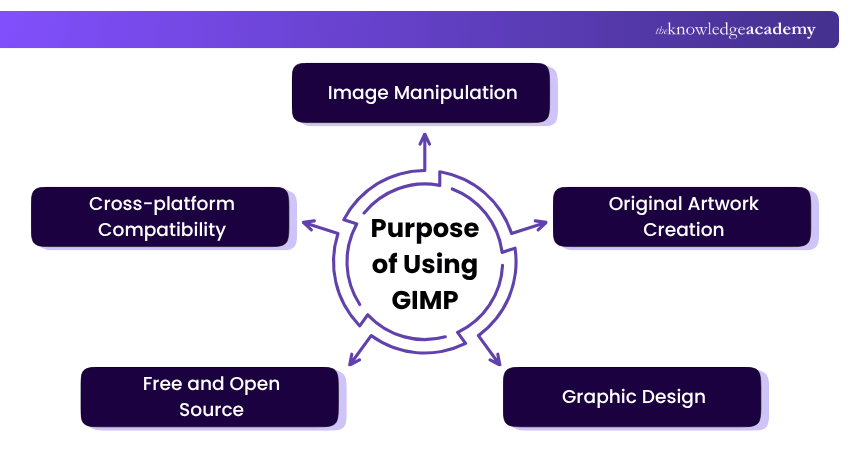
a) Image Manipulation: GIMP is a versatile tool for manipulating digital images, offering features for retouching, enhancing, and transforming photos.
b) Original Artwork Creation: Artists leverage GIMP to create original digital artwork, providing a canvas for creative expression.
c) Graphic Design: Graphic Designers use GIMP to design and create graphics, seamlessly incorporating various visual elements into their projects. In the History of Graphic Design, this tool has become a popular choice for professionals seeking flexibility and creativity.
d) Free and Open Source: GIMP's purpose includes democratising access to powerful image editing tools by being freely available and open source, fostering a collaborative community.
e) Cross-platform Compatibility: GIMP is designed to work seamlessly across various operating systems, ensuring users can access its features on different platforms.
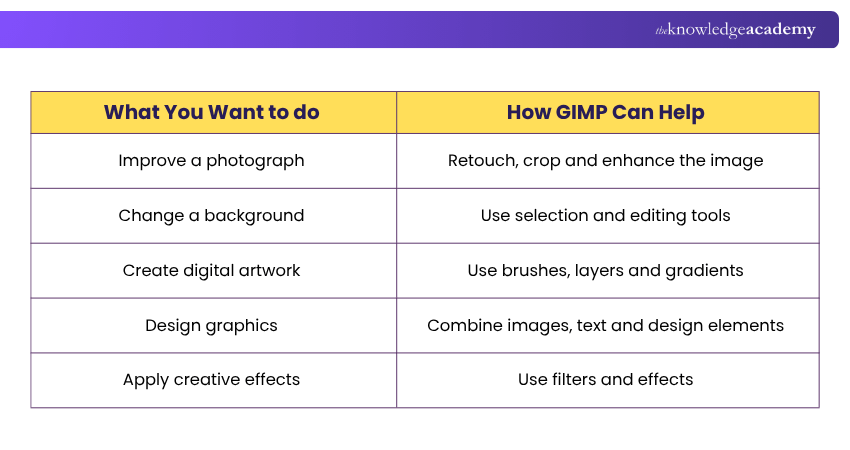
Here are some GIMP use cases at a glance:
Key Features of GIMP
GIMP's working mechanism combines the below-mentioned elements
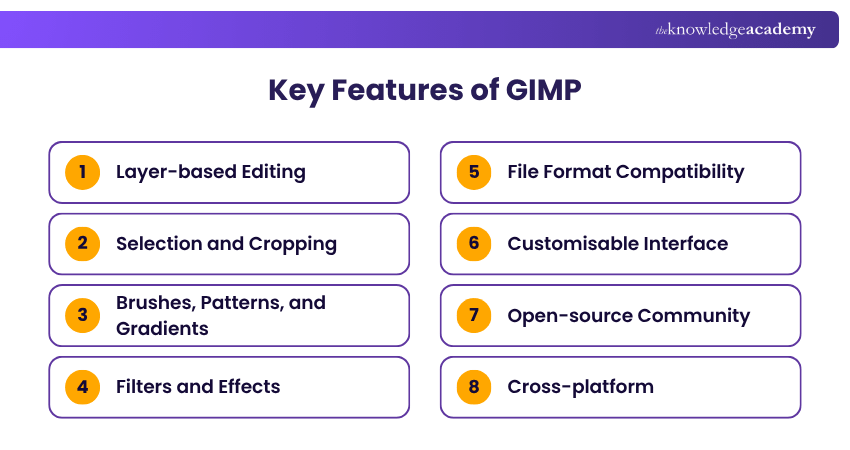
a) Layer-based Editing: GIMP operates on a layer-based system, allowing users to stack and organise different elements within an image, providing a non-destructive editing environment.
b) Selection and Cropping: Users can make precise selections and crop images using GIMP's selection tools, offering control over specific areas for editing.
c) Brushes, Patterns, and Gradients: GIMP provides a rich set of brushes, patterns, and gradients, enabling users to apply diverse textures, designs, and colour transitions to their images for creative expression.
d) Filters and Effects: A wide array of filters and effects are available, allowing users to apply transformations, enhancements, and artistic touches to their images with ease.
e) File Format Compatibility: GIMP supports numerous file formats, thus ensuring compatibility with different types of images, making it a versatile tool for working with diverse media.
f) Customisable Interface: Users can tailor the interface to their preferences, optimising their workflow by arranging tools and panels to suit their needs.
g) Open-source Community: GIMP's functionality is continually evolving through contributions from an active open-source community, ensuring updates and improvements over time.
h) Cross-platform: GIMP is designed to work seamlessly across different operating systems, providing accessibility to a broad user base.
Trainer's Insight
Keep an editable working copy of your project before exporting the final image. This makes it easier to return to the project and modify individual elements later.
Elevate your design game with the Maxon Cinema 4D Training - Join now and unleash limitless creativity!
GIMP History
The history of GIMP is a fascinating journey that begins in 1995. Developed by Spencer Kimball and Peter Mattis, GIMP emerged as an Open-Source Software alternative to commercial image editing Tools, embodying the principles of the GNU Project. The project aimed to create a free, accessible platform for digital image manipulation, aligning with the ethos of collaborative software development.
GIMP's early years were marked by rapid community growth and continuous improvements. Over time, GIMP evolved from a grassroots initiative into a powerful tool widely adopted by Graphic Designers, Photographers, and Artists.
Who Should Use GIMP?
It may be particularly relevant for:
1. Beginners learning image editing2. Photographers performing photo adjustments3. Digital artists creating raster artwork4. Graphic Designers creating visual assets5. Hobbyists working on personal creative projects6. Users looking for free and open-source image-editing software
GIMP Versions
GIMP has evolved through several major versions since its development began in 1995. Each generation has introduced improvements to image editing, performance, interface design and extensibility.
a) Early GIMP (1995): Peter Mattis and Spencer Kimball began developing GIMP in 1995, with its first public announcement appearing in November of that year.
b) GIMP 1.x: The early stable releases established GIMP as an open-source image editor and laid the foundation for its core editing capabilities.
c) GIMP 2.x: The long-running 2.x series introduced significant improvements to the interface, editing capabilities, performance and workflow. Major stable releases included GIMP 2.0, 2.2, 2.4, 2.6, 2.8 and 2.10.
d) GIMP 3.0: Released in March 2025 after seven years of development, GIMP 3.0 introduced a GTK3-based interface, improved display scaling and tablet support, broader file-format support and non-destructive editing for many commonly used filters.
e) GIMP 3.2: Released in March 2026, GIMP 3.2 builds on GIMP 3.0 with features including Link Layers, Vector Layers, additional file-format support and further UI and stability improvements. It is the current stable GIMP series recommended for most users.
Pro Tip
Don't try to learn every GIMP tool immediately. Start with layers, selections, transformations, brushes and basic adjustments, then explore more advanced features as your projects become more complex.
Advantages of GIMP
Here is list of disadvantages of GIMP:
a) Cost-Free Excellence:
GIMP is a cost-effective solution, providing powerful image editing tools without the financial burden associated with many commercial software options.
b) Open-Source Community:
The vibrant open-source community surrounding GIMP ensures continuous improvement, updates, and a collaborative environment that fosters innovation.
c) Versatility in Platforms:
GIMP's cross-platform compatibility allows users to seamlessly transition between operating systems, ensuring flexibility and accessibility.
d) High-Quality Photo Manipulation:
GIMP's advanced tools for photo manipulation empower users to enhance and transform images with precision, achieving professional-grade results.
e) Original Artistic Expression:
GIMP serves as a digital canvas for artists, offering a diverse set of tools to aid in the creation original artwork, from digital paintings to illustrations.
f) Graphic Design Flexibility:
Graphic Designers benefit from GIMP's rich features, utilising the software for crafting logos, banners, and various design elements with creativity and precision.
g) Extensive Feature Set:
GIMP boasts a comprehensive feature set, including layers, filters, brushes, and customisable interfaces, providing users with a toolkit for a wide range of creative projects.
h) Community Support:
GIMP's user community is a valuable resource for support, tutorials, and shared knowledge, creating a supportive environment for both beginners and experienced users.
Transform concepts into engaging visuals, graphics and animations with the Animation and Design Training – Sign up now!
Disadvantages of GIMP
Here is a list of disadvantages of GIMP:
a) Learning Curve:
GIMP's interface may have a steeper learning curve for beginners, requiring time to familiarise themselves with its diverse features and functionalities.
b) Industry Standard Compatibility:
In professional settings, using GIMP and Photoshop in a combined workflow can present challenges due to file format incompatibility. GIMP's file formats may not seamlessly integrate with industry-standard formats like Adobe Photoshop, potentially causing compatibility issues.
c) Resource Intensive:
GIMP's performance may be resource-intensive on older or less powerful hardware, impacting the User Experience and responsiveness.
d) Limited Filter and Effect Variety:
While GIMP offers various filters and effects, some users may find this selection somewhat limited as compared to premium alternatives. In such cases, exploring GIMP alternatives can provide access to a much wider range of advanced options and features.
e) Text Handling Limitations:
Text handling capabilities in GIMP may not match the sophistication found in dedicated design software, making it less suitable for extensive typography work.
f) Plugin Dependency:
Some of the advanced features and functionalities may require additional plugins, and users might rely on third-party plugins for specific tasks.
g) Less Industry Recognition:
GIMP, despite its capabilities, may not have the same level of industry recognition as certain proprietary software, potentially affecting professional opportunities for users.
h) Inconsistent Interface:
The interface across different platforms can be inconsistent, leading to variations in User Experience depending on the operating system.
Here are the pros and cons of GIMP at a glance:
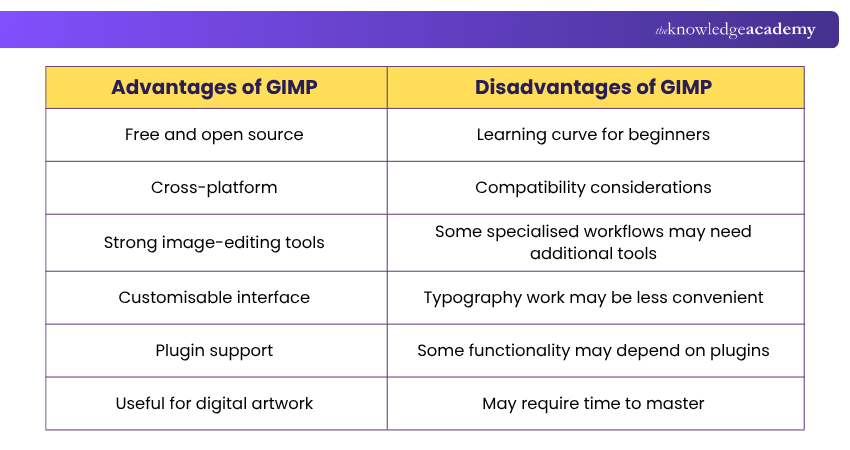
So for beginners, the best approach is to start with GIMP's essential tools and build skills through practical projects. Understanding what GIMP does well, along with its limitations, can help determine whether it is the right image-editing tool for your creative needs.
GIMP Suitability Checklist
Before choosing GIMP, check whether you need:
□ Photo editing and retouching□ Raster image manipulation□ Layer-based editing□ Digital painting or artwork tools□ A free and open-source image editor□ A customisable editing environment□ Support for different image formats

Vishnu Sankar is a Senior Content Writer with 5+ years of experience across content development, software development, web development and system administration. His technical background and professional training support his expertise in IT and Tech, while his extensive research and writing experience covers Project Management and Health and Safety.
View Detail

 If you wish to make any changes to your course, please


