




We may not have the course you’re looking for. If you enquire or give us a call on 01344203999 and speak to our training experts, we may still be able to help with your training requirements.
Snowflake vs AWS: Key Differences
ByNilotpal SarmahLast updated on: 10 October 2026
Snowflake vs AWS compares a managed cloud data platform with a broader cloud services ecosystem, covering architecture, performance, integration, security, backup, pricing, and support.
Understanding Snowflake vs Amazon Web Services (AWS) begins with recognising that they serve different scopes. AWS is a broad cloud platform offering compute, storage, database, analytics, networking, and other services, while Snowflake is a managed cloud data platform focused on data storage, processing, analytics, and related workloads.
Snowflake can run on AWS, Microsoft Azure, or Google Cloud, so the comparison is not between two directly equivalent cloud platforms. This blog explores the key differences between Snowflake and AWS, including their features, architecture, use cases, pricing, and suitability for different business needs.
Snowflake vs AWS: Which is better?
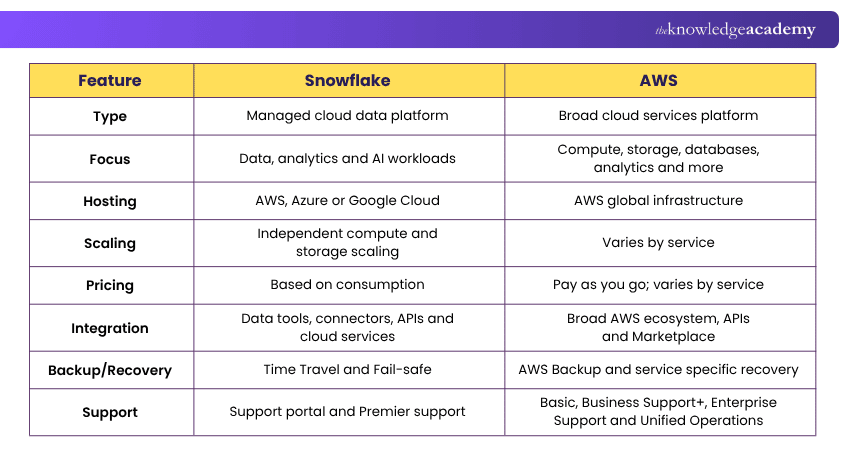
Snowflake and AWS are not direct substitutes. Snowflake focuses on managed data and analytics workloads, while AWS provides a much broader range of cloud services. The following comparison highlights their key differences.
Architectural Comparisons
Snowflake uses a cloud-native architecture that separates data storage, compute, and cloud services. Its architecture combines characteristics of shared-disk and shared-nothing systems, allowing independent compute clusters to process workloads while accessing centrally stored data. The storage layer manages all aspects of data storage efficiently and securely.
The compute layer (or virtual warehouses) allows for the execution of queries, which can be scaled out depending on the workload, without affecting the stored data. This separation ensures that Snowflake can handle vast amounts of data and complex analytical queries efficiently, making it a powerful solution for data warehousing and analytics.
In contrast, AWS provides a broad cloud services ecosystem rather than one fixed architecture. Services such as Amazon EC2, Amazon RDS, Amazon S3, Amazon DynamoDB, and Amazon Redshift can be combined according to workload requirements.
AWS provides flexibility across infrastructure, storage, databases, analytics, and other services, with scalability and availability depending on the specific services and configurations selected.
Quick Check
Which platform separates storage and compute by design? Snowflake separates these layers so they can scale independently, while AWS architecture varies depending on the services selected.

Performance Evaluation
Snowflake's performance is particularly noteworthy when dealing with large-scale data warehousing and analytics. Its ability to dynamically allocate compute resources means that it can efficiently process complex queries across large datasets with minimal management overhead. Snowflake's independent compute clusters can reduce resource contention and support scaling as workloads, users, or data volumes increase.
In contrast, AWS offers comprehensive performance capabilities across its services. For instance, Amazon Redshift provides a highly optimised data warehousing service that leverages columnar storage and data compression to deliver fast query performance. AWS's infrastructure is built to support High-performance Computing (HPC) workloads, offering instances with high CPU, memory, and network capabilities.
The flexibility to choose, configure, and optimise the services based on specific performance requirements makes AWS suitable for many different workloads, including web hosting and complex machine learning tasks.
Integration Analysis
Snowflake is designed to work smoothly with numerous tools for data ingestion and Extract, Transform, and Load (ETL) processes, as well as Business Intelligence (BI) applications. Its compatibility with data integration and business intelligence tools allows organisations to connect and analyse data across different sources.
It also supports programming languages, SDKs, APIs, and connectors for custom integrations and automated workflows across cloud, SaaS, on-premises, and streaming data sources.
AWS provides an extensive ecosystem for integration across compute, storage, databases, analytics, and machine learning services. It supports APIs, SDKs, connectors, and services such as AWS Glue and Amazon AppFlow to connect applications, data sources, and cloud environments. These capabilities also support hybrid and cross-service data workflows.
Build cloud integration skills with our AWS API Gateway Training today.
Security Measures
Snowflake provides robust security features designed to protect data at rest and in transit. It employs always-on, enterprise-grade encryption for data stored on its platform, with options for managing encryption keys.
Snowflake also offers features like multi-factor authentication, role-based access control, and federated authentication to ensure that only authorised users can access sensitive data. Its compliance with major standards and regulations, such as GDPR, HIPAA, and SOC 2, demonstrates its commitment to maintaining high security and privacy standards.
On the other hand, AWS's security measures are comprehensive, covering physical security of its data centres, encryption of data at rest and in transit, and detailed access controls for resources. AWS customers can utilise AWS Identity and Access Management (IAM) to define granular permissions for users, groups, and roles.
AWS also offers advanced features like Amazon GuardDuty for threat detection, AWS Shield for DDoS protection, and AWS Key Management Service (KMS) for encryption key management.
Data Backup and Recovery Comparison
Snowflake provides continuous data protection through features such as Time Travel and Fail-safe rather than relying on conventional user-managed backups. Time Travel allows historical data to be queried or restored within the configured retention period.
For permanent tables, Fail-safe provides an additional seven-day, non-configurable recovery period after Time Travel ends. It is a best-effort recovery service handled by Snowflake and is not intended as a routine backup mechanism.
On the other hand, AWS offers a comprehensive set of tools for data backup and recovery across its services. AWS Backup provides a centralised service to automate and manage backups across AWS services like EC2, RDS, DynamoDB, EFS, and more. You can define policies for backup frequency, retention, and encryption to meet your specific needs.
AWS also provides service-specific recovery options, including Amazon RDS automated backups and snapshots, Amazon EBS snapshots, and centralised protection through AWS Backup. AWS's approach provides flexibility and control over backup and recovery processes, accommodating a broad range of business continuity and compliance requirements.
Understand AWS database services with our AWS Database Offerings Training today.
Use Case Scenarios
Snowflake excels in scenarios requiring robust data warehousing, real-time analytics, and secure data sharing. Its architecture is optimised for processing large volumes of data efficiently, making it ideal for organisations that rely on data-driven decision-making. Key use cases include:
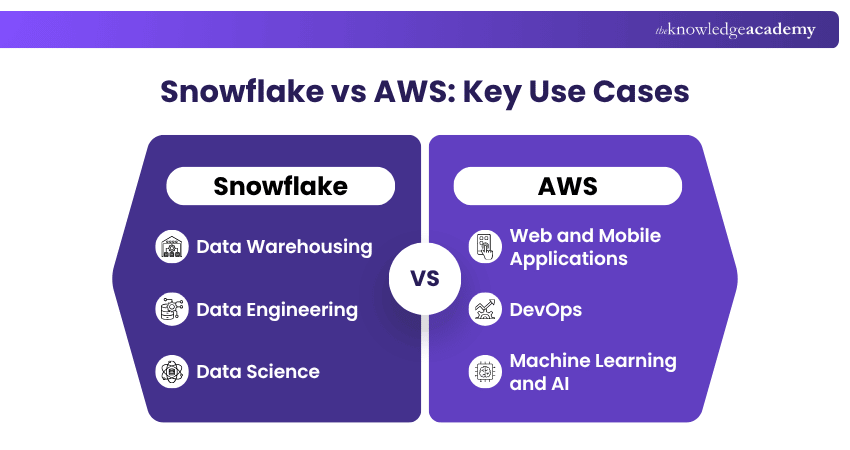
a) Data Warehousing: Companies can consolidate all their data into Snowflake's single, accessible repository, benefiting from its scalable compute resources.
b) Data Engineering: The platform simplifies data pipeline complexity, allowing engineers to easily transform and load vast amounts of data.
c) Data Science: Snowflake supports complex data modelling and machine learning workloads, enabling data scientists to derive insights from large datasets.
AWS's extensive suite of services supports a range of applications, from web hosting to artificial intelligence. It is particularly well-suited for:
a) Web and Mobile Applications: AWS provides scalable infrastructure for hosting dynamic websites and mobile backends, supporting global user bases with ease.
b) DevOps: AWS tools facilitate Continuous Integration and Continuous Delivery (CI/CD), Infrastructure as Code (IaC), and microservices architectures.
c) Machine Learning and AI: AWS offers specialised services like Amazon SageMaker for building, training, and deploying machine learning models at scale.
Trainer’s Pro Tip
When comparing Snowflake with AWS for analytics, compare Snowflake with specific AWS services such as Amazon Redshift rather than treating the entire AWS platform as a direct equivalent.
Explore machine learning workflows with our Amazon SageMaker Training today.
Pricing Considerations
Snowflake's pricing model is consumption-based, focusing on the amount of data stored and compute time used. Key aspects include:
a) Storage Costs: Charged for the volume of data stored in Snowflake, with prices varying by region.
b) Compute Costs: Billed based on the virtual warehouse size and the time it runs, allowing for cost control by scaling compute resources according to demand.
In contrast, AWS adopts a pay-as-you-go approach for its services, offering a detailed pricing model that includes:
a) Compute, Storage, and Data Transfer Costs: Prices vary across services like EC2 (compute), S3 (storage), and data transfer fees.
b) Free Tier: New AWS customers can choose a Free account plan with credits and access to selected free usage limits. The Free account plan lasts for up to six months or until the available credits are used, whichever occurs first.
c) Reserved Instances and Savings Plans: AWS provides commitment-based pricing options for eligible services and workloads that can reduce costs compared with standard on-demand pricing.
Customer Support Assessment
Snowflake provides access to its support portal and knowledge resources across its editions. Premier Support includes 24/7 coverage and a one-hour response window for Severity 1 issues for applicable accounts.
AWS currently offers Basic, Business Support+, Enterprise Support, and Unified Operations. Basic Support includes access to documentation, technical resources, account and billing assistance, and support forums. Developer Support and the previous Business Support plan are scheduled to reach end of support on 1 January 2027.
Keep This in Mind
Snowflake and AWS serve different scopes. Snowflake provides a managed data platform that can run across multiple cloud providers, while AWS offers a broad ecosystem covering infrastructure, storage, databases, analytics, AI, and application services. The suitable option depends on workload, architecture, integration, management, and cost requirements.
Strengthen core cloud knowledge with our AWS Technical Essentials Training today.

Nilotpal Sarmah is a Senior Content Writer with 11+ years of overall experience spanning engineering, operations and content development. His technical knowledge and extensive writing experience enable him to simplify specialised topics across IT and Tech, Business Skills, Project Management, Health and Safety, and ISO and Compliance.
View Detail

 If you wish to make any changes to your course, please


