


 Top Rated Course

We may not have the course you’re looking for. If you enquire or give us a call on 01344203999 and speak to our training experts, we may still be able to help with your training requirements.
What is Privileged Access Management (PAM) and How Does it Work?
Scarlett Adams 22 November 2025Privilege Access Management is a Cyber Security strategy for technology control. Monitor, secure, and audit the Privileged Access and permissions for users. It helps limit who can reach sensitive systems and only gives access when needed. This reduces the risk of misuse and protects important data from internal and external threats.
Home
 Resources
Business Improvement
What is Privileged Access Management (PAM) and How Does it Work?
Resources
Business Improvement
What is Privileged Access Management (PAM) and How Does it Work?
Resources
Business Improvement
What is Privileged Access Management (PAM) and How Does it Work?

Training Outcomes Within Your Budget!
We ensure quality, budget-alignment, and timely delivery by our expert instructors.
Table of Contents
Think about your phone, you lock it because it holds personal and important information. Now imagine someone having access not just to one device, but to every system and sensitive file in a company. That level of control can be risky if it falls into the wrong hands. Privileged Access Management (PAM) protects these powerful accounts and makes sure only trusted people use them, and only when needed.
In this blog, we will explain Privileged Access Management. You will learn what it is, why it matters, how it works, key account types, setup steps, benefits, challenges, and best practices. This will help you understand how companies protect sensitive systems and reduce security risks.
Table of Contents
1) What is Privileged Access Management (PAM)?
2) The Importance of Privileged Access Management
3) How Does Privileged Access Management (PAM) Work?
4) Types of Privileged Accounts
5) How to Implement Privileged Access Management (PAM)?
6) Benefits of Privileged Access Management (PAM)
7) Challenges of Privileged Access Management (PAM)
8) Privileged Access Management (PAM) Best Practices
9) Conclusion
What is Privileged Access Management (PAM)?
Privileged Access Management (PAM) is a security method used by organisations to manage and protect accounts that hold elevated permissions within systems. These privileged accounts can change system settings, access sensitive information, install software, and manage users, which makes them a high-value target for attackers.
PAM ensures that only authorised individuals can use this elevated access and only for legitimate purposes. By controlling how privileged accounts are accessed and monitored, PAM helps prevent misuse, accidental errors, and cyber threats from employees, contractors, or external attackers. It safeguards powerful accounts and strengthens overall system security.
The Importance of Privileged Access Management
Privileged accounts have great control over systems. If they fall into the wrong hands, attackers can cause serious harm. They can steal data, change records, shut down systems, or move across the network.
Privileged Access Management is important because:
a) It protects sensitive business data
b) It prevents internal and external misuse of admin rights
c) It helps reduce the chance of cyberattacks
d) It supports compliance needs and security rules
e) It improves trust and safety inside the organisation
Without PAM, one compromised admin account can lead to a major security breach.
How Does Privileged Access Management (PAM) Work?
PAM works by controlling who can use powerful system accounts, when they can use them, and what actions they perform.

It usually involves:
a) Checking and approving access
b) Logging and recording user activity
c) Limiting access to only what is needed
d) Using safe passwords and rotating them often
e) Watching accounts for unusual behaviour
f) Providing temporary access instead of always-on access
PAM platforms also store privileged passwords securely and make sure they are not shared or misused. If someone tries to access systems without permission, the system blocks them or alerts security teams.
Gain an understanding of integration testing and deployment strategies with our Integration Architect Training – Register today!
Types of Privileged Accounts
Privileged accounts are special accounts that allow users to perform high-level tasks in systems, networks, or software. Each type serves a unique purpose and needs strong protection because misuse can cause serious security risks.
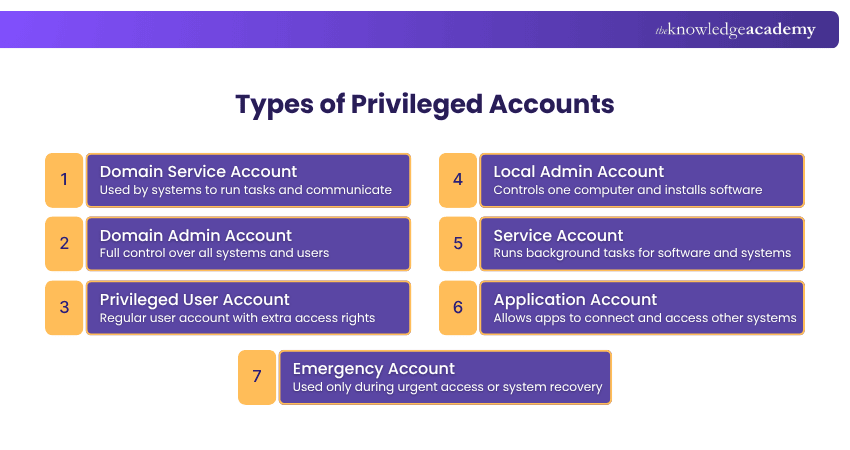
1) Domain Service Account
A Domain Service Account is used by systems and software to communicate and run tasks like updates, backups, and database access. These accounts are not for people, and they need strong security because misuse can lead to control of important systems.
2) Domain Admin Account
A Domain Admin Account has the highest level of control in a company network. It can change settings, manage users, and access all computers and servers. Because it has full power, only trusted people should use it, and only when needed.
3) Privileged User Account
A Privileged User Account is a standard user account with additional permissions to perform tasks such as reviewing system settings or handling sensitive files. This type of account needs strict oversight because misuse or compromise can allow attackers to move through the organisation’s systems.
4) Local Admin Account
A Local Admin Account controls one computer or device. It lets a user install software, change settings, and manage files on that device. These accounts are often used by IT staff. If one password is used on many computers, attackers can break into many systems easily.
5) Service Account
A Service Account is used by software programs to work smoothly. These accounts run tasks in the background, like system updates or internal jobs. They are not for human use. Because passwords often do not change, hackers may target them.
6) Application Account
An Application Account allows software to connect with databases, servers, or other applications. For example, it may let an app read or update stored information. If the credentials are stored in unsecured files, it can expose the entire system to risk.
7) Emergency Account
An Emergency Account is used only during urgent situations, like when normal access stops working. It helps teams get back into the system and fix issues quickly. These accounts stay turned off until needed and are used for short-term recovery only.
Learn techniques for analysing Integration Requirements and solutions. Join our Enterprise Integration Practitioner Training today!
How to Implement Privileged Access Management (PAM)?
PAM can be set up by using different tools and steps to control who can use powerful accounts and when they can use them. Here are the main parts.
Privileged Account and Session Management (PASM)
This tool stores special admin passwords in a safe place so only authorised people can use them. It also records what they do while logged in. This helps companies see if someone makes a mistake or tries to do something wrong.
Privilege Elevation and Delegation Management (PEDM)
This gives someone extra access only when they need it. For example, if a person needs to install software, they get higher permission for that task and then it is removed. This stops people from always having full power.
Secure Remote Access (SRA) Software
This tool lets people work safely from outside the office. It gives only the required access instead of opening everything. It also watches what the person does while working remotely to keep systems safe.
Cloud Infrastructure Entitlements Management (CIEM)
This helps control who can access online systems like cloud services. It checks who has access, removes extra access, and makes sure each person only has the access they need. This helps stop wrong or risky access in cloud platforms.
Benefits of Privileged Access Management (PAM)
Privileged Access Management brings many advantages to an organisation by keeping powerful accounts safe and under control. Here are the key benefits in simple words:
a) Protects Important Systems and Data: PAM helps stop unauthorised access to sensitive systems and data, keeping the company safe from leaks and misuse.
b) Prevents Cyber Attacks: By limiting who can use powerful accounts and watching their actions, PAM makes it harder for attackers to enter systems or cause damage.
c) Reduces Insider Risks: Not all threats come from outside. PAM also helps stop employees or third parties from misusing access or making harmful mistakes.
d) Gives Better Control: PAM lets companies decide exactly who should access certain systems and for how long. This means no one has more access than they really need.
e) Monitors All Privileged Activity: PAM records what users do with high-level access, so if something goes wrong, the company can quickly see what happened.
f) Supports Rules and Compliance: Many industries require strong security controls. PAM helps companies meet these rules and stay compliant.
g) Improves Overall Security: With fewer open access points and stronger control, PAM makes the whole organisation much safer and more secure.
Understand the role of Infrastructure Architecture in modern IT environments. Join our Information Architecture Training now!
Challenges of Privileged Access Management (PAM)
Managing PAM can be difficult for some organisations. Here are the main challenges:
a) Too Many Privileged Accounts: Organisations often have many high-access accounts, making it hard to manage passwords and keep everything organised.
b) Difficult to Track User Actions: Watching what privileged users do is not always easy, and risky activity can be missed.
c) Hard to Spot Unusual Behaviour: Detecting strange or harmful actions quickly can be difficult, which may lead to security issues.
d) Cloud Access Challenges: With more systems moving to the cloud, controlling who has special access across different platforms becomes harder.
Privileged Access Management (PAM) Best Practices
To use PAM effectively, organisations should follow these good practices that help reduce risk and improve control over powerful accounts.
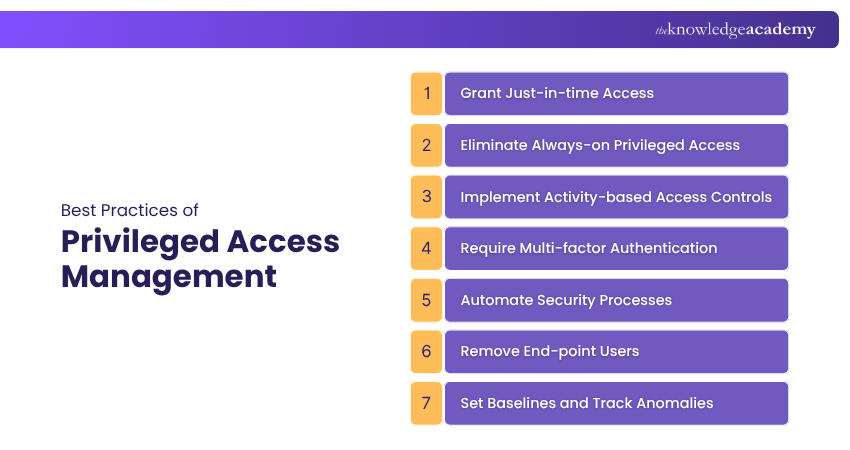
1) Grant Just-in-time Access
Provide high-level access only when it is needed and for a limited period. This prevents users from holding unnecessary privileges all the time. It also lowers the chance of accidental misuse or deliberate abuse of powerful accounts.
2) Eliminate Always-on Privileged Access
Do not keep powerful accounts active all the time. Turn them on only when they are required and turn them off after the task is done. This keeps powerful accounts safe when they are not in use.
3) Implement Activity-based Access Controls
Give access based on the job a person is doing at that moment. They should only get the exact access needed for that task, nothing more. This avoids giving extra access that is not needed and keeps systems safer.
4) Require Multi-factor Authentication
Ask users to confirm their identity in more than one way, like a password plus a code on their phone. This makes it harder for attackers to break in. It adds another layer of safety to important accounts.
5) Automate Security Processes
Use tools to handle tasks like giving access, removing access, and checking activity. This saves time and helps avoid mistakes. Automation also helps keep records updated and secure, improving overall safety.
6) Remove End-point Users
Limit admin rights on everyday computers and devices. Only give admin access if someone truly needs it for work. This helps protect systems from harmful actions on local devices and reduces security risks.
7) Set Baselines and Track Anomalies
Know what normal access looks like in your systems. Watch for anything unusual so you can spot problems early. This helps find risks before they cause serious damage and keeps systems stable.
Conclusion
Privileged Access Management plays an important role in keeping business systems and sensitive data safe. By controlling who has special access, watching account activity, and following best practices, companies can reduce risks and stop misuse. As cyber threats continue to grow, organisations must protect powerful accounts and build a secure environment where trusted users access the right systems at the right time.
Understand how solutions can be designed to support strategy with our Enterprise Architect Training – Join now!
Frequently Asked Questions
What is the Difference Between IAM and PAM?

Identity Access Management (IAM) manages regular user accounts and ensures they have the correct level of access. PAM controls high-power accounts with special access to sensitive systems. So, IAM is for normal users and PAM is for privileged users.
What is an Example of a PAM?
A simple example of PAM is a password vault. It safely stores important admin passwords and only lets approved people use them, while also keeping a record of who used them.
What are the Other Resources and Offers Provided by The Knowledge Academy?
The Knowledge Academy takes global learning to new heights, offering over 3,000+ online courses across 490+ locations in 190+ countries. This expansive reach ensures accessibility and convenience for learners worldwide.
Alongside our diverse Online Course Catalogue, encompassing 19 major categories, we go the extra mile by providing a plethora of free educational Online Resources like Blogs, eBooks, Interview Questions and Videos. Tailoring learning experiences further, professionals can unlock greater value through a wide range of special discounts, seasonal deals, and Exclusive Offers.
What is The Knowledge Pass, and How Does it Work?
The Knowledge Academy’s Knowledge Pass, a prepaid voucher, adds another layer of flexibility, allowing course bookings over a 12-month period. Join us on a journey where education knows no bounds.
What are the Related Courses and Blogs Provided by The Knowledge Academy?
The Knowledge Academy offers various Enterprise Architect Training, including the Identity And Access Management Architect Training, Information Architecture Training, and the Enterprise Integration Practitioner Training. These courses cater to different skill levels, providing comprehensive insights into Enterprise Architecture Governance.
Our Business Improvement Blogs cover a range of topics related to Privileged Access Management, offering valuable resources, best practices, and industry insights. Whether you are a beginner or looking to advance your Access Management skills, The Knowledge Academy's diverse courses and informative blogs have got you covered.
Upcoming Business Improvement Resources Batches & Dates
Date
 Identity and Access Management Architect Training
Identity and Access Management Architect Training
Fri 29th May 2026
Identity and Access Management Architect Training
Fri 28th Aug 2026
Identity and Access Management Architect Training
Fri 27th Nov 2026

 If you wish to make any changes to your course, please


