




We may not have the course you’re looking for. If you enquire or give us a call on +44 1344 203 999 and speak to our training experts, we may still be able to help with your training requirements.
Types of Keys in SQL: Definitions, Examples and Differences
ByThe Knowledge AcademyLast updated on: 10 October 2026
Keys in SQL help uniquely identify records, maintain data integrity, and establish relationships between database tables. Explore primary, foreign, unique, composite, candidate, alternate, super, natural and surrogate keys with practical examples and comparisons.

In This Blog
1. A primary key uniquely identifies each row and cannot contain NULL values.2. A foreign key establishes relationships between tables and supports referential integrity.3. Candidate, alternate and super keys describe different ways attributes can uniquely identify records.4. A composite key uses two or more columns together rather than relying on one column.5. Natural and surrogate keys represent different approaches to choosing meaningful or system-generated identifiers.
Databases need reliable ways to identify individual records and connect related information. Without clear identifiers, maintaining uniqueness, relationships, and consistent data across tables becomes much more difficult.
This is where keys in SQL become important. From primary and foreign keys to candidate, composite and super keys, each has a specific role in relational database design.
This blog explains the major types of keys in SQL, how they differ and how they work together in practical database structures.
What are Keys in SQL?
Keys in SQL are columns, or combinations of columns, used to identify records, enforce uniqueness or establish relationships between tables.
Some keys, such as PRIMARY KEY, FOREIGN KEY and UNIQUE, can be implemented directly using SQL constraints. Others, including candidate, alternate, super, natural and surrogate keys, are primarily database-design concepts that describe how identifiers are selected or classified.
For example, consider a simple employee table:
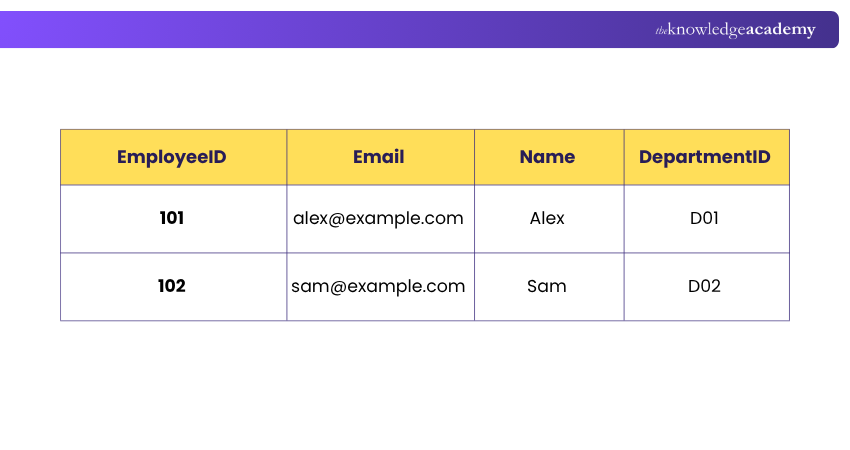
Here, EmployeeID could uniquely identify every employee, while DepartmentID could connect the employee to another table containing department information.
Keys therefore support several important database functions, including unique record identification, relationship management, and data integrity.

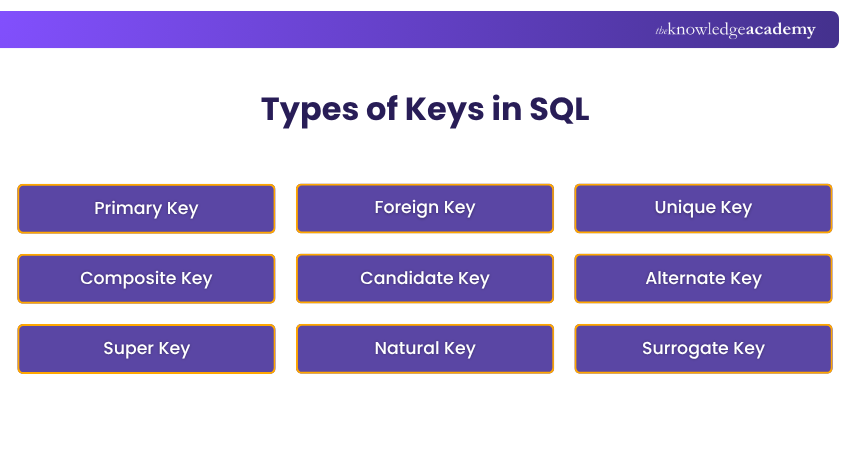
Types of Keys in SQL
Different keys solve different database-design problems. The following types of keys in SQL explain how records can be identified, related, and kept consistent.
Example Database
The system contains three tables: Students, Courses, and Enrolments.
Students Table
|
StudentID |
StudentNumber |
|
Name |
|---|---|---|---|
|
101 |
ST001 |
Sam@example.com |
Sam |
|
102 |
ST002 |
Alex@example.com |
Alex |
|
103 |
ST003 |
sara@example.com |
Sara |
Courses Table
|
CourseID |
CourseCode |
CourseName |
|---|---|---|
|
201 |
SQL101 |
SQL Fundamentals |
|
202 |
PY101 |
Python Programming |
Enrolments Table
|
StudentID |
CourseID |
EnrolmentDate |
|---|---|---|
|
101 |
201 |
9/1/2026 |
|
101 |
202 |
9/2/2026 |
|
102 |
201 |
9/3/2026 |
Now, let's use this same example to understand the different types of keys.
1) Primary Key
A Primary Key is a column or group of columns selected as the main unique identifier for every row in a table.
Primary Key values must be unique and NOT NULL. A table can have only one Primary Key constraint, although that Primary Key may contain multiple columns. SQL Server and PostgreSQL both enforce uniqueness and non-nullability for Primary Keys.
For example:

Here, two students cannot have the same StudentID, and StudentID cannot contain a NULL value.
In our example: StudentID is the Primary Key of the Students table.
Key takeaway: A Primary Key is the selected identifier used to uniquely identify each row in a table.
2) Foreign Key
A Foreign Key is a column or combination of columns whose values reference a Primary Key, Unique Key, or other eligible referenced key in the same or another table. Its purpose is to enforce referential integrity between related records.
For example:

This relationship helps ensure that an enrolment refers to an existing student and course.
In our example:
1) Enrolments.StudentID → Foreign Key referencing Students.StudentID
2) Enrolments.CourseID → Foreign Key referencing Courses.CourseID
A foreign-key column can contain NULL unless it is also defined with a NOT NULL constraint.
Key takeaway: A Foreign Key connects related tables and helps maintain referential integrity.
Remember: A Foreign Key is about establishing and enforcing relationships. It does not need to be unique in the referencing table.
3) Unique Key
A Unique Key, commonly implemented using a UNIQUE constraint, prevents duplicate values in a column or combination of columns.
In our Students table, each student's email address can be required to be unique:

This means the following two records would not be permitted:
|
StudentID |
|
Name |
|---|---|---|
|
101 |
Sam@example.com |
Sam |
|
104 |
Sam@example.com |
Sara |
The second record would violate the UNIQUE constraint.
The treatment of NULL values in a UNIQUE constraint can vary between database management systems, so it is better not to assume that all SQL databases handle NULL in exactly the same way.
In our example: Email is protected by a UNIQUE constraint.
Key takeaway: A UNIQUE constraint prevents duplicate values in the specified column or columns.
Start your database journey with Introduction To SQL and learn to query, manage, and organise data confidently.
4) Composite Key
A Composite Key uses two or more columns together to uniquely identify a record. It is useful when no single column can uniquely identify each row.
For example, consider the Enrolments table. A StudentID can appear multiple times because one student may enrol in several courses. Similarly, a CourseID can appear multiple times because many students may enrol in the same course. However, the combination of StudentID and CourseID can uniquely identify each enrolment.

Here, (StudentID, CourseID) forms a Composite Primary Key.
The database allows the same StudentID or CourseID to appear in different rows, but it does not allow the same combination of both values to appear more than once.
In our example: StudentID + CourseID forms the Composite Primary Key of the Enrolments table.
Key takeaway: A Composite Key combines two or more columns to uniquely identify a row when a single column is not sufficient.
5) Candidate Key
A Candidate Key is a minimal set of attributes capable of uniquely identifying every record in a table.
The word minimal is important. It means that removing any attribute from the Candidate Key would cause it to lose its ability to uniquely identify records.
Consider this table:
|
EmployeeID |
WorkEmail |
NationalEmployeeNumber |
|---|---|---|
|
101 |
alex@company.com |
N1001 |
|
102 |
sam@company.com |
N1002 |
If all three columns are guaranteed to be unique, each could potentially serve as a Candidate Key.
The database designer might choose:
EmployeeID → Primary Key
The remaining Candidate Keys could then become Alternate Keys.
Candidate Keys are primarily a relational database-design concept rather than a dedicated CANDIDATE KEY SQL constraint.
Trainer's Tip:
When identifying Candidate Keys, look for the smallest set of columns that can uniquely identify each row. Once one Candidate Key becomes the Primary Key, the remaining ones can be treated as Alternate Keys.
6) Alternate Key
An Alternate Key is a Candidate Key that was not selected as the table's Primary Key.
For example, suppose an employee table contains both:
1) EmployeeID
2) WorkEmail
If both uniquely identify employees but EmployeeID is selected as the Primary Key, WorkEmail becomes an Alternate Key.
In a practical SQL database, an Alternate Key is often implemented using a UNIQUE constraint where appropriate.
The relationship can therefore be understood as:
Candidate Keys → Choose one Primary Key → Remaining Candidate Keys become Alternate Keys
Alternate Keys give databases another way to maintain uniqueness for meaningful attributes without replacing the main Primary Key.
7) Super Key
A Super Key is any set of one or more attributes that can uniquely identify each row in a table.
Consider:
|
EmployeeID |
WorkEmail |
EmployeeName |
|---|---|---|
|
101 |
alex@company.com |
Alex |
|
102 |
sam@company.com |
Sam |
If EmployeeID is unique, these could all technically be superkeys:
1) {EmployeeID}
2) {EmployeeID, EmployeeName}
3) {EmployeeID, WorkEmail}
4) {EmployeeID, WorkEmail, EmployeeName}
They identify records uniquely because each includes the unique EmployeeID.
However, some contain unnecessary attributes. This creates an important distinction:
Candidate Key: Minimal Super Key
Super Key: May contain additional unnecessary attributes
Therefore, every Candidate Key is a Super Key, but not every Super Key is a Candidate Key.
8) Natural Key
A Natural Key uses meaningful data that already exists within the business or real-world domain to identify records.
Possible examples include:
1) Employee number
2) Vehicle registration number
3) Product SKU
4) Account reference
Suppose every employee is assigned a permanent company identifier:

If this identifier is guaranteed to remain unique and stable, it could potentially serve as a Natural Key.
Natural Keys can make data more meaningful because the identifier has business significance. However, they should be chosen carefully because real-world values can sometimes change.
A Natural Key is a database design concept, not a dedicated SQL constraint.
9) Surrogate Key
A Surrogate Key is an artificial identifier created specifically for use within the database rather than derived from meaningful business data.
For example:
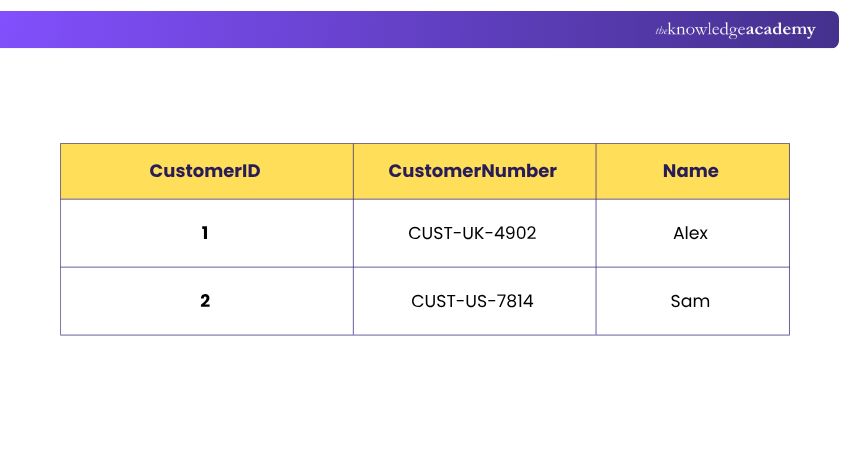
Here, CustomerID might be an internally generated Surrogate Key, while CustomerNumber has business meaning.
Surrogate Keys are commonly numeric IDs, sequence-generated values, or other system-created identifiers.
Their main advantage is stability. Unlike email addresses, phone numbers, product names, or other business information, a Surrogate Key normally does not need to change when business data changes.
Surrogate Keys are also a design approach rather than a separate SURROGATE KEY SQL constraint. They are commonly implemented as Primary Keys.
How Different SQL Keys Work Together
Understanding each key individually is useful, but database relationships become clearer when the keys are viewed together.
Consider a simple sales database containing three tables.
Customers Table
|
CustomerID |
|
CustomerName |
|---|---|---|
|
101 |
alex@example.com |
Alex |
|
102 |
sam@example.com |
Sam |
In this table:
CustomerID: Primary Key Email: If Email is guaranteed to be unique and suitable for identifying each customer, it can be a Candidate Key. Since CustomerID is selected as the Primary Key, Email would then be an Alternate Key.
Orders Table
|
OrderID |
CustomerID |
OrderDate |
|---|---|---|
|
5001 |
101 |
8/20/2026 |
|
5002 |
102 |
8/21/2026 |
Here:
OrderID: Primary Key CustomerID: Foreign Key referencing Customers.CustomerID
The Foreign Key ensures an order references an existing customer.
OrderItems Table
|
OrderID |
ProductID |
Quantity |
|---|---|---|
|
5001 |
201 |
2 |
|
5001 |
205 |
1 |
|
5002 |
201 |
4 |
The combination:
OrderID + ProductID
could form a Composite Primary Key, preventing the same product from appearing more than once for the same order under that particular design.
This relationship can be visualised as:
Customers.CustomerID (PK) → Orders.CustomerID (FK)
Orders.OrderID (PK) → OrderItems.OrderID (FK)
OrderItems (OrderID + ProductID) → Composite Primary Key
Keys therefore work together rather than operating as isolated database features.
Quick Check
Suppose a table contains:EmployeeID | Email | DepartmentIDEmployeeID uniquely identifies the employee, while DepartmentID points to a Departments table.Which keys would fit?EmployeeID → Primary KeyDepartmentID → Foreign KeyEmail → Possible Candidate/Alternate Key if guaranteed unique
Difference Between Different Types of Keys in SQL
Although several SQL keys involve uniqueness, their purposes and behaviour differ significantly. The following comparison highlights the main distinctions:
|
Key Type |
Main Purpose |
Must Be Unique? |
NULL Handling |
Category |
|---|---|---|---|---|
|
Primary Key |
Main identifier for each row |
Yes |
Not allowed |
SQL constraint |
|
Foreign Key |
Connect related records |
No |
Can be allowed depending on definition |
SQL constraint |
|
Unique Key |
Prevent duplicate values |
Yes |
DBMS-dependent |
SQL constraint |
|
Composite Key |
Use multiple columns together as a key |
Depends on the key it forms |
Depends on constraint |
Key structure |
|
Candidate Key |
Possible minimal unique identifier |
Yes |
Cannot contain NULL when serving as a candidate identifier |
Design concept |
|
Alternate Key |
Candidate Key not chosen as Primary |
Yes |
Depends on implementation |
Design concept |
|
Super Key |
Any attribute set capable of unique identification |
Yes |
Conceptual |
Design concept |
|
Natural Key |
Identify records using meaningful business data |
Yes when used as an identifier |
Depends on design |
Design approach |
|
Surrogate Key |
Provide a system-created identifier |
Yes when used as a key |
Usually NOT NULL when Primary |
Design approach |
The most important distinction is that not every term represents a separate SQL constraint. PRIMARY KEY, FOREIGN KEY, and UNIQUE have direct SQL implementations, while terms such as Candidate Key and Super Key primarily describe relational database design concepts.
Strengthen database management skills with our PostgreSQL Administration Training and manage PostgreSQL environments with greater confidence.

The Knowledge Academy develops accessible learning content across Project Management, IT, Cybersecurity, Data Science, Business Analysis, HR, Accounting and Finance, Leadership and Health and Safety. Its resources combine subject research with clear explanations to help professionals build practical knowledge across a wide range of disciplines.
View Detail

 If you wish to make any changes to your course, please


