




We may not have the course you’re looking for. If you enquire or give us a call on +39 800580270 and speak to our training experts, we may still be able to help with your training requirements.
Jenkins CI/CD Pipeline: How It Works, Stages and Examples
ByScarlett AdamsLast updated on: 19 August 2026
A Jenkins CI/CD Pipeline automates the process of building, testing and delivering software after code changes. Learn how Jenkins Pipelines work, their stages, Jenkinsfile structure, benefits and practical implementation.
Key Takeaways
1. A Jenkins CI/CD Pipeline automates tasks between source code changes and software delivery.2. Pipelines commonly include checkout, build, test, package and deployment stages.3. A Jenkinsfile stores Pipeline instructions as code and can be kept in source control.4. Jenkins supports both Declarative and Scripted Pipeline syntax.5. Agents, stages, steps, plugins and integrations work together to execute the Pipeline.
Software can change several times in a single day. Each change may need to be compiled, tested, checked and prepared for deployment before users ever see it. Performing these activities manually makes delivery slower and increases the possibility of inconsistent processes.
A Jenkins CI/CD Pipeline automates much of this work. Instead of developers manually moving code through separate build, test and deployment activities, Jenkins can execute a predefined sequence whenever the appropriate trigger occurs.
But what actually happens between a developer committing code and a new application version being ready for release? This blog explains how Jenkins CI/CD Pipelines work, their main components and stages, how a Jenkinsfile defines the workflow, and how teams can build more reliable automation.
What is a Jenkins CI/CD Pipeline?
A Jenkins CI/CD Pipeline is an automated workflow that uses Jenkins to move software through activities such as building, testing and delivery. Jenkins officially defines Pipeline as a suite of plugins for implementing and integrating continuous delivery pipelines. A Pipeline represents the build process as a sequence of related stages and steps.
Rather than requiring someone to run each activity separately, Jenkins executes the instructions defined for the Pipeline. For example, after a developer commits a change, a Pipeline might retrieve the latest code, compile the application, execute automated tests and prepare a deployment.
The Pipeline definition is commonly stored as code in a Jenkinsfile, which can be kept alongside the application code in source control.
Trainer’s Pro Tip
Start with the smallest working Pipeline. Get Checkout → Build → Test running reliably before introducing deployment, approvals, parallel execution, or complex conditions.
CI vs CD in Jenkins
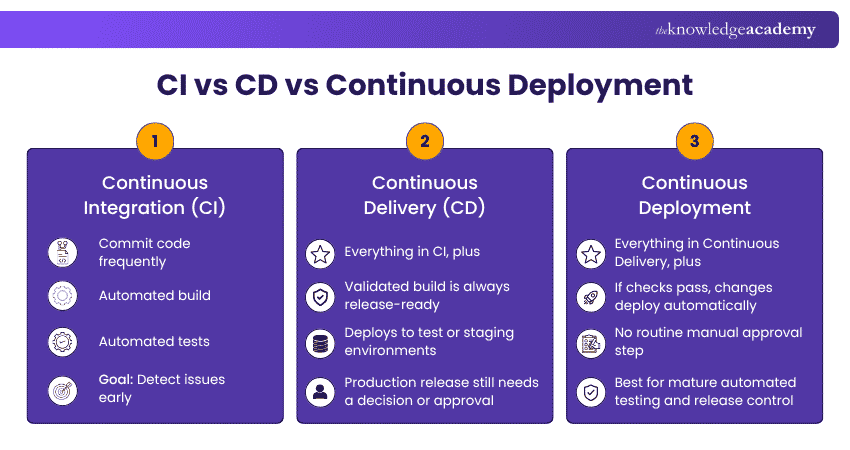
Continuous Integration (CI) focuses on integrating code changes frequently and validating them through automated builds and tests. This helps teams identify problems closer to the point where they are introduced.
Continuous Delivery (CD) extends the workflow by keeping validated software ready for release. A Pipeline may include an approval before production deployment because Jenkins Pipelines can pause and wait for human input.
Continuous Deployment goes further by allowing qualifying changes to proceed automatically to production when the required checks pass.

How Does a Jenkins CI/CD Pipeline Work?
A Jenkins CI/CD Pipeline connects different software delivery activities into one automated workflow. Jenkins coordinates when the Pipeline starts, where tasks run, and which instructions are executed. A typical workflow follows this process:
1) Code Change: A developer commits and pushes a change to the source control repository.
2) Pipeline Trigger: Jenkins detects the configured trigger, such as repository activity, and starts the relevant Pipeline.
3) Pipeline Execution: Jenkins reads the Pipeline instructions and coordinates the required work on the configured execution environment.
4) Validation and Delivery: The Pipeline moves through its defined build, test, validation, and delivery activities.
5) Results: Jenkins records the Pipeline status and can publish results or communicate failures through configured integrations.
The exact workflow depends on the project. Jenkins does not require every team to follow one fixed CI/CD process.
Core Components of a Jenkins CI/CD Pipeline
Understanding the infrastructure behind a Pipeline makes it easier to see how Jenkins coordinates work. Several components have distinct roles such as:
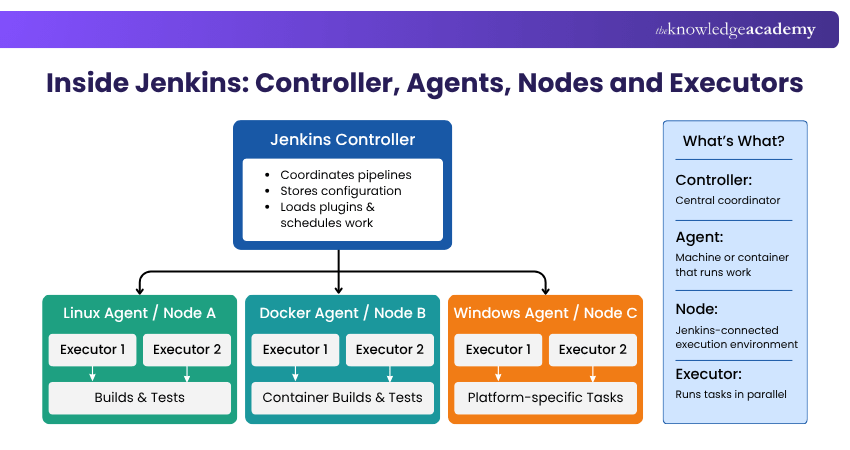
Jenkins Controller
The Jenkins Controller is the central coordinating process. It stores configuration, loads plugins and coordinates when and where work should be performed. In distributed environments, the controller manages agents rather than having every task execute on the controller itself.
Agents and Nodes
An agent is typically a machine or container connected to the Jenkins Controller that executes tasks. A node is a machine within the Jenkins environment capable of running Pipeline work. Jenkins considers both the controller and connected agents to be nodes.
For example, a team might use one Linux agent for Java builds and another environment for a different workload.
Executors
An executor is a slot on a node that can execute Pipeline or job work. The number of executors helps determine how much work a node can run concurrently.
Stages
Stages divide the Pipeline into meaningful phases. Typical names include:
Build → Test → Deploy
This helps both Jenkins and users understand where a Pipeline is in the delivery process.
Steps
A step is an individual instruction within a Pipeline. Running a shell command, publishing test results or checking out source code can each be represented by Pipeline steps.
Plugins and Integrations
Jenkins can be extended through plugins that add Pipeline steps and integrations with development tools. This allows teams to connect Jenkins with source control, testing tools, artefact repositories and deployment technologies according to their requirements.
Become a certified DevOps professional and upskill yourself, Register to our Certified DevOps Professional (CDOP) Course!
Stages of a Jenkins CI/CD Pipeline
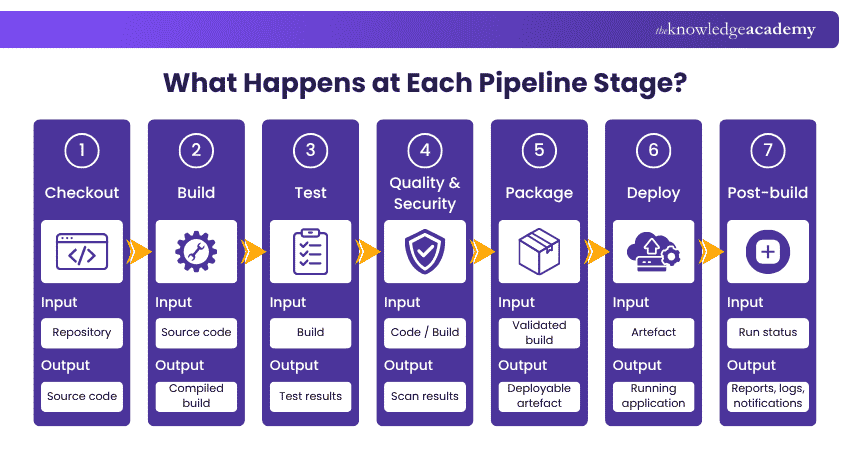
There is no single mandatory set of Jenkins stages. However, most CI/CD Pipelines follow a logical progression from source code to a validated application.
1) Source or Checkout
The Pipeline retrieves the required source code from the configured repository. This establishes exactly which version of the application the Pipeline will process.
2) Build
The build stage converts source code into a usable software build. Depending on the technology, this could involve compilation, dependency installation or other build-tool commands.
3) Test
Automated tests verify the build. A project might use unit tests for individual functions and integration tests to determine whether different components work correctly together.
4) Quality and Security Checks
Teams can integrate relevant analysis tools into the Pipeline to check code quality or security requirements. These checks are project-specific rather than a compulsory Jenkins stage.
5) Package
After successful validation, the application can be packaged into the format required for delivery, such as an application archive or container image.
6) Deploy
The Pipeline moves the validated build to the required environment. Some organisations automatically deploy to staging but require approval before production.
7) Post-build Actions
The Pipeline can perform activities after its main stages, such as publishing test results, recording artefacts or reporting the final status. Jenkins Pipeline syntax provides a post section for actions based on the completion or status of the Pipeline.
Together, these stages create a controlled path rather than a collection of unrelated automation jobs.
What is a Jenkinsfile?
A Jenkinsfile is a text file containing the definition of a Jenkins Pipeline. Jenkins recommends keeping it in source control rather than relying only on Pipeline configuration entered directly through the Jenkins interface.
This approach turns the delivery workflow into code.
Suppose a team changes its deployment process so that an integration test must run before an application reaches staging. Instead of someone manually changing a sequence of jobs, the team can update the Jenkinsfile and review that modification as part of the normal development process.
Keeping a Jenkinsfile in source control provides several useful capabilities. Jenkins highlights benefits including code review of Pipeline changes, an audit trail and a shared source of truth for the Pipeline definition.
Declarative vs Scripted Jenkins Pipeline
Jenkins supports two Pipeline syntaxes: Declarative and Scripted. Both can define delivery workflows, but they take different approaches.
The following comparison highlights the practical distinction:
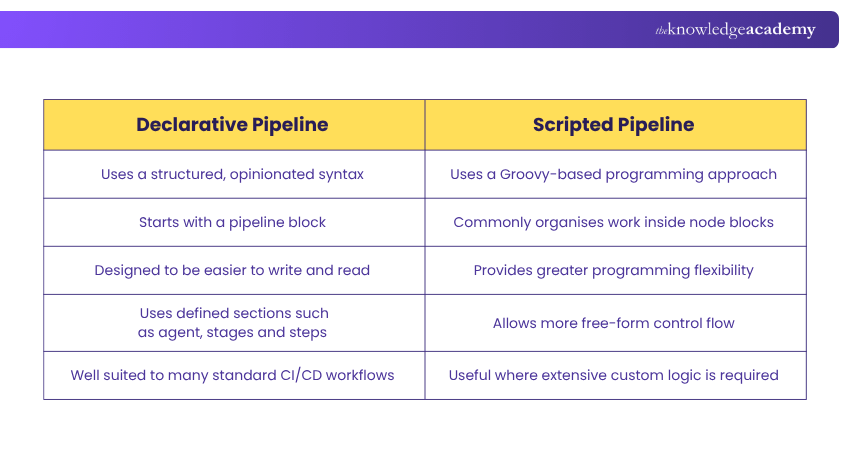
Jenkins describes Declarative Pipeline as a simplified, more opinionated syntax built on the underlying Pipeline system. Scripted Pipeline provides greater freedom but can become harder to maintain when Pipeline logic grows unnecessarily complex.
For someone building their first Jenkins CI/CD Pipeline, Declarative syntax is generally the clearer starting point because its structure makes the workflow easier to follow.
How to Create a Jenkins CI/CD Pipeline
Creating a Pipeline involves both Jenkins configuration and Pipeline code. The precise setup varies by source control system, build technology and deployment target.
A practical implementation can follow these steps:
1) Install and Configure Jenkins
Set up Jenkins and ensure the Pipeline functionality required by your installation is available. Jenkins documentation notes that Pipeline plugins are included among the suggested plugins during standard post-installation setup.
2) Connect the Source Repository
Configure Jenkins to work with the repository containing the application. Jenkins supports defining Pipeline code directly in its interface, but storing a Jenkinsfile in source control is considered the better practice for most projects.
3) Add Required Integrations
Install and configure only the plugins and external integrations needed for the workflow, such as source control, testing, or deployment tooling.
4) Create the Jenkinsfile
Add the Pipeline structure that Jenkins should follow. Start with essential stages rather than designing a highly complex workflow immediately.
5) Define Build, Test and Delivery Actions
Place the relevant commands inside clearly named stages. This makes failures easier to understand because teams can immediately see whether the issue occurred during Build, Test or another stage.
6) Configure Credentials Securely
Do not place passwords, API keys or similar secrets directly in Pipeline source code. Jenkins provides a credentials system that allows Pipelines to reference stored credentials through credential IDs.
7) Configure the Trigger
Decide when the Pipeline should run. This might be based on repository activity, a schedule, another Pipeline or a manual action, depending on the project configuration.
8) Run and Review the Pipeline
Execute the Pipeline and inspect its stages, logs, and test results. Start with a small, reliable workflow, then extend it as the delivery process becomes clearer.
Register for our DevOps Courses and unlock your software developing potential with DevOps!
Jenkins CI/CD Pipeline Example
Consider a simple Java application where the team wants Jenkins to retrieve the code, build it, test it and prepare a staging deployment.
A basic Declarative Jenkinsfile could look like this:
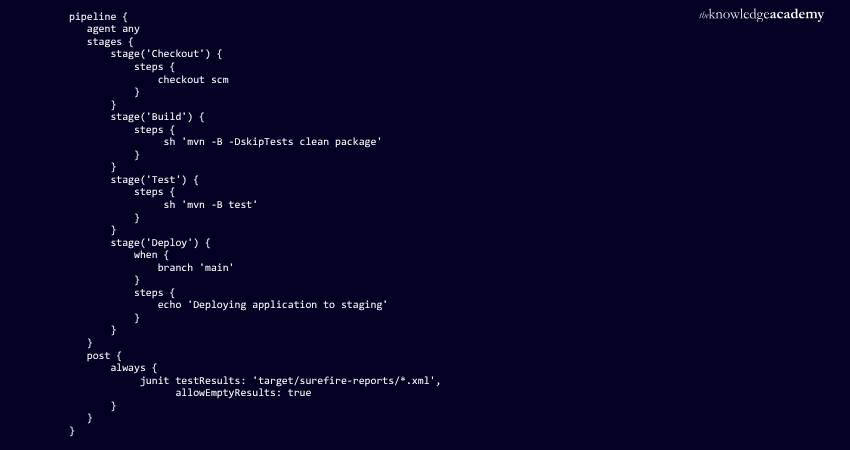
The example demonstrates the basic structure Jenkins documents for Declarative Pipeline: a pipeline block contains the workflow, agent determines where work can execute, stages groups the major phases, and steps contains individual actions.
The Checkout stage retrieves source code. Build runs Maven while skipping tests at that point. Test then executes the test suite. The Deploy stage is restricted to the main branch in this example, while the post section attempts to publish test results after the Pipeline run.
In a real project, the deployment step might call a deployment script, container platform or other release tooling rather than simply printing a message.
Advanced Jenkins CI/CD Pipeline Capabilities
Once a basic Pipeline is reliable, Jenkins provides features that can support more sophisticated delivery requirements.
Parallel Execution
Independent activities can run in parallel rather than sequentially. For example, different groups of automated tests could execute concurrently to reduce overall feedback time. Jenkins Pipeline supports parallel work as part of more complex delivery workflows.
Conditional Stages
Declarative Pipeline provides conditions through directives such as when. A deployment stage might run only for the main branch while feature branches stop after testing.
Manual Approvals
Jenkins Pipelines can pause for input. This is useful when an organisation wants automation up to production but still requires an authorised person to approve the release.
Multibranch Pipelines
A Multibranch Pipeline can automatically discover and manage branches that contain a Jenkinsfile, reducing manual Pipeline configuration for branch-based development.
Shared Libraries
As Pipeline adoption grows, teams often repeat similar logic across projects. Jenkins Shared Libraries allow reusable Pipeline code to be stored separately and loaded into multiple Pipelines.
Benefits of Using Jenkins for CI/CD
Jenkins Pipeline provides more than task automation. Its main value comes from making the software delivery process repeatable and manageable as code.
Faster Feedback
Automated build and test stages can identify failed changes without waiting for someone to manually execute each check.
Consistent Delivery
A defined Pipeline follows the same instructions each time it runs. This reduces variation between releases caused by people following different manual procedures.
Pipeline as Code
A Jenkinsfile makes the delivery workflow manageable as code, helping teams maintain a consistent and traceable Pipeline definition.
Flexible Automation
Pipelines can incorporate approvals, parallel work, conditional behaviour and integrations for different delivery requirements.
Distributed Work
Jenkins supports distributed build environments where work can be assigned across agents. This can help teams use different execution environments and distribute workloads more effectively.
Jenkins CI/CD Pipeline Best Practices
A Pipeline can technically work while still being difficult to maintain. Good design therefore matters as much as automation itself.
The following practices can make Jenkins CI/CD Pipelines easier to operate:
1) Keep the Jenkinsfile in source control: This provides version history and makes Pipeline changes reviewable.
2) Avoid hard-coded credentials: Store credentials in Jenkins and reference them through supported credential mechanisms rather than exposing secrets in Pipeline code.
3) Keep Pipeline logic focused: Jenkins recommends using Groovy primarily as the glue connecting build activities rather than putting large amounts of computation into Pipeline code.
4) Use agents for build work: Jenkins recommends running build workloads on agents and allowing the controller to focus on coordination and management.
5) Use clear stage names: Names such as Build, Unit Test, Integration Test and Deploy make failures easier to locate.
6) Reuse common logic: Shared Libraries can reduce repeated Pipeline code across projects.
7) Run suitable tasks in parallel: Independent tests or checks can sometimes execute concurrently instead of extending the Pipeline unnecessarily.
8) Publish useful results: Test reports and build outputs provide more value than a simple red or green Pipeline status.
The goal is not to create the most complicated Jenkinsfile possible. It is to create automation that teams can understand, trust and maintain.
Common Jenkins CI/CD Pipeline Challenges
Jenkins is flexible, but that flexibility can also create operational problems when Pipelines grow without clear controls.
Slow Pipelines
Large builds and extensive sequential tests can increase feedback time. Parallelising suitable tasks, removing unnecessary work and reviewing Pipeline performance can help reduce delays.
Flaky Tests
Tests that sometimes pass and sometimes fail without meaningful application changes weaken confidence in CI. Teams may begin ignoring Pipeline failures if the results are frequently unreliable.
Plugin Complexity
Plugins make Jenkins highly extensible, but unnecessary dependencies can increase administration and maintenance work. Pipeline functionality should be extended for a clear reason rather than by adding every available plugin.
Resource Bottlenecks
Pipeline work can wait when appropriate nodes or executors are unavailable. Jenkins defines executors as the slots in which Pipeline or job work runs, so capacity and workload distribution need to match expected demand.
Overly Complex Pipeline Code
Very large Jenkinsfiles filled with Groovy logic become difficult to test and maintain. Jenkins recommends simplifying Pipeline code and using Pipeline primarily to coordinate external build activities.
Conclusion
A Jenkins CI/CD Pipeline turns software delivery into a defined, automated process that can move code through building, testing and deployment with greater consistency. Jenkinsfiles bring that workflow into source control, while stages, steps, agents and integrations provide the structure needed to execute it. Starting with a clear Build, Test and Deploy flow and expanding only where necessary can help teams create CI/CD automation that remains useful as projects grow.

 If you wish to make any changes to your course, please


