


 Top Rated Course

We may not have the course you’re looking for. If you enquire or give us a call on 01344203999 and speak to our training experts, we may still be able to help with your training requirements.
What is IsDisplayed() in Selenium? Syntax and Working Explained
The Knowledge Academy 06 February 2026This blog explores the IsDisplayed in Selenium, a vital tool for test automation. It covers the details on how to check element visibility, along with syntax and usage examples. This blog is a must-read for Developers who are aiming to understand and effectively use IsDisplayed in Selenium for reliable Web Testing.

Training Outcomes Within Your Budget!
We ensure quality, budget-alignment, and timely delivery by our expert instructors.
Table of Contents
Imagine you are automating a test and need to make sure a button is visible before clicking it. So, how do you check? That's where Selenium's IsDisplayed flourish as a lifesaver! It’s the hidden asset that helps you confirm if web elements are visible and ready to interact. In this blog, we will analyse how IsDisplayed works while breaking down its syntax and show you real-world examples to ramp up your automation skills.
Table of Contents
1) Understand What is Selenium?
2) What are Web Elements in Selenium?
3) What is isDisplayed Method in Selenium?
4) What is isEnabled Method in Selenium?
5) What is isSelected Method in Selenium?
6) Comparison between isDisplayed, isSelected & isEnabled
7) Conclusion
Understand What is Selenium?
Selenium is an open-source framework that is used to automate web browsers. It allows software testers to simulate real user interactions with websites, ensuring functionality and performance. With Selenium, you can automate tasks, ranging from filling out forms to navigating pages. One of the prerequisites to learn Selenium is a basic understanding of web technologies such as HTML and JavaScript.
The tool supports a wide range of Programming Languages, such as Python, Java and C#, and works across different browsers (Chrome, Firefox, and Safari). Here, Selenium WebDriver, the core component, interacts directly with browsers to control their actions.
For example,
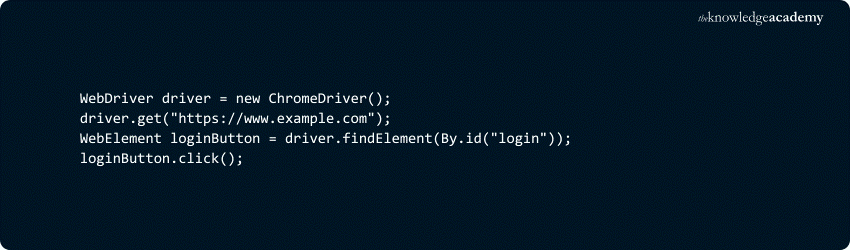
This code opens a website, locates a login button, and clicks it automatically. Moreover, Selenium works to streamline web testing and helps ensure web applications work as expected.

What is Web Elements in Selenium?
Web elements in Selenium represent the webpage’s components, such as buttons, links, text fields, and images that can be interacted with during automated testing. These elements are identified using locators like ID, name, class, and XPath.
Selenium interacts with these elements through its WebDriver API, which allows users to perform actions like clicking, typing, or validating visibility. Hence, properly locating and manipulating these elements is essential for automating browser tasks and ensuring web applications work as expected.
What is isDisplayed Method in Selenium?
The isDisplayed in Selenium checks whether a web element is visible on a webpage or not. It returns a boolean value 'true' if the element is visible and 'false' if not. This method is crucial for ensuring elements are present and interactable during automated tests.
Syntax

Here, the element refers to the web element you want to check for visibility. The method returns ‘true’ if the element is displayed on the page and ‘false’ otherwise.
How to Use isDisplayed Method in Selenium?
To use isDisplayed, first locate the element using Selenium's WebDriver, then call the method to check its visibility. For example, if you want to verify if a button is visible on the page, you would use the following code snippet:

Take the next step in automation – Register for our Selenium WebDriver with Python Training today!
What is isEnabled Method in Selenium?
The isEnabled in Selenium determines whether a web element, such as a button or text field, is enabled or disabled. An element that is enabled can be interacted with (e.g., clicked or typed into), while a disabled element cannot be interacted with.
Syntax

Here, element refers to the web element being checked. If the element is enabled, isEnabled returns ‘true’, indicating that it can be interacted with. On the other hand, if the element is disabled, it returns ‘false’, meaning interaction is not possible. This method is important to validate the state of interactive elements in automated tests.
What is isSelected Method in Selenium?
The isSelected in Selenium is used to check whether a specific element, like a checkbox or radio button, is selected. It returns a boolean value 'true' if the element is selected, and 'false' if it's not. This method is often used for verifying whether a user has made a selection in forms or input fields.
Syntax

In this syntax, an element represents the web element (e.g., a checkbox or radio button). The method returns ‘true’ if the element is currently selected, otherwise, it returns ‘false’. This is crucial for validating user selections in automated tests.
Take your Selenium skills to the next level – Register for our Selenium Immersion with C# Course today!
Comparison Between isDisplayed, isSelected & isEnabled
The methods isDisplayed, isSelected, and isEnabled allow you to interact with and verify the state of web elements during automation, ensuring that the elements behave as expected. Their brief comparison is stated below:
1) isDisplayed checks if an element is visible on the page. It returns to true if the element is visible and false if it is not.
2) isSelected checks whether elements like checkboxes or radio buttons are selected. It returns true if selected and false if not.
3) isEnabled determines if an element is enabled (clickable or interactable). It returns `true` if the element is enabled and 'false' if it is disabled.
Each of these methods serves a specific role in web testing, helping ensure that the web elements behave as expected during automation. The key difference lies in what aspect of the element they validate: visibility, selection state, or interactivity.
Unlock the power of Selenium Testing Framework – Join our Selenium Testing Framework Course now!
Conclusion
We hope you understand this brief overview on isDisplayed in Selenium. Mastering the isDisplayed in Selenium is important to ensure that web elements are visible and interactable during automated testing. Incorporating Synchronization in Selenium WebDriver is essential in conjunction with the isDisplayed function to guarantee that elements are fully loaded before performing checks.
Revolutionise your Web Testing skills – Join our Web Application Testing With PHPUnit Framework Training now!
Frequently Asked Questions
What Is the Return Value of the isDisplayed Function in Selenium WebDriver?

The isDisplayed function in Selenium WebDriver returns a boolean value: ‘true’ if the web element is visible on the webpage and ‘false’ if it is not. This method helps verify that an element is present in the viewport and available for interaction, which is essential for testing UI functionality.
What is the Difference Between isDisplayed and isPresent?
The difference between isDisplayed and isPresent in Selenium lies in their focus. IsDisplayed checks if an element is visible on the page, returning true if visible and false if not. In contrast, isPresent checks if the element exists in the DOM, regardless of visibility, returning ‘true’ if it is present and ‘false’ if not.
What are the Other Resources and Offers Provided by The Knowledge Academy?
The Knowledge Academy takes global learning to new heights, offering over 3,000+ online courses across 490+ locations in 190+ countries. This expansive reach ensures accessibility and convenience for learners worldwide.
Alongside our diverse Online Course Catalogue, encompassing 19 major categories, we go the extra mile by providing a plethora of free educational Online Resources like Blogs, eBooks, Interview Questions and Videos. Tailoring learning experiences further, professionals can unlock greater value through a wide range of special discounts, seasonal deals, and Exclusive Offers.
What is The Knowledge Pass, and How Does it Work?
The Knowledge Academy’s Knowledge Pass, a prepaid voucher, adds another layer of flexibility, allowing course bookings over a 12-month period. Join us on a journey where education knows no bounds.
What are the Related Courses and Blogs Provided by The Knowledge Academy?
The Knowledge Academy offers various Selenium Training, including Introduction to Test Automation with Selenium WebDriver, Selenium WebDriver with Python Training, and Selenium Testing Framework Training. These courses cater to different skill levels, providing comprehensive insights into Selenium Tester Roles and Responsibilities.
Our Programming & DevOps Blogs cover a range of topics related to software development, automation, cloud computing, and system administration, offering valuable resources, best practices, and industry insights. Whether you are a beginner or looking to advance your Programming skills, The Knowledge Academy's diverse courses and informative blogs have got you covered.

The Knowledge Academy


Global Training Provider
The Knowledge Academy is a world-leading provider of professional training courses, offering globally recognised qualifications across a wide range of subjects. With expert trainers, up-to-date course material, and flexible learning options, we aim to empower professionals and organisations to achieve their goals through continuous learning.

Upcoming Programming & DevOps Resources Batches & Dates
Date
 Introduction to Test Automation with Selenium Web Driver
Introduction to Test Automation with Selenium Web Driver
Fri 20th Mar 2026
Introduction to Test Automation with Selenium Web Driver
Fri 26th Jun 2026
Introduction to Test Automation with Selenium Web Driver
Fri 25th Sep 2026
Introduction to Test Automation with Selenium Web Driver
Fri 4th Dec 2026

 If you wish to make any changes to your course, please


