




We may not have the course you’re looking for. If you enquire or give us a call on +91-181-5047001 and speak to our training experts, we may still be able to help with your training requirements.
What is a Web Page: Definition, Types and Examples
ByThe Knowledge AcademyLast updated on: 10 October 2026
Curious about what a web page is? It is a digital document that can be displayed in a web browser and is typically accessed through a URL. This blog explains different types of web pages, their structure, examples, and how they work on the Web.
The Gist
1. A web page is an individual document or resource accessed through a web browser, typically via a URL.2. Web pages can contain text, images, videos, hyperlinks and interactive elements.3. Static pages generally display predefined content, while dynamic pages can generate or update content based on data or user interaction.4. Common web page elements include a page title, header, body, navigation and footer.5. A web page is an individual resource, while a website is a collection of related web pages.
So, how does the internet work when you click on a link, browse a website or watch a video online? Every piece of content you interact with, whether it’s an article, a shopping page, or a search result, is displayed through a web page. But what is a web page, and how does it function? A web page is way more than just an online document; it's the building block of the internet.
In this blog, you will find answers to What is Web Page, how it works, its different types, and why it matters. Understanding web pages will help you appreciate the technology behind your online experience. Let’s dive in!
What is a Web Page?
A web page refers to a document accessible on the World Wide Web (www), formatted using Hypertext Markup Language (HTML), and other web technologies like Cascading Style Sheets (CSS) and JavaScript. A web page is typically accessed through a unique Uniform Resource Locator (URL) and is designed to deliver information to users, including text, images, videos, and other multimedia.

Web pages are hosted on servers and can be accessed via browsers like Google Chrome, Mozilla Firefox, or Microsoft Edge. Web pages are the individual documents that make up websites and can be static or dynamic.
Web Page Characteristics
Web pages possess several key characteristics:
1) Unique URL: Each web page is identified by a distinct Uniform Resource Locator (URL), enabling precise access.
2) Hypertext and Hyperlinks: They contain hypertext, which includes hyperlinks to other web pages or resources, facilitating easy navigation.
3) Multimedia Content: Web pages can incorporate several forms of media, like text, images, videos, and animations, to enhance user engagement.
4) Interactivity: Many web pages include interactive elements like forms, buttons, and embedded applications to improve user experience.
Pro Tip
Use clear and descriptive URLs where possible. They make page addresses easier for users to understand and share.
Types of Web Pages
Web pages can be broadly classified into two categories:
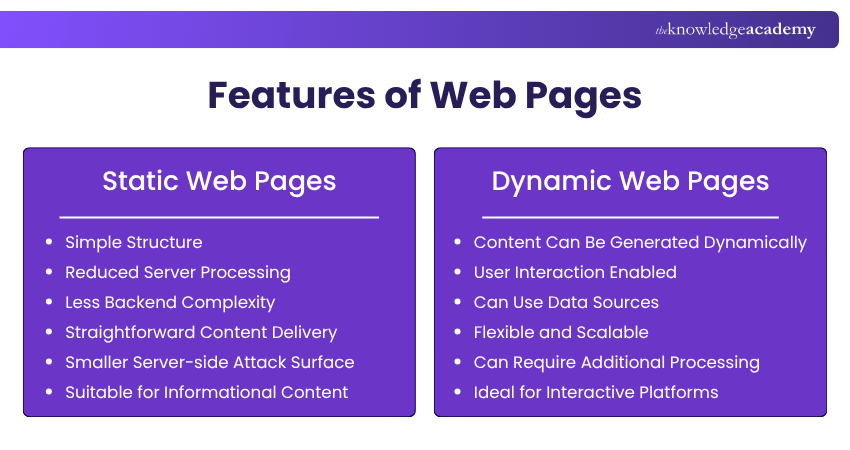
1) Static Web Pages
Static web pages generally deliver stored content without generating a new version on the server for each request. They are often suitable for informational content that does not need frequent or personalised updates.
Features:
a) Simple Structure: Basic static pages can be created using HTML and CSS without requiring server-side application logic.
b) Reduced Server Processing: Static files can often be served directly without generating page content for each request.
c) Less Backend Complexity: Basic static pages may not require databases or server-side application code.
d) Straightforward Content Delivery: Page content can be delivered directly in the HTML, although search visibility still depends on many technical and content factors.
e) Smaller Server-side Attack Surface: Simple static pages may expose fewer server-side components than database-driven applications, although they still require appropriate security controls.
f) Suitable for Informational Content: Suitable for pages like About Us, Contact, or Privacy Policy.
Example: An online brochure detailing a company’s services or a personal resume website showcasing a professional’s skills and achievements.
Unlock your creativity in web design with our HTML and CSS Course - Sign up today!
2) Dynamic Web Pages
Dynamic web pages can generate or update content based on data, user interactions, requests or other inputs. They are commonly used in applications that require personalised or frequently updated information.
Features:
a) Content Can Be Generated Dynamically: Page content can change according to data, user requests or application logic.
b) User Interaction Enabled: Allows forms, comments, and personalised experiences.
c) Can Use Data Sources: Dynamic pages can retrieve content from databases, APIs or other sources.
d) Flexible and Scalable: Can handle large volumes of data efficiently.
e) Can Require Additional Processing: Server-generated dynamic pages may use technologies such as PHP, Python, JavaScript or other server-side languages and frameworks.
f) Ideal for Interactive Platforms: Used for social media, e-commerce, and news websites.
Example: A news portal that updates articles automatically or an e-commerce website displaying product availability based on stock levels.
Trainer’s Insight
Not every web page needs every characteristic in equal measure. Its structure and level of interactivity should reflect the page’s purpose and the actions users need to perform.
Components of a Web Page
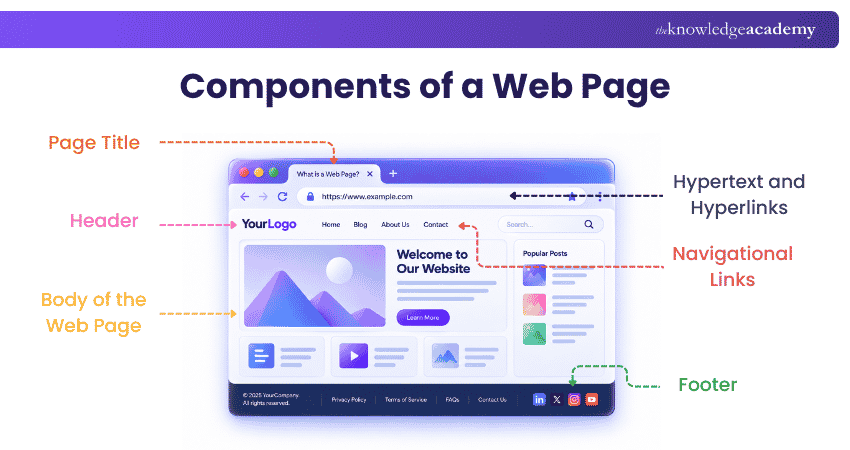
A typical web page comprises several fundamental components:
1) Hypertext and Hyperlinks
Hypertext allows web content to connect to other pages, sections or resources through hyperlinks. Hyperlinks can appear as clickable text, images or other elements and help users navigate within a page, across a website or external resources.
Types of Hyperlinks:
1) Internal Links: Direct users to another section of the same website
2) External Links: These links redirect users to a different website
3) Anchor links: Jump to a specific section of the same web page
2) Page Title
The
1) It has an important role in Search Engine Optimisation (SEO)
2) A clear, descriptive title can help users understand the page and is one of the signals search engines can consider when presenting and ranking web content.
Example: A page discussing web pages might have the title “What is a Web Page? Definition, Types & Examples.”
3) Header
The top section of a web page typically includes:
1) Website logo for branding
2) Navigation menu with links to key pages
3) Search bar for easy content discovery
4) Additional elements like contact details or login options
A header can support consistent branding and provide access to important sections.
Example: An e-commerce site header may include categories like “Home,” “Shop,” “About Us,” and “Cart.”
4) Body of the Web Page
The main content area is where core information is displayed. It can contain:
1) Text content (articles, blog posts, descriptions)
2) Multimedia elements (images, videos, infographics)
3) Interactive features (forms, buttons, user interactions)
The body is crucial as it delivers the primary message.
Example: A news website’s body consists of articles, headlines, and embedded media.
Pro Tip
When learning how web pages work, separate the process into three parts: what the browser requests, what the server returns and how the browser renders the resources. This makes the request-response process easier to understand.
5) Navigational Links
These links help users move between pages or sections within a website.
Common Navigation Types:
1) Main navigation Bar: Located in the header for quick access
2) Breadcrumb Navigation: Displays the user’s path (e.g., Home > Blog > Article)
3) Sidebar Navigation: Offers links to related content or categories
4) Pagination: Facilitates browsing multi-page content
Enhancing usability, navigation improves accessibility and content organisation.
Example: In an online store, navigation links direct users to categories like “Men’s Clothing,” “Women’s Accessories,” or “New Arrivals.”
6) Footer
The bottom section of a web page usually contains:
1) Copyright Notice: Indicates copyright ownership or rights information
2) Privacy Policy & Terms of Service: Legal information
3) Contact Details: Includes phone number, email, or address
4) Social Media Links: Icons linking to social profiles
5) Additional Site Links: Quick access to FAQs, careers, or sitemap
The footer provides secondary navigation, legal details, and reinforces brand identity.
Example: A business website footer may include “© 2025 Company Name | Privacy Policy | Contact Us.”
How Does a Web Page Work?
Here are the main steps involved in loading a web page:
1) Request: When you enter a URL or follow a link, the browser typically resolves the domain name where necessary and sends an HTTP or HTTPS request for the required resource.
2) Server Response: The server processes the request and returns an HTTP response containing the requested HTML document or dynamically generated HTML content. This file is essentially the blueprint of the web page.
3) Rendering: Your browser reads the HTML file and starts rendering the page. It may then fetch additional resources referenced by the HTML, like CSS for styling, JavaScript for interactivity, and media files like images or videos.
4) Display: Finally, all these components come together, and the browser displays the web page on your screen, ready for you to interact with!
For a Deeper Dive into the Process:
a) DNS (Domain Name System): Translates the web address into an IP address the server can understand.
b) HTTP/HTTPS: Protocols for communication between your browser and the server.
c) Cookies and Sessions: Help maintain user state and manage data during browsing sessions.
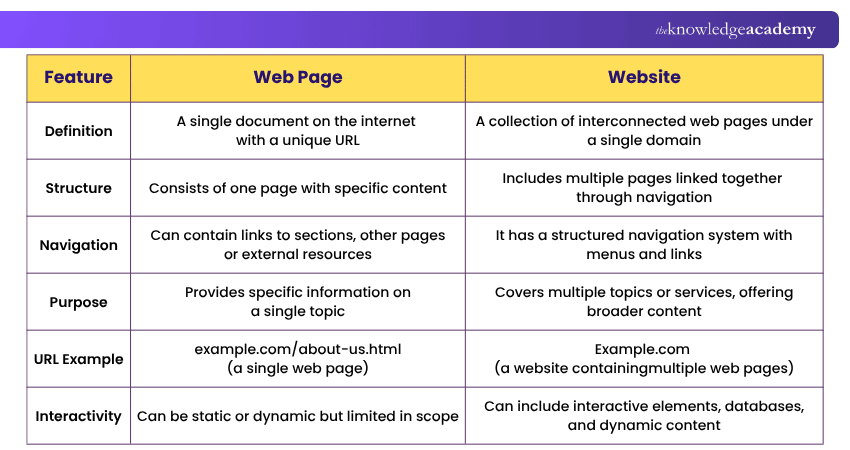
Web Page vs Website
Here are the key differences between a web page and a website:
Web Page Examples
Here are two examples of web pages:
Example 1
A course page on The Knowledge Academy website is an example of a web page. It can combine structured text, navigation, images, links and interactive elements to provide information about a specific course. Like other modern web pages, its visible content is rendered in a browser using web technologies.
Viewing the Source Code
A browser can display the HTML source delivered for a web page, while developer tools can also help inspect loaded CSS, JavaScript and other page resources. However, this does not expose the website's complete server-side implementation.
The Knowledge Academy offers Website Static and Dynamic Web Pages
a) Static Web Pages: Fixed content pages that are updated manually such as About Us, Privacy Policy, and Terms and Conditions.
b) Dynamic Web Pages: Listing of courses, results from searches, and dashboards of users are automatically produced through scripts like PHP and JavaScript devices that modify information according to users and users data in real time.
For instance, a static web page such as course details may be displayed with a .html or .htm extension while database content pages PHP extension .php would pull course details through stored databases.
Example 2
An Amazon product page is a familiar example of a dynamic web page because information such as availability, product details, reviews and recommendations can change over time or according to the user context.
Highlighted Features:
a) Dynamic Content: Product prices, availability and reviews are updated frequently.
b) User Engagement: Users are able to leave reviews, pose questions, and also add items to their carts.
c) Multimedia Elements: Screenshots, videos, and 360 degree views of the product are incorporated within the domain.
d) Dynamic Data: Product information such as availability, reviews and recommendations can be updated as underlying data changes.
A simpler informational page, such as a policy or terms page, can illustrate content that changes less frequently than a product page. However, its underlying delivery method cannot be determined solely from how often the visible content changes.
Learn the professional HTML skills with Introduction to HTML Training - Sign up now!

The Knowledge Academy develops accessible learning content across Project Management, IT, Cybersecurity, Data Science, Business Analysis, HR, Accounting and Finance, Leadership and Health and Safety. Its resources combine subject research with clear explanations to help professionals build practical knowledge across a wide range of disciplines.
View Detail

 If you wish to make any changes to your course, please


