




We may not have the course you’re looking for. If you enquire or give us a call on 01344203999 and speak to our training experts, we may still be able to help with your training requirements.
C++ Arrays: Setup and Examples
ByNilotpal SarmahLast updated on: 26 September 2026
C++ arrays store multiple values of the same data type in a single, fixed-size structure for efficient data handling and processing. They provide quick access to elements using index positions. Arrays are commonly used when working with structured data that requires fast retrieval and predictable memory usage.
At a Glance
1. C++ arrays keep a fixed collection of same-type values stored next to one another in memory.2. Arrays can be single-dimensional or multidimensional, depending on how data needs to be organised.3. C++ supports several ways to initialise arrays, including full, partial, zero, and size-deduced initialisation.4. Array elements are accessed using indices, with indexing starting at 0.5. Arrays provide fast element access and efficient memory use but have fixed sizes and no automatic bounds checking.
Organising a vast number of values doesn't have to be a daunting task, thanks to C++ arrays. C++ arrays provide a structured way to store multiple values under a single name, making data handling more organised and efficient. From simple applications to complex systems, arrays help you structure data in a reliable and predictable way.
This blog explores C++ arrays, highlighting their types, advantages and drawbacks in detail. To make your learning even smoother, you'll learn how to set up arrays, initialise them correctly and work through practical examples that bring the concept to life.
What are C++ Arrays?
An array in C++ is a data structure that lets you store multiple elements of the same data type under a single array name. In simple terms, it is a collection of similar data items grouped together. Arrays can hold values of basic types such as int and char, as well as other types including pointers and structures.
All elements in an array are stored in contiguous memory locations and accessed using an index, starting from 0. This structure makes arrays efficient for organising and retrieving data. Arrays are especially useful when handling large sets of information where fast, direct access is required.

C++ Array Types
C++ array types include single-dimensional and multidimensional arrays. These structures help organise data efficiently based on the complexity of the information being stored. Let's explore them in detail:
1) Single-Dimensional Array
A single-dimensional array stores a sequence of elements of the same data type within a contiguous block of memory. Each value is placed next to the other, and you can access any element using a single index. This type of array is useful for storing simple lists such as marks, prices, or other values of the same data type.
2) Multidimensional Array
A multidimensional array stores data across multiple dimensions by nesting arrays within other arrays. It uses multiple indices to access values and is often visualised in rows and columns. This type is useful for representing complex data structures such as matrices, tables, grids or game boards.
Initialisation of Arrays in C++
Initialising an array in C++ provides a structured way to set the initial values of its elements when the array is created. Different initialisation methods let you control how initial values are assigned to the array elements.
1) Initialise an Array with Values in C++
You can create an array and provide its initial values in the same statement. For example:

Here, the array numbers have five elements, each initialised with a specific value.
2) Initialise an Array Without Specifying Its Size in C++
If you omit the size, the compiler infers the array length from the values listed in the initialiser. For example:

The compiler automatically creates an array of size 4.
3) Assign Values to an Array After Declaration (Using Loops)
You can declare an array first and then assign values using a loop. For example:

This method is commonly used when values depend on calculations or incremental logic.
4) Initialise an Array Partially in C++
You can initialise only some elements. The remaining elements are automatically initialised to 0. For example:

Here, only two elements are given values; the rest default to zero.
5) Initialise an Array with Zero in C++
If you want all elements to be zero, you can use a simple syntax. For example:

The first element is initialised to 0, and the remaining elements are automatically initialised to 0.
Accessing Elements in a C++ Array
In C++, every element in an array is associated with a number. This number is known as an array index. You can access an array's elements by using those indices.
Key Array Points
1) Array indexing begins at 0, which means x[0] refers to the first element.
2) If an array has size m, the last element is located at index m-1.
3) For an array of size 8, x[7] would be the final element.
4) All array elements occupy contiguous memory locations.
5) For example, if the starting address of x[0] is 3000 and sizeof(int) is 4 bytes in that implementation, x[1] would begin at 3004, x[2] at 3008, and so on.
6) The address difference between consecutive elements corresponds to the size of each element. In this example, sizeof(int) is assumed to be 4 bytes.
Build your C++ skills for game development with our C++ Programming for Unreal Game Development Training - Sign up now!
Example 1: Displaying Array Elements
Here’s an example of displaying the elements of a C++ array:
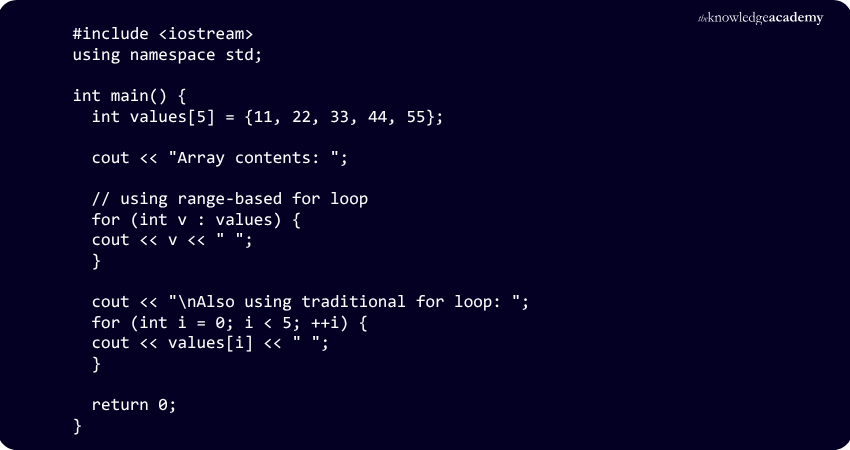
Here’s the expected output:
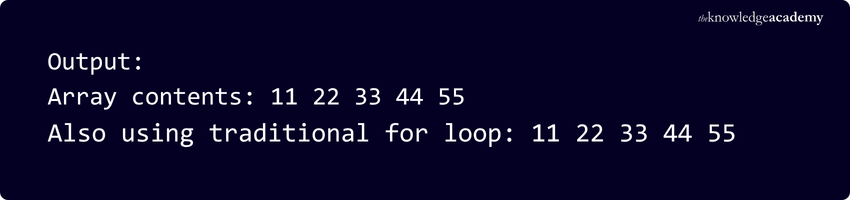
This example shows how to declare, initialise, and display all elements of a fixed-size array.
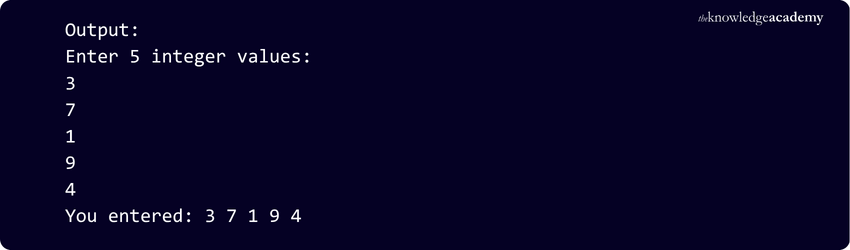
Example 2: Taking Input from the User and Storing It in an Array
Here’s an example that shows how to take user input and store it in an array:
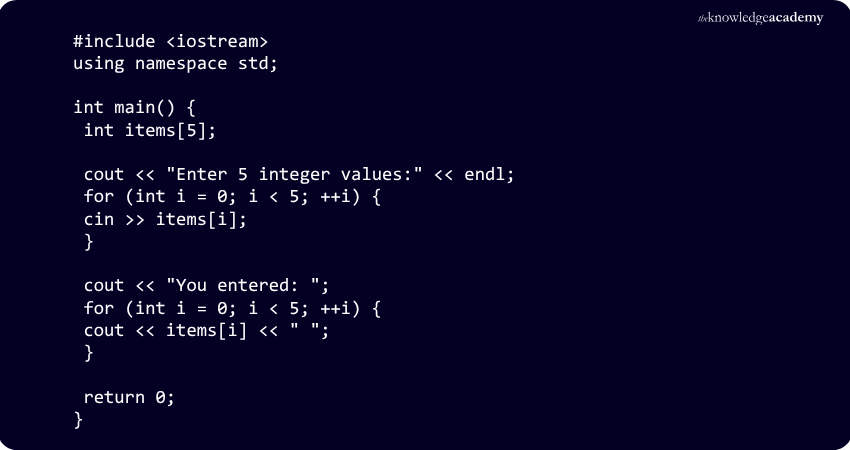
Here’s the expected output:
Advantages of C++ Arrays
The key advantages of C++ arrays are:
1) Efficient Memory Use: Arrays store elements in contiguous memory locations, which supports efficient memory access and data retrieval.
2) Quick Access to Elements: Each item can be retrieved directly using its index. This allows for fast and simple data access.
3) Supports Various Data Types: Arrays can be created for various data types, but each array stores elements of a single data type.
4) Easy to Use in Algorithms: Arrays work well with many algorithms that process collections of elements sequentially or by index.
5) Works Well With Other Structures: Arrays can be used as underlying storage for data structures such as stacks and queues.
6) Passing Arrays to Functions: Arrays can be passed to functions for processing, although the array size usually needs to be provided separately.
Disadvantages of C++ Arrays
Here are the main drawbacks of C++ arrays you need to consider:
1) Fixed Size: A raw array has a fixed size once defined and cannot grow dynamically.
2) Contiguous Storage Requirement: Raw array elements must occupy contiguous memory. Very large arrays may therefore face allocation limitations depending on their size, storage duration and available memory.
3) No Automatic Bounds Checking: C++ does not provide automatic bounds checking for raw arrays. Accessing elements outside their valid range results in undefined behaviour.
4) Limited Flexibility: Raw arrays cannot be resized or have their dimensions changed after definition, making them less suitable for dynamic data handling.
5) Costly Insertion and Deletion: Raw arrays do not support direct insertion or deletion. Simulating these operations may require manually shifting elements, which can be inefficient for large arrays.
Trainer’s Pro Tip
Use arrays when the number of elements is known in advance and fast index-based access is important. For data that needs to grow or shrink dynamically, consider using other C++ containers instead.
C++ arrays provide a simple and efficient way to store and access multiple values of the same data type. Understanding their initialisation, indexing, advantages, and limitations helps developers use arrays effectively in different programming scenarios.
Build a strong foundation in essential programming concepts with our C Programming – Join now!

Nilotpal Sarmah is a Senior Content Writer with 11+ years of overall experience spanning engineering, operations and content development. His technical knowledge and extensive writing experience enable him to simplify specialised topics across IT and Tech, Business Skills, Project Management, Health and Safety, and ISO and Compliance.
View Detail

 If you wish to make any changes to your course, please


