




We may not have the course you’re looking for. If you enquire or give us a call on +44 20 4538 6376 and speak to our training experts, we may still be able to help with your training requirements.
16 Best AI Video Editing Tools to Create Videos Faster
ByLily TurnerLast updated on: 22 September 2026
AI video editing tools automate editing, captions, audio enhancement, and text-to-video creation, using platforms such as Descript, Lumen5, and Runway. These solutions reduce manual effort, speed up production, and help creators, marketers, and businesses produce high-quality videos efficiently using AI-driven workflows.
Video creation no longer requires hours of manual editing or advanced technical skills. With AI-powered video editing tools, complex tasks like cutting footage, adding captions, and enhancing audio can now be completed in minutes.
From content creators to marketing teams, businesses are increasingly turning to AI video editing software to produce professional-quality videos faster and at scale. This blog explores the Best AI Video Editing Tools and how these tools work, and why they are transforming modern video production.
AI in Video Editing
AI in Video Editing refers to the utilisation of Machine Learning (ML) algorithms to automate and enhance different aspects of the editing process. These algorithms are trained on massive datasets to recognise patterns and make intelligent decisions.
One of the most significant benefits is the time-saving aspect. Manual tasks such as sorting footage, identifying key moments, and applying transitions are automated. This helps accelerate the editing process. This also enables editors to focus more on the creative aspects of their work. Additionally, understanding the different Types of Video Editing can help leverage AI tools more effectively for various editing styles and needs.
Want to know how these tools help reduce time and effort? In the next few minutes, you will be introduced to some of the best AI Video Editing Tools to elevate your Video Editing skills and create compelling and engaging videos.

Best AI Video Editing Tools
AI-driven Video Editing tools work efficiently for both amateur creators and seasoned professionals, and incorporating the right Tips for Video Editing can further enhance the final output. These tools work on the power of Artificial Intelligence (AI) algorithms. As a result, they empower users to create captivating videos with enhanced efficiency, creativity, and precision. Some of the most used AI Video Editing tools are as follows:
1) Descript
Descript is an AI video editing platform focused on simplifying transcription and editing. Its AI transcript generator allows users to edit videos as easily as editing text. Some of the key features are:
a) AI Transcript Generator: Converts speech in videos to editable text.
b) Easy Corrections: Allows manual edits to improve transcript accuracy.
c) Quick Content Creation: Simplifies short-form video editing.
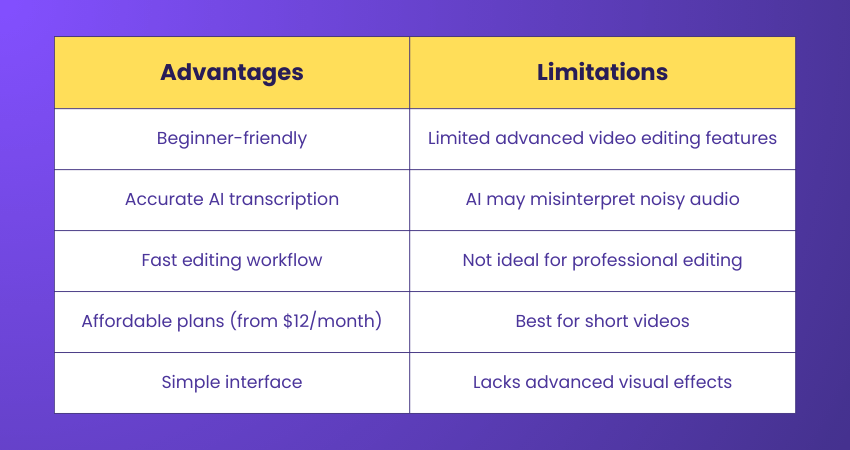
The advantages and limitations of Descript are in the below table:
2) Runway
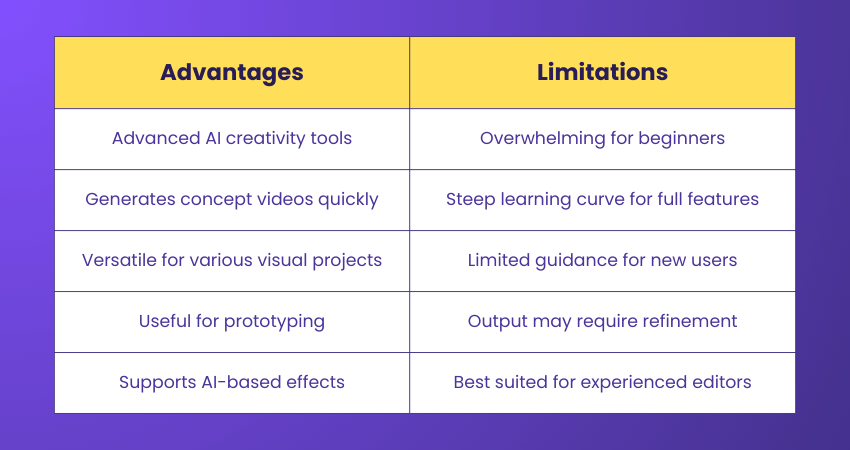
Runway is a versatile AI platform for video editing and visual content creation. While powerful, its wide array of tools may be overwhelming for beginners, though its AI video generator is simple to use for concept videos and inspiration. The key features are:
a) AI Video Generator: Creates videos from text prompts.
b) Visual Editing Suite: Includes effects, background removal, and creative tools.
c) Creative Prototyping: Ideal for testing concepts and generating visuals.
The advantages and limitations of the Runway are:
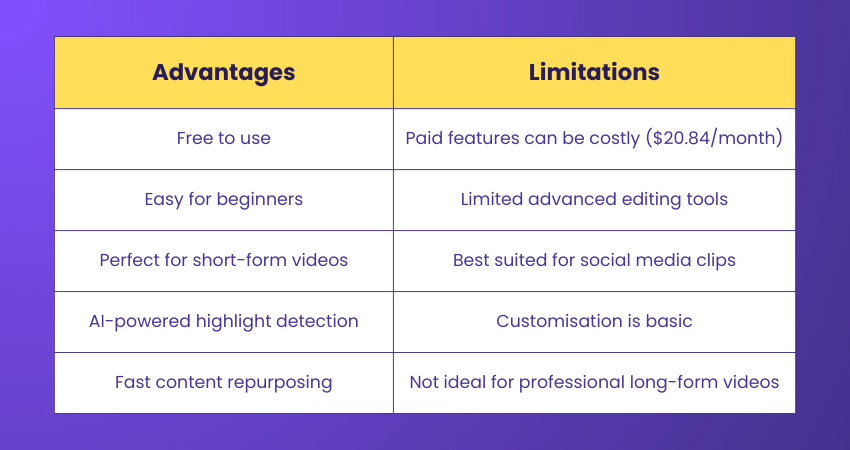
3) Opus Clip
Opus Clip uses AI to quickly generate short-form videos from longer content, making it perfect for social media creators and marketers who want fast, engaging clips. Some of the key features of Opus Clip are:
a) Auto-highlight Detection: Extracts key moments automatically.
b) Short-form Video Generation: Optimised for TikTok, Reels, Shorts.
c) Automated Captions: Adds AI-generated captions for accessibility.
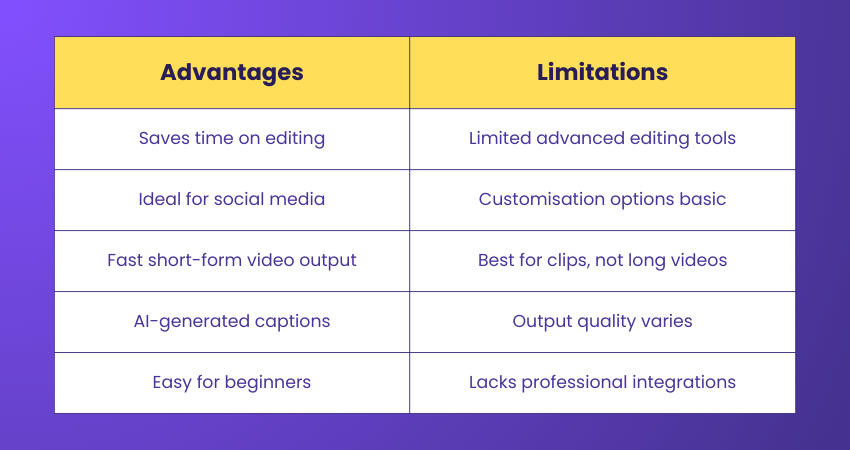
The advantages and limitations of the Opus Clip are:
4) CapCut
One of the Best AI Video Editing Tools is Capcut. It is a user-friendly video editing app popular on social media platforms like TikTok and Instagram. Its AI tools automatically identify highlights and shorten long videos, making it simple to create engaging short-form content. Some of the main features of CapCut are:
a) Highlight Detection: Automatically identifies key moments in videos
b) AI Editing: Shortens long-form content for short-form platforms.
c) Social Media-ready Output: Optimised for TikTok, Instagram Reels, and YouTube Shorts.
The advantages and limitations of using CapCut are:
5) InVideo
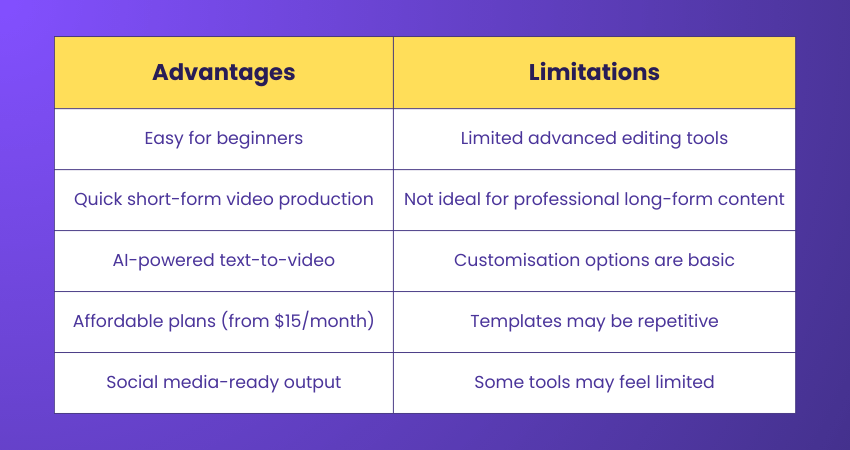
InVideo is a simple, intuitive AI video editing platform, ideal for marketers and creators producing short-form content. Its AI text-to-video feature can transform scripts and images into videos in minutes. The key features of InVideo are:
a) AI Text-to-video: Converts scripts into video content.
b) Pre-made Templates: Offers ready-to-use templates for various platforms.
c) Quick Production: Ideal for short-form social media videos.
The advantages and limitations of using InVideo are as followed;
6) Adobe Premiere Pro
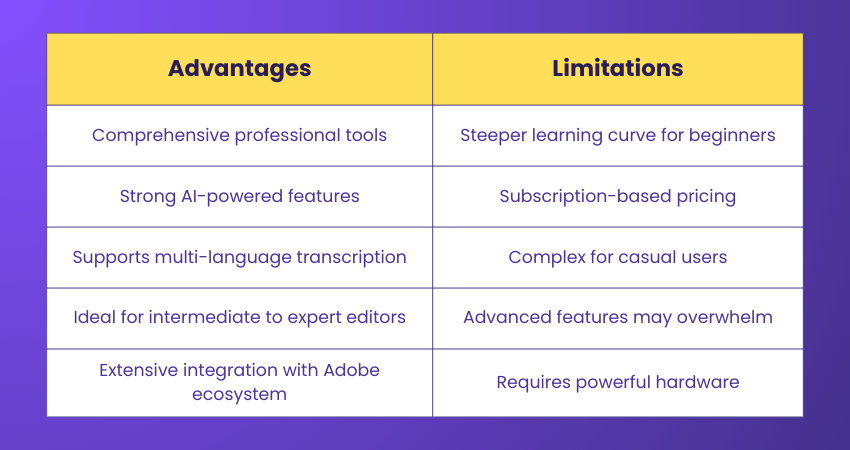
Adobe Premiere Pro is a professional-grade video editing software used by creators for both work and passion projects. Its AI tools streamline complex tasks like text-based editing, audio categorisation, and speech-to-text, allowing editors to work faster and more efficiently. Key features are:
a) Text-based Editing: Edit video clips like a text document using transcripts.
b) AI Audio Category Tagging: Automatically identifies music, dialogue, ambient sounds, and sound effects.
c) Speech-to-text: Generates captions and transcripts in up to 18 languages, distinguishing between speakers.
The advantage and limitations of one of using Adobe Premiere Pro are:
7) DaVinci Resolve
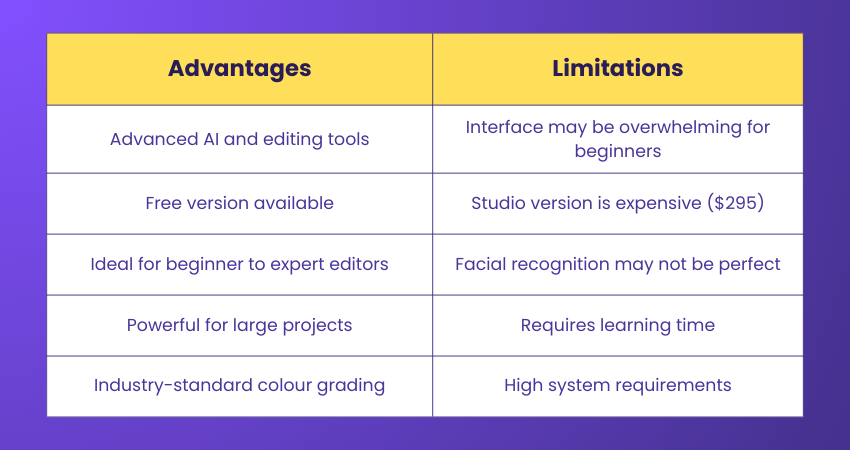
DaVinci Resolve has long integrated AI features, including facial recognition for video clips. Its AI can scan and group clips by the people appearing in them, saving time when editing events with multiple participants. The main features of the DaVinci Resolve are;
a) Facial Recognition: Groups clips based on detected faces.
b) Multi-level AI Editing: Enhances colour grading, transitions, and scene detection.
c) Free And Studio Versions: Users can choose between a free version or paid Studio upgrade.
8) ClipChamp
ClipChamp, a Microsoft video editor, offers simple AI tools for beginners. Its standout feature is AI text-to-speech, supporting over 400 voice styles in 170 languages, with adjustable pitch, mood, and accent. The key features of this AI video editing tool are:
a) AI Text-to-speech: Converts text into realistic voiceovers.
b) Video Editing Templates: Beginner-friendly, easy-to-use templates.
c) Multi-language Support: Voiceovers in 170 languages and multiple accents.
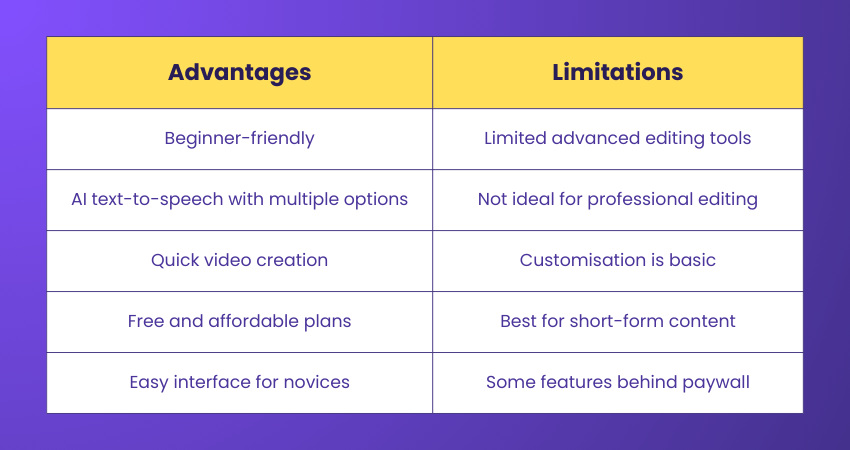
The major advantages and limitations of ClipChamp are as follows:
9) Filmora
Filmora strikes a balance between user-friendliness and advanced editing capabilities. AI helps automate tasks like creating highlight reels and matching music, making it accessible for beginners. Its array of effects, transitions, and features caters to both new and intermediate editors. Some of the key features of the Filmora tool are as follows:
a) Auto Creations: Filmora uses AI to analyse footage and automatically create highlight reels, trailers, and more.
b) Smart Tagging: The software can tag and categorise footage based on content analysis.
c) Music Matching: Filmora suggests music tracks that match the mood and tempo of your video.
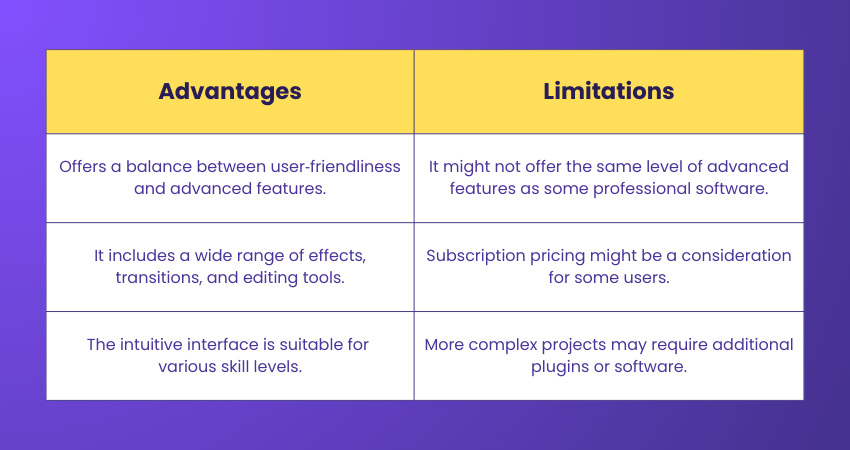
The advantages and limitations of the Filmora tool are as follows:
10) Biteable
Biteable caters to users seeking simplicity without sacrificing quality. With its range of templates and drag-and-drop interface, it's easy to assemble videos for marketing, presentations, and more. AI-powered colour matching and customisable animations elevate the editing experience. Thus, it becomes an attractive option for creating engaging visual content. Some of the salient features of Biteable are as follows:
a) Template Library: Biteable provides a variety of templates for different purposes, from marketing to social media.
b) Drag-and-drop Interface: It customises videos by adding text, images, and animations.
c) AI-powered Colour Matching: The tool suggests colour schemes based on uploaded content.
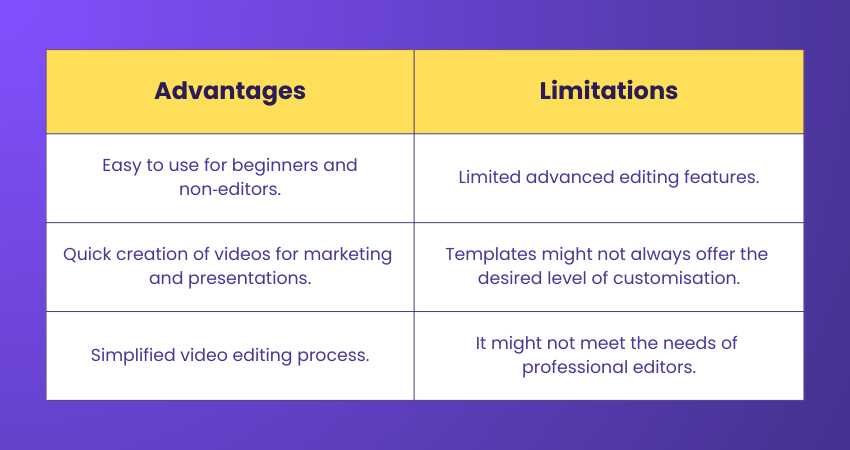
Some of the advantages and limitations of this tool are as follows:
11) Animoto
Animoto empowers users with limited editing experience to create dynamic videos. By combining AI with user-friendly features, it offers customisable templates for various purposes. With its stock media library and simplified editing process, Animoto provides a head start for those new to video creation. Being an easy-to-use editing tool, some of the key features that will help you create engaging videos on Animoto are:
a) User-friendly Interface: It offers a drag-and-drop interface for assembling videos without the need for extensive editing knowledge.
b) Template Variety: You can choose from various templates, each catering to different video styles and themes.
c) Stock Media Library: Allow access to a library of visuals and music to enhance video content.
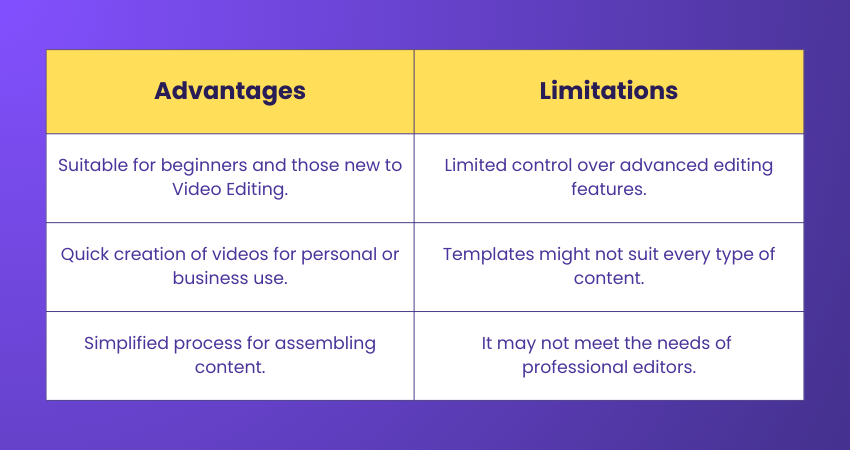
Here are some of the limitations and advantages of this tool:
12) Renderforest
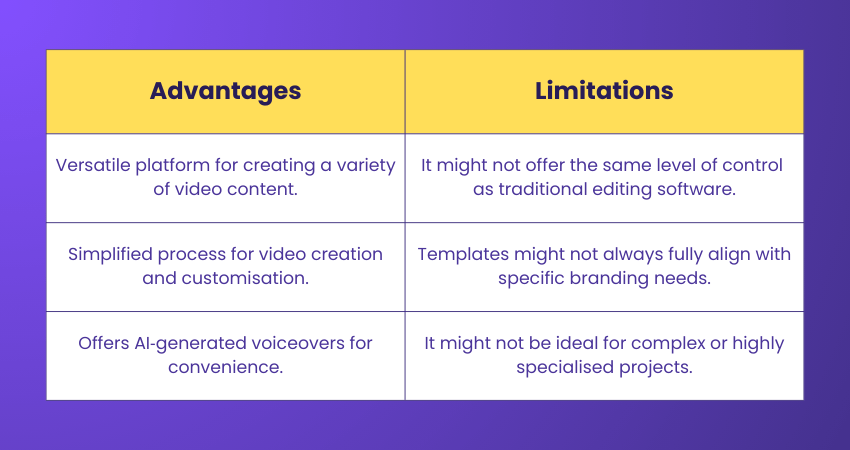
Renderforest is one of the versatile AI Video Editing Tools, catering to a range of video creation needs. From marketing videos to introductions and animations, its templates and AI-powered tools expedite the editing process. With customisable features and AI-generated voiceovers, Renderforest empowers users to create impactful videos. Some of the key features of the Renderforest tool are as follows:
a) Template selection: In the template section, you can opt for a wide range of templates for different video purposes.
b) Customisation options: Customise templates with your content, branding, and style preferences.
c) Voiceover tools: The platform offers an AI voiceover tool for narration.
Renderforest offers certain advantages over other video editing tools and has some limitations based on the requirements of the users:
13 Viosk
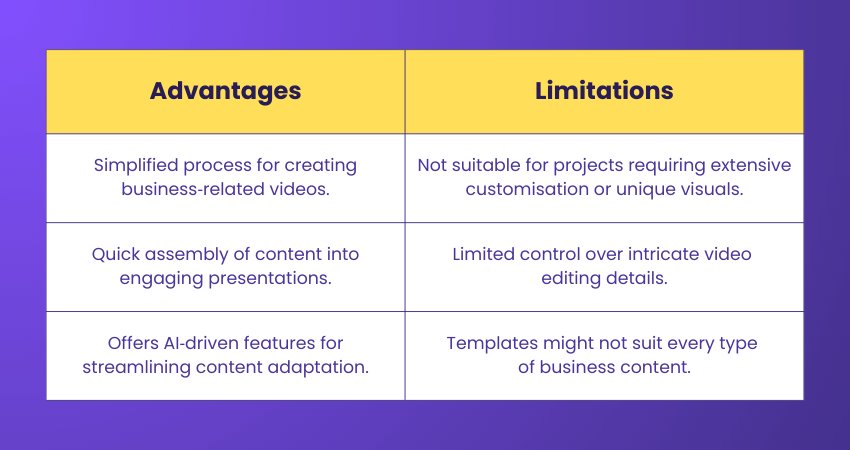
Viosk simplifies business presentations and marketing video creation. AI-powered automation transforms text content into engaging video presentations, and customisable templates ensure videos align with branding. With Viosk, businesses can quickly adapt content into visual presentations that resonate with their target audience. Viosk offers a variety of features, some of which are mentioned below:
a) Automation for content creation: Viosk uses AI to transform your content into engaging video presentations.
b) Templates for business use: You can choose from templates optimised for business presentations, product showcases, and more.
c) Customisation options: You can tailor templates with your content, logos, and branding.
With its advanced customisation and other relevant features, this tool has certain limitations and advantages as compared to other tools:
14) Fliki
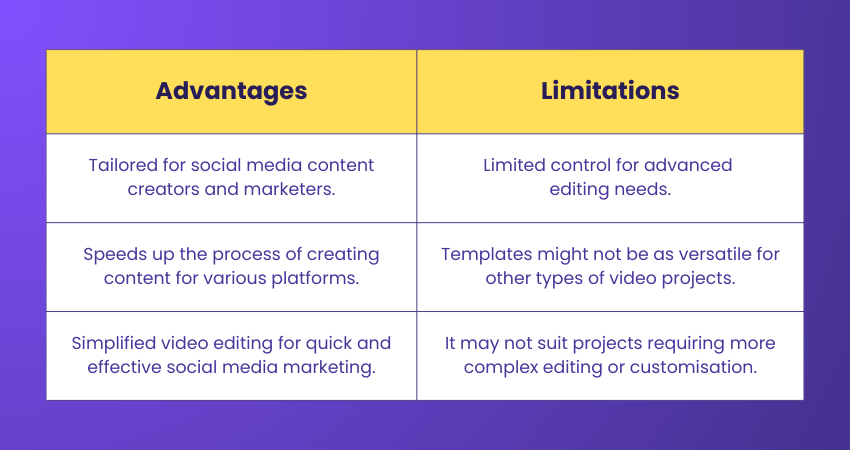
Fliki prioritises social media content creation through AI automation. By simplifying video creation for various platforms, Fliki enables users to quickly assemble engaging videos. With its tailored approach to social media content, Fliki aligns with the needs of Content Creators and marketers. This tool is widely used to create YouTube videos and offers plenty of features to create videos for other social media platforms. Some of its key features are as follows:
a) Video automation: Fliki automates the creation of short, engaging videos for social media.
b) Customisable templates: You can choose from templates designed for different platforms and content types.
c) Storyboarding: The tool suggests and assembles video clips based on a storyboard you create.
Like any other tool, Fliki has certain advantages and limitations:
15) Magisto by Vimeo
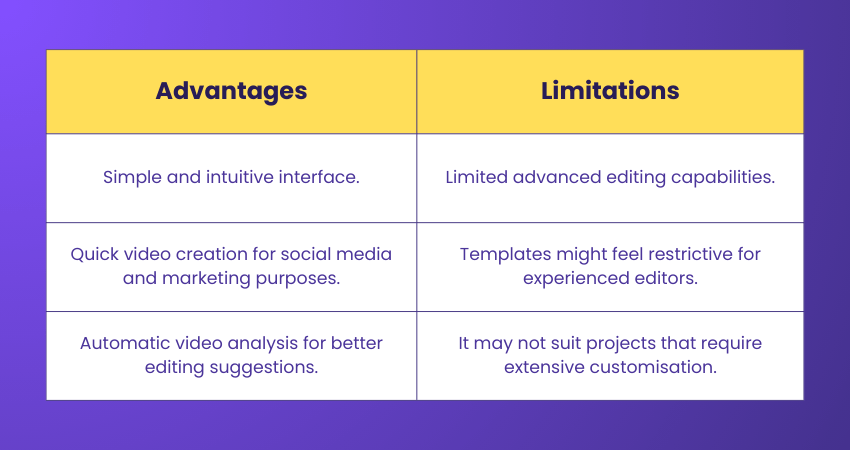
Magisto, now a part of Vimeo, caters to those seeking simplified Video Editing. Its AI-driven approach automates the process of turning raw footage into polished videos. With automatic scene selection, transitions, and music synchronisation, Magisto is an accessible platform for creating professional-looking videos without the complexities of traditional editing software. Among the variety of features, some of Magisto’s key features are as follows:
a) Automatic video creation: Magisto can analyse your content and generate a polished video with transitions, effects, and music.
b) Customisable templates: Using this tool, users can select from a variety of themes and styles to match their branding and requirements.
c) Social media integration: Easily creates videos optimised for various social media platforms.
Some of the advantages and limitations of the Magisto editing tool are as follows:
16) Lumen5
Lumen5 redefines content adaptation for Content Creators and marketers. It utilises AI to convert text content into engaging video presentations. By analysing text, selecting appropriate visuals, and adding animations, Lumen5 transforms articles and blog posts into captivating videos suitable for various platforms. Lumen5 has efficient features that help creators to create stunning video edits. Some of the features of Lumen5 are as follows:
a) Text-to-video conversion: Lumen5 can analyse text content and create video slides with animations and visuals.
b) Stock media library: Access to a wide range of images, videos, and audio clips for enhancing videos.
c) Easy customisation: Users can fine-tune the video by adjusting colours, fonts, and layouts.
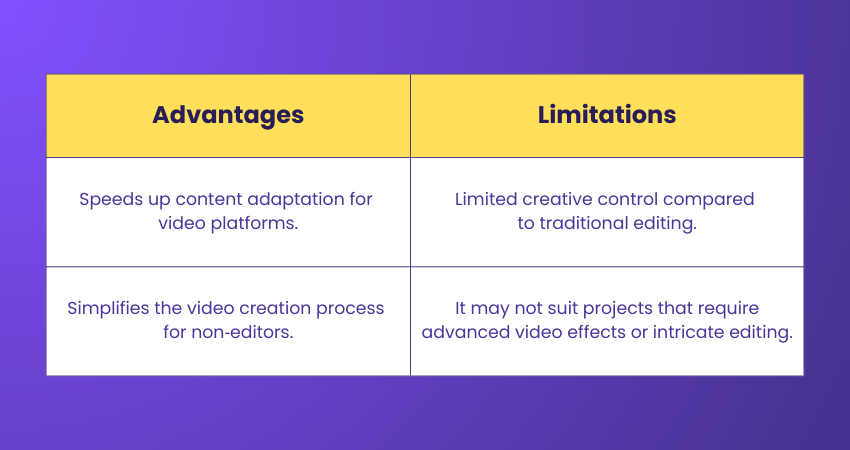
The advantages and limitations of this tool are as follows:
How to Choose the Best Video Editing Tool
Choosing the right video editing software is essential for creating high-quality videos efficiently. The best tool balances your needs, skill level, and budget.
The key points to consider are as follows:
1) Identify your specific video editing requirements
2) Balance features with usability and learning curve
3) Check cross-platform compatibility for your devices
4) Consider pricing and subscription plans
5) Match the software to your skill level, from beginner to professional
6) Choose a tool that supports your video goals, whether short-form or complex projects
7) Stay adaptable, keep learning, and explore new features to maximise creativity
Master sketching fundamentals and visual thinking techniques with our Sketchbook Essential Training- Join today!
Future Video Editing Trends
The future of AI video editing is rapidly evolving, transforming how content is created, optimised, and personalised. These emerging trends will make editing faster, more intelligent, and more accessible, allowing creators to focus on storytelling rather than technical tasks.
The major trends to watch are as follows:
1) Real-time AI Scene Detection and Auto-editing: AI will analyse footage frame by frame to identify optimal cuts, emotional shifts, and narrative beats, enabling fully automated editing workflows.
2) Voice-activated Editing Commands: Natural language processing will allow editors to make complex edits using spoken instructions, transforming traditional timeline-based workflows.
3) Context-aware Auto-captioning: Future captioning will understand tone, emotion, and cultural nuance, adjusting style automatically for different platforms.
4) AI-powered Content Personalisation: Machine learning will create multiple versions of videos optimised for specific audiences, demographics, and distribution channels.
5) Autonomous Resizing and Reformatting: AI will adapt video composition intelligently across vertical, square, and horizontal formats without manual cropping.
6) Predictive Content Optimisation: AI will analyse performance data and audience behaviour to recommend ideal thumbnails, video length, and release times.
7) AI-generated B-roll And Visual Enhancement: AI will produce contextually relevant supplementary footage and graphics to enrich primary content dynamically.
8) Collaborative AI Editing Assistants: Intelligent assistants will work alongside human editors, suggesting edits, automating routine tasks, and learning from creative decisions.
Learn how to design impactful, memorable logos from concept to final delivery with our Logo Design Course- Sign up today!

Lily Turner transforms complex data concepts into structured resources for aspiring and established data professionals. Her writing demonstrates how analytical methods and emerging technologies can be used to investigate problems, generate insights and support informed decisions.
View Detail

 If you wish to make any changes to your course, please


