




We may not have the course you’re looking for. If you enquire or give us a call on 01344203999 and speak to our training experts, we may still be able to help with your training requirements.
Advantages And Disadvantages Of Sage Accounting Software
ByNaveena VenkatesanLast updated on: 05 October 2026
This blog comprehensively evaluates Sage accounting software, delving into its different strengths. Some of these strengths include streamlined financial management, enhanced accuracy, and scalability. Additionally, it will explore the weaknesses, including initial setup complexity and limited mobility.
Keep This in Mind
1. Sage can centralise and automate several financial management activities.2. Its advantages include improved efficiency, reporting and scalability.3. Setup, training and ongoing costs should be considered before implementation.4. Accessibility and capabilities can vary depending on the Sage product and deployment model.5. The right choice depends on business requirements, integrations, users and available resources.
Accounting software has become an important tool in finance and business industries. It promises improved efficiency, precision, and streamlined financial management. Among the many options available, Sage accounting software has emerged as a popular choice for organisations looking to revolutionise their financial processes. However, like any other technical tool, there are several advantages and disadvantages of Sage accounting software.
Thus, it’s crucial to first evaluate and then choose the right accounting software for yourself. But how do you evaluate the pros and cons of this software? Worry no more. Read this blog to explore the advantages and disadvantages of Sage accounting software. Also, learn whether Sage accounting software aligns with your organisation's financial management goals.
Advantages of Sage Accounting Software
Sage accounting software is a powerful and versatile tool for businesses looking to streamline their financial management processes. Its numerous benefits make it a popular choice for organisations of all sizes and industries. Let’s dive into the key benefits of using Sage accounting software in detail:
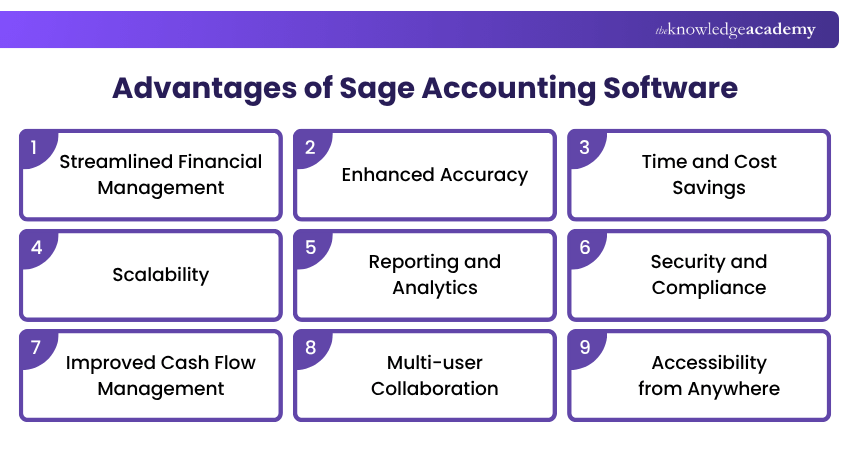
1) Streamlined Financial Management
Sage accounting software excels in simplifying financial management processes. It provides a centralised platform to manage financial transactions, records, and documents efficiently. This streamlining of financial tasks reduces the need for manual data entry, minimising errors and saving valuable time. This streamlining of financial tasks can profoundly impact your organisation by providing the following:
a) Efficient Workflow: With Sage, the financial workflow becomes systematic, enhancing efficiency. It guides organisations through data entry, reconciliation and reporting processes, ensuring that everything is properly accounted for.
b) Reduced Manual Labour: By automating routine financial tasks, Sage minimises the need for manual data entry. This saves time and reduces the risk of data entry errors, which are common in manual accounting processes.
c) Improved Organisation: Sage categorises and organises financial data logically, making it easy to find and access. This organisation simplifies audits, financial analysis and tracking of economic trends.

2) Enhanced Accuracy
Accurate financial records are paramount for any business. Sage accounting software automates calculations and data entry, reducing the likelihood of human errors common in manual accounting. This enhanced accuracy ensures that financial data is reliable and up-to-date, facilitating better decision-making and transparency. Sage accounting software excels in ensuring that your financial data is precise and error-free by providing the following:
a) Automated Calculations: Sage performs complex calculations automatically, reducing the chances of mathematical errors. Whether it is calculating taxes, payroll, or depreciation, the software handles it with precision.
b) Error Checks: Sage includes built-in error-checking and validation rules alerting organisations about discrepancies or inconsistencies. This proactive approach helps them catch and correct mistakes before they become significant issues.
c) Consistency: With Sage, financial data is recorded consistently and follows established accounting principles. This consistency enhances the reliability of financial records and reports.
3) Time and Cost Savings
Automation is a core feature of Sage accounting software. Organisations can decrease the time spent on routine administrative work by automating tasks such as data entry, invoice generation, and payroll processing. This boosts productivity and translates into cost savings, as you can allocate resources more efficiently. Efficiency is a significant advantage of Sage accounting software, and this efficiency translates into both time and cost savings by providing the following:
a) Time Efficiency: Automating repetitive tasks, such as data entry, invoice generation and payroll processing, frees up valuable employee time. Staff members can redirect their efforts toward higher-value work, contributing to increased productivity.
b) Reduced Labour Costs: Sage lowers labour costs by automating duties that would otherwise need manual labour. This is especially useful for small businesses with little resources to allocate to administrative work.
c) Minimised Overtime: Automating tasks means fewer late nights or overtime hours for accounting teams. Sage ensures that financial processes are completed within standard working hours.
Pro Tip
Start with your accounting requirements rather than the software features. Identify the transactions, reports, integrations and user access your business needs, then assess which Sage product and configuration can support them.
4) Scalability
One of Sage's standout advantages is its scalability. Whether a small business or a large enterprise, Sage can adapt to all evolving requirements. Organisations can begin with a basic package and develop their use of the software as their business grows. This scalability ensures that Sage remains a valuable tool as an organisation’s financial requirements become more complex. Sage's scalability is notable for businesses with growth aspirations and provides the following advantages:
a) Start Small, Expand Later: Sage allows organisations to start with a basic package and add more advanced features or modules as their business grows. This scalability ensures that Sage remains aligned with evolving financial needs.
b) Multi-entity Support: Sage can accommodate complex accounting structures for organisations with multiple entities or subsidiaries. They can manage various business units efficiently within a single software solution.
c) Integration with Other Systems: As a business expands, it may need to integrate Sage with other software or systems. Its scalability ensures that it can seamlessly integrate with the organisation’s growing technology ecosystem.
5) Reporting and Analytics
Effective financial management involves more than just recording transactions; it requires analysing data to make informed decisions. Sage accounting software offers robust reporting and analytics tools that enable you to generate various financial reports.
Organisations can track KPIs, analyse trends, and gain valuable insights into their financial health. These features empower them to make strategic decisions and refine their business strategies. Sage's robust reporting and analytics capabilities offer several advantages:
a) Data-driven Decisions: Sage provides a wide range of pre-built reports and customisable templates. This empowers organisations to analyse financial data, track KPIs, and identify trends, supporting data-driven decision-making.
b) Timely Insights: The real-time access to financial data in Sage allows organisations to generate reports on demand. Thus, organisations are not limited to month-end or year-end reporting cycles, ensuring they always have up-to-date information.
c) Customisation: Sage's reporting tools are highly customisable. Organisations can tailor reports to meet the specific needs of their business, whether it is industry-specific metrics or unique performance indicators.
Learn to streamline accounting tasks with market-leading software tools in the Accounting Software Training – Sign up now!
6) Security and Compliance
Protecting sensitive financial data is important. Sage accounting software places a strong emphasis on safety. It includes data encryption, user authentication, and access controls to safeguard financial information from unauthorised access or breaches. Sage assists in maintaining compliance with tax regulations and accounting standards, reducing the risk of legal issues and penalties. Thus, Sage offers robust advantages to organisations in the following areas:
a) Data Encryption: Sage employs advanced encryption techniques to protect sensitive financial data. This ensures that financial information remains confidential and secure from external threats.
b) User Authentication: Access to Sage is controlled through user authentication. Only authorised personnel can access financial records, reducing the risk of unauthorised data manipulation.
c) Compliance Support: Sage assists businesses in adhering to tax regulations, accounting standards, and legal requirements. It helps them avoid costly compliance violations and associated penalties.
7) Improved Cash Flow Management
Sage accounting software offers tools for monitoring and managing cash flow. Organisations can track income, expenses, and outstanding payments to maintain a healthy cash flow. This feature is valuable for small businesses that must closely manage their finances to ensure sustainability and growth.
8) Multi-user Collaboration
Collaboration is essential in a business environment. Sage accounting software allows multiple users to access and work on financial data simultaneously. This feature is invaluable for accounting teams, as it enhances collaboration, reduces bottlenecks, and speeds up financial processes.
9) Accessibility from Anywhere
With cloud-based versions of Sage accounting software, organisations can access their financial data from anywhere with an internet connection. This flexibility is crucial in today's remote work environment, allowing you to manage your finances even when you are not in the office. It also enables real-time collaboration with team members and accountants, enhancing efficiency and responsiveness.
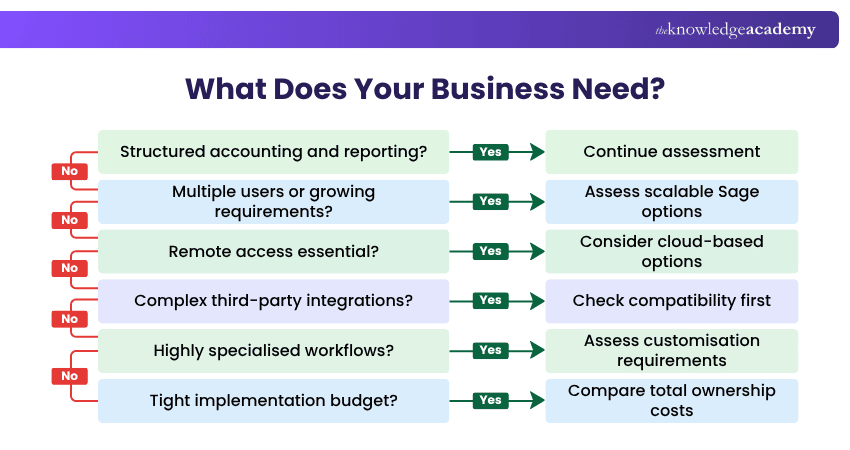
Here's how you can determine if Sage is suitable for your requirements:
Disadvantages of Sage Accounting Software
After learning about its advantages, it’s time to explore the disadvantages of Sage accounting software. Let's look at each of them in detail and learn how this software can become a bane for organisations:
1) Initial Setup Complexity
Setting up Sage accounting software can be complex, especially for businesses without experience with such systems. It often requires careful configuration to match an organisation’s specific accounting needs, chart of accounts, tax codes, and reporting structures. This complexity can result in delays and increased implementation costs.
Implementing Sage effectively may necessitate the assistance of IT professionals or consultants who are well-versed in the software. This adds a layer of cost and complexity, particularly for small businesses with limited resources.
2) Learning Curve
Sage accounting software has a learning curve, particularly for users who are less familiar with accounting principles and software. Employees may need training to use it efficiently, and productivity might dip temporarily during the transition as users adapt to the new system.
While Sage strives to be user-friendly, some users may find its interface less intuitive, particularly if they're accustomed to simpler accounting software. This can extend the learning curve and lead to frustration among users.
3) Cost of Ownership
Sage accounting software typically involves an initial investment for software licenses. The cost can vary depending on the edition and features you require. Fees may be associated with purchasing hardware or upgrading existing infrastructure to support this Software.
Beyond the initial investment, there may be ongoing costs, such as subscription fees, maintenance fees, and costs associated with software updates or patches. These recurring expenses can strain the budget, particularly for small businesses with limited financial resources.
Trainer Insight
Compare total cost of ownership rather than the initial price alone. Consider subscriptions or licences, implementation, training, integrations, support and any infrastructure requirements.
4) Limited Mobility
Sage's traditional on-premises software installations limit mobility. Users may need to be physically present in the office to access the software and financial data. This lack of flexibility may be a significant disadvantage in today's increasingly remote work environments.
While Sage offers cloud-based versions of its software, these may come with additional costs and may not provide the same mobility and accessibility as other cloud-based accounting solutions.
5) Compatibility Issues
Integrating Sage accounting software with other business applications or third-party tools can be challenging. Compatibility issues may arise when trying to sync data with CRM systems, e-commerce platforms, or other software your business relies on. These integration challenges can hinder the overall efficiency of your operations and result in data discrepancies.
Sage may have a more limited ecosystem of third-party integrations than other Accounting Software providers. This can limit your ability to customise and extend the software's functionality to meet your unique business needs.
Make every business figure count with QuickBooks. Build practical skills in exceptional financial record management with the QuickBooks Training – Sign up now!
6) Customer Support
The quality of customer support for Sage accounting software can vary. Some users have reported needing help to obtain timely and effective assistance when facing technical issues or questions. Inconsistent support quality can lead to frustrations and disruptions in your accounting processes.
While Sage offers customer support, premium support services often come at an additional cost. Small businesses with limited budgets may find these added expenses burdensome, especially if they encounter issues that require frequent support.
7) Limited Customisation
Sage offers a reasonable degree of customisation for common business needs, but highly specific or unique requirements may fall outside its built-in capabilities. Addressing these gaps can require additional development work or third-party tools, adding both complexity and cost.
Businesses with industry-specific requirements, such as complex inventory management or specialised reporting, may find that Sage's out-of-the-box solutions don't fully address their needs. This can lead to workarounds or additional software, increasing the overall complexity of a financial management system.
Before Choosing Sage, Check:
☐ Which accounting functions does your business require?☐ How many people need access?☐ Do you require cloud-based or on-premises deployment?☐ Which existing systems need to integrate with it?☐ What reporting capabilities are required?☐ How much training will users need?☐ What is the expected total cost of ownership?☐ Will the selected solution support future growth?

Naveena Venkatesan is a Content Editor with 2+ years of experience in content writing, editing and linguistic quality assurance. Her research, fact-checking and editorial experience enable her to develop accurate, accessible resources across Business Skills, Human Resources, and Accounting and Finance.
View Detail

 If you wish to make any changes to your course, please


